Google

2006-08-12

compiz on Ubuntu Dapper

[LAST UPDATED ON 2006-08-16]

After seeing compiz videos at eHomeUpgrade, I could hardly wait to try it on my Ubuntu. I have an HP X6000 Workstation with nVidia 980 XGL card which is not of course that great to show all the great effects compiz offers. Plus I was disheartened at some blog entry because I did not have direct rendering enabled on my card :
adil@ahlnx:/etc/apt$ glxinfo  grep rendering
direct rendering: No
but none of them proved to be a show stopper! I had to try a few things to get this working so bear with me...

First thing first, I backed up my /etc/X11/xorg.conf and /etx/apt/sources.list
Then edited /etc/X11/xorg.conf as described here.

It was time to add additional repositories so that I could download and install compiz and dependent packages again as described in the link above. I added the followings into /etc/apt/sources.list
deb http://www.beerorkid.com/compiz/ dapper main
deb http://xgl.compiz.info/ dapper main
deb http://media.blutkind.org/xgl/ dapper main

Then installed the GPG key:
wget http://www.beerorkid.com/compiz/quinn.key.asc -O - sudo apt-key add -
Updated the available package list:
sudo apt-get update
and finally installed the packages:
sudo apt-get install xserver-xgl compiz-gnome gset-compiz
Edited the /etc/gdm/gdm.conf-custom and added the followings
---------------------------------
[servers]
0=Xgl

[server-Xgl]
name=Xgl server
command=/usr/bin/Xgl :0 -fullscreen -ac -accel glx:pbuffer -accel xv:pbuffer
flexible=true
Updated (Automatix Bleeder) script

=================================
adil@ahlnx:~$ more /usr/bin/toggle-compiz-nvidia
#!/bin/bash
if ps -A grep -e "compiz.real$" > /dev/null; then
killall cgwd
metacity --replace &
else
cgwd &
compiz --replace gconf &
fi

=================================

If you do not use Automatix Bleeder, make sure you can execute it
sudo chmod 755 /usr/bin/toggle-compix-nvidia

I actually use a different name:
sudo mv /usr/bin/toggle-compix-nvidia /usr/local/bin/startcompiz


Effects are mind blowing. To have an idea what my desktop is like now, watch this YouTube video or see the below post

=-=-=-=-=-=-=-=-=-=-=-=-=-=-=-=-=-=-=-=-=-=-=-=-=-=

TIPS & TRICKS
As I keep on reading and learning more and more on compiz,
I decided to add some more tips...

1) When ubuntu Logon Screen shows up I have an option for XGL
Here is the content of my xsessions
sudo gedit /usr/share/xsessions/xgl.desktop
---------------------------------
[Desktop Entry]
Encoding=UTF-8
Name=Xgl
Comment=Start an Xgl Session
Exec=/usr/bin/startxgl.sh
Icon=
Type=Application
---------------------------------
If you have do not see any effects, try to start compiz-start script we created
above. To see session start up errors, take a look at your xsession-errors file
gedit ~/.xsession-errors
2) Remember, you can find tons of info on compiz forums

3) Obviously, ATI configuration is different than nVidia. For example,

in /etc/gdm/gdm.conf-custom>

[servers]
# Override display 1 to use Xgl (DISPLAY 1 IMPORTANT FOR ATI FGLRX).
1=Xgl

For nVidia screen is always 0 not 1!

4) When checking forumg, if you need to find out whether you have a
package already installed try:

dpkg -s  grep -i status
eg.
adil@ahlnx:/usr/local/bin$ dpkg -s compiz grep -i status
Status: install ok installed
5) Use `xvinfo` to confirm that your
color depth is set to 24 bit

6) To check what plugins you have, run gconf-edit & browse to
"apps/compiz/general/allscreens/options"
double click active_plugins, you should see things like
gconf decoration reflection blur wobble fade minimize cube rotate zoom
scale move resize dbus switcher water trailfocus state showdesktop neg bs
If you do not try adding them in that order as there are dependencies
(one per line)

7) Sometimes you see an application is missing a window decorator,
eg. my firefox was missing it, use ALT + Mouse to move that window ;)

8) There are some really nice themes for compiz , heres how to install them:
You will need the following packages:
gcompizthemer
cgwd
After you have installed the packages , edit /usr/local/bin/startcompiz
And change it like this:
---------------------------------
#!/bin/sh
killall gnome-window-decorator
wait

cgwd &
compiz --replace gconf &
---------------------------------
Restart compiz / reboot.
Go to System , preferences and you will find Compiz Themer there.

Apparently there used to be a gcompizthemer-themes package, which is now
part of cgwd package, which will appear in
System > Preferences > CGWD Themes menu

9) If you do not want the XGL session restart when you press shift+backspace, add this to your start up script: (toggle-compiz-nvidia or startcompiz)
xmodmap -e "keycode 22 = BackSpace BackSpace Terminate_Server"

=-=-=-=-=-=-=-=-=-=-=-=-=-=-=-=-=-=-=-=-=-=-=-=-=-=-=-=-=
So, what's not working?
Well, after reboot, if I choose XGL session, it does not start.
I see some errors in the ~/.session-errors log...

The workaround?
Well, I asked in Automatix Bleeder forum and arnieboy suggested this:
"revert your gdm-custom.conf to its original shape and try again. you told me in #Automatix yesterday that you already have gdm set up to start xgl. you need to change that to NOT let gdm start up xgl by default (in other words, revert it back to the default) and try loggin in to the xgl session from gdm (after restarting)."
That did the trick. No more issues logging into XGL session.

Linux XGL/Compiz Graphics to Apple Aqua & Vista Aero: EAT ME!

WOW! Oh boy, is this really possible? Guys at worked showed me the videos of Compiz together with Apple's new Leopard and of course Microsoft's Aero. There is no comparison really. Compiz is the clear winner. You really have to see these videos.

By Alexander Grundner - "I couldn't help being a little over the top on this one. Just watch the attached videos. And if you want to see XGL/Compiz running on dual screens, click here. Do me a favor, though. After watching all three videos, tell me which desktop graphics environment looks more advanced."

read more digg story

2006-08-09

Installing mailx on Ubuntu Dapper

At work, I frequently use mailx on Solaris and I thought I could make use of it on my linux box too. I did not know how to install it but guessed right:
sudo apt-get install mailx
During the installation, it asked some questions which I did not know how to answer and just chose the defaults. Then I tried something like
ls -l |mailx myemail@address.com
which indeed did not work. Then I started reading and realized that I should have probably used "Satellite" mode during installation....

Removing it should be easy, right? Well, sure, if you know what you are doing! I did not :)
sudo apt-get remove mailx
said it removed the package but when I reinstalled it, it did not really ask me any questions which meant that I had not removed it completely. Reading some more on APT documentation, I learnt a few useful commands like
sudo apt-get --purge remove mailx
(would remove mailx together with "configuration files")
Nope! Then I cleaned the cache:
sudo apt-cache autoclean
(supposed to remove unupgradable packages from /var/cache/apt/archives)
and
sudo apt-cache clean
(Removes everything except locks from apt-cache archives)
Still, I was missing something. The command I was looking for was something like
rpm -qp 
or
rpm -qlp 
that would tell me more about package and its file.

I found something similar:
sudo apt-get depends mailx
mailx
Depends: libc6
Depends: liblockfile1
|Depends: postfix
Depends: <mail-transport-agent>
...
Depends: base-files
Conflicts: <suidmanager>
Aha, I needed to remove postfix too. As expected, after that I was able to get the install menu. I chose satellite and specified smtp.comcast.net as my relay host. I got an error when I tried the above mailx command though:
postdrop: warning: unable to look up public/pickup: No such file or directory

I did not find much info on the error but somebody was talking about authentication... Then, I remembered that comcast needs authentication and did some more google search and found a nice article.

I did everything mentioned but still the same issue. It looks like I am missing SASL now but readme is losing me...

[UPDATE - Aug.17 -2006]
Looking at the /var/log/mail.err files, I found out that it was complaining about a file missing
/etc/postfix/sasl_passwd.db
Then, I remembered that I had entered this line:
smtp_sasl_password_maps = hash:/etc/postfix/sasl_passwd
into /etc/postfix/main.cf
sasl_passwd file included something like this:
smtp.comcast.net myuserid:mypwd
but I had fat fingers and actually named the file not sasl_passwd but sasl_password and the accompanying .db file was named sasl_password.db. The thing is, running
sudo postmap sasl_passwd
gave me an update error. So I left it as is.

So I corrected both and now when I tail /var/log/mail.info, while I run something like
ls -l|mails myemail@address.com
I don't see errors:
Aug 17 00:13:20 ahlnx postfix/pickup[17245]: 6823B64707: uid=1000from=Aug 17 00:13:20 ahlnx postfix/cleanup[17973]: 6823B64707: message-id=<20060817041320.6823b64707@ahlnx>Aug 17 00:13:20 ahlnx postfix/qmgr[11714]: 6823B64707: from=, size=788, nrcpt=1 (queue active)

Bad news is, mail still does not arrive and I see this warning:
Aug 17 00:29:45 ahlnx postfix/master[4870]: warning: /usr/lib/postfix/smtp: bad command startup -- throttling

I still had a hunch that there not being able to update that .db file was not good. Even stopping postfix was not enough:
sudo /etc/init.d/postfix stop
So, I removed it. Then changed the permissions on /etc/postfix
sudo chmod 777 /etc/postfix
and ran the command again while I was in /etc/postfix directory :
sudo postmap sasl_passwd
I got relatively better results:
Aug 17 00:39:22 ahlnx postfix/pickup[18775]: CC18F63A35: uid=1000 from=
Aug 17 00:39:22 ahlnx postfix/cleanup[18784]: CC18F63A35:
message-id=<20060817043922.cc18f63a35@ahlnx>
Aug 17 00:39:22 ahlnx postfix/qmgr[18776]: CC18F63A35: from=,
size=788, nrcpt=1 (queue active)
Aug 17 00:39:23 ahlnx postfix/smtp[18781]: CC18F63A35: to=,
relay=smtp.comcast.net[63.240.77.77], delay=1, status=bounced (host 
smtp.comcast.net[63.240.77.77] said: 550 [PERMFAIL]
comcast.net requires valid sender
domain (in reply to RCPT TO command))
So, I needed to enter a valid address somewhere. Examining /etc/postfix/main.cf, I guessed that I had to activate this line:
myorigin=/etc/mailname
and created the file /etc/mailname, which included a single line like
comcast.net

That did the trick, and after reloading postfix
sudo /etc/init.d/postfix reload
I was able to send e-mails:
Aug 17 00:45:22 ahlnx postfix/master[18772]: reload configuration /etc/postfix

Aug 17 00:46:08 ahlnx postfix/pickup[19101]: 87A5163A35: uid=1000 from=

Aug 17 00:46:08 ahlnx postfix/cleanup[19148]: 87A5163A35:
message-id=<20060817044608.87a5163a35@ahlnx>

Aug 17 00:46:08 ahlnx postfix/qmgr[19102]: 87A5163A35: from=, size=2033, nrcpt=1 (queue active)Aug 17 00:46:09 ahlnx postfix/smtp[19150]: 87A5163A35: to=<destination@comcast.net>, relay=smtp.comcast.net[216.148.227.147], delay=1, status=sent (250 ok ; id=20060817044626m12001a30fe)
Aug 17 00:46:09 ahlnx postfix/qmgr[19102]: 87A5163A35: removed


That was some experience! But as always, it feels good to make something finally work :)

SSH, SCP, SFTP From Windows

I have just finished configuring my ssh daemon on my ubuntu box where I changed port number to 443 in /etc/ssh/sshd.config file

Then I tried to use Putty to connect to it from windows, it worked like a charm. However, I found another very useful tool that can do scp, sftp as well: It's called WinSCP. It's very easy to configure and in not time I was able to login to my Ubuntu and copy files from there to my windows box using scp/sftp.

The problem is I have NAT enabled. I also have a Vonage box in front of my router. I created an account on www.dyndns.org and entered relevant info on my router configuration. However, because it is also behind NAT, it can not properly update its IP and there is no configuration option on the Vonage Motorola box.

The only thing I could do was to tell Vonage Motorola box to forward all 443 port requests to my router and then enabled Port forwarding in my router so that it would forward all 443 requests to my Ubuntu box.

I have restarted ssh daemon by running
/etc/init.d/ssh restart
and now it's listening on 443. This is working fine as long as I connect to it directly at 443 but port forwarding does not seem to be working properly. I guess I have to wait for Mathieu to come back from France to show me a few tricks to do this...

2006-08-08

Creating A New Partition in Ubuntu Dapper


When I was installing my Ubuntu Dapper, I had not really used up all the space. In fact, I had left about 250GB free space. Today I wanted to use up that space...

First, I checked my partitions
adil@ahlnx:/etc$ sudo fdisk -l Disk /dev/hde: 300.0 GB, 300090728448 bytes 255 heads, 63 sectors/track, 36483 cylinders Units = cylinders of 16065 * 512 = 8225280 bytes Device Boot Start End Blocks Id System /dev/hde1 * 1 3187 25599546 7 HPFS/NTFS /dev/hde2 3188 36483 267450120 7 HPFS/NTFS Disk /dev/hdf: 300.0 GB, 300090728448 bytes 255 heads, 63 sectors/track, 36483 cylinders Units = cylinders of 16065 * 512 = 8225280 bytes Device Boot Start End Blocks Id System /dev/hdf1 1 4613 37053891 83 Linux /dev/hdf2 4614 4740 1020127+ 82 Linux swap / Solaris /dev/hdf3 4741 5633 7173022+ 83 Linux
So, I could have simply run
  • sudo mkfs.ext3 /dev/hdf4
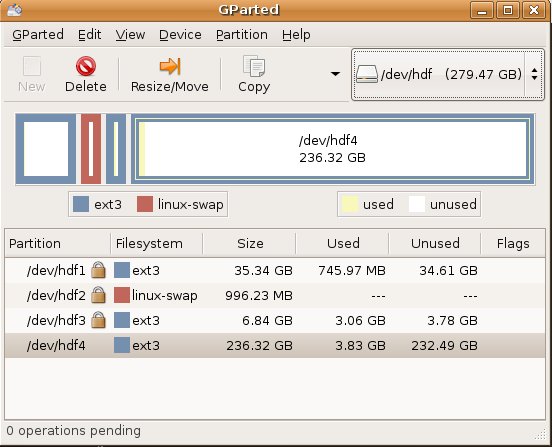
but I wanted to use Gnome Partition Tool. So,
  • sudo apt-get install gparted
After the installation, I ran it (also available System > Administeration > Gnome Partition Editor)
  • gksudo gparted
Tool is very intuitive! Simply select the /dev/hdf from up on right side on the toolbar and then click the empty space, click "New" & choose the size. Then "Apply".

After partitioning done, it advised that I reboot the server...

2006-08-04

Configuring IP Address in Ubuntu

As most people, I have a small home-network. My ubuntu was getting the IP address from the router dynamically. I decided to use static addresses instead of DHCP. The procedure is a bit different then Red Hat Linux.

I first connected to my router and changed the DHCP range so that I would have plenty of static addresses. Then I backed up my /etc/network/interfaces file which had an entry like this:

iface eth0 inet dhcp

As I did not know how to edit this file, I ran the network-admin script:
/etc/network-admin, (you can also do this from GUI: System > Administration > Networking)
Clicked Deactivate Ethernet Connection
Clicked Properties & Changed the IP/NetMask/Gateway after choosing static
Clicked Activate Ethernet Connection
and examined the difference in /etc/network/interfaces file:

OLD <> iface eth0 inet static
NEW > address 192.168.1.3
NEW > netmask 255.255.255.0
NEW > gateway 192.168.1.1

Then, to be able to access my windows box, I added the following entry into /etc/hosts
192.168.1.2 windows

In Red Hat Enterprise, there are to bring up/down eth0, you would run
/etc/sysconfig/network-scripts/if-up eth0
/etc/sysconfig/network-scripts/if-down eth0

In Ubuntu, it's a little different
sudo /etc/ifup eth0
sudo /etc/ifdown eth0

[UPDATE - 08/09/2006]
I noticed a weird issue with the Gnome Network Applet icon on the top right corner. It has a little red exclamation mark and when hovered reads "No network connection" although my network connection is just fine...

2006-08-03

Red Hat Enterprise Training

I was at Red Hat Training this week. I took RH133 Red Hat Linux System Administration course at Global Knowledge which located in down-town Manhattan at 90 Broad street.

It was one of the best training courses I ever attended. Instructor Rob Locke was great! Unfortunately, I am not going to take the exam to become a Red Hat Certifief Technician but today they gave us a taste of what the exam will be like. I loved it.

They made us install a troubleshooting package and then go to init 3. Then, we started to the tests. They were divided into 3 categories. Basically, they break something in your system and make you repair it. They do not care how you fix it as long as it is fixed.

They had 4 so called 'local' problems, 2 network and 3 boot problems. The last boot problem was the hardest to find but my scripting skills helped me realize that they broke bash and that's why the system was not booting up.

I was one of the few who fixed all the issues and I was proud of myself when I completed them. I came home and tested myself via their course pre-assessment tasks. Normally, you should take RH033 , Red Hat Linux Essentials but I had skipped that as it would be difficult for me to get both that one and system administration.

Interestingly, when I tested myself using Red Hat Linux System Administration Pre-assessment Questionnaire, I scored 34/48 but scored 37/48 on Red Hat Linux System Administration Pre-assessment Questionnaire .

Below are my results... The thing is, I use Ubuntu as my desktop :)

Red Hat Linux Essentials Pre-assessment Questionnaire

Topic Evaluation Score
Basic Filesystem and File Commands Deep Understanding 4
The Linux Filesystem Layout Substantial Knowledge 3
Permissions and Attributes Substantial Knowledge 3
Manipulating Floppy Disks Familiarity 1
The vi and vim Editors Substantial Knowledge 3
Regular Expressions Substantial Knowledge 3
Standard Input and Output System Substantial Knowledge 3
Process Control Substantial Knowledge 3
Client-side Encrypted Communications Familiarity 1
bash Command Line Shortcuts Substantial Knowledge 3
Shell Scripting Substantial Knowledge 3
Task Automation Deep Understanding 4

Total Score: 34


Red Hat Linux System Administration Pre-assessment Questionnaire

Topic Evaluation Score
Supported Hardware Substantial Knowledge 3
Installation Deep Understanding 4
Creating and maintaining filesystems Deep Understanding 4
X Window System Administration Familiarity 1
System initialization Substantial Knowledge 3
User and group administration Substantial Knowledge 3
Client-side network authentication Substantial Knowledge 3
Network setup and troubleshooting Deep Understanding 4
Printing Substantial Knowledge 3
System Logging and Monitoring Familiarity 1
System-wide task automation Deep Understanding 4
RPM Deep Understanding 4

Total Score: 37

Conclusion: You have sufficient knowledge of the topics at this skill level.


How Pre-assessment Questionnaires are Scored

Questionnaire takers answer questions on twelve topics related to a particular subject matter.

Each topic is scored separately, more points for more difficult questions. Question type and scoring is as follows:

Question 1:

  • Easy
  • Correct = +1 point

Question 2:

  • Moderately difficult
  • Correct = +2 points

Question 3:

  • Extremely difficult
  • Correct = +4 points

For any one topic, the range of possible points is 0 to 7. Questionnaire takers are evaluated per topic as follows:

Deep Understanding


6 or 7

Substantial Knowledge


3, 4, or 5

Familiarity


1 or 2

Unfamiliar


0

The overall score for the class will be based on the number of topics falling into each category, as follows:

# of topics with this score


Multiplied by

Deep Understanding


4

Substantial Knowledge


3

Familiar


1

Unfamiliar


0

This final score will range from 0 to 48. Based on this score, we come to one of the following conclusions:


42 - 48

You have mastered the topics at this skill level.


Red Hat Linux Essentials (RH033)


Consider taking a System Administration or Network and Security class. Take the Red Hat Linux System Administration Pre-assessment Questionnaire to determine your best placement.


Red Hat Linux System Administration (RH133)


Consider taking a Network and Security class or the RHCE Rapid Track course. Take the Red Hat Linux Network and Security Pre-assessment Questionnaire to determine your best placement.


Red Hat Linux Network and Security (RH253)


Most likely, you are prepared for the RHCE exam. Either:

  1. Take RH302, the RHCE exam, or:
  2. Take RH300, the RHCE Rapid Track course, if you would like a review of the material before taking the exam, although this is probably not necessary.

36 - 41

You have sufficient knowledge of the topics at this skill level.


Red Hat Linux Essentials (RH033)


Consider taking a System Administration class. Take the Red Hat Linux System Administration Pre-assessment Questionnaire to determine your best placement.


Red Hat Linux System Administration (RH133)


Consider taking a Network and Security class. Take the Red Hat Linux Network and Security Pre-assessment Questionnaire to determine your best placement.


Red Hat Linux Network and Security (RH253)


You are probably prepared for the RHCE exam. However, you should consider taking RH300, the RHCE Rapid Track course, if you would like some review before taking the exam.

32 - 35

You have substantial knowledge of the topics at this skill level, but you may benefit from further study.


Red Hat Linux Essentials (RH033)


Either:

  1. Take the RH033 class, or:
  2. Take classes from the Red Hat Linux Essentials eLearning curriculum, or:
  3. Take classes from the Red Hat Academy Essentials curriculum, or:
  4. Study the material in this curriculum on your own before taking a system administration class.


Red Hat Linux System Administration (RH133)


Either:

  1. Take the RH133 class, or:
  2. Take classes from the Red Hat Linux System Administration eLearning curriculum, or:
  3. Take classes from the Red Hat Academy System Administration curriculum, or:
  4. Take the pre-assessment questionnaire for RH253. If you score decently (24+ points) on that quiz, you may consider taking RH300, the RHCE Rapid Track class, or:
  5. Study the material in this curriculum on your own before attempting a Networking and Security class.


Red Hat Linux Network and Security (RH253)


Either:

  1. Take the RH253 class, or:
  2. Take RH300 if you prefer a rapid track class and would like to review the system administration material, or:
  3. Study the material in this curriculum on your own before attempting RH302, the RHCE exam.

24 - 31

Your knowledge of the materials at this skill level is spotty.


Red Hat Linux Essentials (RH033)


Either:

  1. Take the RH033 class, or:
  2. Take classes from the Red Hat Linux Essentials eLearning curriculum, or:
  3. Take classes from the Red Hat Academy Essentials curriculum, or:
  4. Plan on studying extensively to become completely comfortable with this material before taking a system administration class.


Red Hat Linux System Administration (RH133)


Either:

  1. Take the RH133 class, or:
  2. Take classes from the Red Hat Linux System Administration eLearning curriculum, or:
  3. Take classes from the Red Hat Academy System Administration curriculum, or:
  4. Take the Red Hat Network and Security Pre-assessment Questionnaire. If you score decently (24+ points) on that quiz, you may consider taking RH300, the RHCE Rapid Track class.


Red Hat Linux Network and Security (RH253)


Take the Red Hat Linux System Administration Pre-assessment Questionnaire. If your score for that questionnaire is:

  1. Below 24: consider taking RH133, the System Administration class, or taking classes from the Red Hat Linux System Administration eLearning series, or similar classes from the Red Hat Academy before taking a Networking and Security class.
  2. 24 through 35: consider taking RH300 to learn/review the system administration materials as well as learning the Networking and Security materials in a rapid track class.
  3. Above 35: take a Networking and Security class:

0 - 23

You will need to undertake substantial studying to acquire skills at this level.


Red Hat Linux Essentials (RH033)


You must take a Red Hat Essentials class before engaging in the study of System Administration. Either:

  1. Take the RH033 class, or:
  2. Take classes from the Red Hat Linux Essentials eLearning curriculum, or:
  3. Take classes from the Red Hat Linux Essentials curriculum from the Red Hat Academy.


Red Hat Linux System Administration (RH133)


Either:

  1. Take the RH133 class, or:
  2. Take classes from the Red Hat Linux System Administration eLearning curriculum, or:
  3. Take classes from the Red Hat Linux System Administration curriculum from the Red Hat Academy.

Also, take the Red Hat Linux Essentials Pre-assessment Questionnaire, if you have not already done so, to consider if classes in that sequence are a better placement.


Red Hat Linux Network and Security (RH253)


Either:

  1. Take the RH253 class, or:
  2. Take classes from the Red Hat Linux Networking and Security eLearning curriculum, or:
  3. Take classes from the Red Hat Linux Networking and Security curriculum from the Red Hat Academy.

Also, take the Red Hat Linux System Administration Pre-assessment Questionnaire, if you have not already done so, to consider if classes in that sequence are a better placement.

2006-08-02

The 100 Top Brands 2006

Just wanted to blog this: Top 100 Brands of 2006. The two company I worked for are on the list as #36 & #37

2006-07-22

Podcast & AudioShell

When I was shopping for an mp3 player, I preferred Cowon iAudio X5L over iPods as it had much longer battery life and radio. Since then, podcasts became very popular and iTunes is one of the best out there. Of course, it only works with iPods :(

So today I started to look for non-iPod podcast software. That's when I saw AudioShell, which is

"a freeware MS Windows Explorer shell extension plugin which allows you to view and edit music file tags directly in Windows Explorer. AudioShell support all files and tags standards supported by Tag&Rename. AudioShell adds tag editor and viewer tabs to the music files properties menu (you can edit tags file by file or by groups), detailed music files hints with tag and file information, and additional columns in the Explorer files list. Full Unicode support. Great tool for mp3 players owners! You can fast and easy fix files tags in Explorer before uploading its to your iPod/Creative or any other mp3 player."


I am a big fan of Tag&Rename but this little utility seems to do a good job too.

My quest for ideal podcast application is still going on. I have tried a few apps like Juice (aka iPodder) and MyPodder from Podcast Ready but had issues with both. Still searching...

2006-07-19

NTFS with read/write support using ntfs-3g

One of the things I wanted to do but never got to is to be able to write to NTFS partitions from my Ubuntu Dapper. I came across a nice how-to doc here

I will post results once I try it out...
[UPDATE - 07/22/2006]
I tried the instructions today. It did not work for me but that was because I had a typo: I typed en-us instead of en_US which resulted in an error like "Couldn't set locale to en_us.utf8 thus you may not see properly or at all some files". Correcting the error in the /etc/fstab resolved the issue and now I can write to NTFS without any issues :)

2006-07-12

Marcus Ranum on hard disk encryption "This stuff is really easy!"

I barely tested TrueCrypt just before my hard drives crashed one after another 2 months ago. I was planning to reinstall it but could not just get to it. After reading Marcus Ranum's article, I guess I have more confidence in this software: http://www.truecrypt.org/

read more | digg story

2006-07-07

31 browser hacks in 31 days

Browser Fun blog has promised to disclose 31 browser hacks/vulnerabilities during the month of July 2006, one for each day. Apparently, there is a story behind all this :)

2006-06-22

Welcome Rohit!

On April 27th, one of my co-workers, Mathieu Wache accepted my invitation to be a contributed to this technology blog. I had expressed my wish to have more contribution from other techies that share my passion for technology.

Andy Mei is on a business trip to Japan but will soon join us. And today, Rohit Pai became a contributor for scorion.net. Rohit proved us that he can cook! :) I added Rohit's blog to the links on the right side where he is sharing his recipes.

Gregorian Calendar

In my alumni e-mail list, somebody questioned the origins of Gregorian Calender... An informative link was given that explained a lot of things I did not know about the subject. check it out, you may find it interesting too.

2006-06-19

Analytical Puzzles

Just noticed this on popular del.icio.us pages. On the site, there are logic problems in varying difficulty levels. Be careful though, you may get addicted to them :)

Google Notebook Review

The more I use Google Notebook, the more I like it! When looking for information on web, I usually find myself taking notes using MS OneNote, Outlook > Notes or plain notepad. As my blackberry is sync'ed with Outlook Notes, I tend to remind myself to put notes in there but it has a lot of limitations.

What Google Notebook gives me is the ability to select some part of a web page & simply make it a note that's available to me wherever I can access internet.

I downloaded & the plugin for IE and Firefox on all my computers. Both plugins work equally well. I created a number of notebooks as seen on the screenshot. If I want to move a note from one notebook to another, I can simply drag and drop it over.

I can edit the note anytime and really like the fact that it captures the original URL, I created the note from. So, if I have to go back to the original document, there is a reference to it.

By default, only "you" can see your notes. they are private. However, if you want to make them public, you can choose to do so. And of course, google's fabulous search engine lets you search your own, or public notes effectively.

What can be improved? Well, this is pretty good for taking notes from web sites. One step further would be to highlight any part of any document and upload it as a note! Now, I think that would be a killer-app!

2006-06-17

Hi-Res Panoramic Images of Paris

Mathieu should have posted this but I saw it before him :) Here is a link to high resolution panoramic pictures of beautiful Paris.

Did you know that France was the most visited country in the World in 2004?
2. Spain
3. US
...
12. Turkey
(Source: http://www.world-tourism.org/facts/menu.html)


Site is a bit slow but I saw some mirrors in digg. I don't know for how long they will stay:

http://www.gourp.com/paris-360-110.jpg
http://195.62.29.95/paris-360-110.jpg

15,000 px X 520 px (1.8 mb)
http://duggmirror.com/design/Hi-Res_Panoramic_Image_of_Paris/fc08a2cad710de1774c7d1d76eb11fce_paris-360-110.jpg

Direct Links to two other images on same website:
4200 px X 520 px (500 kb)
http://www.arnaudfrichphoto.com/Images/paris-neige-panorama.jpg

15,000 px X 520 px (1.9 mb)
http://www.arnaudfrichphoto.com/Images/paris-360-110-texte.jpg

2006-06-16

On Bill Gates...

When I read today that Bill Gates is stepping down from day to day managerial works of Microsoft, I felt happy for him. Unlike many other rich people of the world all throughout the history, he did not become slave of his own wealth and managed to put it into good work. So I always admired him!

"With great wealth comes great responsibility. Many years ago I made it clear that almost all my wealth would be returned to society," Gates said in an afternoon press conference in Redmond, Wash.

I think it could not be put better. He has created a giant industry and became the richest man on earth all in a very short time. He is a one of a kind, a great man that I think, most of us in the IT world owe him a big "thank you"!

He is setting a huge example that I hope other rich people will follow! Thank you, Bill!

2006-06-13

2006-06-12

Opt-Out of Credit Card Offers

Are not you sick & tired of receving credit card offers everyday? Don't you want the junk mail STOP? Who does not? :)

Well, you may not be able to stop getting all junk mail but to remove (or add???) your name from firm offers based on your credit information, it's possible to call Consumer Credit Reporting Industry Opt-in, Opt-Out Number: 1-888-567-8688
or write to:
Equifax Options, P.O. Box 740123, Atlanta, GA 30374-01123
Experian Target Marketing, P.O. Box 919, Allen, TX 75013
TransUnion Opt Out Request, P.O. Box 505, Woodlyn, PA 19094-0505

You can either choose to opt-out for 5 years or permenantly and you can add your name back any time you want.

To give you and idea, it took me about 5mins to remove both my name and my wife's name for 5 years. Of course, because they already fed many businesses with your information offers may keep on coming for quite sometime. and if you want your name to be removed permenantly, then they will send you a form that you need to fill in and send back to them and you will be removed from the lists of 4 Credit Reporting Agencies.

2006-06-10

Ubuntu Dapper Install Issues

Today, I downloaded Ubuntu Dapper 6.06 LTS Desktop CD to install it on a new hard drive. I ran into some issues but luckily I was able to fix them. I will write them down here just in case someone out there runs into a similar issue and may benefit from the solution

1) Ubuntu CD would not boot
I knew that CD was good because it was booting fine on a different PC. On the other hand, if I inserted an XP or Vista set-up CD, they would be detected fine but not the ubuntu CD.

I suspected that CD was not detected because of the Promise UltraATA133 TX2 card I was using with my "large" drives. The motherboard of my HP XW6000 pc did have ATA100 but not ATA133.

Anyway, to solve the problem, I disconnected my DVD drive from Promise Controller and connected it directly to the motherboard's Primary ATA. Then, Ubuntu CD happily booted.

2) "Out of range" error while Ubuntu was booting
So, to install Ubuntu Dapper 6.06, I chose "Live CD & Install" option from the boot menu. However, at some point Ubuntu would disappear and I would just see an "Out of Range" error on the screen.

Fixing this was pretty easy actually. I hit Ctrl+Alt+F1 to go to prompt and then edited the display config
sudo vi /etc/X11/xorg.conf

I removed all entries before"1280x1024" for my nVidia card so that my card would not try to load a resolution that it can not support and saved the file.

Then, I hit "Ctrl+Alt+F7" to go back to the screen where I was seeing "out of range" and hit "Ctrl+Alt+Backspace" to restart Gnome Display Manager (gdm) and voila!

Then, ubuntu user logged in and there was a "Install" icon on the desktop. Using GPart, I first created three partitions on the free space:
1 GB for swap
7 GB for / (formatted with ext3 file system)
25 GB /home (formatted with ext3 file system)

Installation did not took long and in about 20mins, my ubuntu dapper was up and running :)

2006-06-02

sudo issues

While testing linux to linux nxclient with my coworker andy Mei, a rogue line was accidentally pasted to /etc/hosts just before we saved & exit.

It was something like this
192.168.1.1 myubuntu.scorion.net192.168.1.1 myubuntu.scorion.net192.168.1.1 myubuntu.scorion.net192.168.1.1 myubuntu.scorion.net192.168.1.1 myubuntu.scorion.net192.168.1.1 myubuntu.scorion.net192.168.1.1 myubuntu.scorion.net192.168.1.1 myubuntu.scorion.net192.168.1.1 myubuntu.scorion.net192.168.1.1 myubuntu.scorion.net192.168.1.1 myubuntu.scorion.net192.168.1.1 myubuntu.scorion.net192.168.1.1 myubuntu.scorion.net192.168.1.1 myubuntu.scorion.net...

That caused some grief! It broke sudo. So everytime I typed `sudo ...` I would get an error:
sudo: unable to lookup via gethostbyname()

I was not able to sudo and therefore I was not able to correct /etc/hosts. So, I rebooted (I could not `sudo reboot` but I could reboot from GUI) to login in Recovery Mode.

As luck would have it, I ran into another issue. I was always getting "keyboard error" while system was booting up but it would be fine after GUI came up. So, I never paid attention to it.

To fix the issue, I connected my keyboard to a different usb port (but this time at the back of my dell pc) and then I was able to login in Recovery Mode as root. Once the offending entry was deleted, everything was back to normal.

2006-06-01

Ubuntu 6.06 LTS released

New Ubuntu Release Available for Desktops and Servers, with Long Term, Global Support

Ubuntu, which has become one of the world's most popular Linux distributions in recent years, launched its latest version on June 1 following months of intense testing. The new release is titled Ubuntu 6.06 LTS (Long Term Support), and has a specific emphasis on the needs of large organisations with both desktop and server versions... Read the rest of their announcement.

BTW, check this nice blog entry called "25 tips to make Ubuntu 6.06 LTS perfect
by Keir Thomas"

2006-05-28

Office 2007 Beta 2 Test

I downloaded Office 2007 Beta 2 from MSDN and testitto see if I could use it for my day-to-day needs... I did not really use everything but Word, Excel & Outlook. I installed on top of my Office 2003 and installation was without a hitch. I liked the new interface in on all of the Office products I tested. I think MS did a very good job!

I will mostly talk about Outlook as I used it extensively for two days. I was very impressed when I started to use Outlook. It asked me for my e-mail address & password. I enetered them and waited for the screen to ask me for pop3, smtp addresses etc. It did not happen. In fact, it did not ask me anything else and just informed me that my e-mail configurion was complete! See below


What else I liked? RSS support! It worked very well. I was able to import my OPML file of feeds and in a few seconds all of them were downloaded to Outlook. It also gave me an option to download the complete feed as a html attachment.

Search was considerably faster compared to Office 2003, however, it asked me to download MS Search companion which did not install on Windows 2003 Server.

Now, the worst part. I could not keep Outlook on. It would just keep on crashing. I would click "Forward" and it would crash, I would click Reply All and it would crash. Guess what? I would leave it on by itself and it would crash after sometime. I really tried but after two days of constant crashes, I had to give up and remove it. I am not sure how something can be crashed so frequently in beta 2 stage, I would expect a little bit more stability. Oh, well...

2006-05-25

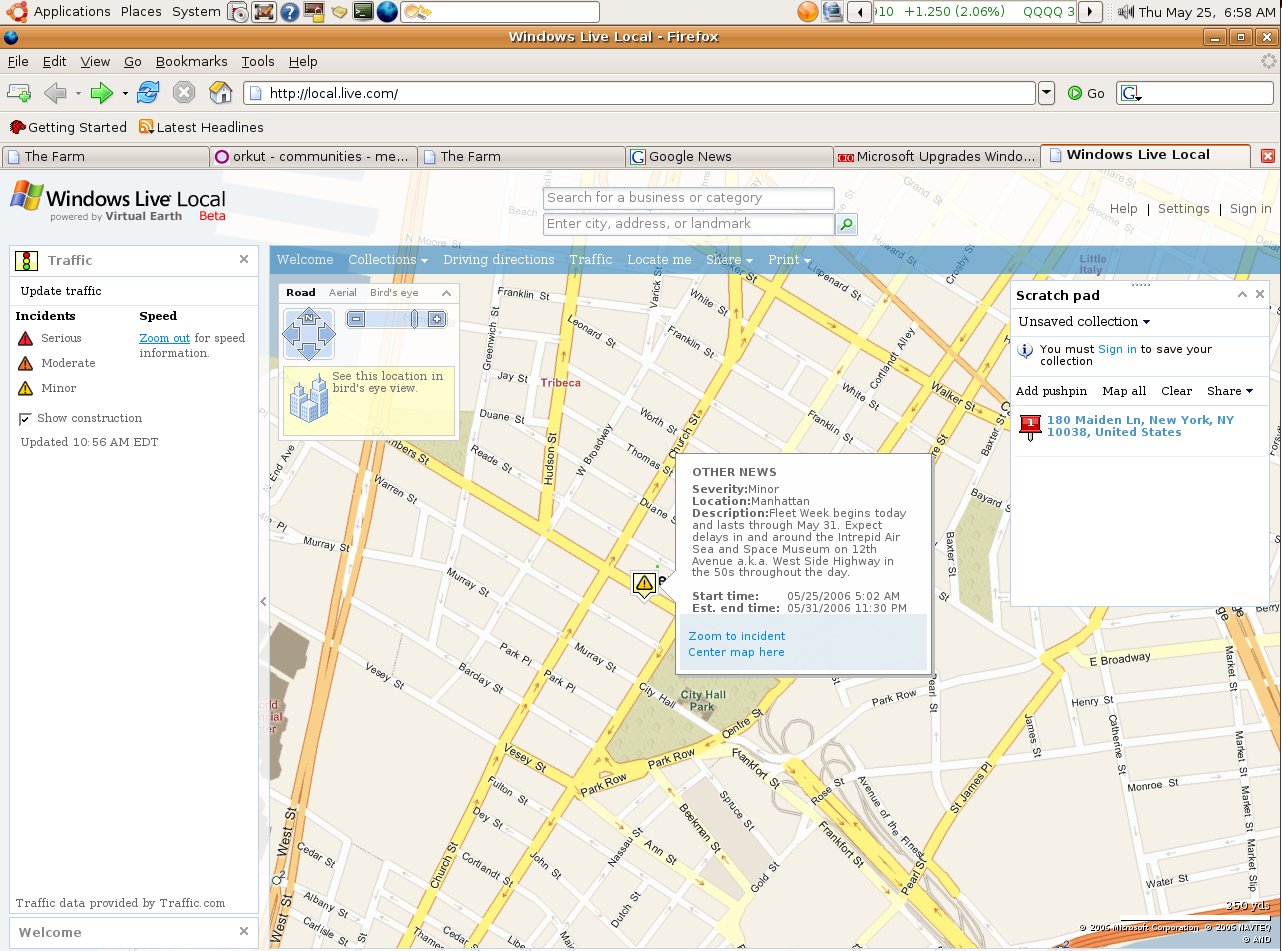
Traffic Info from Windows Live Local

In the newest Windows Live Local release, users will be able to see how heavy or light traffic is along specific U.S. roads, find out if and where there are accidents, and how serious they are. For this new feature, Microsoft is partnering with Traffic.com.

Also new is a functionality Microsoft calls "collections," which lets users save their favorite places and locations to an online notebook, upload photos and add notes. Users will also be able to share with others these scratchpads’ content via e-mail or the MSN Spaces blogging service, creating a sort of social network based on Windows Live Local.

This new version also features integration with the Windows Live Messenger instant messaging service, so that users can initiate an instant-messaging session from within Windows Live Local while seeing and interacting with the same map.

In addition, Microsoft is releasing a new plug-in for Windows Live Local that extends the service’s mapping functions to the company’s Outlook e-mail, calendaring and contacts application. With the plug-in, Outlook XP and Outlook 2003 users will be able to find and print Windows Live Local maps from within Outlook. The plug-in will be available as a free download. Read the rest of the story here.

2006-05-22

Ubuntu Tips & Tricks

Just wanted to blog a very nice tips & tricks page for Ubuntu which is part of Ubuntu FAQ.

On a separate note, I installed Skype which is missing all the bells and whistles of the Windows version (like Video conferencing) but works fine. It start up very slowly though, I am not sure why...

How does Yahoo, MSN stack up against Google?

According to the latest numbers compiled by Hitwise Blogger Bill Tancer, Google is the search-king (no surprises there) but Yahoo leaves Google in dust when it comes to e-mail, news, finance etc. Nice compariso tables over there, check it out!

Running DVDDecrypter on Ubuntu Linux via Wine

I was not sure if it would work, but it did. I was able to relatively easily install DVD Decrypter 3.5.4 via wine & rip a DVD!

Most of the instructions mentioned in "Ubuntu Linux DVD Shrink, DVD Decrypter Guide" are OK. I had to do a few things differently:
  • Verified via hdparm command that my DVD drive was already using DMA
After enabling universe in /etc/apt/sources.list
  • sudo apt-get update
  • sudo apt-get install wine winesetuptk
(I did NOT need to run winesetuptk, it did not work for me anyway).
I prefer to use y: drive for dvd-reader and z: for dvd burner

cd ~/.wine/dosdevices
rm y:
ln -s /media/cdrom y:

gedit ~/.wine/config
[Version]
"Windows"="win98"
change to
"Windows"="nt40"

When I first launched DVD decrypter, it did not detect any drives but then when I popped in a DVD, it was able to detect both y: and z: drives and I was able to rip the dvd. Sweet!

2006-05-21

device is busy...really?

Today, I was trying to figure out how I can run DVD Shrink on my Ubuntu. At some point, a DVD was stuck in my DVD-ROM drive and eject button would not work.

I tried to unmount the drive:
  • umount /dev/hdd (or umount /media/cdrom0)
but it failed with a message "device is busy". This means that some process/application is using the device but I could not locate it. I was getting really annoyed when I found out that
  • umount -l /media/cdrom0
would actually work.
Apparently, the -l unlinks /media/cdrom0 from fstab, at which point any apps
with a lock on this directory cannot access it anymore and therefore it can be successfully unmounted.

I did not think of this at the time but next time it happens, I'll try using lsof to locate the process:
  • lsof |grep /media/cdrom0

2006-05-19

BBC Senses Challange

I love BBC's tests and I mentioned some of them here. The latest one I discovered is about testing your senses: 8/20 (I think I was too tired to take this test so late at night).

Zero Day Exploit For MS Word

Ginwui.A Backdoor Trojan Horse is Distributed Inside MS Word Document

Description: Ginwui.A is a new backdoor Trojan Horse that exhibits rootkit functionality and that may arrive at a user's workstation inside an MS Word document. This vulnerability is claimed to be used as part of an attack that involves the exploitation of an unpatched vulnerability in the MS Word application. Fingerprint information is as follows:

File Information:

· [Windows Temp directory]\csrse.exe

· [Windows system directory]\winguis.dll

The shellcode contained in the MS Word document decrypts and drops the backdoor's file as csrse.exe in the Windows temporary folder. After execution, this file then drops a second file, winguis.dll to the Windows System folder. The dropper then deletes itself from a system. The .dll file acts as a main backdoor component. This file also exhibits rootkit functionality since it hides certain processes from the computer user.

Look for the Windows registry key(s) created by Ginwui.A.

Recovery: Remove all files and the Windows registry key modifications associated with this malicious code threat. Restore corrupted or damaged files with clean back-up copies. Restore script.ini and other files potentially overwritten by the Trojan. Validate the functionality of all anti-virus and security-related software.

More info:

2006-05-18

Cutting Edge News

As I love to read technology news and would like to hear new things as soon as they become news, I will list some of the sites that I regularly visit (or syndicate via RSS) to get news:

  • On top of my list is Technology Page of Google: news.google.com
  • I also recently learnt and became addicted to digg.com
  • ghacks.net is one of the first sites I love to read when I fire up my RSSOwl
  • Yes, news on Google blog is much more exciting than news on Microsoft these days
  • Interestingly, sometimes blogs on google are even more interesting: http://google.blognewschannel.com
  • Bink.nu has been my primary source of information on Microsoft for years now...
  • Who does not know about slashdot.org (Gee their interface is so outdated)
  • I recently discovered a nice information source especially about *Betas* www.flexbeta.net
  • And finally, Last year, I was sent to Tokyo for a business trip. Having lived in Japan for many years, my manager (then) called me into his office and made me a list of places to see. On top of the list was famous Akihabara, the electronics town! So, if you would like to know about newest, coolest gadgets, here is a site for you: www.akihabaranews.com.
Add yours...

2006-05-17

Windows Media Player 11 Beta

It's available in its beta form here http://www.microsoft.com/windows/windowsmedia/player/11/default.aspx but honestly I don't know what's the big fuss about. It's polished and surely looks better than previous versions but I have not really noticed a huge difference. Maybe I have not looked around too carefully?

2006-05-16

Accessing Favorites/Bookmarks From Anywhere

There used to be a lot of good & free websites, that offered favorites/bookmarks syncronization. My all-time favorite was SyncIt. Then, they started charging for the service and I dropped them! (Hmm, I just checked and it looks like they are free again).

Now that we have google, it's usually faster to find something by searching instead of trying to locate it among your bookmarks. Still, we can't stop bookmarking, can we?

So, in a catch-up game with Google, Microsoft started to offer some internet goodies, one of which is called "Windows Live Favorites". It's free in its beta form. You can easily upload all your bookmarks and access/edit them online anywhere.

There are also some other not-so-bad utilities on microsoft's ideas.live.com web site that you may want to check out.

2006-05-15

File/Folder Sharing with PowerFolder


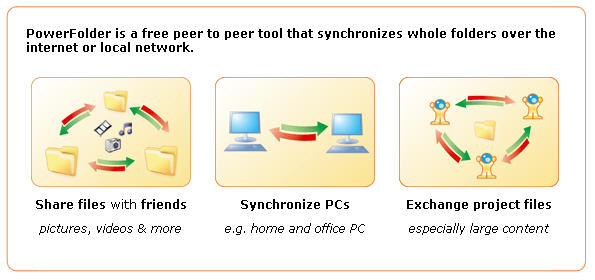
PowerFolder is a free peer to peer tool that synchronizes whole folders over the internet or local network.

In fact, It looks very promising as a back up solution. They just released PowerFolder 1.0 (for Windows & Linux). It's Java-based and installation will not finish if you do not have Java Runtime Environment 1.5 or above, so you may want to go to www.java.com and download it if you do not have it.

[Update - 05/17/2006]
I am really disappointed! Application has many features I love, GUI is beautiful, it is very easy to use and intuitive BUT it keeps on hanging :(
I installed it on my 3 PCs (2 XP and 1 Win2K3) and set up some folders for syncronization. These folders have about 150 folders & 15000 files. What I see is, it detects the differences and starts uploading/downloading but in a few minutes my systems start to hang. It seems to be very resource hungry and kicks my CPU usage to 100% (I have dual P4-2.8 GHz CPU).

Mathieu mentioned another application called iFolder. I also heard about some other file/folder syncronization software like SyncBack, Unison & BestSync...

I already tested Unison but did not really like it. I had to install GTK+, for which I needed to install Gaim for Windows. I could not specify a remote folder using \\ notation. It uses ssh, rsh or socket method to connect to a remote host. Too troublesome...

Free version of SyncBack (v.3.2) seems quite promising actually. I installed it on only one of my PCs and I was able to specify remote directories for sync'ing. Speed was OK. Setting up sync profiles were straight forward too. I am planning to install it on the other PCs and modify sync profiles accordingly. I checked their Support site and two methods to carry profiles were discussed here.

Taking notes via IM: Sabifoo

I was looking for a way to take notes and access them from anywhere and I came across this interesting tool called Sabifoo. You just add it to your IM. Then, whatever message you sent to it will be posted to a web site and you can retrieve it from there.

ServiceContact To Add
AOL Instant Messengersabifoo
Jabbersabifoo@sabifoo.com
MSN Messengersabifoo@sabifoo.com
Yahoo Messengersabifoo
Google Talksabifoo@gmail.com

There is more to it that you can read at Sabifoo Help Page

Skype: Free PC to landline calls

Yippee! I love skype. Voice quality is very good compared to others. As explained in this FT article, now they are upping ther ante and making it free to call landlines from your PC (skypeOut) *FREE* until the end of the year! Competition is good!

[Update-1]
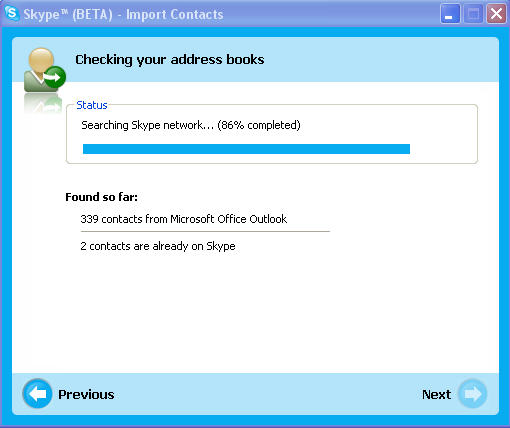
I've downloaded the latest Skype 2 and made calls to regular home and cell phones without any issues. I've also tried the Skype 2.5 beta (2.5.0.72), which has additional features that makes calling even easier. On the left, you can see the "import contacts from Outlook" screen. Instead of importing them, you can also just "view" them.

2006-05-13

Fallacies and how to recognize them

We all have our biases and argue with others. You sometimes see people arguing in a faul way. They use fallacies. Below is a description of fallacies from Nizkor Project Web Site. You can also find there how to recognize fallacies. A must-read!

Description of Fallacies

In order to understand what a fallacy is, one must understand what an argument is. Very briefly, an argument consists of one or more premises and one conclusion. A premise is a statement (a sentence that is either true or false) that is offered in support of the claim being made, which is the conclusion (which is also a sentence that is either true or false).

There are two main types of arguments: deductive and inductive. A deductive argument is an argument such that the premises provide (or appear to provide) complete support for the conclusion. An inductive argument is an argument such that the premises provide (or appear to provide) some degree of support (but less than complete support) for the conclusion. If the premises actually provide the required degree of support for the conclusion, then the argument is a good one. A good deductive argument is known as a valid argument and is such that if all its premises are true, then its conclusion must be true. If all the argument is valid and actually has all true premises, then it is known as a sound argument. If it is invalid or has one or more false premises, it will be unsound. A good inductive argument is known as a strong (or "cogent") inductive argument. It is such that if the premises are true, the conclusion is likely to be true.

A fallacy is, very generally, an error in reasoning. This differs from a factual error, which is simply being wrong about the facts. To be more specific, a fallacy is an "argument" in which the premises given for the conclusion do not provide the needed degree of support. A deductive fallacy is a deductive argument that is invalid (it is such that it could have all true premises and still have a false conclusion). An inductive fallacy is less formal than a deductive fallacy. They are simply "arguments" which appear to be inductive arguments, but the premises do not provided enough support for the conclusion. In such cases, even if the premises were true, the conclusion would not be more likely to be true.

Read more at Nizkor Project Web site. You may also want to visit Constructing a Logical Argument

Google Trends


Google recently announced yet another nice search related feature called 'Google Trends'. Basically, it's a web site (http://google.com/trends) where you can type keywords and see how popular those keywords has been over the time and where they are most popular. It's fun to throw out some keywords into it and see the results.

Let me warn you though, if you put in more than one keyword, then results are displayed so that you will see the cities where the first keyword is most popular and popularity of the remaining keywords on these cities. So, I would suggest to use one keyword at a time.

See above a screenshot for "science". Yet another sign of upcoming India?

2006-05-05

Star-Spangled Banner in Spanish?

I'm back in my home country, Turkey, for a few days now and I just heard about some discussions on singing star-spangled banner in Spanish.

Someone in an Orkut Community pointed out to this link where it is said that "U.S. Government Commissioned Spanish-Language ‘Star-Spangled Banner’ in 1919". What's more interesting is this link though:

In the early 1800's musical instruments and performances were not common in America. Music was generally imported from Europe, and popular tunes were frequently re-used as foundations for other lyrics. As an example, Maryland's state song, "Maryland, My Maryland" can be recognized as the German tune, "O Tannenbaum" (Oh Christmas Tree). Francis Scott Key used this English drinking song to set the meter of "The Star-Spangled Banner."

2006-05-04

Are you good at geography?

Take this test from National Geographic and find out:
http://www9.nationalgeographic.com/roper2006/index.html

I was not too bad but did not do very well either 16/20. If you are into geography, you may also try this but I am warning you,it is tough, very tough (I guess I am saying that because my accuracy was merely 20%)

2006-04-28

I love the new Goowy


Afew months ago, I posted some information about Goowy. Mark Cuban had mentioned it on his blog. I liked the interface then, but they were not offering that much other than 1Gig e-mail which I already had plenty of anyway. It looks like they improved it a lot!

Apparently, Mark liked it so much that he invested in them. After seeing the enhancements, I can understand why. They are now also offering 1 GB free space that you can access from anywhere. They also offer a GAIM like Instant Messenger interface. You can also import your contacts there (they support up-to 1000) either using a CSV file or from other common web based e-mail accounts.

Unfortunately, there is not a Linux version of Macromedia Flash Player v.8, so I could not use it from my Ubuntu installation. They also do not yet offer pop3 access. So, there is still room to enhance but it's a much better site now!

2006-04-27

Welcome Mathieu!

I am pleased to announce that my linux guru, Mathieu Wache, has accepted my invitation to join to scorion.net as a contributor. In fact, I would like to soo more of my friends join to this blog and share their experiences. Who knows, maybe someone out there will benefit from entries we post here. Peace!

Digg in?

Ever since Google started their "News Site", I've been using it as my home-page. I customized it a little bit, increased the number of news in Tech/Science, Sports, Business etc... It's a good short-cut to check for technology news.

Yet, it's not enough. Too many things happen in the tech world everyday (thanks god!). slashdot.org is many people's favorite but I never like the interface. So, I was pretty excited when I heard about "digg". A lot of last minute technology news from all over the world. So far, 'I'm lovin' it".

Don't forget to check "Digg spy" to get a sense of updates...

2006-04-26

Ubuntu Install

A few weeks ago, Mathieu, a friend of mine from work, gave me a "original" Ubuntu CDs and I promised myself to dump my Fedora Core 4 & test Ubuntu instead. Unfortunately, I was very busy and I even forgot where I put the CD.

INSTALLATION BLUES
Finally, last week, I downloaded Ubuntu Breezy Badger 5.10 (meaning 2005 / October release). Unfortunately, installation did not finish. I kept on getting installation failures about some "initrd-tools".

As I see it, it is good that things do not work and it gives me a chance to do some research and learn while trying to fix it... Some people in Ubuntuforums suggested that they burnt their CD images with lower speeds and it worked but that did not sound right to me. Plus, it did not work for some other people. Yet, they might have a point...

So, I found the CDs Mathieu had given to me and tried to install it on the PCs. It worked like a charm on both. Setup was a breeze :)

To be able to use Synaptic Package Manager to get updates, I had to enter my proxy into Settings > Preferences > Network.

UPGRADING TO DAPPER DRAKE 6.06
Then, I decided to update my Ubuntu to the latest test version: Dapper Drake 6.06 (it will be released in June). The problem I usually faced with Fedora was that if I wanted to upgrade, let's say, from Core 3 to Core 4, cleanest way was to dump the previous version and install the new version from scratch.

As Ubuntu is based on Debian Technology, it does a much better job in handling such issues. Unfortunately my first attempt was unsuccesful.


Then, I wanted to see how the latest Beta was and as someone suggested edited my sources.list file which is like yum repositories of Fedora in Ubuntu World:

sudo sed -i -e "s/breezy/dapper/" /etc/apt/sources.list

Then ran the following commands
  • sudo apt-get update
  • sudo apt-get dist-upgrade

I did not pay attention to any messages and just rebooted when finished and all hell broke loose. X-Server would just not start! I googled to see if anyone else had the same issue and sure enough many people had seen similar issues. Unfortunately, none of the fixes suggested worked:
  • sudo dpkg-reconfigure xserver-xorg
After spending a few hours and trying every trick I could find, I gave up & reinstalled Breezey Badger from scratch.

I mentioned my experience to Mathieu, and we tried it together on my pc at work. We first needed to enable proxy by entering the following in a terminal window:
export http_proxy=http://proxyext.ourserver.com:8080

I actually used my old entry in this blog about configuring yum to make the change permenant :)

Then we manually edited /etc/apt/sources.list and replaced "breezy" with "dapper".

Then we ran:
  • sudo apt-get update
and we realized that we had missed one entry in the sources.list that was pointing to Breezy Badger 5.10 CD. After removing it, things worked out smoothly. Then, we ran the dist-upgrade:
  • sudo apt-get dist-upgrade
Upgrade took about 30mins. Once it was finished, I noticed the changes on the screen. New icons are amazingly cute and bright. I loved the new interface!

CONNECTING TO NTFS
The very first thing I wanted to do after I got the new OS was to access my mp3s on my Windows 2003 R2 server. This was surprisingly easy:

Clicked to Places > Connect to Server and just entered the hostname, sharename, username and password. In fact, I noticed that the shortcut that automatically got created on the desktop was still available after reboot, I just needed to enter my password to the key-ring.

CAN YOU HEAR ME NOW?
So, now that I had access to my mp3s, I wanted to play them. As I knew from Fedora, there are licensing issues and official release does not have the necessary codecs etc.

How-to docs were readily available in Ubuntu Wiki > Multimedia section.
By enabling the multiverse and universe repositories and installing the gstreamer0.8-mad packages:
sudo apt-get install gstreamer0.10-plugins-ugly (for Dapper Draker 6.06 only)
I was supposed to be done. As expected, when I clicked on mp3s, Totem Launched without complaining but I heard no sound.

I ran lspci to check if system detected my sound card and it showed
0000:05:0e.0 Multimedia audio controller: Creative Labs SB Audigy LS
This reminded me of my "No Sound on Fedora Core 3" entry last year :) I was then able to solve that problem using alsamixer. When I googled for ubuntu sound problems, I saw that some people had solved that problems via alsamixer too.

So, I launched it and started to play with it. I found out that I had to increase the volume level for "Analog Front" channel.

All issues behind, I am quite happy right now. The next is to play DivX, DVD etc. I need to find something like PowerDVD in linux...

2006-04-22

Open Command Prompt Here

On my XP box, when I browse to a folder where I need to open a command prompt, I just right click and have the option "Command Prompt Here'. That's available because I installed Windows XP Power Toys, which includes "Open Command Window Here" (aka cmdhere) toy.

It's possible to do the same on Windows 2003 and you can do it too:
  1. Open regedt32 and navigate to the HKEY_LOCAL_MACHINE\SOFTWARE\Classes\Folder\shell folder.
  2. Add a new key called “Command Prompt“
  3. Modify the default custom string to read “Open Command Window Here“
  4. Add a new key to this folder called “command“
  5. Modify the default custom string to read: Cmd.exe /k pushd %L
  6. Changes will take effect immediately

Or just copy the lines below to a text file and rename it as something like "cmdhere.reg". Then, when you click (or double click) it, you will have the option to import it...

------ Include all lines below this line -----
Windows Registry Editor Version 5.00

[HKEY_CLASSES_ROOT\Folder\shell\CMD]
@="Open CMD Here"

[HKEY_CLASSES_ROOT\Folder\shell\CMD\command]
@="cmd.exe /k pushd %L"
------ Include all lines above this line -----

2006-04-18

Me Gusta Muive Muive


If I remember correctly, that means something like "I want to move it move it" :) I guess it well describes the game I want to mention here:
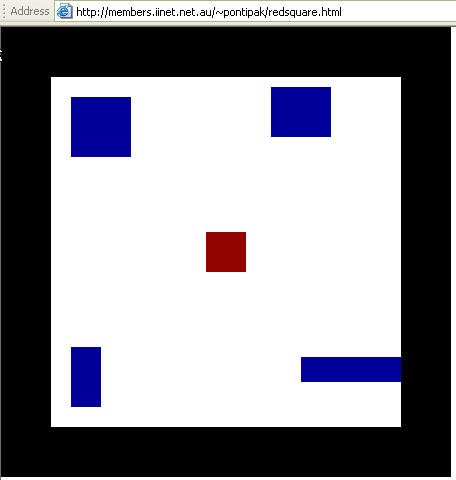
http://members.iinet.net.au/~pontipak/redsquare.html

There is a little red square that you can move with your mouse. You should not touch any of the blue squares or black space. Can you do it for 18secs ?

2006-04-16

Can not Install SyncToy...

We were seeing some issues with the hard drive on my wife's pc recently so, I ordered two Maxtor 300GB Hard drives from Tiger Direct last week.

It turned out to be a very timely order! To my surprise, I lost two hard drives out of four on my two HP XW6000 PCs the very same weekend. Luckily, I was checking the Event Viewer and noticed "dsk" alerts like:

"The driver has detected that device \Device\Harddisk0\DR0 has predicted that it will fail. Immediately back up your data and replace your hard disk drive. A failure may be imminent."

I was able to back up all my data before they totally crashed :) So, I installed new drives on my PCs. One XP and one Windows 2003. I tend to use my own scripts & robocopy for back up but wanted to install Microsoft's SyncToy 1.2 on my XP box. Guess what? I could not...

During SyncToy installation, I got the message below:

This setup requires the .NET Framework version 1.1.4322. Please install the .NET Framework and run this setup again. The .NET Framework can be obtained from the web. Would you like to do it now? Yes Button No Button

Yes Button will lead you to http://msdn.microsoft.com/netframework/downloads/updates/default.aspx. From here you have the choice of 3 .NET Framework versions to choose from as of this writing, among Service Packs, SDKs, Compact Framework, Redistributable for Windows 2003, and others. And nowhere does it mention version 1.1.4322, which is required according to the message mentioned above.

Because I installed everything from scratch, Windows update installed .NET Framework 2.0.50727 on my machine and it appears that it is not backward compatible. What a shame!

I downloaded .NET Framework 1.1 from Microsoft but it would not install. I googled and it looks like there are others who had the same issue. I liked the blog entry from Haidong Ji, who has a good blog called Ji Village News. You can read his story here...

So, I guess I will keep on using Robocopy :)

2006-04-04

Rosetta Stone for SysAdmins

My friend, Nageen "Bad-Boy" Panchani sent this link: http://bhami.com/rosetta.html
You can choose from a number of OSes including FreeBSD, Linux, Solaris and a bunch of other *nix flavors, and you will get a nice table which tells you what the command is for a specific task in each OS.

2006-03-28

Access denied .File is in use blah blah

Oh, don't you hate to see access denied messages when you trying to copy/delete a file?


A friend of mine had showed me a trick that sometimes work:
If the filename is abc.dll -> rename the file like this abcd.dll_
that magical "underscore " may help you.

But if not, try this nice & free utility named Unlocker.

AlertBear

So, you have tons of RSS feeds and rather than reading them like e-mails, you would prefer to get alerts as the feeds become available? Let me introduce you to AlertBear (Windows Only)!

Altiris Software Virtualization Solution

With Altiris SVS, you can install any program to a transparent layer that snags all attempts that the program makes to write to your system, instead saving them inside of the layer. That means no extra .dll’s and no permanent registry changes - SVS takes care of all of that....

Read the rest of the article at LifeHacker.com

Disposable e-mail services

I saw a nice article at ghacks.net about the subject:

There are two ways to avoid spam when registering somewhere on the internet. First you can use Disposable Email Address Services that allow you to check an email account that is not your own and email aliases that webmailers like gmail and yahoo mail offer. I will only post free sites that offer the first service.

The procedure itself is always the same. You go to the website of the service and take a look at the requirements of the email address. For example the service www.mytrashmail.com offers only free emails that use somename@mytrashmail.com. After this you visit the website you want to register with and enter an email address which could be anything as long as it ends with @mytrashmail.com....

Email Aliases:

This is becoming increasingly popular. I only tested it with my gmail account but friends told me that yahoo for instance is offering a similar service. You can send emails using a service called plus addressing. This is not documented yet in the help files so I explain the basic concept. Lets say your email address is ghacks@gmail.com and you want to register at a website. You might register with an email alias that looks like ghacks+sitename@gmail.com. The verification mail will be send to your inbox and you can reply to it to activate the account.

Read all at source

2006-03-18

Meet the Life Hackers

This is a lengthy but a must read article about "life hackers"...

Meet the Life Hackers
Can anyone find a way to make your constantly beeping computer leave you alone and let you work? Inside the nascent field of interruption science.
by Clive Thompson
Read at source

David Lynch: Consciousness, Creativity and the Brain

A wonderful webcast I would suggest everyone to watch: David Lynch: Consciousness, Creativity and the Brain. Check out Wikipeadia for more info on David Lynch, whose Mulholland Drive, Twin Peaks, Blue Velvet & Straight Story are among my favorite movies.

Also, someting to check if you are in NYC: Practical Philosophy

2006-03-07

Free USB Drive from Microsoft

Head over to the Mystery Solved site of microsoft.com and click on the usb stick on the right where it says Get Yours. You need to sign in with passport.net and answer the following questions:

Q1. How many ways are there to obtain a full Microsoft® Windows® Desktop license?
Answer:: 2

Q2: Volume License Agreements cover Windows Desktop operating system upgrades only.
Answer: True

Q3: OEM operating system licenses are non-transferable.
Answer: True

Q4: The most cost-effective way to acquire an initial, full underlying Windows Desktop license is preinstalled.
Answer: True

It will take between 6 and 8 weeks before you get the stick, but free is free, right ?

2006-03-02

Microsoft's Origami Project

Have you heard of Microsoft's Origami Project? Have you seen http://www.origamiproject.com, you must be wondering what the demo is talking about and what will be announced on March 9, 2006.

Hmm, here is a tip: would you want to have just one device that would do what all other devices like blackberry, treo, palm & camera phone, mp3 player can do? :) Well, at least that's the promise of the new gadget Microsoft is supposed to announce in a week from now & we'll see if it is hot or hype