Google
Showing posts with label Hardware. Show all posts

2011-02-21

nVidia GTX 460, but which one?

A couple of days ago, I mentioned that my eVGA GTS 8800 512 had gone corrupted. Falcon Northwest techs replied to my e-mail (I love how informative and friendly their responses are) and confirmed that eVGA tech recommendation on GTX 460 would be a great replacement, it would fit in just fine if I got with a <9" card and my Power Supply Unit (PSU) should be able to carry the load just fine (It's 500Watts).

So, I started reading reviews on these cards. This review from GuruD3.com is a bit dated but talks in great details about several GTX 460 cards and is a good read to understand the landscape.

Maybe conventional wisdom would dictate I go with a different brand than the one I had problem with. I did not. I loved how quite the card was. The fact that Falcon NW guys chose eVGA over others gave me more confidence. Plus, there is no such thing as never-failing-hardware-manufacturer.

For example, I liked the output options of PNY video cards and used several in the past but most of them developed fan-noise after a year or two. So, I gave up on them. If a company is using cheap mats and lowering the quality, they lose in the long run. PNY is still around, so maybe it was just that series, or it was my (lack of) luck. I am sure there are millions of PNY users out there with no issue whatsoever (and in full disclosure I still have a PNY card running on one of my much less used PCs after 9 years - oh yes sometimes I have to endure the fan-noise but it goes away after a while!).

Again, I wanted to go with a card, that is silent, performant and has good warranty. I learned that eVGA has lifetime warranty on some series (oh I am sure I will remember to register this time). Even these did not make the choice easy, as there are several eVGA cards that fit the bill.

Then I decided that I did not want an overclocked one, it's not need that for my use-case and I believe it taxes both the system (need more power / more heat) and the life of card. Finally, my choice is a non-overclocked eVGA GTX 460 1 GB card in the -AR series from buy.com which seems to have the best deal (hmm, it's really annoying me that they have a typo in the tile. It says "INVIDIA" instead of "NVIDIA". How could they miss that???).

2010-04-07

Raise The Dead...Fragbox

I mentioned last week that Win7 on my My fragbox 2 came down with a BSOD and I could not boot from C: drive anymore. Then worse happened and my fragbox 2 stopped powering up all together.

I contacted Falcon Northwest Technical Support by sending them an e-mail and leaving a couple of Voice Mails. Falcon keep their support in US (a great plus!). They are in PST time zone which works out fine for me as I can work with them when I get home.

Anyway, a support engineer called me back and I described my problem. Then we scheduled a call when I get home. I had pretty tried everything other than resetting CMOs. So, he went over the steps he wanted to try:
  • Keep computer connected to power switch but turn off the switch so there is no power but machine is grounded
  • Remove Graphics Card, for which I had to remove the fan over it
  • Reseat RAM sticks
  • Reseat power switches for CPU etc.
  • Disconnect power cord
  • Clear CMOS, which means moving a jumper as per ASUS P5E-VM DO documentation
  • Wait for a couple of minutes
  • Put the jumper back
  • Connect Graphics Card
  • Put everything else back
  • Just connect Keyboard, Monitor Cable and Power
  • Power Up
Fragbox is a small box. Everything is neatly placed and as the support engineer put it, "they do not expect things to go wrong", so it is not build to be very easy to remove parts. I am used to taking machines apart so I was able to follow instructions.... and it powered up just fine.

We went into BIOS to set the correct settings for my set up. Falcon Northwest documentation is great. They had sent each and every change they had done to BIOS defaults. Plus, support engineer had the settings as well. So, we set them, saved them and rebooted.

I was pretty convinced my had HD gone bad and unfortunately I was right. We ended up where we started: BSOD with "Unmountable_boot_volume". We kept on troubleshooting... He sent me an e-mail with links to Seagate's SeaTools HD Diagnostic page and instructions on what he needed.

I ran them and SeaTools confirmed that my D: drive was healthy but my C: drive had Electical Issues. Log went like this:
Started Short DST 4/7/2010 @7:44.14


DST -- FAILED - Electrical Element

Short DST FAILED 4/7/2010 @7.44.21 

I ran the long test as well but it simply confirmed the issue. I powered down the PC, sent an e-mail to Falcon Northwest support about results and left for work in the morning.

I got an e-mail back later in the day that confirmed drive was bad and mentioned that Seagate might still have my disk under warranty. It had links to check if I was covered. Good news was, yes I was covered. I started the RMA process but at some point realized that I did not have the 'CODE' they were asking. Apparently, there was a newer version of the tool (2.17) than I had downloaded (2.16) which was returning this code.

I downloaded the new software from Seagate; burn the image into a CD and booted from it. I got the code they needed and finished the RMA process. When I read their documentation, which is a subject of another blog post probably, I realized that they will not give me a new HD but replace it with a refurbished one :(

Anyway, there is more to story actually. When I came back, my power up issue was back as well. I had hoped that clearing CMOS would fix it but apparently it had not.

Here is how it goes:


  1. I click power button
  2. I hear fan noise 1 sec, it stops
  3. 2 secs of silence, fan noise again for power up for 1 sec and it stops
  4. same as above...
  5. 15mins later...
  6. fan does not stop this time and computer boots up
 I felt like this was either a Mobo or PSU (possibly capacitor) issue and descibed this in an e-mail to Falcon Northwest support. I got a call back and we discussed what needs to be done and I tried to remove the Hard drive but as I mentioned above it's not really build so that you can easily remove parts. In fact, I realized that there is no way for me to remove the hard disk without 'breaking' something.

At this point, support engineer told me that he will talk to his supervisor to see if my machine would be covered, what will be the warranty situation and give me a call back tomorrow. I am kinda stuck because I cannot take out the HD anyway and I do not know at this point if the power up issues I have been having ever since I got the Mobo replaced last summer are at all relevant to this HD or not (my guess - NOT!).

I checked Falcon Northwest site and they have 3 years warranty on Fragboxes but it seems that mine had only a year :(  My previous Mobo change was covered under warranty but I kept on having issues since then as well and it got worse and worse with power. So I do not know if they will stand behind their product or not at this point. We will find out tomorrow. Hopefully, I will post good news!

2010-04-04

Shopping for a new (gaming) PC

Now that my lovely fragbox is dead :( I wondered what's the latest out there in terms hardware. My Fragbox 2 cost me about  $2K in Aug 2008 and came with

  • nVidia 8800 GTS 512MB PCIe 
  • Intel Core 2 duo E8500 - 3.16 GHz 1333FSB
  • Crucial 2x2GB DDR2 PC2-6400 800MHz
So, 1.5 yrs later, my nVidia card is about 3-4 tiers down from today's top graphics cards as per this recent article from Tom's Hardware Guide - Graphics Hierarchy Chart.

Similarly, Tom's Hardware Guide - CPU Hierarchy Chart of March 2010, puts my then top of the line CPU as a third tier CPU now.
These are great articles to help understand where technology is now compared to my current gear. I will keep on adding links here while researching.

2009-09-26

CPU Fan Error Thriller - The Saga Continues

After my post about the error "CPU Fan Error!", I had two days without any issues but today error is back. I had left my computer on for a couple of hours and apparently it went into deep sleep mode (S3). I came back and moved the mouse - nothing happened! O_o
Then, I hit the keyboard, knowing it would not help... I had one option left, Power button to wake up the PC.

It did wake up but really like an annoyed person coming back from deep sleep. Fans roared full speed for 15 secs; then a brief silence as if power went off... Finally a blinking cursor on the screen and BIOS messages showing up. Unfortunately, BIOS messages stopped at some point as before and after 20 secs of silence I saw the familiar message printed on the screen:
"CPU Fan Error!
Press F1 to continue.

I hit F1 and loaded Win7 but I knew what was coming: 'computer freeze every other second'...

So, I rebooted and decided to disable Q-Fan again but I failed to hit "del" key to go into BIOS on time and noticed a new message:
Overclocking Failed! Please enter Setup to re-configure your system

In fact, these two messages seems to be related. My system has arrived overclocked from Falcon Northwest; I know that because they mentioned every single BIOS change they made in their documentation (kudos). When a system is overclocked, it may generate more heat; again referring to incapacity of the fan to do its job...

The reason I had bought the system was WoW but I quit WoW a couple of months ago. So I turned overclocking off as I do not need the every piece of cpu cycle these days.

Of course, it is still bothering me that this is happening; and I am not totally convinced that this is a hardware story. It could very well be that Win7 has something to do with this. I am, for example, noticing some other "System" errors in Event Log like
"The NVIDIA Display Driver Service service has reported an invalid current state 32"
There was a report in nVidia forum today that problem was resolved after installing latest Win7 beta drivers. I have not however seen the same issues reported there.

At this point, I thought I should switch to something more productive and do some investigation with PowerShell, like when did these messages appear and how many of them were in system log:

get-eventlog system -entry error  |where {$_.message -match "nvidia"} |ft -auto
Index Time         EntryType Source                  InstanceID Message
----- ----         --------- ------                  ---------- -------
74903 Sep 26 19:04 Error     Service Control Manager 3221232488 The NVIDIA Display Driver Service service has report...
74614 Sep 25 00:03 Error     Service Control Manager 3221232488 The NVIDIA Display Driver Service service has report...
74456 Sep 24 23:07 Error     Service Control Manager 3221232488 The NVIDIA Display Driver Service service has report...
74343 Sep 24 23:04 Error     Service Control Manager 3221232488 The NVIDIA Display Driver Service service has report...
74198 Sep 24 22:57 Error     Service Control Manager 3221232488 The NVIDIA Display Driver Service service has report...
74037 Sep 24 22:31 Error     Service Control Manager 3221232488 The NVIDIA Display Driver Service service has report...
73887 Sep 24 22:02 Error     Service Control Manager 3221232488 The NVIDIA Display Driver Service service has report...
73758 Sep 24 21:58 Error     Service Control Manager 3221232488 The NVIDIA Display Driver Service service has report...
73399 Sep 22 00:06 Error     Service Control Manager 3221232488 The NVIDIA Display Driver Service service has report...
73164 Sep 21 00:02 Error     Service Control Manager 3221232488 The NVIDIA Display Driver Service service has report...

So, apparently this nVidia problem is also a recent phenomenon. I checked Microsoft's documentation on event id and did not see anything to worry me. So, I went back to PowerShell and started playing with it a bit more...

How many errors did my system have in System Log?

(get-eventlog system -entry error).count
39

Some people actually doing that in a different way. First get the events from log & then count them:

$events=get-eventlog -logname system -entryType error # I used the long notation here
$events.count
39

I actually like that "(something).property" way of getting properties but assigning it to a variable first is much more useful if you will re-use the object. For example, if I wanted to find out what sources generated these errors (i.e. group them):

$events |group source |FT count,name -auto #It centered the output without -auto

Count Name
----- ----
   20 DCOM
   11 Service Control Manager
    3 HECI
    3 EventLog
    2 Serial

Or if I wanted to see only certain fields:

$events |ft TimeGenerated, Source, Message -Auto

TimeGenerated         Source                  Message
-------------         ------                  -------
9/26/2009 7:10:33 PM  DCOM                    The description for Event ID '-1073731808' in Source 'DCOM' cannot be ...
9/26/2009 7:04:13 PM  Service Control Manager The NVIDIA Display Driver Service service has reported an invalid curr...
9/26/2009 7:03:31 PM  HECI                    HECI driver has failed to perform handshake with the Firmware.
9/26/2009 7:03:40 PM  EventLog                The previous system shutdown at 5:09:01 PM on ?9/?26/?2009 was unexpec...
9/26/2009 2:39:20 PM  DCOM                    The description for Event ID '-1073731808' in Source 'DCOM' cannot be ...
9/25/2009 12:03:26 AM Service Control Manager The NVIDIA Display Driver Service service has reported an invalid curr...
...

Btw, did you also notice that in the first example I only typed "entry" instead of "entryType", that's because you can type the minimum number of chars sufficient enough for PowerShell to identify which parameter you meant.

I also tend to skip default parameter names. For example, default parameter for "get-eventlog" is of course EventLog name which is represented by "-logname string" parameter. You can skip -logname if nobody else will read your code:

get-eventlog system

As usual to get list of event logs simply type:

get-eventlog -list

  Max(K) Retain OverflowAction        Entries Log
  ------ ------ --------------        ------- ---
  20,480      0 OverwriteAsNeeded       1,142 Application
  15,168      0 OverwriteAsNeeded           0 DFS Replication
  20,480      0 OverwriteAsNeeded           0 HardwareEvents
     512      7 OverwriteOlder              0 Internet Explorer
  20,480      0 OverwriteAsNeeded           0 Key Management Service
   8,192      0 OverwriteAsNeeded         127 Media Center
  16,384      0 OverwriteAsNeeded           0 ODiag
  16,384      0 OverwriteAsNeeded         263 OSession
                                              Security
  20,480      0 OverwriteAsNeeded       4,321 System
     512      7 OverwriteOlder            415 Windows PowerShell

help get-eventlog -examples
has several examples for common scenarios.
Fin!

2009-09-24

CPU Fan error thriller

If you read my "RIP: My Falcon Fragbox2" story, you know that I own one of these beasts.. Since I got it back from Falcon, it was working fine all these months and I love it.

Recently though, I upgraded my Vista to Windows 7 Home Premium Edition from MSDN. I know, I know it is early and many vendors do not have drivers etc etc but I love Windows 7 and could not wait!

All went well and I have been running it fine for the last month or so. Recently though, I started to see some weird behaviour from “sleep mode” again. I dont remember what setting it had originally but at some point it would not go to sleep. I mentioned that story below and I thought it was a software issue. Unfortunately it came back and the final solution I found was to change BIOS setting for sleep from S1 to S3. That had put and end to it. So, I went back and checked the setting to see if it somehow got reset. It was still in S3.

It would go to “sleep” fine; then sometime later it, fan wakes up with full ferocity and does not stop running. This kept on happening so I started to shutdown the machine instead of putting it into Sleep. I started to notice another weird behaviour though. Windows would come up fine but after I logged in, it would suddenly start to act up. Basically it was running for 2secs and freezing for 2secs. I could see this behaviour clearly by simply moving the mouse around. It was quite weird and I had no idea what was causing it as I had not installed any software (I did inplace upgrade) recently. I was annoyed but figured out that rebooting system would clear this issue.

The worst happened today though. I cold booted the system and noticed an error:
CPU fan error!
Press F1 to continue.

I was freaking out at this point and immediately opened the case only to find out that all fans were plugged properly and firmly, and they were all running just fine. So, I started to research this and found out that other people with Asus Motherboard had seen this issue. They suggested to “disable” Q-fan, which was set to “silence” mode. I tested this and it did clear the error. However, I thought this would be a risky thing to do; so kept on checking Asus site. Apparently they have a BIOS update 0902 (mine was 0802) but instructions were not too clear to me. I downloaded a utility from their site, which is supposed to allow saving bios and updating it from Windows.

When I ran it; it displayed a message which told me to remove Memory from A* banks. I checked the motherboard documentation and found out which one was A1 (I have 2 Gig at A1 and 2 gig at B1). I powered down the pc, removed all the cables and removed A1 memory. After reboot, I saw a message which said something like “Because of AMT requirement A1 bank should be filled or you may experience system malfunction”. I went ahead anyway and launched Asus update utility after logging in. This time, it did not complain and gave me the option to save and update bios. I did that and chose to reset CMOS.

All went fine. I rebooted and of course got CMOS checksum errors. I hit F1 and continued to logon to Windows. All seemed fine. Then, I rebooted and went into BIOS. Took out the awesome  documentation from Falcon and reset all the setting one by one to what was documented. Saved and rebooted again. I do not see the fan error and all seems to be OK right now.

2008-09-02

RIP: My Falcon Fragbox 2


I bought a Fragbox 2 gaming computer from Falcon Northwest last month. The first time I ran World of Warcraft on it, it felt awesome. Everything was incredibly smooth; I had all the settings in the game maxed up but I was never getting less than 60fps. I thought it was worth the ~$2000 and 2 weeks wait time!

Some specs:
MB: Asus P5E-VM Micro ATX Q35 Motherboard (AS-P5E-VM )
CPU: Intel Core 2 Duo E8500 - 3.16 GHz 1333 FSB ( INTC2E8500 )
RAM: Crucial 4GB (2x2GB) DDR2 PC2-6400 800MHz ( CR-4GBK2-6400 )
Video: NVidia 8800 GTS 512MB PCIE (NV8800GTS512 )
Storage: Seagate Sata 750GB HD 7200 RPM
ST50EFCS 500 watt power supply ( SS-ST50EFCS )


Two days ago, I was getting ready for Karazhan raid and suddenly my fragbox started to stutter. Everything became slow and at some point it became unresponsive, I was not able to restart it. So, I hard booted it by pressing the power button and all hell broke lose!

Windows failed to start. A recent hardware or software change might be the cause. To fix the problem:
1.Insert your installation disc and restart your computer
2. Choose your language settings, and then click "next"
3. Click "Repair your computer"
If you do not have this disc, contact your system administrator or computer manufacturer for assistance.
File:\Windows\System32\config\system
Status: 0xc00000e9
Info: Windows failed to load because the system registry file is missing, or corrupt.

I tried to reboot a couple of times hoping it would clear but it did not seem like the kind. So, after trying safe mode and every other option without moving an inch closer to booting into Windows, I gave up and attempted to reload Windows Vista...

Install seemed to go smoothly but after the reboot; same error showed up. As a last resort, I used the Recovery Disc that came with the Fragbox 2 package. Recovery stalled at 30% and I was prompted to either ignore the errors or abort recovery. I chose to ignore the errors but recovery did not go thru.

I attempted recovery again and to my surprise, it completed this time but no joy after reboot:

Windows has encountered a problem communicating with a device connected to your computer.
This error can be caused by unplugging a removable storage device such as an external usb drive while the drive is in use, or by faulty hardware such as a hard drive or CD-rom drive that is failing. Make sure any removable storage is properly connected and then restart your computer.
If you continue to receive this error message, contact the hardware manufacturer.
File: \Windows\System32\Winload.exe
Status: 0xc00000e9
Info: An unexpected I/O error has occured

At this point, I looked at the warranty document and was happy to see that this:

Falcon Overnight Service
Your Falcon Overnight Service Policy: How It Works
Summary: If your Falcon system should develop a serious hardware problem that we can't solve via telephone technical support, we will pick it up via overnight courier, correct any problem, and overnight it back to you, The Falcon Overnight Service covers any applicable instance within one year of the date of purchase.

So, I sent an e-mail to support@falcon-nw.com with all the details of the issue and steps I have taken and asked them to call me back...

That brings us to today. I called them to follow up and talked to a technician who suggested that I should open up the box and re-seat cables... OK, unscrewing a couple of screws and opening up a box is no big deal but I am sure many people may feel uneasy about doing this. They do not need to know how to do this...

Anyway, I went ahead and re-seat the cables which seemed firmly in place anyway and of course nothing is fixed. Falcon support also told me that I should run some hard drive diagnostics. So, I asked where I would get the diagnostic application and he said he will send me instructions.

It's been a couple of hours since the conversation but they have not yet replied to my e-mail with instructions. I called them up a couple of times already but keep on getting Voice mail. So, I left VMs...and waiting.... Arrrgh!

[ Update - 09/04/2008]
Apparently, Falcon Support team was calling me back...but they were not calling my work number instead of the number I left with them. Anyway, person I talked to was a soft spoken, very kind person. After sorting out the miscommunication, I agreed to follow the instructions to download a Seagate tool and use it to test the drive.

I reseated the cables on the motherboard side and re-ran recovery disc as they suggested; which resulted in the same error. Then I downloaded the Seagate Diagnostic tool from http://www.seagate.com/support/seatools/SeaToolsDOS207EURO.iso . 20mins after starting the diagnostic in "Long Test" mode, it stopped at 17% done. Waited for another hour but it was clearly not moving. So, I aborted the process and checked the logs which did not have anything useful about test.

I sent another e-mail to support detailing what I have done and the results. They called me back and and I said "I think at this point, I'd better ship it to you guys'. The sense I get from talking to these guys is that they sure would like to avoid shipping it if possible and work with you to fix it if you are willing to work with them, but they are not 'forcing' you to do that.

I was willing to work with them but I don't think anyone reading this should be worried if they are planning to buy a Fragbox from Falcon and would not be willing to do troubleshooting in case they hit a similar issue.

On the plus side, when I was purchasing the system, they refused to add a second hard drive as the configuration was fixed and they were not willing to modify it. Now that I encountered this issue, I asked the support person if it would be possible to buy a second 750GB Seagate drive from them and would they install it for me. He said yes and told me they could even install a drive that I would ship them if I had any extra. I am waiting for them to confirm the price. I hope it is not too much above market price.
[Update - 09/24/2008]
So, it took Falcon a week to fix issue(s) on my Fragbox 2...
  • First they replaced the Seagate 750gig hard drive and added the second 750gig I bought from them.... During testing, they found out that issue did not disappear.
  • Then, they replaced motherboard. During test, they realized that one of the RAM chips were defective although it had passed RAM test.
  • After replacing RAM, all went well and they installed Windows, updates drivers etc. Falcon creates a Recovery disk. So, that disc did not get created successfully at first but second attempt was successful. Oh, they also print a funny custom DVD cover with my name on it :)

They kept me informed via e-mail updates all along and I told them that although I could not wait to get back on my Fragbox, I would rather a bit and have it tested thoroughly, which they do and at the end they send a list of all checks they performed.

Of course, it sucks that my Fragbox had all these issues only after 2 months but it's clear that they are using the best parts and testing it; so cannot blame them for that. Now that I have a second drive on it, I will be able to use it not just as a gaming (ie. World of Warcraft) computer but as my main workstation at home replacing HP workstation xw6000.

2007-08-09

A (much needed) update for Vista

Today, when I saw MS KB938194 titled "An update is available that improves the compatibility and reliability of Windows Vista" and look at the issues it resolved, it reminded me of my experience with an ATI card when I moved to Vista:

A couple of months ago I bought a nice (=expensive) ATI all in wonder X800 video card and it worked perfectly fine under Windows XP when I was playing World of Warcraft (WoW). Then, I installed Vista. All seemed fine for a week or so and then hell broke loose...

At first, I would not be able to play more WoW than 5 minutes. It would freeze and I had to reboot. Then it got worse so that I could not even play 30 secs. I gave up and started to use my other PC to play the game.

It got even worse when Vista started to freeze even when I am not playing a game but just playing any video file. At some point, my pc was totally unusable as animations were too much to display.

One of these days, I saw a sign that CompUSA shop near my house was getting closing and there was a close-out sale. I bought ATI X1600 Pro & retired the problematic one but promised myself to test it out on my Windows XP box to see if the problem would present itself there too...

Read this article for more on Windows Vista issues and possible fixes coming out...

2007-06-09

Hack Your Router

Umm, well this is 'old news' that I only became aware of thanks to a colleague. There is a LifeHacker article about boosting router signal as well as adding tons of features to it for some make/model but especially Linksys WRT54GL Wireless router

Here is the link to the article.

2006-11-30

Vista Aero at last!


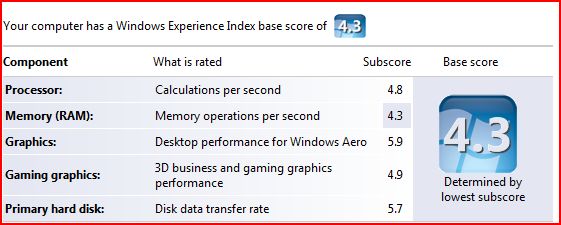
When I installed Vista, I was disappointed to see that my Windows Experience Index was 1.0 I was disappointed because I have a pretty decent machine:
  • HP XW6000 Workstation
  • 2 x 2.8 GHz P4 processor
  • 1 GB DDR 266Mhz RAM
  • 2 x 750GB SATA drives
  • nVidia 980XGL video card with 128 MB ram & dual DVI output
So, what was wrong in this picture? Why was I getting such a bad score? Well, apparently, Windows Experience Index base score is determined by the lowest number. And what was that? Yep, you probably guesses it right. It was my video card.

It looks like I fell behind times in video cards department and I felt that this was a good time to catch up. So, I did some research. As always, Tom's Hardware Guide on graphic cards was pretty useful.

I ended up ordering an AGP 8x, ATI Radeon GDDR3 X800 XT with 256 MB ram from TigerDirect.com for $168 (I checked again now and they are not selling it anymore, maybe I got the last one :). It's all-in-one card, although I am not currently planning to use its TV capture capabilities.

I received in just two days. When I installed it though, my machine did not boot, all I was hearing was 2 long beeps. I put back the old card and got on internet to talk to HP. They simply told me that
- "ATI Radeon X800 XT card is not tested on xw6000 and is not supported".

In fact, HP guy told me that there was a problem between it and the motherboard but I kept on asking questions and he confessed that he was not sure of that and suggested I try the *newest* BIOS which was 2 years old and I was already running that.

I started tinkering with BIOS settings and one setting got my eye "AGP Aperture Size". It was set to 64MB. I did not know what it was for but when I saw someone mentioning it to fix a video card issue (not ATI), I realized that I had to change it to 256MB = what my new card had & voila!

To my surprise, Vista detected the card and installed the driver for it. Then, I checked my Windows Experience Index again: 4.3

This time, it was my 1Gig memory that was taking me down but hey, I have all the bells and whistles of Aero now :) I am quite disappointed with Doom 3 though, it looks better but not way better...

BTW, to see your Windows Experience index, do the followings:
Start > Run
control.exe system

Lastly, I wrote about BlackBerry on Vista yesterday. I checked the device in the morning and as expected it was fully charged.

2006-11-29

Blackberry & Vista

when I connected my Blackberry 8700 to Vista to charge it, it immediately popped up a message telling me that "a blackberry device was found". It did not however had the software for it

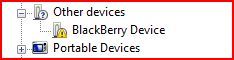
I checked the device manager and sure enough BlackBerry was listed with a yellow icon on it meaning that it was missing the driver.

I went to RIM's homepage to see if they had any Vista drivers but could not locate one.

As my experience with Vista so far showed me that XP drivers usually worked fine, I wanted to give it a try by downloading and installing the latest BlackBerry Desktop Software (4.2 as of this moment).

So I downloaded the software and installed it. Installation went just fine no issues. I have selected Enterprise features as mine is in fact belongs to my company.

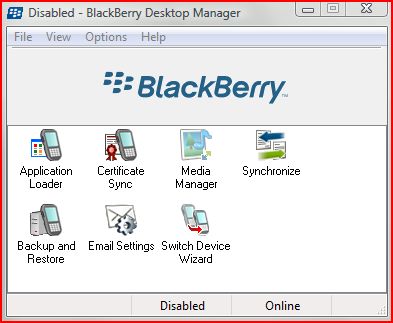
As I only wanted to charge the battery and I selected not to launch the application at start up. I will probably not be able to use it anyway. Still, when I launched it, it came up just fine.


Then, I went back to Device manager to see what happened and noticed that it was now showing under Universal Serial Bus Controller. Right now, it looks like it is charging. I will check back in the morning to see if it 'really' charged.