Google
Showing posts with label issue. Show all posts

2013-08-13

Work around quirky Printui.dll on XP

In the previous post, I talked about issues I was seeing when using printui.dll to push per-machine connections on Windows XP. I did tons of testing and in the realized that XP's spooler service was too flaky for my purpose.

I spent some time diving deeper into what the commands are doing and if there was anything that I could do in the startup script that would make it more consistent...

Let's cut to the chase:

I concluded that the most reliable way to make sure printers will be pushed when users logged in was to make sure relevant connection entries are created by my script under HKLM during startup, instead of relying printui.dll /ga switch.

How did I arrive at this conclusion?

Well,  I used Process Monitor (aka Procmon) from SysInternals,
watched what happens if I issue commands like the ones below manually

  • rundll32 printui.dll,PrintUIEntry /ga /n\\PrintServer\Printer (add per-machine printer connection)
  • rundll32 printui.dll,PrintUIEntry /gd /n\\PrintServer\Printer (remove per-machine printer connection)

A Watched sequence of events during boot (Procmon > Options > Enable Boot-Logging)

Here are a few things to note that will help us understand what is going on :

  • Our Print Server is named PrintServer1 
  • Printers shared on it has sharenames Printer1.. PrinterN 
  • HKLM Connections key: HKLM\SYSTEM\CurrentControlSet\Control\Print\Connections
  • HKCU Connections key: HKCU\Printers\Connections
  • If there is no ",,PrintServer1,PrinterX" entry under HKLM Connections key, user does not get the PrinterX connection.

Q. What happens if we "add per-machine printer connection" in a user session?
A. Seemingly nothing, user does not see the new printer connections until Spooler service is started. In reality, a new registry key under HKLM Connections key is created.

Q. So, what happens if we re-start the spooler services?
A. Normally, user gets the printer connection. It does not show up immediately, spooler service takes its sweet time but unless something goes terribly wrong, new printers shows up in a minute or two. Here is how (shortened for relevancy):

Spooler Service checks the entries under HKLM Connections key and detects a new printer connection, which will be in the following form:
HKLM\SYSTEM\CurrentControlSet\Control\Print\Connections\,,PrintServer1,PrinterX
Server=\\PrintServer1 (RegSZ)
Provider=Win32spl.dll (RegSZ)
LocalConnection=0x0000001 (DWORD)

You probably noticed that \\PrintServer1\PrinterX has been transformed to ,,PrintServer1,PrinterX and became a key. Provider and LocalConnection always had the same value, "Server" was set to the name of the Print Server with '\\' prefix.

So far, so good. The rest is the tiring loop:

  • Spooler starts going through SIDS
  • Creates a new connection under HKCU\Printers\Connections,,PrinterServer1.PrinterX
  • Clones the 'Server', 'Provider', 'LocalConnection' settings from HKLM Connections key
  • Queries and creates a new port setting:

    HKLM\Software\Microsoft\Windows NT\CurrentVersion\Ports\NeXX: (Reg_SZ ),
    where Ne in my case went from Ne00 to Ne08
  • It then created an entry under devices that linked the port to printer:

    HKCU\Software\Microsoft\Windows NT\CurrentVersion\Devices\
    \\PrintServer1\PrinterX = Winspool,NeXX: (Reg_SZ)
  • In the next step, spooler creater a PrinterPort entry in the following form:

    HKCU\Software\Microsoft\Windows NT\CurrentVersion\PrinterPorts\
    \\PrintServer1\PrinterX = Winspool,NeXX:15,45 (Reg_SZ)
  • In the actual flow, HKCU was the last. Spooler actually started with SID S-1-5-19 (HKU\S-1-5-19\)and cycled through all SIDS under HKU but you get the point.
  • THEN, an important step comes: querying printer, getting a connection to it (I see a %windir%\System32\spool\PIPE file created), creating a registry key for printer and writing everything about that printer

    HKLM\SOFTWARE\Microsoft\Windows NT\CurrentVersion\Print\Providers\LanMan Print Services\Servers\PrinterServer1\Printers\PrinterX
So, that's gist of what spooler seems to be doing. 

What's the problem?

Well, the problem I identified was that during the startup Spooler service would something be slacking. The command I ran to add a per-machine printer connection would return 258. 
Whenever rundll32 returned 0, that process ended up creating an HKLM connection entry and printer showed up just fine for user.
If, however, rundll32 returned 258, no connection was created.

So, what does return code 258 mean? Answer comes from Alan Morris of Microsoft Windows Printing team:

"this is the error
C:\>winerror 258
   258 WAIT_TIMEOUT <--> No NTSTATUS matched
printui does not validate the data that you are adding to the registry."
He goes on to explain:

"I'd check the number of printers and drivers as well as the drivers installed on a machine where this is failing.  The spooler may not be fully online and printui does call into spooler for these methods." 

Well, all good, but I had seen services.exe kicking off spooler service a full minute before any commands were issued to it. Additionally, spooler service would almost always map the first printer but the number of printers it connected was varying each time.

I was using the same XP VM and got considerably different results (sometimes tons of return code 258 errors, sometimes just 1 or two).

Techs in the field were reporting a similar pattern and a quick  Google search also got many hits in terms of people complaining about success rate of using these commands in the startup scripts.

What do we do now?

Well, as I said in the beginning, my approach was to help the spooler service a bit by creating the HKLM connections registry keys for it. In my tests, it worked like a charm (YMMV) every single time.

Below is modified sample script


on error resume next
Const ForReading = 1, ForWriting = 2, ForAppending = 8, CanCreate=True
ScriptVersion="2013-08-13-02"

Set oShell = CreateObject("WScript.Shell")
oShell.LogEvent 0, "WinXP_WSStartup.vbs: Script Version: " & ScriptVersion

'Get group membership for the machine
Set objSysInfo = CreateObject("ADSystemInfo")
Set objComputer = GetObject("LDAP://" & objSysInfo.ComputerName)

Groups = objComputer.GetEx("MemberOf")
' If Above Command does not find any groups for computer, it will error
if  Err.Number <> 0 Then  
 oShell.LogEvent 0, "WinXP_WSStartup.vbs: Computer is not member of any AD groups. Exiting."
 Wscript.Quit
end if

isFirst=vbTrue
Count=0
For Each group In Groups
  group=Replace(group,"/","\/")   ' escape groups with a slash in the object name   
  Set objGroup = GetObject("LDAP://" & group)
  If ( Instr(LCase(objGroup.CN),"grp.prn." ) > 0 ) then          
  If isFirst Then
   PrinterGroups = objGroup.CN
   isFirst=vbFalse
   Count=1
  Else
   PrinterGroups = PrinterGroups & ";" & objGroup.CN
   Count=Count+1
  End If   
  End if 
  'AllGroups = AllGroups & ";" & objGroup.CN
Next 

if (Count > 0) Then
   
 'Take care of setting up Reg File
 Set oFSO = CreateObject("Scripting.FileSystemObject") 
 sRegFile = oShell.ExpandEnvironmentStrings("%TEMP%")  & "\WinXP_WSStartup_PrinterConnections.reg" 
 If oFSO.FileExists(sRegFile) Then
  oFSO.DeleteFile(sRegFile)
 End If 
  
 Set oRegFile = oFSO.OpenTextFile(sRegFile, ForAppending, CanCreate)
 oRegFile.WriteLine "Windows Registry Editor Version 5.00" & vbCrLF & vbCrLF
  
 ' Now let's process each printer grou[
 
 arrPrinterGroups=Split(PrinterGroups,";") 
 for each PrinterGroup in arrPrinterGroups 
  arrGroup = Split(PrinterGroup,".")
  ' skipping first 2 grp and prn as groups are named grp.prn.ServerName.PrinterName
  Server=arrGroup(2)
  Printer=arrGroup(3)
  
  '' Update registry file
   oRegFile.WriteLine("[HKEY_LOCAL_MACHINE\SYSTEM\CurrentControlSet\Control\Print\Connections\,," & Server & "," & Printer & "]" )
   oRegFile.WriteLine(chr(34) & "Server" & chr(34) & "=" & chr(34) & "\\\\" & Server & chr(34))
   oRegFile.WriteLine(chr(34) & "Provider" & chr(34) & "=" & chr(34) & "win32spl.dll" & chr(34))
   oRegFile.WriteLine(chr(34) & "LocalConnection" & chr(34) & "=dword:0000001" & vbCrLf)

  ''
'  cmdConnectPrinter="%comspec% /c rundll32 printui.dll,PrintUIEntry /ga /n\\" & Server & "\" & Printer
  oShell.LogEvent 0, "WinXP_WSStartup.vbs: Connecting to Printer: " & Printer & " on Server: " & Server
'  oShell.LogEvent 0, "WinXP_WSStartup.vbs: Running " & cmdConnectPrinter
  
  ' Hide Window and return immediately without waiting
'  oShell.Run cmdConnectPrinter,0,false
   
 Next 
 
 oRegFile.close
 
 ' Import Printer Connection file silently
 oShell.Run "regedit /s " & Chr(34) & sRegFile & Chr(34), 0, True 
 
End If

oShell.LogEvent 0, "WinXP_WSStartup.vbs: Nothing else to do. Exiting" 
Set oShell=Nothing

2012-08-05

Fixing pepper flash issue(?) on latest chrome


Problem:
 The latest version of Chrome (v22.0.1221.0 - I am on dev-m channel) causes some playback issues with flash videos on my pc. Top part of the video is cut diagonally and keeps on flickering. Here is the link to my bug report.

Screenshot shows how it looks on my screen.

Possible Cause:
The new 'Pepper Flash', result of collaboration between Adobe and Google is supposed to be more secure. Latest release of Chrome has it set as the default flash player on my Windows 7 machines and it seems to be the cause of this issue.

Workaround:
Until a fix is available, disabling Pepper Flash seems to be an easy solution.
In my case, typing chrome://plugins showed that I had 3 Flash plug-ins:

  • The new Pepper Flash plug-in
  • The built-in Flash plug-in that comes with Chrome
  • And the Flash plug-in installed separately for IE and other browsers. 

Clicking the details on the right side of the screen and checking the "disable" link under Pepper Flash seems to have fixed the issue for me.


Note: I still see the same diagonal line if I hover over a link item on the page that would normally overlay a menu, so I am actually not so convinced that this is a PepperFlash issue as I originally suspected. See Chromium discussions for further details (link above).

2012-05-28

Do typos bother you?


Typos do bother me. I guess that's because when I am reading something, they hit (and hurt) my eyes pretty quickly (so if you are seeing typos on this blog, you know why: I do not read my own blog :) and it sort of gives the impression that the person who was writing it may not have paid enough attention to the piece, somewhat decreasing the over all value of it.

Anyway, today I was looking at my Google Reader RSS subscriptions and noticed a new article from Microsoft KB here: "Configuring WinRM for HTTPS" (click on pic above to see the actual page).

There is nothing special about this KB other than that it is on its 8th revision (wow!) as of May 17, 2012, yet apparently information was printed without going through a spell-checker. In fact, there is a note at the bottom of the article which prepares us for such typos:

Note This is a "FAST PUBLISH" article created directly from within the Microsoft support organization. The information contained herein is provided as-is in response to emerging issues. As a result of the speed in making it available, the materials may include typographical errors and may be revised at any time without notice.

I sent a message to them using the feedback system at the bottom. I wonder how long it will take them to correct it.

Update: 2012-06-29
Almost the same story but this time, it's about an Apple Knowledge Base article. Here is a very common typo in article about 'Apple Thunderbolt to Gigabit Ethernet Adapter: FAQ' (HT5309) that was last modified 10 days ago (click on picture to see the actual page).


Unfortunately, there is no feedback mechanism on the page to tell Apple about this.
Oh, Microsoft page is still not corrected. I guess they are not reading the feedback.


2009-11-19

Outlook 2010 Beta - Issue with smtp

I downloaded 2010 Beta bits from MSDN yesterday and installed over Office 2007. Upgrade was successful. The new Outlook interface is neat! I know there are several new features and by default it now sorts by Conversation & Date, which is how I prefer to read my e-mails, especially at work. It helps me to see the whole thread on a subject.

The only problem I have had was when receiving the e-mail. By default, Outlook 2007 used the following ports
POP3: 995 (SSL)
SMTP: 587 (TLS)
as per Gmail documentation

Outlook timed out sending e-mails with these settings. I tried a couple of times but I kept on getting  time-out messages with an error:

Task 'smtp server name - Sending and Receiving' reported error (0x8004210): 'The operation timed out waiting for a response from the sending (SMTP) server. If you continue to receive this message, contact your server administrator or Internet service provider (ISP).'

Message seems a bit generic as Microsoft listed this as an issue message for Outlook 2002. Anywho, problem is solved now but I am not clear what did the trick. Here is what I did:

Changed SMTP to : 465 SSL
After e-mail was successfully sent, I changed SMTP back to 587 (TLS). It is still working. Go figure!

2009-09-28

Double-clicking Logitech

As if I do not have enough issues with my computers these days, apparently my Logitech G7 mouse died. Yes, I said "apparently" because it works just fine except a little annoyance: 7 out of 10 times when I simply left click, it treats it as a double click.

I noticed this a couple of days ago and it got worse. I played with every mouse setting to no avail. Then, googled it to see if this was a reported Windows 7 issue and it turned out that this is a "common" case with mouse brands today that "microdrive" fails. From what I read, some people claim that Logitech mouses are especially notorious & exhibit this problem after a year or so. Although my case would certainly fall into that category, I doubt that there is a systematic problem with Logitech mouses.

A couple of months ago, this would be a perfect excuse to buy a Razer, who by the way created a new mouse - called "Naga" - that seems to be specifically targeting World of Warcraft players [17 buttons & custom interface for WoW = drool]. I still can't get myself pay $130 for a mouse though. So no "mamba" for me.

2009-09-26

CPU Fan Error Thriller - The Saga Continues

After my post about the error "CPU Fan Error!", I had two days without any issues but today error is back. I had left my computer on for a couple of hours and apparently it went into deep sleep mode (S3). I came back and moved the mouse - nothing happened! O_o
Then, I hit the keyboard, knowing it would not help... I had one option left, Power button to wake up the PC.

It did wake up but really like an annoyed person coming back from deep sleep. Fans roared full speed for 15 secs; then a brief silence as if power went off... Finally a blinking cursor on the screen and BIOS messages showing up. Unfortunately, BIOS messages stopped at some point as before and after 20 secs of silence I saw the familiar message printed on the screen:
"CPU Fan Error!
Press F1 to continue.

I hit F1 and loaded Win7 but I knew what was coming: 'computer freeze every other second'...

So, I rebooted and decided to disable Q-Fan again but I failed to hit "del" key to go into BIOS on time and noticed a new message:
Overclocking Failed! Please enter Setup to re-configure your system

In fact, these two messages seems to be related. My system has arrived overclocked from Falcon Northwest; I know that because they mentioned every single BIOS change they made in their documentation (kudos). When a system is overclocked, it may generate more heat; again referring to incapacity of the fan to do its job...

The reason I had bought the system was WoW but I quit WoW a couple of months ago. So I turned overclocking off as I do not need the every piece of cpu cycle these days.

Of course, it is still bothering me that this is happening; and I am not totally convinced that this is a hardware story. It could very well be that Win7 has something to do with this. I am, for example, noticing some other "System" errors in Event Log like
"The NVIDIA Display Driver Service service has reported an invalid current state 32"
There was a report in nVidia forum today that problem was resolved after installing latest Win7 beta drivers. I have not however seen the same issues reported there.

At this point, I thought I should switch to something more productive and do some investigation with PowerShell, like when did these messages appear and how many of them were in system log:

get-eventlog system -entry error  |where {$_.message -match "nvidia"} |ft -auto
Index Time         EntryType Source                  InstanceID Message
----- ----         --------- ------                  ---------- -------
74903 Sep 26 19:04 Error     Service Control Manager 3221232488 The NVIDIA Display Driver Service service has report...
74614 Sep 25 00:03 Error     Service Control Manager 3221232488 The NVIDIA Display Driver Service service has report...
74456 Sep 24 23:07 Error     Service Control Manager 3221232488 The NVIDIA Display Driver Service service has report...
74343 Sep 24 23:04 Error     Service Control Manager 3221232488 The NVIDIA Display Driver Service service has report...
74198 Sep 24 22:57 Error     Service Control Manager 3221232488 The NVIDIA Display Driver Service service has report...
74037 Sep 24 22:31 Error     Service Control Manager 3221232488 The NVIDIA Display Driver Service service has report...
73887 Sep 24 22:02 Error     Service Control Manager 3221232488 The NVIDIA Display Driver Service service has report...
73758 Sep 24 21:58 Error     Service Control Manager 3221232488 The NVIDIA Display Driver Service service has report...
73399 Sep 22 00:06 Error     Service Control Manager 3221232488 The NVIDIA Display Driver Service service has report...
73164 Sep 21 00:02 Error     Service Control Manager 3221232488 The NVIDIA Display Driver Service service has report...

So, apparently this nVidia problem is also a recent phenomenon. I checked Microsoft's documentation on event id and did not see anything to worry me. So, I went back to PowerShell and started playing with it a bit more...

How many errors did my system have in System Log?

(get-eventlog system -entry error).count
39

Some people actually doing that in a different way. First get the events from log & then count them:

$events=get-eventlog -logname system -entryType error # I used the long notation here
$events.count
39

I actually like that "(something).property" way of getting properties but assigning it to a variable first is much more useful if you will re-use the object. For example, if I wanted to find out what sources generated these errors (i.e. group them):

$events |group source |FT count,name -auto #It centered the output without -auto

Count Name
----- ----
   20 DCOM
   11 Service Control Manager
    3 HECI
    3 EventLog
    2 Serial

Or if I wanted to see only certain fields:

$events |ft TimeGenerated, Source, Message -Auto

TimeGenerated         Source                  Message
-------------         ------                  -------
9/26/2009 7:10:33 PM  DCOM                    The description for Event ID '-1073731808' in Source 'DCOM' cannot be ...
9/26/2009 7:04:13 PM  Service Control Manager The NVIDIA Display Driver Service service has reported an invalid curr...
9/26/2009 7:03:31 PM  HECI                    HECI driver has failed to perform handshake with the Firmware.
9/26/2009 7:03:40 PM  EventLog                The previous system shutdown at 5:09:01 PM on ?9/?26/?2009 was unexpec...
9/26/2009 2:39:20 PM  DCOM                    The description for Event ID '-1073731808' in Source 'DCOM' cannot be ...
9/25/2009 12:03:26 AM Service Control Manager The NVIDIA Display Driver Service service has reported an invalid curr...
...

Btw, did you also notice that in the first example I only typed "entry" instead of "entryType", that's because you can type the minimum number of chars sufficient enough for PowerShell to identify which parameter you meant.

I also tend to skip default parameter names. For example, default parameter for "get-eventlog" is of course EventLog name which is represented by "-logname string" parameter. You can skip -logname if nobody else will read your code:

get-eventlog system

As usual to get list of event logs simply type:

get-eventlog -list

  Max(K) Retain OverflowAction        Entries Log
  ------ ------ --------------        ------- ---
  20,480      0 OverwriteAsNeeded       1,142 Application
  15,168      0 OverwriteAsNeeded           0 DFS Replication
  20,480      0 OverwriteAsNeeded           0 HardwareEvents
     512      7 OverwriteOlder              0 Internet Explorer
  20,480      0 OverwriteAsNeeded           0 Key Management Service
   8,192      0 OverwriteAsNeeded         127 Media Center
  16,384      0 OverwriteAsNeeded           0 ODiag
  16,384      0 OverwriteAsNeeded         263 OSession
                                              Security
  20,480      0 OverwriteAsNeeded       4,321 System
     512      7 OverwriteOlder            415 Windows PowerShell

help get-eventlog -examples
has several examples for common scenarios.
Fin!

2009-09-24

CPU Fan error thriller

If you read my "RIP: My Falcon Fragbox2" story, you know that I own one of these beasts.. Since I got it back from Falcon, it was working fine all these months and I love it.

Recently though, I upgraded my Vista to Windows 7 Home Premium Edition from MSDN. I know, I know it is early and many vendors do not have drivers etc etc but I love Windows 7 and could not wait!

All went well and I have been running it fine for the last month or so. Recently though, I started to see some weird behaviour from “sleep mode” again. I dont remember what setting it had originally but at some point it would not go to sleep. I mentioned that story below and I thought it was a software issue. Unfortunately it came back and the final solution I found was to change BIOS setting for sleep from S1 to S3. That had put and end to it. So, I went back and checked the setting to see if it somehow got reset. It was still in S3.

It would go to “sleep” fine; then sometime later it, fan wakes up with full ferocity and does not stop running. This kept on happening so I started to shutdown the machine instead of putting it into Sleep. I started to notice another weird behaviour though. Windows would come up fine but after I logged in, it would suddenly start to act up. Basically it was running for 2secs and freezing for 2secs. I could see this behaviour clearly by simply moving the mouse around. It was quite weird and I had no idea what was causing it as I had not installed any software (I did inplace upgrade) recently. I was annoyed but figured out that rebooting system would clear this issue.

The worst happened today though. I cold booted the system and noticed an error:
CPU fan error!
Press F1 to continue.

I was freaking out at this point and immediately opened the case only to find out that all fans were plugged properly and firmly, and they were all running just fine. So, I started to research this and found out that other people with Asus Motherboard had seen this issue. They suggested to “disable” Q-fan, which was set to “silence” mode. I tested this and it did clear the error. However, I thought this would be a risky thing to do; so kept on checking Asus site. Apparently they have a BIOS update 0902 (mine was 0802) but instructions were not too clear to me. I downloaded a utility from their site, which is supposed to allow saving bios and updating it from Windows.

When I ran it; it displayed a message which told me to remove Memory from A* banks. I checked the motherboard documentation and found out which one was A1 (I have 2 Gig at A1 and 2 gig at B1). I powered down the pc, removed all the cables and removed A1 memory. After reboot, I saw a message which said something like “Because of AMT requirement A1 bank should be filled or you may experience system malfunction”. I went ahead anyway and launched Asus update utility after logging in. This time, it did not complain and gave me the option to save and update bios. I did that and chose to reset CMOS.

All went fine. I rebooted and of course got CMOS checksum errors. I hit F1 and continued to logon to Windows. All seemed fine. Then, I rebooted and went into BIOS. Took out the awesome  documentation from Falcon and reset all the setting one by one to what was documented. Saved and rebooted again. I do not see the fan error and all seems to be OK right now.

2009-05-16

Vista Sleep Problems

Vista on my Fragbox2 PC has a problem with sleep mode. When I click the Start > "Power button", it works for a couple of seconds; then I hear a "click" and HD and most of the PC shutsdown but fan keeps on running.

I could not remember if I had updated the firmware on it since I bought it last year but I suspected my Asus P5E-VM DO had something to do with this. Unfortunately, I failed to find anything on Asus forums.

Today, I was trying to locate what key was causing PowerDVD registration reminder to pop-up via Sysinternal Procmon and noticed that my Philips camcorder was constantly querying registry. I decided to disable it.

So, I ran Start > msconfig and while there started to clean up other unnecessary stuff like pesky Adobe Acrobat's acrobat_sl.exe.

That's when I looked closer at two Logitech start-up processes:
  • SetPoint.exe
  • KHALMNPR.exe
I knew that they belong to my Logitech G7 software; the only reason I had installed them was to dynamically increase/decrease sensitivity while playing World of Warcraft. As I quit playing it; there was no reason to keep the software. I checked the forums anyway and found out that someone else was complaining about Vista not going to sleep mode with these running.

I disabled them and rebooted. It worked. Vista sleeps happily now :)

Update:

Well, it was not happily ever after :(
I did solve the problem for good though:
Apparently there are two Sleep levels in BIOS; S1 and S3 ( dont know what happened to S2). So, I had to go into BIOS and change sleep level to let it go to 'deep sleep'.

2008-09-02

RIP: My Falcon Fragbox 2


I bought a Fragbox 2 gaming computer from Falcon Northwest last month. The first time I ran World of Warcraft on it, it felt awesome. Everything was incredibly smooth; I had all the settings in the game maxed up but I was never getting less than 60fps. I thought it was worth the ~$2000 and 2 weeks wait time!

Some specs:
MB: Asus P5E-VM Micro ATX Q35 Motherboard (AS-P5E-VM )
CPU: Intel Core 2 Duo E8500 - 3.16 GHz 1333 FSB ( INTC2E8500 )
RAM: Crucial 4GB (2x2GB) DDR2 PC2-6400 800MHz ( CR-4GBK2-6400 )
Video: NVidia 8800 GTS 512MB PCIE (NV8800GTS512 )
Storage: Seagate Sata 750GB HD 7200 RPM
ST50EFCS 500 watt power supply ( SS-ST50EFCS )


Two days ago, I was getting ready for Karazhan raid and suddenly my fragbox started to stutter. Everything became slow and at some point it became unresponsive, I was not able to restart it. So, I hard booted it by pressing the power button and all hell broke lose!

Windows failed to start. A recent hardware or software change might be the cause. To fix the problem:
1.Insert your installation disc and restart your computer
2. Choose your language settings, and then click "next"
3. Click "Repair your computer"
If you do not have this disc, contact your system administrator or computer manufacturer for assistance.
File:\Windows\System32\config\system
Status: 0xc00000e9
Info: Windows failed to load because the system registry file is missing, or corrupt.

I tried to reboot a couple of times hoping it would clear but it did not seem like the kind. So, after trying safe mode and every other option without moving an inch closer to booting into Windows, I gave up and attempted to reload Windows Vista...

Install seemed to go smoothly but after the reboot; same error showed up. As a last resort, I used the Recovery Disc that came with the Fragbox 2 package. Recovery stalled at 30% and I was prompted to either ignore the errors or abort recovery. I chose to ignore the errors but recovery did not go thru.

I attempted recovery again and to my surprise, it completed this time but no joy after reboot:

Windows has encountered a problem communicating with a device connected to your computer.
This error can be caused by unplugging a removable storage device such as an external usb drive while the drive is in use, or by faulty hardware such as a hard drive or CD-rom drive that is failing. Make sure any removable storage is properly connected and then restart your computer.
If you continue to receive this error message, contact the hardware manufacturer.
File: \Windows\System32\Winload.exe
Status: 0xc00000e9
Info: An unexpected I/O error has occured

At this point, I looked at the warranty document and was happy to see that this:

Falcon Overnight Service
Your Falcon Overnight Service Policy: How It Works
Summary: If your Falcon system should develop a serious hardware problem that we can't solve via telephone technical support, we will pick it up via overnight courier, correct any problem, and overnight it back to you, The Falcon Overnight Service covers any applicable instance within one year of the date of purchase.

So, I sent an e-mail to support@falcon-nw.com with all the details of the issue and steps I have taken and asked them to call me back...

That brings us to today. I called them to follow up and talked to a technician who suggested that I should open up the box and re-seat cables... OK, unscrewing a couple of screws and opening up a box is no big deal but I am sure many people may feel uneasy about doing this. They do not need to know how to do this...

Anyway, I went ahead and re-seat the cables which seemed firmly in place anyway and of course nothing is fixed. Falcon support also told me that I should run some hard drive diagnostics. So, I asked where I would get the diagnostic application and he said he will send me instructions.

It's been a couple of hours since the conversation but they have not yet replied to my e-mail with instructions. I called them up a couple of times already but keep on getting Voice mail. So, I left VMs...and waiting.... Arrrgh!

[ Update - 09/04/2008]
Apparently, Falcon Support team was calling me back...but they were not calling my work number instead of the number I left with them. Anyway, person I talked to was a soft spoken, very kind person. After sorting out the miscommunication, I agreed to follow the instructions to download a Seagate tool and use it to test the drive.

I reseated the cables on the motherboard side and re-ran recovery disc as they suggested; which resulted in the same error. Then I downloaded the Seagate Diagnostic tool from http://www.seagate.com/support/seatools/SeaToolsDOS207EURO.iso . 20mins after starting the diagnostic in "Long Test" mode, it stopped at 17% done. Waited for another hour but it was clearly not moving. So, I aborted the process and checked the logs which did not have anything useful about test.

I sent another e-mail to support detailing what I have done and the results. They called me back and and I said "I think at this point, I'd better ship it to you guys'. The sense I get from talking to these guys is that they sure would like to avoid shipping it if possible and work with you to fix it if you are willing to work with them, but they are not 'forcing' you to do that.

I was willing to work with them but I don't think anyone reading this should be worried if they are planning to buy a Fragbox from Falcon and would not be willing to do troubleshooting in case they hit a similar issue.

On the plus side, when I was purchasing the system, they refused to add a second hard drive as the configuration was fixed and they were not willing to modify it. Now that I encountered this issue, I asked the support person if it would be possible to buy a second 750GB Seagate drive from them and would they install it for me. He said yes and told me they could even install a drive that I would ship them if I had any extra. I am waiting for them to confirm the price. I hope it is not too much above market price.
[Update - 09/24/2008]
So, it took Falcon a week to fix issue(s) on my Fragbox 2...
  • First they replaced the Seagate 750gig hard drive and added the second 750gig I bought from them.... During testing, they found out that issue did not disappear.
  • Then, they replaced motherboard. During test, they realized that one of the RAM chips were defective although it had passed RAM test.
  • After replacing RAM, all went well and they installed Windows, updates drivers etc. Falcon creates a Recovery disk. So, that disc did not get created successfully at first but second attempt was successful. Oh, they also print a funny custom DVD cover with my name on it :)

They kept me informed via e-mail updates all along and I told them that although I could not wait to get back on my Fragbox, I would rather a bit and have it tested thoroughly, which they do and at the end they send a list of all checks they performed.

Of course, it sucks that my Fragbox had all these issues only after 2 months but it's clear that they are using the best parts and testing it; so cannot blame them for that. Now that I have a second drive on it, I will be able to use it not just as a gaming (ie. World of Warcraft) computer but as my main workstation at home replacing HP workstation xw6000.

2008-02-17

Vista - Cannot Open Control Panel (Fixed)

World of Warcraft was giving me headache yesterday. FPS near Ogri'la was only 4fps, although lag was not too bad (~150-200ms). So I decided to disable addons, defrag HD blah blah. I was also using procmon from sysinternals to see if there was anything hogging Vista...

I noticed SearchIndexer was a bit troublesome and stopped the service. While there, I went thru the list and disabled a couple of other that did not seem useful/applicable. One of them was "Software Licensing".

Software Licensing Service Description:
Enables the download, installation and enforcement of digital licenses for Windows and Windows applications. If the service is disabled, the operating system and licensed applications may run in a reduced function mode.

Apparently, if you disable this service you cannot open Control Panel. It looks like it's coming up but then disappears immediately. Enabling/starting service fixes the issue...

2007-07-20

Vista UAC is just trouble

I am sorry to say this but Vista UAC is broken! I understand the concept, and I understand where Microsoft is coming from. In fact, I felt quite comfortable the way Ubuntu has implemented basically the same idea. But it is just painful in Vista.

I tried to work with it but got fed up soon. So, I disabled it using Local Group Policy. And then, my problems started. I did not realize it until today but UAC was the reason behind a couple of mysterious issues I was having. A few recent examples...

* NTFS permissions are all screwed up. Although my user account is in Administrators/backup operators groups, I sometimes can not access my personal folders. Then, I have actually blogged this here, so I wont go into details...

* My backup process got broken. I loved rsync in unix world and the closest thing I have in Vista is of course good old Robocopy. I already had some backup scripts that would take daily back ups between my various disks and PCs. Time to time, I would get mysterious errors like "ERROR 5 (0x00000005) Changing File Attributes"...

* Windows update would never install 'any' update. It kept on downloading the files and then reported errors but never offered any explanation why.

Finally, I suspected that UAC was not fully disabled. I saw a nicely written article and used msconfig method (Run msconfig > Tools > Disable UAC).

And guess what? Suddenly all looks good now :)

Vista fails to boot


My vista ultimate crushed today for no apparent reason. As if that's not bad enough, Vista could not be loaded. Instead, I was stuck at the screen.

*******************************
WINDOWS BOOT MANAGER
Windows failed to start. A recent hardware or software change might be the cause. To Fix the problem:

1. Insert your Windows installation disc and restart your computer
2. Choose your language settings, and then click "Next"
3. Click "Repair your computer"

If you do not have this disc, contact your system administrator or computer manufacturer for assistance.

File: \Windows\system32\winload.exe

Status: 0x000000e

Info: The selected entry could not be loaded because the application is missing or corrupt
*******************************

Resolution: Simple, I simply unplugged the exterior Sony DVD burner. A funny fact was that simple reboot did not fix the issue but I shutdown the PC completely and then powered it on.

2007-07-12

Vista snipping tool error

I had an interesting issue with my Vista build today. Well, I have to disclose that this is basically a preview build that our engineering team is testing in the company. I was trying to launch Snipping Tool and received an error:

The Snipping Tool is not working on your computer right now. Restart your computer, and then try again. If the problem persists, contact your system administrator.

Sure enough, rebooting the machine did not help. I checked the event viewer and noticed that a warning gets logged everytime I try to start it:

Log Name: Application
Source: Microsoft-Windows-SoftwareRestrictionPolicies
Date: 7/12/2007 3:15:25 PM
Event ID: 866
Description:
Access to C:\Windows\SYSTEM32\WISPTIS.EXE has been restricted by your Administrator by location with policy rule {F8509577-AE57-4057-B256-2929FCC0931A} placed on path *WISPTIS.exe.


So, what's this Wisptis? "Windows Ink Services Platform Tablet Input Subsystem".
I ran rsop.msc to confirm that it was listed under

"Computer Configuration" > "Windows Settings" > "Security Settings" > "Software Restriction Policies" > "Additional Rules"

Why would snipping tool need Wisptis.exe is beyond me.

[Edit: 04/04/2008]
I've scraped the preview build long time ago and I use ultimate version for sometime. However, I get comment from people who still see the issue I mentioned above. I got two comments from people who confirmed that running "Office Diagnostics", however irrelevant it seems, fixed the issue for them.

It makes me very happy to see comments from people who reach this blog and either find or suggest solutions to problems. Thank you all!

2006-12-03

PowerDVD Issue with Vista Aero


I use Cyberlink PowerDVD 7.0. Everytime I started it up, Vista would pop up an message saying that PowerDVD would not support Aero and therefore Aero features (transparency etc. ) would be DISABLED. I see screen flickering and then PowerDVD starts. As soon as I shutdown PowerDVD, I see screen flickering again and Aero is back!


Well, good news is that Cyberlink has an updated build (#2211) for PowerDVD that you can download for free & it resolves this issue.

2006-11-27

Vista: Corrupted Recycle Bin

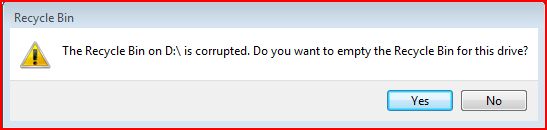
One of the issues I see everyday with Vista is about the recycle bin. It keeps on getting corrupted. I suspect that this is because of my dual-boot configuration with XP and may be permissions. It does not matter how many times I click "YES", it keeps on popping up. I am not sure how to fix it yet and the weird thing is that there is nothing in the eventlogs!