I never thought I would say that but after my PC froze today, I found myself looking at a garbled boot screen and realized my video card had gone bad as well as bad sectors on the boot disk. If this was a BSOD, it would probably be a driver issue which would not be too hard to fix but now I have to replace the video card in the minimum. Bah!
I opened up my PC (Fragbox from Falcon Northwest I bought mid-2008) to see if anything got loose (I know... it's wishful thinking), but of everything was seated properly. Then checked out serial number of the video card (nVidia GTS 8800) and called EVGA. To my surprise, someone picked up the phone. I had already read on their web site that my card had a lifetime warranty. So, I asked about it and was told that I was out of luck b/c card had to be registered in the first 30 days of purchase. Apparently, Falcon Northwest had not done it of course, neither did I...
I sent an e-mail to Falcon Northwest support to ask what would be a good replacement card. Because of the shape of Fragbox, I want to make sure I buy a card that would fit in seamlessly.
Then, I started looking for a replacement PC (Cannot keep Cho'gall waiting :p). Ever since I had issues with my Fragbox last year, I had that on the back of my mind. I was thinking about new Talon from Falcon NW. It's pretty decent and had great reviews. This time though, I acted like an impulse buyer and did all my shopping in about two hours. Here is what I ordered: Systemax Sys CrossFire. Looking forward to it.
Taking mental notes does not help anyone else, bloggin' it might...
2011-02-19
2011-01-30
Android Google Contacts: "Other Contacts"
I bought a pair of Google Nexus S phones for my wife and myself. As I use Google for my pics, contacts, docs, e-mail etc, I love the device! Integration to all the Google services are done by simply entering your Google account the first time you power on your Android device.
I've been spending some time on Google App Market and other app sites like AppBrain.com and AndroidTapp.com to find out the apps that I need, as well as getting tips from friends who are either Android users or know about cross-platform (i.e. Blackberry - iPhone - Android) apps.
Today, while tinkering with a cross-platform messaging app named "WhatsApp", I noticed that some of my contacts were not showing up on the phone. That seemed weird. I checked Google.com/contacts and noticed that they were showing up under "Other Contacts" instead of "My Contacts". I have the option to move them but I do not know who else is in the "Other Contacts" category.
I wondered what caused this and upon a little google'ing, I found out that both Gmail and Picasa creates accounts under "Other Contacts". Picasa has always been problematic when it came to sync'ing with Google Contacts for me. Apparently, Picasa had a bug in v3.8 and that caused all this mess. Issue is fixed in Picasa so that it does not now keep on moving contacts to "other contacts" but the damage is done. Comparing the number of "All contacts" to "My Contacts", I figured out that I am missing about ~100 contacts. They have also been removed from the groups I had created.
If worse comes to worst, I will need to export both lists and write a PowerShell script to figure out the delta that I have to move back and regroup them. Publish Post
I love Picasa but always had two gripes with it:
Adding to the list: I really do not need other apps to mess with my Google contacts!
I've been spending some time on Google App Market and other app sites like AppBrain.com and AndroidTapp.com to find out the apps that I need, as well as getting tips from friends who are either Android users or know about cross-platform (i.e. Blackberry - iPhone - Android) apps.
Today, while tinkering with a cross-platform messaging app named "WhatsApp", I noticed that some of my contacts were not showing up on the phone. That seemed weird. I checked Google.com/contacts and noticed that they were showing up under "Other Contacts" instead of "My Contacts". I have the option to move them but I do not know who else is in the "Other Contacts" category.
I wondered what caused this and upon a little google'ing, I found out that both Gmail and Picasa creates accounts under "Other Contacts". Picasa has always been problematic when it came to sync'ing with Google Contacts for me. Apparently, Picasa had a bug in v3.8 and that caused all this mess. Issue is fixed in Picasa so that it does not now keep on moving contacts to "other contacts" but the damage is done. Comparing the number of "All contacts" to "My Contacts", I figured out that I am missing about ~100 contacts. They have also been removed from the groups I had created.
If worse comes to worst, I will need to export both lists and write a PowerShell script to figure out the delta that I have to move back and regroup them. Publish Post
I love Picasa but always had two gripes with it:
- Face Recognition is excruciatingly slow when # of pics are large(have more than 50K pics) and not so intelligent (hello, I just tagged the same person 10 times already for the pics that were taken minutes apart, do the rest please?)
- Cannot write the tagged info into the pic (have to use a third party tool called AvPicFaceXMPTagger)
Adding to the list: I really do not need other apps to mess with my Google contacts!
2010-12-24
Screenshot Capturing App
Just wanted to drop a note about a nifty little app called "Greenshot"... Recently, I was writing an article and needed to take some screenshot and do minimal editing to make instructions clearer.
Of course, Snag-it, from TechSmith is the leader and hands down the best tool for such things but it's not free and I could not justify buying it to myself as I rarely need to use it at home.
Greenshot is a free, open-source alternative, that did the job well. When you launch it, you will notice a new tray icon ( menu is shows on the left). It then detects when you hit "Print Screen" key in Windows, and allows you to specify the area you would like to capture. Once done, you can put annotations like some text, arrows, and shapes (circle some text, etc.) and save it as .png or .jpg (is anything else being used these days?)
That's it. If you are looking for an alternative on Windows, give it a shot.
Of course, Snag-it, from TechSmith is the leader and hands down the best tool for such things but it's not free and I could not justify buying it to myself as I rarely need to use it at home.
Greenshot is a free, open-source alternative, that did the job well. When you launch it, you will notice a new tray icon ( menu is shows on the left). It then detects when you hit "Print Screen" key in Windows, and allows you to specify the area you would like to capture. Once done, you can put annotations like some text, arrows, and shapes (circle some text, etc.) and save it as .png or .jpg (is anything else being used these days?)
That's it. If you are looking for an alternative on Windows, give it a shot.
2010-11-27
Windows 7 Tweaking: God - Mode
This is from LifeHacker: Five Best Windows 7 Tweaking Applications
I loved the God-Mode tweak. You enable it by creating a folder on your desktop with a name like this:God-Mode.{ED7BA470-8E54-465E-825C-99712043E01C}
2010-09-13
SlimDrivers & Realtek Audio Issue
I was looking for a tool to update drivers on my pc automatically as it's too much of a trouble for me to look up each and every device and search for updates on vendors' site. I used Device Doctor in the past and it was OK with XP but mostly screwed up on Windows 7. I saw an article @Lifehacker which mentioned a new beta software called SlimDrivers and decided to test it out.
It found my USB card reader, Intel USB host controller, network card, GEForce 8800 GT 500 had old drivers and updated each one of them without any issues. It nicely suggest to create a Restore Point, in case you forget. It also suggests (well kinda force you) to reboot. It was not really needed in case of Network Card so, I think they are not really checking if the reboot is required.
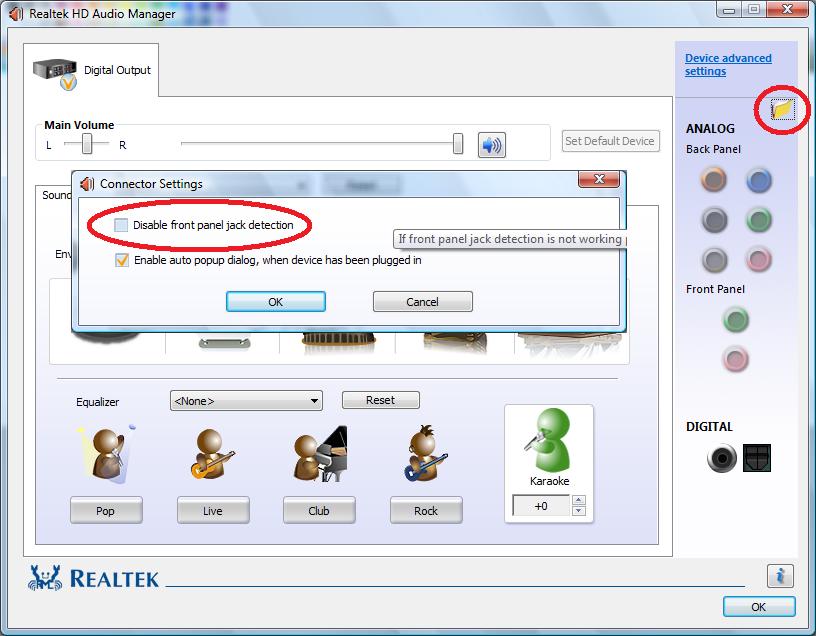
The problem started when it updated my Realtek Audio Drivers. I suddenly lost the Realtek Audio Manager after the upgrade, so when I connected my headphone, for example, it would not be detected. As mine came with the Intel DG43GT motherboard, I went to intel's site and downloaded the drivers instead of rolling them back. This worked fine except that in the front of the computer it would only recognize the recording input.
I found this thread @Tom's Hardware Forums where many people had the same issue. Solution was to "disable front panel jack detection".
While at it, I also updated BIOS using Intel's Windows based update tool. Worked like a charm.
It found my USB card reader, Intel USB host controller, network card, GEForce 8800 GT 500 had old drivers and updated each one of them without any issues. It nicely suggest to create a Restore Point, in case you forget. It also suggests (well kinda force you) to reboot. It was not really needed in case of Network Card so, I think they are not really checking if the reboot is required.
The problem started when it updated my Realtek Audio Drivers. I suddenly lost the Realtek Audio Manager after the upgrade, so when I connected my headphone, for example, it would not be detected. As mine came with the Intel DG43GT motherboard, I went to intel's site and downloaded the drivers instead of rolling them back. This worked fine except that in the front of the computer it would only recognize the recording input.
I found this thread @Tom's Hardware Forums where many people had the same issue. Solution was to "disable front panel jack detection".
While at it, I also updated BIOS using Intel's Windows based update tool. Worked like a charm.
2010-08-05
Nigerian Scam
Here is the new Nigerian Iraqi Scam I found in my e-mail box today. Wonder if they are still able to victimize people ith such stupidity.
Hi,
How are you?. My name is Sheila and I am working with a Humanitarian Aid Organization in Al-Anbar province of Iraq. Our main work is to establish adequate Educational institutions and health care centre for the internally displaced people in the rural areas.
I got your address from a universal contact directory hence I decided to write to you personal for an urgent discussion if you don`t mind.
My main reason for writing to you is that I need your help urgently. I am planning to resign from my job due to security risk in this area therefore I want to know if you would be interested to help me secure some funds which I want to move out of Iraq as quick as possible
The total amount is 2.7 million USD (TWO MILLION SEVEN HUNDRED THOUSAND US DOLLARS) and I need a reliable partner out side Iraq who can assist me in the process therefore I want to know if you can be able to help me secure this money in your country on my behalf until I come and collect it back with out having any problem with you.
Actually I do not know you in person to trust you enough but I hope you can prove to me that you are reliable, and can handle this transaction competently. There is no risk involved because I will arrange how to move the fund to your country through a very safe way but Can I trust you?. Are you going to keep this money intact for me until I come and get it back from you?.
I will offer you 15% of the total amount if you would accept to assist me in this process and also I would like you to suggest any profitable venture in which I can invest some part of the money so that I will have a source of income after my resignation.
Thanks and have a peaceful day. I am looking forward to hearing from you soon.
sincerely
Mrs Sheila
Hi,
How are you?. My name is Sheila and I am working with a Humanitarian Aid Organization in Al-Anbar province of Iraq. Our main work is to establish adequate Educational institutions and health care centre for the internally displaced people in the rural areas.
I got your address from a universal contact directory hence I decided to write to you personal for an urgent discussion if you don`t mind.
My main reason for writing to you is that I need your help urgently. I am planning to resign from my job due to security risk in this area therefore I want to know if you would be interested to help me secure some funds which I want to move out of Iraq as quick as possible
The total amount is 2.7 million USD (TWO MILLION SEVEN HUNDRED THOUSAND US DOLLARS) and I need a reliable partner out side Iraq who can assist me in the process therefore I want to know if you can be able to help me secure this money in your country on my behalf until I come and collect it back with out having any problem with you.
Actually I do not know you in person to trust you enough but I hope you can prove to me that you are reliable, and can handle this transaction competently. There is no risk involved because I will arrange how to move the fund to your country through a very safe way but Can I trust you?. Are you going to keep this money intact for me until I come and get it back from you?.
I will offer you 15% of the total amount if you would accept to assist me in this process and also I would like you to suggest any profitable venture in which I can invest some part of the money so that I will have a source of income after my resignation.
Thanks and have a peaceful day. I am looking forward to hearing from you soon.
sincerely
Mrs Sheila
2010-04-07
Raise The Dead...Fragbox
I mentioned last week that Win7 on my My fragbox 2 came down with a BSOD and I could not boot from C: drive anymore. Then worse happened and my fragbox 2 stopped powering up all together.
I contacted Falcon Northwest Technical Support by sending them an e-mail and leaving a couple of Voice Mails. Falcon keep their support in US (a great plus!). They are in PST time zone which works out fine for me as I can work with them when I get home.
Anyway, a support engineer called me back and I described my problem. Then we scheduled a call when I get home. I had pretty tried everything other than resetting CMOs. So, he went over the steps he wanted to try:
We went into BIOS to set the correct settings for my set up. Falcon Northwest documentation is great. They had sent each and every change they had done to BIOS defaults. Plus, support engineer had the settings as well. So, we set them, saved them and rebooted.
I was pretty convinced my had HD gone bad and unfortunately I was right. We ended up where we started: BSOD with "Unmountable_boot_volume". We kept on troubleshooting... He sent me an e-mail with links to Seagate's SeaTools HD Diagnostic page and instructions on what he needed.
I ran them and SeaTools confirmed that my D: drive was healthy but my C: drive had Electical Issues. Log went like this:
Started Short DST 4/7/2010 @7:44.14
DST -- FAILED - Electrical Element
Short DST FAILED 4/7/2010 @7.44.21
I ran the long test as well but it simply confirmed the issue. I powered down the PC, sent an e-mail to Falcon Northwest support about results and left for work in the morning.
I got an e-mail back later in the day that confirmed drive was bad and mentioned that Seagate might still have my disk under warranty. It had links to check if I was covered. Good news was, yes I was covered. I started the RMA process but at some point realized that I did not have the 'CODE' they were asking. Apparently, there was a newer version of the tool (2.17) than I had downloaded (2.16) which was returning this code.
I downloaded the new software from Seagate; burn the image into a CD and booted from it. I got the code they needed and finished the RMA process. When I read their documentation, which is a subject of another blog post probably, I realized that they will not give me a new HD but replace it with a refurbished one :(
Anyway, there is more to story actually. When I came back, my power up issue was back as well. I had hoped that clearing CMOS would fix it but apparently it had not.
Here is how it goes:
At this point, support engineer told me that he will talk to his supervisor to see if my machine would be covered, what will be the warranty situation and give me a call back tomorrow. I am kinda stuck because I cannot take out the HD anyway and I do not know at this point if the power up issues I have been having ever since I got the Mobo replaced last summer are at all relevant to this HD or not (my guess - NOT!).
I checked Falcon Northwest site and they have 3 years warranty on Fragboxes but it seems that mine had only a year :( My previous Mobo change was covered under warranty but I kept on having issues since then as well and it got worse and worse with power. So I do not know if they will stand behind their product or not at this point. We will find out tomorrow. Hopefully, I will post good news!
I contacted Falcon Northwest Technical Support by sending them an e-mail and leaving a couple of Voice Mails. Falcon keep their support in US (a great plus!). They are in PST time zone which works out fine for me as I can work with them when I get home.
Anyway, a support engineer called me back and I described my problem. Then we scheduled a call when I get home. I had pretty tried everything other than resetting CMOs. So, he went over the steps he wanted to try:
- Keep computer connected to power switch but turn off the switch so there is no power but machine is grounded
- Remove Graphics Card, for which I had to remove the fan over it
- Reseat RAM sticks
- Reseat power switches for CPU etc.
- Disconnect power cord
- Clear CMOS, which means moving a jumper as per ASUS P5E-VM DO documentation
- Wait for a couple of minutes
- Put the jumper back
- Connect Graphics Card
- Put everything else back
- Just connect Keyboard, Monitor Cable and Power
- Power Up
We went into BIOS to set the correct settings for my set up. Falcon Northwest documentation is great. They had sent each and every change they had done to BIOS defaults. Plus, support engineer had the settings as well. So, we set them, saved them and rebooted.
I was pretty convinced my had HD gone bad and unfortunately I was right. We ended up where we started: BSOD with "Unmountable_boot_volume". We kept on troubleshooting... He sent me an e-mail with links to Seagate's SeaTools HD Diagnostic page and instructions on what he needed.
I ran them and SeaTools confirmed that my D: drive was healthy but my C: drive had Electical Issues. Log went like this:
Started Short DST 4/7/2010 @7:44.14
I ran the long test as well but it simply confirmed the issue. I powered down the PC, sent an e-mail to Falcon Northwest support about results and left for work in the morning.
I got an e-mail back later in the day that confirmed drive was bad and mentioned that Seagate might still have my disk under warranty. It had links to check if I was covered. Good news was, yes I was covered. I started the RMA process but at some point realized that I did not have the 'CODE' they were asking. Apparently, there was a newer version of the tool (2.17) than I had downloaded (2.16) which was returning this code.
I downloaded the new software from Seagate; burn the image into a CD and booted from it. I got the code they needed and finished the RMA process. When I read their documentation, which is a subject of another blog post probably, I realized that they will not give me a new HD but replace it with a refurbished one :(
Anyway, there is more to story actually. When I came back, my power up issue was back as well. I had hoped that clearing CMOS would fix it but apparently it had not.
Here is how it goes:
- I click power button
- I hear fan noise 1 sec, it stops
- 2 secs of silence, fan noise again for power up for 1 sec and it stops
- same as above...
- 15mins later...
- fan does not stop this time and computer boots up
At this point, support engineer told me that he will talk to his supervisor to see if my machine would be covered, what will be the warranty situation and give me a call back tomorrow. I am kinda stuck because I cannot take out the HD anyway and I do not know at this point if the power up issues I have been having ever since I got the Mobo replaced last summer are at all relevant to this HD or not (my guess - NOT!).
I checked Falcon Northwest site and they have 3 years warranty on Fragboxes but it seems that mine had only a year :( My previous Mobo change was covered under warranty but I kept on having issues since then as well and it got worse and worse with power. So I do not know if they will stand behind their product or not at this point. We will find out tomorrow. Hopefully, I will post good news!
2010-04-04
Shopping for a new (gaming) PC
Now that my lovely fragbox is dead :( I wondered what's the latest out there in terms hardware. My Fragbox 2 cost me about $2K in Aug 2008 and came with
- nVidia 8800 GTS 512MB PCIe
- Intel Core 2 duo E8500 - 3.16 GHz 1333FSB
- Crucial 2x2GB DDR2 PC2-6400 800MHz
So, 1.5 yrs later, my nVidia card is about 3-4 tiers down from today's top graphics cards as per this recent article from Tom's Hardware Guide - Graphics Hierarchy Chart.
Similarly, Tom's Hardware Guide - CPU Hierarchy Chart of March 2010, puts my then top of the line CPU as a third tier CPU now.
These are great articles to help understand where technology is now compared to my current gear. I will keep on adding links here while researching.
More Fragbox Issues
My "fragbox" is causing me so much frustration these days. I feel like I am done with it and although I loved it when it's running , at this point I feel like a new (gaming) rig is in order. So, how did this happen? Unfortunately, it kept on going worse over time...
At some point in the last 6 months, when it went into sleep mode, it would not come back and I had to power off, power on again (here is one of my previous blog posts about this).. So, I disabled all sleep modes to keep it up and running. Then again, I did not want to waste so much energy, so I started powering my pc off at night. For the last couple of months, when I power it off, it would take me an hour to power it up. It's the most puzzling thing I have ever seen...
I kinda got used to the frustrating routine. Power outages are not common so I kept my pc running. I still had to go thru this every other months for some brief power outage (winter has been harsher this year). Unfortunately, it got worse...
Yesterday, all of a sudden pc crashed. Windows 7 has been rock solid for me, so I was surprised and immediately started thinking about any recent updates I made to it... Could it be the nVidia driver update that was supposed to fix overheating issues?
My question was answered when I tried to recycle and see the ugly face of real problem:
At some point in the last 6 months, when it went into sleep mode, it would not come back and I had to power off, power on again (here is one of my previous blog posts about this).. So, I disabled all sleep modes to keep it up and running. Then again, I did not want to waste so much energy, so I started powering my pc off at night. For the last couple of months, when I power it off, it would take me an hour to power it up. It's the most puzzling thing I have ever seen...
- Phase 0) I connect the power cable, see the motherboard light up and nothing happens when power button is pressed...
- Phase 1) At some it powers up, I see fans spinning but it only does that for a sec and then stop.
- Phase 2) I keep on pressing power and reset buttons and disconnect/reconnect power cord, in that 1 sec period when fans are spinning and they keep on spinning, but when I take my fingers off of the buttons, the stop again.
- Phase 3) Finally, when I take my fingers off, fans keep on spinning, HD spins up and pc starts running just fine.
I kinda got used to the frustrating routine. Power outages are not common so I kept my pc running. I still had to go thru this every other months for some brief power outage (winter has been harsher this year). Unfortunately, it got worse...
Yesterday, all of a sudden pc crashed. Windows 7 has been rock solid for me, so I was surprised and immediately started thinking about any recent updates I made to it... Could it be the nVidia driver update that was supposed to fix overheating issues?
My question was answered when I tried to recycle and see the ugly face of real problem:
- 0x000000DE Unmountable_Boot_Volume
I had noticed (especially when playing wow) that my computer would freeze for a sec, as if it's trying to read a sector but cannot do it immediately and I would hear ticking sound of my hard drive.
I also recalled seeing some Ubuntu event logs sometime ago that suggested something was not right with the hard drive.
I tried hitting F8 to bring up boot options to see if Safe mode would work but none of the options worked. Even trying to boot with Win7 CD failed (I ended up in a black screen with mouse only). So, I gave up on the hard drive, which really did not have anything other than OS and a couple of settings (Google Picasa, WoW addons etc) I would want to keep.
Enter Ubuntu Live CD (v8.04). I booted using the live CD to see if I could access my drives and move data to my Qnap NAS.
I was able to access Qnap, my D drive but C drive (boot drive) was not accessible. I started google'ing and saw a nice article that basically was suggesting the exact same steps. The step I had forgotten was to create a temp folder to mount C:
sudo su - mkdir /media/disk mount -t ntfs-3g /dev/sda1 /media/disk -o force
I got a warning but it worked, I was able to access C drive. Unfortunately, I could not copy everything I wanted off to NAS as it gave me 'read source' errors time to time but got most of it.
Then I used the following command to mark my C drive as 'dirty' for Windows to pick up and fix (at least that's the theory).
ntfsfix /media/disk
I wanted to give Win7 cd another try at this point. The good news was that it worked this time and brought me to the install screen. The bad news, however, was that it no longer detected my primary hard disk where previous installation was.
I went ahead and installed Windows 7. All went fine.... until I came back in the morning to notice that PC was somehow shutdown and I was back to Phase 0. My searches for Asus P5E-VM DO returned nothing about why could this be happening and at this point it seemed that I have to talk to Falcon Northwest support to get this shipped and fixed over there...again (see RIP - My Falcon Fragbox 2).
2010-03-28
SIDs
Mark Russinovich wrote about "The Machine SID Duplication Myth" on his blog last year where he explained why he had retired a utility called "NewSID" that he had written more than a decade ago.
Today, I saw an e-mail that referenced to this article. And while reading the discussion, I started to wonder if there was a way to list SIDs of users using PowerShell instead of other well-known tools like SysInternals utility PSGetSID.
I was almost sure that it would be somewhere in WMI but obvious first question with WMI is how to find it. I remembered seeing Jeff Snover's blog on 'Exploring WMI' which gave me an idea about how to look. I had to start somewhere to search for SIDs so I started searching for WMI classes that included keyword 'account':
Win32_AccountSID seemed like the best match but it turned out a bit more difficult to read than I expected:
Simply using Win32_UserAccount showed me the user accounts & their SIDS in a cleaner way:
Similarly, Win32_SystemAccount can be used to display SIDs of System accounts or Win32_Account can display both user and system account info.
Today, I saw an e-mail that referenced to this article. And while reading the discussion, I started to wonder if there was a way to list SIDs of users using PowerShell instead of other well-known tools like SysInternals utility PSGetSID.
I was almost sure that it would be somewhere in WMI but obvious first question with WMI is how to find it. I remembered seeing Jeff Snover's blog on 'Exploring WMI' which gave me an idea about how to look. I had to start somewhere to search for SIDs so I started searching for WMI classes that included keyword 'account':
PS C:\> gwmi -list *account* |ft -auto
NameSpace: ROOT\cimv2
Name Methods Properties
---- ------- ----------
MSFT_NetBadAccount {} {SECURITY_DESCRIPTOR, TIME_CREATED}
Win32_Account {} {Caption, Description, Domain, InstallDate...}
Win32_UserAccount {Rename} {AccountType, Caption, Description, Disabled...}
Win32_SystemAccount {} {Caption, Description, Domain, InstallDate...}
Win32_AccountSID {} {Element, Setting}Win32_AccountSID seemed like the best match but it turned out a bit more difficult to read than I expected:
PS C:\> gwmi win32_accountsid |select element,setting |ft -auto element setting ------- ------- \\AHFB\root\cimv2:Win32_Group.Domain="AHFB",Name="Administrators" \\AHFB\root\cimv2:Win32_SID.SID="S-1-5-32-544" \\AHFB\root\cimv2:Win32_Group.Domain="AHFB",Name="Distributed COM Users" \\AHFB\root\cimv2:Win32_SID.SID="S-1-5-32-562" \\AHFB\root\cimv2:Win32_Group.Domain="AHFB",Name="Event Log Readers" \\AHFB\root\cimv2:Win32_SID.SID="S-1-5-32-573" \\AHFB\root\cimv2:Win32_Group.Domain="AHFB",Name="Guests" \\AHFB\root\cimv2:Win32_SID.SID="S-1-5-32-546" \\AHFB\root\cimv2:Win32_Group.Domain="AHFB",Name="IIS_IUSRS" \\AHFB\root\cimv2:Win32_SID.SID="S-1-5-32-568" ...
Simply using Win32_UserAccount showed me the user accounts & their SIDS in a cleaner way:
PS C:\> gwmi win32_useraccount |select name,sid |ft -auto name sid ---- --- Adil Hindistan S-1-5-21-2019936553-3113866535-3325437445-1000 Administrator S-1-5-21-2019936553-3113866535-3325437445-500 Bezen S-1-5-21-2019936553-3113866535-3325437445-1002 Guest S-1-5-21-2019936553-3113866535-3325437445-501 HomeGroupUser$ S-1-5-21-2019936553-3113866535-3325437445-1013 __vmware_user__ S-1-5-21-2019936553-3113866535-3325437445-1012
Similarly, Win32_SystemAccount can be used to display SIDs of System accounts or Win32_Account can display both user and system account info.
2010-03-05
Popular Science Archive Available Online
All 137 years of Popular Science magazine has been digitalized and is available here .... courtesy of Google Books!
2009-12-20
Resolving Office 2010 Beta Activation Issues
My Office 2010 Beta installation has been working fine for the most part but apparently activation kept failing. Here is the step by step fix posted at MSDN Social. If you are getting 0x8007232B or similar errors when trying to activate Office 2010 Beta, give it a try.
2009-11-20
Yes, I want to empy deleted items folder
It looks like I hit another annoying bug with Outlook 2010 Beta. Every time I exit outlook, I get the following prompt:
Do you want to permanently delete all the items and subfolders in the "deleted items" folder for all accounts.
Under Outlook Options > Advanced > Start and Exit, I have the following option checked off:
"Empty deleted items folders when exiting outlook"
Problem is that even if there is nothing in the deleted items, I still get the prompt. It is possible to stop this by unchecking the option above but that would mean deleted items will need to be purged manually.
In 2007, there was an option that read "do not prompt when emptying deleted items". This option is no longer available...
I found a discussion about this on MS social but no solution as of yet.
Do you want to permanently delete all the items and subfolders in the "deleted items" folder for all accounts.
Under Outlook Options > Advanced > Start and Exit, I have the following option checked off:
"Empty deleted items folders when exiting outlook"
Problem is that even if there is nothing in the deleted items, I still get the prompt. It is possible to stop this by unchecking the option above but that would mean deleted items will need to be purged manually.
In 2007, there was an option that read "do not prompt when emptying deleted items". This option is no longer available...
I found a discussion about this on MS social but no solution as of yet.
2009-11-19
Outlook 2010 Beta - Issue with smtp
I downloaded 2010 Beta bits from MSDN yesterday and installed over Office 2007. Upgrade was successful. The new Outlook interface is neat! I know there are several new features and by default it now sorts by Conversation & Date, which is how I prefer to read my e-mails, especially at work. It helps me to see the whole thread on a subject.
The only problem I have had was when receiving the e-mail. By default, Outlook 2007 used the following ports
POP3: 995 (SSL)
SMTP: 587 (TLS)
as per Gmail documentation
Outlook timed out sending e-mails with these settings. I tried a couple of times but I kept on getting time-out messages with an error:
Task 'smtp server name - Sending and Receiving' reported error (0x8004210): 'The operation timed out waiting for a response from the sending (SMTP) server. If you continue to receive this message, contact your server administrator or Internet service provider (ISP).'
Message seems a bit generic as Microsoft listed this as an issue message for Outlook 2002. Anywho, problem is solved now but I am not clear what did the trick. Here is what I did:
Changed SMTP to : 465 SSL
After e-mail was successfully sent, I changed SMTP back to 587 (TLS). It is still working. Go figure!
The only problem I have had was when receiving the e-mail. By default, Outlook 2007 used the following ports
POP3: 995 (SSL)
SMTP: 587 (TLS)
as per Gmail documentation
Outlook timed out sending e-mails with these settings. I tried a couple of times but I kept on getting time-out messages with an error:
Task 'smtp server name - Sending and Receiving' reported error (0x8004210): 'The operation timed out waiting for a response from the sending (SMTP) server. If you continue to receive this message, contact your server administrator or Internet service provider (ISP).'
Message seems a bit generic as Microsoft listed this as an issue message for Outlook 2002. Anywho, problem is solved now but I am not clear what did the trick. Here is what I did:
Changed SMTP to : 465 SSL
After e-mail was successfully sent, I changed SMTP back to 587 (TLS). It is still working. Go figure!
2009-10-21
How should I solve 'backup' issue?
My Western Digital MyBook Pro died a couple of months ago and when I took it apart (it was really painful) I realized that I did not have a TB drive in it. Instead, it was 2 x 500GB Western Digital HDs. Apparently, they were using JBOD technology to offer 1TB space.
So either I had to find a similar card or forget about recovering backup data on the HDs and think about getting a new external backup system. I have an 4 year old HP XW6000 sitting idle with 2x750Gig drives in it. So, I thought I could try freeNAS. I installed it on a 64KB usb stick. It was able to detect my drives but sharing them proved to be quite challenging for whatever reason.
I started looking at other alternatives and one of my friends suggested I take a look at Drobo. So I did. It's simply impressive although there are several horror stories about it. It's using a proprietary technology to mix and match different size hard drives and that was the biggest reason I was sold. I have several healthy HDs that I did not want throw away.
So, I ordered it ($350) from Amazon the other day with two 1.5 GB HDs (2 x $120). 1 from Seagate and 1 from Western Digital. A common mistake is that people just go and buy 2 (or 4 ) of the same make/model hard drive and they usually fail at times close to each other (yeah happened to me in an earlier life).
With 200MB/min HD video clips of my two year old and thousands of pics a month, soon the drives at my Fragbox2 will not be enough and I know I will have to move some stuff to Drobo. That defeats the purpose though. Using Drobo as storage would mean, I need to back up drobo somewhere else as one should NEVER have data in a single drive (or location or...)...
While doing the research though, I fell in love with real-deal NAS solutions. Especially QNAP & Synology have terrific feature-sets for such solutions. My friend gave me a great idea: Use one of these NAS solutions as your primary/secondary data storage area on network, then connect drobo to it and use the 1-button backup on these NAS solutions to back them up! I loved the idea.
Right now I am eyeing QNAP TS-410 Turbo (~$450). TS-439 Pro with its 1GB DDRII RAM and 1.6GHz Intel processor looks sexy but is double the price. 4x1.5TB HDs will cost around another $500. Such solutions are not cheap.
Cloud is another way to go for backup. Prices came down and $50 to $60 a year does not seem a bad price to pay for back-up. It has the advantage of reaching your data from anywhere as well.
By the way, while I was doing research, I re-discovered a neat feature of Google: www.google.com/Products. It's very useful to find all kinds of information, including price, about a product.
Also when using Google to search for recent reviews, you can simply put the product name and add +October +2009 then expand "Show Options" and choose reviews from left hand side menu.
So either I had to find a similar card or forget about recovering backup data on the HDs and think about getting a new external backup system. I have an 4 year old HP XW6000 sitting idle with 2x750Gig drives in it. So, I thought I could try freeNAS. I installed it on a 64KB usb stick. It was able to detect my drives but sharing them proved to be quite challenging for whatever reason.
I started looking at other alternatives and one of my friends suggested I take a look at Drobo. So I did. It's simply impressive although there are several horror stories about it. It's using a proprietary technology to mix and match different size hard drives and that was the biggest reason I was sold. I have several healthy HDs that I did not want throw away.
So, I ordered it ($350) from Amazon the other day with two 1.5 GB HDs (2 x $120). 1 from Seagate and 1 from Western Digital. A common mistake is that people just go and buy 2 (or 4 ) of the same make/model hard drive and they usually fail at times close to each other (yeah happened to me in an earlier life).
With 200MB/min HD video clips of my two year old and thousands of pics a month, soon the drives at my Fragbox2 will not be enough and I know I will have to move some stuff to Drobo. That defeats the purpose though. Using Drobo as storage would mean, I need to back up drobo somewhere else as one should NEVER have data in a single drive (or location or...)...
While doing the research though, I fell in love with real-deal NAS solutions. Especially QNAP & Synology have terrific feature-sets for such solutions. My friend gave me a great idea: Use one of these NAS solutions as your primary/secondary data storage area on network, then connect drobo to it and use the 1-button backup on these NAS solutions to back them up! I loved the idea.
Right now I am eyeing QNAP TS-410 Turbo (~$450). TS-439 Pro with its 1GB DDRII RAM and 1.6GHz Intel processor looks sexy but is double the price. 4x1.5TB HDs will cost around another $500. Such solutions are not cheap.
Cloud is another way to go for backup. Prices came down and $50 to $60 a year does not seem a bad price to pay for back-up. It has the advantage of reaching your data from anywhere as well.
By the way, while I was doing research, I re-discovered a neat feature of Google: www.google.com/Products. It's very useful to find all kinds of information, including price, about a product.
Also when using Google to search for recent reviews, you can simply put the product name and add +October +2009 then expand "Show Options" and choose reviews from left hand side menu.
2009-10-20
Hippo File Update Checker
I had mentioned FileHippo.com when I was posting about links to download offline install version of Google Chrome. LifeHacker mentioned their Hippo File Update Checker as a way to keep up with the latest updates to the software you have on your PC. I tried it and looks pretty decent!
2009-10-17
Home (The Movie)
This is a must-see documentary about Earth and how we change it.
2009-10-13
What's new in PowerShell 2.0
I find myself going back to to this great blog entry on Huddled Masses by Joel 'Jaykul' Bennett, so I am going to add an entry here for it.
Here is also a PowerShell blogs pipe that I shamelessly cloned from his original one and customized a bit.
2009-10-01
Google Wave Invitation
Yay! I got my Google Wave invitation and have 8 invites to send out *grin*. If you are reading this, chances are you are eager to get one... Hmm, read on.
When I started bloggin in 2004, my second post was about how I was trying to get a gmail invite and how someone sent me one. It made me happy then and I want to make a fellow netizen happy.
I need your e-mail address to send an invite but I would not want you to be an easy target for spammers so be creative when you are leaving it...
(For example: if your e-mail address is johnny_boy@hotmail.com, before@johnny_boy after@hotmail.com)
I will collect the requests tonight and send one to a random person.
When I started bloggin in 2004, my second post was about how I was trying to get a gmail invite and how someone sent me one. It made me happy then and I want to make a fellow netizen happy.
I need your e-mail address to send an invite but I would not want you to be an easy target for spammers so be creative when you are leaving it...
(For example: if your e-mail address is johnny_boy@hotmail.com, before@johnny_boy after@hotmail.com)
I will collect the requests tonight and send one to a random person.
2009-09-30
Google Chrome Offline (Standalone) Installer
I had a post on how to download full Google Chrome earlier this year. Ghacks has a recent post on how to download the offline version:
They warn that this version may not auto-update, but that may be exactly what you want in your environment if you would like to deliver versions in a controlled manner.
Unfortunately, when I tried this I kept on downloading the same version (172.28) as Prod only. According to Google Chrome Release Blog, QA is in v3 and Dev channel is in v4 right now.
I searched thru Google Chrome Forums and found a link to download full executable for every single release: http://www.filehippo.com/download_google_chrome/
and yet another one here:
http://www.softpedia.com/progDownload/Google-Chrome-Download-108166.html
All that these users need to do is to append the parameter standalone=1 to the website where Google Chrome can be downloaded. Here are the two download links for the latest official and latest beta version of the Google browser:
Latest official: http://www.google.com/chrome/eula.html?standalone=1
Latest beta: http://www.google.com/chrome/eula.html?extra=betachannel&standalone=1
Latest Test: http://www.google.com/chrome/eula.html?extra=devchannel&standalone=1
They warn that this version may not auto-update, but that may be exactly what you want in your environment if you would like to deliver versions in a controlled manner.
Unfortunately, when I tried this I kept on downloading the same version (172.28) as Prod only. According to Google Chrome Release Blog, QA is in v3 and Dev channel is in v4 right now.
I searched thru Google Chrome Forums and found a link to download full executable for every single release: http://www.filehippo.com/download_google_chrome/
and yet another one here:
http://www.softpedia.com/progDownload/Google-Chrome-Download-108166.html
2009-09-28
Double-clicking Logitech
As if I do not have enough issues with my computers these days, apparently my Logitech G7 mouse died. Yes, I said "apparently" because it works just fine except a little annoyance: 7 out of 10 times when I simply left click, it treats it as a double click.
I noticed this a couple of days ago and it got worse. I played with every mouse setting to no avail. Then, googled it to see if this was a reported Windows 7 issue and it turned out that this is a "common" case with mouse brands today that "microdrive" fails. From what I read, some people claim that Logitech mouses are especially notorious & exhibit this problem after a year or so. Although my case would certainly fall into that category, I doubt that there is a systematic problem with Logitech mouses.
A couple of months ago, this would be a perfect excuse to buy a Razer, who by the way created a new mouse - called "Naga" - that seems to be specifically targeting World of Warcraft players [17 buttons & custom interface for WoW = drool]. I still can't get myself pay $130 for a mouse though. So no "mamba" for me.
I noticed this a couple of days ago and it got worse. I played with every mouse setting to no avail. Then, googled it to see if this was a reported Windows 7 issue and it turned out that this is a "common" case with mouse brands today that "microdrive" fails. From what I read, some people claim that Logitech mouses are especially notorious & exhibit this problem after a year or so. Although my case would certainly fall into that category, I doubt that there is a systematic problem with Logitech mouses.
A couple of months ago, this would be a perfect excuse to buy a Razer, who by the way created a new mouse - called "Naga" - that seems to be specifically targeting World of Warcraft players [17 buttons & custom interface for WoW = drool]. I still can't get myself pay $130 for a mouse though. So no "mamba" for me.
2009-09-26
CPU Fan Error Thriller - The Saga Continues
After my post about the error "CPU Fan Error!", I had two days without any issues but today error is back. I had left my computer on for a couple of hours and apparently it went into deep sleep mode (S3). I came back and moved the mouse - nothing happened! O_o
Then, I hit the keyboard, knowing it would not help... I had one option left, Power button to wake up the PC.
It did wake up but really like an annoyed person coming back from deep sleep. Fans roared full speed for 15 secs; then a brief silence as if power went off... Finally a blinking cursor on the screen and BIOS messages showing up. Unfortunately, BIOS messages stopped at some point as before and after 20 secs of silence I saw the familiar message printed on the screen:
"CPU Fan Error!
Press F1 to continue.
I hit F1 and loaded Win7 but I knew what was coming: 'computer freeze every other second'...
So, I rebooted and decided to disable Q-Fan again but I failed to hit "del" key to go into BIOS on time and noticed a new message:
Overclocking Failed! Please enter Setup to re-configure your system
In fact, these two messages seems to be related. My system has arrived overclocked from Falcon Northwest; I know that because they mentioned every single BIOS change they made in their documentation (kudos). When a system is overclocked, it may generate more heat; again referring to incapacity of the fan to do its job...
The reason I had bought the system was WoW but I quit WoW a couple of months ago. So I turned overclocking off as I do not need the every piece of cpu cycle these days.
Of course, it is still bothering me that this is happening; and I am not totally convinced that this is a hardware story. It could very well be that Win7 has something to do with this. I am, for example, noticing some other "System" errors in Event Log like
"The NVIDIA Display Driver Service service has reported an invalid current state 32"
There was a report in nVidia forum today that problem was resolved after installing latest Win7 beta drivers. I have not however seen the same issues reported there.
At this point, I thought I should switch to something more productive and do some investigation with PowerShell, like when did these messages appear and how many of them were in system log:
So, apparently this nVidia problem is also a recent phenomenon. I checked Microsoft's documentation on event id and did not see anything to worry me. So, I went back to PowerShell and started playing with it a bit more...
How many errors did my system have in System Log?
Some people actually doing that in a different way. First get the events from log & then count them:
I actually like that "(something).property" way of getting properties but assigning it to a variable first is much more useful if you will re-use the object. For example, if I wanted to find out what sources generated these errors (i.e. group them):
Or if I wanted to see only certain fields:
Btw, did you also notice that in the first example I only typed "entry" instead of "entryType", that's because you can type the minimum number of chars sufficient enough for PowerShell to identify which parameter you meant.
I also tend to skip default parameter names. For example, default parameter for "get-eventlog" is of course EventLog name which is represented by "-logname string" parameter. You can skip -logname if nobody else will read your code:
As usual to get list of event logs simply type:
Fin!
Then, I hit the keyboard, knowing it would not help... I had one option left, Power button to wake up the PC.
It did wake up but really like an annoyed person coming back from deep sleep. Fans roared full speed for 15 secs; then a brief silence as if power went off... Finally a blinking cursor on the screen and BIOS messages showing up. Unfortunately, BIOS messages stopped at some point as before and after 20 secs of silence I saw the familiar message printed on the screen:
"CPU Fan Error!
Press F1 to continue.
I hit F1 and loaded Win7 but I knew what was coming: 'computer freeze every other second'...
So, I rebooted and decided to disable Q-Fan again but I failed to hit "del" key to go into BIOS on time and noticed a new message:
Overclocking Failed! Please enter Setup to re-configure your system
In fact, these two messages seems to be related. My system has arrived overclocked from Falcon Northwest; I know that because they mentioned every single BIOS change they made in their documentation (kudos). When a system is overclocked, it may generate more heat; again referring to incapacity of the fan to do its job...
The reason I had bought the system was WoW but I quit WoW a couple of months ago. So I turned overclocking off as I do not need the every piece of cpu cycle these days.
Of course, it is still bothering me that this is happening; and I am not totally convinced that this is a hardware story. It could very well be that Win7 has something to do with this. I am, for example, noticing some other "System" errors in Event Log like
"The NVIDIA Display Driver Service service has reported an invalid current state 32"
There was a report in nVidia forum today that problem was resolved after installing latest Win7 beta drivers. I have not however seen the same issues reported there.
At this point, I thought I should switch to something more productive and do some investigation with PowerShell, like when did these messages appear and how many of them were in system log:
get-eventlog system -entry error |where {$_.message -match "nvidia"} |ft -auto
Index Time EntryType Source InstanceID Message
----- ---- --------- ------ ---------- -------
74903 Sep 26 19:04 Error Service Control Manager 3221232488 The NVIDIA Display Driver Service service has report...
74614 Sep 25 00:03 Error Service Control Manager 3221232488 The NVIDIA Display Driver Service service has report...
74456 Sep 24 23:07 Error Service Control Manager 3221232488 The NVIDIA Display Driver Service service has report...
74343 Sep 24 23:04 Error Service Control Manager 3221232488 The NVIDIA Display Driver Service service has report...
74198 Sep 24 22:57 Error Service Control Manager 3221232488 The NVIDIA Display Driver Service service has report...
74037 Sep 24 22:31 Error Service Control Manager 3221232488 The NVIDIA Display Driver Service service has report...
73887 Sep 24 22:02 Error Service Control Manager 3221232488 The NVIDIA Display Driver Service service has report...
73758 Sep 24 21:58 Error Service Control Manager 3221232488 The NVIDIA Display Driver Service service has report...
73399 Sep 22 00:06 Error Service Control Manager 3221232488 The NVIDIA Display Driver Service service has report...
73164 Sep 21 00:02 Error Service Control Manager 3221232488 The NVIDIA Display Driver Service service has report...
So, apparently this nVidia problem is also a recent phenomenon. I checked Microsoft's documentation on event id and did not see anything to worry me. So, I went back to PowerShell and started playing with it a bit more...
How many errors did my system have in System Log?
(get-eventlog system -entry error).count 39
Some people actually doing that in a different way. First get the events from log & then count them:
$events=get-eventlog -logname system -entryType error # I used the long notation here $events.count 39
I actually like that "(something).property" way of getting properties but assigning it to a variable first is much more useful if you will re-use the object. For example, if I wanted to find out what sources generated these errors (i.e. group them):
$events |group source |FT count,name -auto #It centered the output without -auto
Count Name
----- ----
20 DCOM
11 Service Control Manager
3 HECI
3 EventLog
2 SerialOr if I wanted to see only certain fields:
$events |ft TimeGenerated, Source, Message -Auto TimeGenerated Source Message ------------- ------ ------- 9/26/2009 7:10:33 PM DCOM The description for Event ID '-1073731808' in Source 'DCOM' cannot be ... 9/26/2009 7:04:13 PM Service Control Manager The NVIDIA Display Driver Service service has reported an invalid curr... 9/26/2009 7:03:31 PM HECI HECI driver has failed to perform handshake with the Firmware. 9/26/2009 7:03:40 PM EventLog The previous system shutdown at 5:09:01 PM on ?9/?26/?2009 was unexpec... 9/26/2009 2:39:20 PM DCOM The description for Event ID '-1073731808' in Source 'DCOM' cannot be ... 9/25/2009 12:03:26 AM Service Control Manager The NVIDIA Display Driver Service service has reported an invalid curr... ...
Btw, did you also notice that in the first example I only typed "entry" instead of "entryType", that's because you can type the minimum number of chars sufficient enough for PowerShell to identify which parameter you meant.
I also tend to skip default parameter names. For example, default parameter for "get-eventlog" is of course EventLog name which is represented by "-logname string" parameter. You can skip -logname if nobody else will read your code:
get-eventlog system
As usual to get list of event logs simply type:
get-eventlog -list
Max(K) Retain OverflowAction Entries Log
------ ------ -------------- ------- ---
20,480 0 OverwriteAsNeeded 1,142 Application
15,168 0 OverwriteAsNeeded 0 DFS Replication
20,480 0 OverwriteAsNeeded 0 HardwareEvents
512 7 OverwriteOlder 0 Internet Explorer
20,480 0 OverwriteAsNeeded 0 Key Management Service
8,192 0 OverwriteAsNeeded 127 Media Center
16,384 0 OverwriteAsNeeded 0 ODiag
16,384 0 OverwriteAsNeeded 263 OSession
Security
20,480 0 OverwriteAsNeeded 4,321 System
512 7 OverwriteOlder 415 Windows PowerShell
help get-eventlog -exampleshas several examples for common scenarios.
Fin!
2009-09-24
CPU Fan error thriller
If you read my "RIP: My Falcon Fragbox2" story, you know that I own one of these beasts.. Since I got it back from Falcon, it was working fine all these months and I love it.
Recently though, I upgraded my Vista to Windows 7 Home Premium Edition from MSDN. I know, I know it is early and many vendors do not have drivers etc etc but I love Windows 7 and could not wait!
All went well and I have been running it fine for the last month or so. Recently though, I started to see some weird behaviour from “sleep mode” again. I dont remember what setting it had originally but at some point it would not go to sleep. I mentioned that story below and I thought it was a software issue. Unfortunately it came back and the final solution I found was to change BIOS setting for sleep from S1 to S3. That had put and end to it. So, I went back and checked the setting to see if it somehow got reset. It was still in S3.
It would go to “sleep” fine; then sometime later it, fan wakes up with full ferocity and does not stop running. This kept on happening so I started to shutdown the machine instead of putting it into Sleep. I started to notice another weird behaviour though. Windows would come up fine but after I logged in, it would suddenly start to act up. Basically it was running for 2secs and freezing for 2secs. I could see this behaviour clearly by simply moving the mouse around. It was quite weird and I had no idea what was causing it as I had not installed any software (I did inplace upgrade) recently. I was annoyed but figured out that rebooting system would clear this issue.
The worst happened today though. I cold booted the system and noticed an error:
CPU fan error!
Press F1 to continue.
I was freaking out at this point and immediately opened the case only to find out that all fans were plugged properly and firmly, and they were all running just fine. So, I started to research this and found out that other people with Asus Motherboard had seen this issue. They suggested to “disable” Q-fan, which was set to “silence” mode. I tested this and it did clear the error. However, I thought this would be a risky thing to do; so kept on checking Asus site. Apparently they have a BIOS update 0902 (mine was 0802) but instructions were not too clear to me. I downloaded a utility from their site, which is supposed to allow saving bios and updating it from Windows.
When I ran it; it displayed a message which told me to remove Memory from A* banks. I checked the motherboard documentation and found out which one was A1 (I have 2 Gig at A1 and 2 gig at B1). I powered down the pc, removed all the cables and removed A1 memory. After reboot, I saw a message which said something like “Because of AMT requirement A1 bank should be filled or you may experience system malfunction”. I went ahead anyway and launched Asus update utility after logging in. This time, it did not complain and gave me the option to save and update bios. I did that and chose to reset CMOS.
All went fine. I rebooted and of course got CMOS checksum errors. I hit F1 and continued to logon to Windows. All seemed fine. Then, I rebooted and went into BIOS. Took out the awesome documentation from Falcon and reset all the setting one by one to what was documented. Saved and rebooted again. I do not see the fan error and all seems to be OK right now.
Recently though, I upgraded my Vista to Windows 7 Home Premium Edition from MSDN. I know, I know it is early and many vendors do not have drivers etc etc but I love Windows 7 and could not wait!
All went well and I have been running it fine for the last month or so. Recently though, I started to see some weird behaviour from “sleep mode” again. I dont remember what setting it had originally but at some point it would not go to sleep. I mentioned that story below and I thought it was a software issue. Unfortunately it came back and the final solution I found was to change BIOS setting for sleep from S1 to S3. That had put and end to it. So, I went back and checked the setting to see if it somehow got reset. It was still in S3.
It would go to “sleep” fine; then sometime later it, fan wakes up with full ferocity and does not stop running. This kept on happening so I started to shutdown the machine instead of putting it into Sleep. I started to notice another weird behaviour though. Windows would come up fine but after I logged in, it would suddenly start to act up. Basically it was running for 2secs and freezing for 2secs. I could see this behaviour clearly by simply moving the mouse around. It was quite weird and I had no idea what was causing it as I had not installed any software (I did inplace upgrade) recently. I was annoyed but figured out that rebooting system would clear this issue.
The worst happened today though. I cold booted the system and noticed an error:
CPU fan error!
Press F1 to continue.
I was freaking out at this point and immediately opened the case only to find out that all fans were plugged properly and firmly, and they were all running just fine. So, I started to research this and found out that other people with Asus Motherboard had seen this issue. They suggested to “disable” Q-fan, which was set to “silence” mode. I tested this and it did clear the error. However, I thought this would be a risky thing to do; so kept on checking Asus site. Apparently they have a BIOS update 0902 (mine was 0802) but instructions were not too clear to me. I downloaded a utility from their site, which is supposed to allow saving bios and updating it from Windows.
When I ran it; it displayed a message which told me to remove Memory from A* banks. I checked the motherboard documentation and found out which one was A1 (I have 2 Gig at A1 and 2 gig at B1). I powered down the pc, removed all the cables and removed A1 memory. After reboot, I saw a message which said something like “Because of AMT requirement A1 bank should be filled or you may experience system malfunction”. I went ahead anyway and launched Asus update utility after logging in. This time, it did not complain and gave me the option to save and update bios. I did that and chose to reset CMOS.
All went fine. I rebooted and of course got CMOS checksum errors. I hit F1 and continued to logon to Windows. All seemed fine. Then, I rebooted and went into BIOS. Took out the awesome documentation from Falcon and reset all the setting one by one to what was documented. Saved and rebooted again. I do not see the fan error and all seems to be OK right now.
2009-09-23
Imported old blog here
When I started blogging in 2004, I had a different address. When blogger was moving to a new format, I started this one. It was not possible to merge the two for quite sometime. Today, while looking around, I found out from Blogger Buzz that this feature has been implemented already and it's very simple to import/export blogger blogs.
So, I went to my old blog and from Settings > Basic page, chose "Export Blog". Then simply logged on to this one and clicked "Import Blog" from the same location. I have it all here now, yay!
If only now, I could find a nice template to make the posting space larger...
So, I went to my old blog and from Settings > Basic page, chose "Export Blog". Then simply logged on to this one and clicked "Import Blog" from the same location. I have it all here now, yay!
If only now, I could find a nice template to make the posting space larger...
Code Syntax Highlighting for Blogger
I was envious how nice my friend, Arnoud's PowerShell blog was showing up the code and decided to look for something similar in Blogger. After a bit of searching, I found a very nice open-source tool Called SyntaxHighlighter. There is a great instruction page here.
2009-09-20
PowerTab for PowerShell
A friend of mine had mentioned to me this cool free PowerShell addon, which takes tabbing into a whole new level. You can download "PowerTab" from ThePowerShellGuy.com
A bit of registry with PowerShell
I was trying some PowerShell commands to see how it works with Registry. I liked of course how I can browse registry by simply typing:
And the way I prefer it with Get-ChildItem (gci)
But of course when I type that it shows me the registry keys under that path
If I actually wanted to see the content, the command to use is Get-ItemProperty (gp)
I removed the PSxxx properties from the results above.
So, what if I wanted remove the registry entry for Adobe Reader Speed Launcher?
Is there an alias for that? We can use Get-Alias (gal) to find out
Interestingly, if you wanted to search for "blahblah" with gci using a filter like this:
it would not work as registry key is a 'path'. So you would use something like
I was curious to find out why; so I typed
Name: HKEY_LOCAL_MACHINE\software\blahblah
So, changing above search pattern to "*blah*" works:
Registry:
And the way I prefer it with Get-ChildItem (gci)
gci HKLM:\Software\microsoft\Windows\CurrentVersion\Run
But of course when I type that it shows me the registry keys under that path
SKC VC Name ;
--- -- ---- --------
3 1 OptionalComponents {(default)}
If I actually wanted to see the content, the command to use is Get-ItemProperty (gp)
gp hklm:\software\microsoft\windows\currentversion\run\ Kernel and Hardware Abstraction Layer : KHALMNPR.EXE Adobe Reader Speed Launcher : "C:\Program Files\Adobe\Reader 9.0\Reader\Reader_sl.exe" atchk : "C:\Program Files\Intel\AMT\atchk.exe"
I removed the PSxxx properties from the results above.
So, what if I wanted remove the registry entry for Adobe Reader Speed Launcher?
Remove-ItemProperty does that: remove-itemproperty hklm:\software\microsoft\windows\currentversion\run -name "Adobe Reader Speed Launcher"
Is there an alias for that? We can use Get-Alias (gal) to find out
gal | where {$_.Definition -eq "Remove-ItemProperty"} |select name
Name
------
rp
Note that, we removed something directly under Run key. If we wanted to create a key or delete it, we would not use "*-ItemProperty" but "new-item (ni)" and "remove-item (ri)" respectively:ni hklm:\software\blahblah ri hklm:\software\blahblah
Interestingly, if you wanted to search for "blahblah" with gci using a filter like this:
gci hklm:\Software -include "blah*"
it would not work as registry key is a 'path'. So you would use something like
gci hklm:\software | where {$_.name -match "blah"}orgci hklm:\software | where {$_.PsPath -match "blah"}Notice that -match (regexp search) works but -like (pattern search... more like -eq) does not:gci hklm:\software | where {$_.name -like "blah*"}returns nothing.I was curious to find out why; so I typed
gci hklm:\software\ |where {$_.name -match "blah*"} |fl *and reason is clear:Name: HKEY_LOCAL_MACHINE\software\blahblah
So, changing above search pattern to "*blah*" works:
gci hklm:\software | where {$_.name -like "*blah*"}
2009-09-12
PowerShell bits and pieces - Search for a file
I am taking some notes while discovering how to do simple things in PowerShell. What better place to store these than this blog?
Searching for a file:
Assume, We are searching for Remote Desktop Client File. I know that it's called mstsc.exe (and in fact I have a pretty good idea where it is) but assuming we don't have a clue about it's location. We would want to go to root of the drive and start searching from there. In DOS, I would run the following from the root of the drive
In PowerShell:
If you are not at root, add c:\
gci is short for Get-ChildItem (or ls or dir)
-recurse is like /s in DOS; goes recursively into subdirectories
-filter is very efficient because provider filters the results before they are passed to powershell
-EA is short for ErrorAction, which tells PowerShell what to do when there is an error. You are likely to hit access denied errors when searching. Options include
Then we are piping results to FormatTable using column names and telling it to Auto Size
A couple of notes on this...
1) If the file we are searching for may be hidden, then we would want to add -force parameter when searching.
2) ErrorAction is a common parameter to PowerShell commands; not specific to Get-ChildItem. If you would like to get the explanation for a parameter of Get-ChildItem; you could type
If you wanted to find out which other commands have "force" parameter; you would omit the command name like this:
None of these would work for ErrorAction as it's a common parameter. So, you would simply type
and you will notice that one of the help files is about_CommonParameters
That prints the information about ErrorAction I copied above.
Searching for a file:
Assume, We are searching for Remote Desktop Client File. I know that it's called mstsc.exe (and in fact I have a pretty good idea where it is) but assuming we don't have a clue about it's location. We would want to go to root of the drive and start searching from there. In DOS, I would run the following from the root of the drive
dir /s mstsc.exe
In PowerShell:
gci -recurse -filter mstsc.exe -EA SilentlyContinue|ft directory,name -auto
If you are not at root, add c:\
gci c:\ -recurse -filter mstsc.exe -EA SilentlyContinue|ft directory,name -auto
gci is short for Get-ChildItem (or ls or dir)
-recurse is like /s in DOS; goes recursively into subdirectories
-filter is very efficient because provider filters the results before they are passed to powershell
-EA is short for ErrorAction, which tells PowerShell what to do when there is an error. You are likely to hit access denied errors when searching. Options include
- SilentlyContinue. Suppresses the error message and continues executing the command.
- Continue. Displays the error message and continues executing the command. "Continue" is the default value.
- Inquire. Displays the error message and prompts you for confirmation before continuing execution. This value is rarely used.
- Stop. Displays the error message and stops executing the command.
Then we are piping results to FormatTable using column names and telling it to Auto Size
A couple of notes on this...
1) If the file we are searching for may be hidden, then we would want to add -force parameter when searching.
2) ErrorAction is a common parameter to PowerShell commands; not specific to Get-ChildItem. If you would like to get the explanation for a parameter of Get-ChildItem; you could type
get-help gci -parameter force
If you wanted to find out which other commands have "force" parameter; you would omit the command name like this:
get-help * -parameter force
None of these would work for ErrorAction as it's a common parameter. So, you would simply type
get-help ErrorAction
and you will notice that one of the help files is about_CommonParameters
get-help about_CommonParameters -detailed
That prints the information about ErrorAction I copied above.
2009-08-23
Time to give PowerShell another try
Today, I transferred our pictures and videos from the weekend to my PC and then diligently started tagging them... I accumulated more than 10K pictures @year since my daughter was born. It's clear that I need a lot of Tagging to do. Then it occurred to me that I could possible use the folder structure I've been using to do some of the tagging.
I use the following structure for media files
Root |
|Audio
|Video
|Pics
| {Year}
|{Month}
|{Event}
So, I could probably tag all my pics with at least year and month information and possibly add event too... and I thought PowerShell should be perfect for such file manipulations. There is a slight problem though. I am not sure how to code it... Well that brings us to our subject matter.
Windows 7 is out with PowerShell 2 and I have changed my mind about it; I think it's time to give it another try. There are a couple of reasons I think it's valuable to learn it:
- Resources are not scarce: There is now a large enough community coding in powershell; which means it's possible to find resources
- .Net!: I've been reading 'learning C#' books, and understanding whole that .net world makes understand PowerShell easier. It works the other way too.
- MS Emphasis on PowerShell: Microsoft seems to be going full speed in making Powershell the premium scripting language for all products as well as OS.
- It really is powerful: The more I read about it, the more I understand how powerful it is. Well, I still do not like the syntax but I am used to Perl; I am sure I can get used to it too :p
No, I have not yet figured out the language fully, although I am more comfortable with it now that I read some material. I encountered Keith Hill's blog, there are tons of useful material there and even better, he has compiled his "Effective Windows Powershell" posts into a single pdf file. I just finished reading it and found it quite useful.
I will probably post the solution I come up with about the original tagging issue, but right now I am just trying to take in as much as I can before going all out scripting. Who would think PowerShell could be fun too? :p
2009-08-18
Windows - First Report
So far, I am loving it. It seems to be a rock solid build, at least as fast as Vista. New taskbar takes sometime to get used to but after that seems more intuitive. The only annoyance I noticed is when an application prompts user, it does not stick out and there is not an easy way for user to tell it is pending for action unless that user clicks that group.
0 4 0 0x80000000000000 18655 Application XXXX
For example, if I am downloading, say Citrix ICA client and switch to another application, I would not know download finished and it's waiting for me to click "run" button unless I pay extra attention to it.
On my laptop, I also noticed an interesting situation which was not there until the final build. When I simply close the screen, I expect it to go to sleep mode. It seems to do that but every time I put the screen back up; it displays a dos window as if it is booting and even asks me if I would like to boot from the CD if I have one in the tray. If I click the "Suspend" button though, this does not happen.
Lastly, I did upgrade to Windows 7 Home Premium from Vista Home edition, and noticed that a couple of application got broken. Newsleecher is one of them; I had to re-enter activation code. PowerDVD is another one; which simply launches and disappears immediately without any messages.
The new action center is a great way of finding out solutions to problems. I see some gusvc error as in the form
Log Name: Application
Source: gusvc
Date: 8/18/2009 4:22:10 PM
Event ID: 0
Task Category: None
Level: Information
Keywords: Classic
User: N/A
Computer: XXXX
Description:
The description for Event ID 0 from source gusvc cannot be found. Either the component that raises this event is not installed on your local computer or the installation is corrupted. You can install or repair the component on the local computer.
If the event originated on another computer, the display information had to be saved with the event.
The following information was included with the event:
Service stopped
Event Xml:
Service stopped
but not sure what's wrong with Google Updater. It did not seem to be affecting any functionality in Picasa or Chrome (from which I am typing this).
The other error, which again does not seem to be breaking anything I use is from Adobe (suprise?) Air
Log Name: Application
Source: SideBySide
Date: 8/15/2009 4:03:48 PM
Event ID: 63
Task Category: None
Level: Error
Keywords: Classic
User: N/A
Computer: XXXX
Description:
Activation context generation failed for "C:\Program Files\Common Files\Adobe AIR\Versions\1.0\Adobe AIR.dll".Error in manifest or policy file "C:\Program Files\Common Files\Adobe AIR\Versions\1.0\Adobe AIR.dll" on line 3. The value "MAJOR_VERSION.MINOR_VERSION.BUILD_NUMBER_MAJOR.BUILD_NUMBER_MINOR" of attribute "version" in element "assemblyIdentity" is invalid.
Other than these little annoyances, it's working like a champ!
2009-08-16
Is this cool or what?
Tony Darnell of www.deepastronomy.com has masterfully edited this and some more on his youtube page.
2009-08-07
The 40 most popular SA tools
Sunbelt's NTSYSADMIN was one of my favorite lists for years. These folks gathered a list of 40 most popular SA tools. Take a look.
2009-07-08
Passwords
Recently, I encountered a common issue in programming. My perl application needs to use a service account to pass some parameters to another application. One of these params is a password. So, question is how do I pass the password to the other application while securing it from people who can view the source code...
I will not go into details of the solution I came up with but discuss the "password issue" we face everyday. In today's world, almost every site requires username/pwd, give you the same simple password recovery options etc.
So, if someone is trying to hack into your account; the first thing they will try is the 'password recovery' option of the site. Some sites allow you to create your own question; but most don't. The answer to these common questions may not be that difficult to find out considering how much of our information is exposed.
What's worse? It's common knowledge that people use the same password most of the time on web sites. Assume you have a password and make it unique for each site. Much better safety but that approach is not fail-proof either if you think about the possibility that a couple of your passwords may be exposed and someone may figure out your system...
How about using a say MD5 (now broken and not safe) or SHA1 hash instead of password? Well, good thing about hash is that it's one way function. So, if you are not using the same password; then the hashes you will use will be unique for each site.
Sounds great; right? Guess what? Most sites; even the very respectable financial ones have restrictions on your password that will make them quite unsecure.
Take a look at Microsoft's often cited "Strong Password: How to create and use them"
Following is from American Express Password Change Page:
Your Password should:
- Contain 6 to 8 characters - at least one letter and one number (not case sensitive)
- Contain no spaces or special characters (e.g., &, >, *, $, @)
- Be different from your User ID and your last Password
Check any password you create with these rules against Microsoft's Password Checker
Not surprisingly; you cannot get a strong password with these restrictions.
Only 6-8 chars, and not even case sensitive?
You cannot use any special characters??
What were they thinking ???
How about storing passwords? Well, long story short; it seems that Passpack is leading the pack. Check that one out...
2009-06-28
Bypassing Internet Censorship
It was interesting to see how much content leaked out of Iran although government censorship. Today I saw an article about psiphon, a software (guide here) that helps circumvent censorship. More information is available at their site: psiphon.ca
There is also an informative guide there titled "Everyone's guide to bypassing Internet Censorship for Citizens Worldwide".
2009-05-16
Vista Sleep Problems
Vista on my Fragbox2 PC has a problem with sleep mode. When I click the Start > "Power button", it works for a couple of seconds; then I hear a "click" and HD and most of the PC shutsdown but fan keeps on running.
Update:
Well, it was not happily ever after :(
I could not remember if I had updated the firmware on it since I bought it last year but I suspected my Asus P5E-VM DO had something to do with this. Unfortunately, I failed to find anything on Asus forums.
Today, I was trying to locate what key was causing PowerDVD registration reminder to pop-up via Sysinternal Procmon and noticed that my Philips camcorder was constantly querying registry. I decided to disable it.
So, I ran Start > msconfig and while there started to clean up other unnecessary stuff like pesky Adobe Acrobat's acrobat_sl.exe.
That's when I looked closer at two Logitech start-up processes:
- SetPoint.exe
- KHALMNPR.exe
I knew that they belong to my Logitech G7 software; the only reason I had installed them was to dynamically increase/decrease sensitivity while playing World of Warcraft. As I quit playing it; there was no reason to keep the software. I checked the forums anyway and found out that someone else was complaining about Vista not going to sleep mode with these running.
I disabled them and rebooted. It worked. Vista sleeps happily now :)
I did solve the problem for good though:
Apparently there are two Sleep levels in BIOS; S1 and S3 ( dont know what happened to S2). So, I had to go into BIOS and change sleep level to let it go to 'deep sleep'.
2009-05-11
How fast is Google Alerts?
I just got a google alert; which told me that I had blogged "XML++". I recalled that I had created a Google Alert when I heard about the service quite some time ago.
I checked the alert and I had set it to be "comprehensive" and send me alerts "as-it-happens". Hmm, 'as-it-happens'? Judging from the time passed between alert and my previous blog post; it took Google ~1hr to detect my blog entry. That does not sound like 'as-it-happens' to me.
Ps. Umm, and I wonder what's up with the timing? I posted this at 00:20am EDT but see the posted time as T23:06-5:00 ???
2009-05-10
XML++
Well I could not find a better title for this post as it touches several different but connected subjects as you will find out below...
I've been an Outlook user for over 10 years and I've used it as my contacts manager until recently. Although, I am guessing very few people use it, one of the features I like is the ability to add a picture.
Times have changed. Facebook has pictures, e-mail and other contact information that I would normally keep in Outlook. Still, I would want to have Outlook as my 'authorative source' as I control what information goes in there.
Grand Central (now known as Google Voice) and gmail also has contacts and now that Google separated Google Contacts as a stand alone product; I decided to take my contacts online.
Problem is importing from Outlook to Google Contacts strips many fields, pictures being one of them. Plus there is no product out there that would import updated Facebook information to Google Contacts.
I am quite surprised that it does not exist actually but understand that Facebook is using some measures (like e-mail address is displayed as a graphics file instead of text; so any software that needs to read it need some sort of ocr capability + it may violate Facebook's terms).
All hope is not lost. There are some applications that partially helps:
- FoneBook is a Facebook application that lets you import some information:
[Fonebook does not, and will never export phone numbers or email addresses - Facebook does not allow this!! Feel free to join this group to petition for it to change http://www.facebook.com/group.php?gid=47429104064]
[For a Mac version you might want to try AddressBookSync - http://www.facebook.com/apps/application.php?id=43678885451]
Fonebook is used to transfer contacts photos and infomation from Facebook™ to Outlook®. If your phone then supports Outlook® synchronization you should be able to have your contacts photos on your phone when they call you!
This application works with both Outlook® 2003 and 2007. It is also know to work with most modern Nokias and all Windows® Smartphones/PDAs.
The application currently copies a contacts photo, profile web address, about me details, status details and if you are using Outlook® 2007 their birthday
- I also found out that apparently there was an application called Facebook Downloader which made it to LifeHacker but it has been taken down by Facebook for violating their terms.
- OutSync lets you select Facebook contacts and select their pics with Outlook
- Gupdate is another facebook application; that attempts to sync Facebook data to Google Contacts. It can also add new contacts if they do not exist. Well, I tried it but it did not seem to do anything for me.
- There is a .NET application by Koushik Dutta, a software developer, that only attempts to import pictures from Facebook to Google Contacts. Source Code is available too.
On that last note, Koushik was referring to Google Data API & Facebook Toolkit which brings me to the real reason I am blogging this. While digging thru the Google Data API, I saw a link to "The Annotated XML Specification", written by one of the XML co-authors, Tim Bray in 1998.
I was reading thru it, and found the annotations extremely helpful. So, I googled to find more on Tim Bray and found his blog "ongoing"; It's quite entertaining and enlightening.
One of his recent blog entries titled "Nastiness"; his observations and recommendation are simply awesome. He is thinking very clearly and communicating well. I am adding his blog to my Google Reader (so should you :p )!
That article actually dragged me into the incident blog and I have read some extremely well written, thoughtful articles and comments.
For example:
- Reaction from Sarah Allen, who was there.
- Liz Keogh looks at how talks like this lead to cognitive associations that lead to problems.
- I also loved this comment about "Respect" & it made me reconsider some of the things I do
- Lastly, enjoyed Giles Bowkett's rants
2009-05-03
Vista Post-SP2 Black Screen. Is Vista slower?
There are tons of XP vs. Vista posts on web. To be honest, I have a pretty fast PC and never I could care less if Vista is a couple of seconds slower than XP; it's still fast. This post is not looking to make a comparison but it is more about a couple of useful things I discovered when I was looking around post-sp2 upgrade. Here is what happened...
Post-SP2 Black Screen
I've downloaded and installed Vista SP2 on one of my laptops and noticed that there was an extended period of "black" screen during boot time. I did not pay much attention to it but today I noticed the same thing on my desktop post SP2. Vista Logs
It tickled my curiosity and I started looking around. Soon, I found out that Vista Logs are incredibly detailed and there is abundant information to diagnose such stuff. That is great news because I always hated XP's inability to tell me what was causing slowness during boot. I would sit there and watch for 4-5 mins painfully while my laptop crawls to a start. Of course I tried invaluable Sysinternal tools like Procmon to watch boot process and try to sift thru hundreds of thousands of records which was mostly useless...
So, first I headed to Control Panel to see what was Vista reporting recently:
Control Panel > Performance Information and Tools > Advanced Tools
I have not seen anything in the recent "Performance Issues" section that suggested that I was seeing a degradation of system boot but interestingly enough there was some clue to another issue I was seeing on my Pc recently; it just would not go to Sleep mode...
You will notice that at the bottom of the dialog box; there is a link to the Event Viewer; and that's the beauty of Vista. This basically means that Vista is in fact going thru performance logs and giving you a summary of recent events...
Diagnostics-Performance
To get to Diagnostics-Performance logs, you can click the link above or open up Event Viewer
Start > run > eventvwr.msc then browse to
Applications and Services Logs > Microsoft > Windows > Diagnostics-Performance > Operational
Under the Operational, you will see tons of events logged. There a couple of Task Categories.
- Click on "Task Category" and
- Select "Group Events by This Category"
From category names, it's clear that "Boot Performance Monitoring" is the one that should give us the information we are looking for.
In the screenshot above you will notice that; Vista is in fact telling us about the time it took to boot. There is more, if you click the details tab, there is actually a breakdown of boot time! I think this is a very neat feature b/c I still remember how painful it was for me to use a stopwatch to record each phase of XP boot visually and then try to match them to whatever was recorded by extended Group Policy logs and Event Logs... It's all there; in the event logs now.
When I looked at break-down of boot times, it was not easy to tell what some of them were; so I googled and in fact found an article titled "Microsoft's hidden diagnostic tool unlocks Vista startup secrets". Well, there is not much there other than what I had already found out but it mentioned two parts of boot time:
MainPathBootTime measures the time it takes for the system to load all drivers and services that are critical to user interaction and get to the Windows desktop where the user can begin doing things.
BootPostBootTime includes all the other drivers and processes that aren’t critical to user interaction and can be loaded with low-priority I/O that always gives preference to user-initiated actions that execute using Normal I/O priority.
I tried to find the follow up writing on ZD net but after spending 20mins to no avail; I gave up.
I filtered by Event ID 100-190:
- On the left pane, right click on "Operational"
- Click "Filter Current Log"
- Replace "
" with 100-190
And started to look at boot times. Apparently my boot up time was around 80000milliseconds (ie. 80 seconds) but the latest boot time was a whopping 262sec (4.3mins). Unfortunately, there was no smoking gun; and Windows did not report anything unusual in this case.
This may be OK though; because I remembered that I had also installed Office 2007 SP2 and had not rebooted yet; so this might have been the cause of delay. To be sure, I will need to reboot a couple of times and measure them to see if I was still getting 80secs.
During the investigation, I noticed that at times, some apps (McAfee Antivirus, Rawr etc) were causing delays and Windows were reporting such events. By the way, the same log is also used to determine what is blocking a machine from sleeping or causing delays during shutdown.
Conclusion
So, is Vista slower than XP? Maybe but I don't care. With XP, I could never tell what was causing slowness. Now, at least I have better visibility. Overall, I like Vista more.
2009-01-14
Google Chrome Standalone Installer
Google Chrome Standalone (aka offline) installer is available in a openly hidden :) link here:
This version is probably more suitable for Enterprise environment as it does not attempt to auto-update itself. Auto-Updating / Home-Dialing software is usually a no-no as Enterprise IT would want to control the deployments and phase them in.
Subscribe to:
Comments (Atom)