Are not you sick & tired of receving credit card offers everyday? Don't you want the junk mail STOP? Who does not? :)
Well, you may not be able to stop getting all junk mail but to remove (or add???) your name from firm offers based on your credit information, it's possible to call Consumer Credit Reporting Industry Opt-in, Opt-Out Number: 1-888-567-8688
or write to:
Equifax Options, P.O. Box 740123, Atlanta, GA 30374-01123
Experian Target Marketing, P.O. Box 919, Allen, TX 75013
TransUnion Opt Out Request, P.O. Box 505, Woodlyn, PA 19094-0505
You can either choose to opt-out for 5 years or permenantly and you can add your name back any time you want.
To give you and idea, it took me about 5mins to remove both my name and my wife's name for 5 years. Of course, because they already fed many businesses with your information offers may keep on coming for quite sometime. and if you want your name to be removed permenantly, then they will send you a form that you need to fill in and send back to them and you will be removed from the lists of 4 Credit Reporting Agencies.
2006-06-12

2006-06-10
Ubuntu Dapper Install Issues
Today, I downloaded Ubuntu Dapper 6.06 LTS Desktop CD to install it on a new hard drive. I ran into some issues but luckily I was able to fix them. I will write them down here just in case someone out there runs into a similar issue and may benefit from the solution
1) Ubuntu CD would not boot
I knew that CD was good because it was booting fine on a different PC. On the other hand, if I inserted an XP or Vista set-up CD, they would be detected fine but not the ubuntu CD.
I suspected that CD was not detected because of the Promise UltraATA133 TX2 card I was using with my "large" drives. The motherboard of my HP XW6000 pc did have ATA100 but not ATA133.
Anyway, to solve the problem, I disconnected my DVD drive from Promise Controller and connected it directly to the motherboard's Primary ATA. Then, Ubuntu CD happily booted.
2) "Out of range" error while Ubuntu was booting
So, to install Ubuntu Dapper 6.06, I chose "Live CD & Install" option from the boot menu. However, at some point Ubuntu would disappear and I would just see an "Out of Range" error on the screen.
Fixing this was pretty easy actually. I hit Ctrl+Alt+F1 to go to prompt and then edited the display config
sudo vi /etc/X11/xorg.conf
I removed all entries before"1280x1024" for my nVidia card so that my card would not try to load a resolution that it can not support and saved the file.
Then, I hit "Ctrl+Alt+F7" to go back to the screen where I was seeing "out of range" and hit "Ctrl+Alt+Backspace" to restart Gnome Display Manager (gdm) and voila!
Then, ubuntu user logged in and there was a "Install" icon on the desktop. Using GPart, I first created three partitions on the free space:
1 GB for swap
7 GB for / (formatted with ext3 file system)
25 GB /home (formatted with ext3 file system)
Installation did not took long and in about 20mins, my ubuntu dapper was up and running :)
1) Ubuntu CD would not boot
I knew that CD was good because it was booting fine on a different PC. On the other hand, if I inserted an XP or Vista set-up CD, they would be detected fine but not the ubuntu CD.
I suspected that CD was not detected because of the Promise UltraATA133 TX2 card I was using with my "large" drives. The motherboard of my HP XW6000 pc did have ATA100 but not ATA133.
Anyway, to solve the problem, I disconnected my DVD drive from Promise Controller and connected it directly to the motherboard's Primary ATA. Then, Ubuntu CD happily booted.
2) "Out of range" error while Ubuntu was booting
So, to install Ubuntu Dapper 6.06, I chose "Live CD & Install" option from the boot menu. However, at some point Ubuntu would disappear and I would just see an "Out of Range" error on the screen.
Fixing this was pretty easy actually. I hit Ctrl+Alt+F1 to go to prompt and then edited the display config
sudo vi /etc/X11/xorg.conf
I removed all entries before"1280x1024" for my nVidia card so that my card would not try to load a resolution that it can not support and saved the file.
Then, I hit "Ctrl+Alt+F7" to go back to the screen where I was seeing "out of range" and hit "Ctrl+Alt+Backspace" to restart Gnome Display Manager (gdm) and voila!
Then, ubuntu user logged in and there was a "Install" icon on the desktop. Using GPart, I first created three partitions on the free space:
1 GB for swap
7 GB for / (formatted with ext3 file system)
25 GB /home (formatted with ext3 file system)
Installation did not took long and in about 20mins, my ubuntu dapper was up and running :)
2006-06-02
sudo issues
While testing linux to linux nxclient with my coworker andy Mei, a rogue line was accidentally pasted to /etc/hosts just before we saved & exit.
It was something like this
192.168.1.1 myubuntu.scorion.net192.168.1.1 myubuntu.scorion.net192.168.1.1 myubuntu.scorion.net192.168.1.1 myubuntu.scorion.net192.168.1.1 myubuntu.scorion.net192.168.1.1 myubuntu.scorion.net192.168.1.1 myubuntu.scorion.net192.168.1.1 myubuntu.scorion.net192.168.1.1 myubuntu.scorion.net192.168.1.1 myubuntu.scorion.net192.168.1.1 myubuntu.scorion.net192.168.1.1 myubuntu.scorion.net192.168.1.1 myubuntu.scorion.net192.168.1.1 myubuntu.scorion.net...
That caused some grief! It broke sudo. So everytime I typed `sudo ...` I would get an error:
sudo: unable to lookup via gethostbyname()
I was not able to sudo and therefore I was not able to correct /etc/hosts. So, I rebooted (I could not `sudo reboot` but I could reboot from GUI) to login in Recovery Mode.
As luck would have it, I ran into another issue. I was always getting "keyboard error" while system was booting up but it would be fine after GUI came up. So, I never paid attention to it.
To fix the issue, I connected my keyboard to a different usb port (but this time at the back of my dell pc) and then I was able to login in Recovery Mode as root. Once the offending entry was deleted, everything was back to normal.
It was something like this
192.168.1.1 myubuntu.scorion.net192.168.1.1 myubuntu.scorion.net192.168.1.1 myubuntu.scorion.net192.168.1.1 myubuntu.scorion.net192.168.1.1 myubuntu.scorion.net192.168.1.1 myubuntu.scorion.net192.168.1.1 myubuntu.scorion.net192.168.1.1 myubuntu.scorion.net192.168.1.1 myubuntu.scorion.net192.168.1.1 myubuntu.scorion.net192.168.1.1 myubuntu.scorion.net192.168.1.1 myubuntu.scorion.net192.168.1.1 myubuntu.scorion.net192.168.1.1 myubuntu.scorion.net...
That caused some grief! It broke sudo. So everytime I typed `sudo ...` I would get an error:
sudo: unable to lookup via gethostbyname()
I was not able to sudo and therefore I was not able to correct /etc/hosts. So, I rebooted (I could not `sudo reboot` but I could reboot from GUI) to login in Recovery Mode.
As luck would have it, I ran into another issue. I was always getting "keyboard error" while system was booting up but it would be fine after GUI came up. So, I never paid attention to it.
To fix the issue, I connected my keyboard to a different usb port (but this time at the back of my dell pc) and then I was able to login in Recovery Mode as root. Once the offending entry was deleted, everything was back to normal.
2006-06-01
Ubuntu 6.06 LTS released
New Ubuntu Release Available for Desktops and Servers, with Long Term, Global Support
Ubuntu, which has become one of the world's most popular Linux distributions in recent years, launched its latest version on June 1 following months of intense testing. The new release is titled Ubuntu 6.06 LTS (Long Term Support), and has a specific emphasis on the needs of large organisations with both desktop and server versions... Read the rest of their announcement.
BTW, check this nice blog entry called "25 tips to make Ubuntu 6.06 LTS perfect
by Keir Thomas"
2006-05-28
Office 2007 Beta 2 Test
I downloaded Office 2007 Beta 2 from MSDN and testitto see if I could use it for my day-to-day needs... I did not really use everything but Word, Excel & Outlook. I installed on top of my Office 2003 and installation was without a hitch. I liked the new interface in on all of the Office products I tested. I think MS did a very good job!
I will mostly talk about Outlook as I used it extensively for two days. I was very impressed when I started to use Outlook. It asked me for my e-mail address & password. I enetered them and waited for the screen to ask me for pop3, smtp addresses etc. It did not happen. In fact, it did not ask me anything else and just informed me that my e-mail configurion was complete! See below

What else I liked? RSS support! It worked very well. I was able to import my OPML file of feeds and in a few seconds all of them were downloaded to Outlook. It also gave me an option to download the complete feed as a html attachment.
Search was considerably faster compared to Office 2003, however, it asked me to download MS Search companion which did not install on Windows 2003 Server.
Now, the worst part. I could not keep Outlook on. It would just keep on crashing. I would click "Forward" and it would crash, I would click Reply All and it would crash. Guess what? I would leave it on by itself and it would crash after sometime. I really tried but after two days of constant crashes, I had to give up and remove it. I am not sure how something can be crashed so frequently in beta 2 stage, I would expect a little bit more stability. Oh, well...
I will mostly talk about Outlook as I used it extensively for two days. I was very impressed when I started to use Outlook. It asked me for my e-mail address & password. I enetered them and waited for the screen to ask me for pop3, smtp addresses etc. It did not happen. In fact, it did not ask me anything else and just informed me that my e-mail configurion was complete! See below

What else I liked? RSS support! It worked very well. I was able to import my OPML file of feeds and in a few seconds all of them were downloaded to Outlook. It also gave me an option to download the complete feed as a html attachment.
Search was considerably faster compared to Office 2003, however, it asked me to download MS Search companion which did not install on Windows 2003 Server.
Now, the worst part. I could not keep Outlook on. It would just keep on crashing. I would click "Forward" and it would crash, I would click Reply All and it would crash. Guess what? I would leave it on by itself and it would crash after sometime. I really tried but after two days of constant crashes, I had to give up and remove it. I am not sure how something can be crashed so frequently in beta 2 stage, I would expect a little bit more stability. Oh, well...
2006-05-25
Traffic Info from Windows Live Local
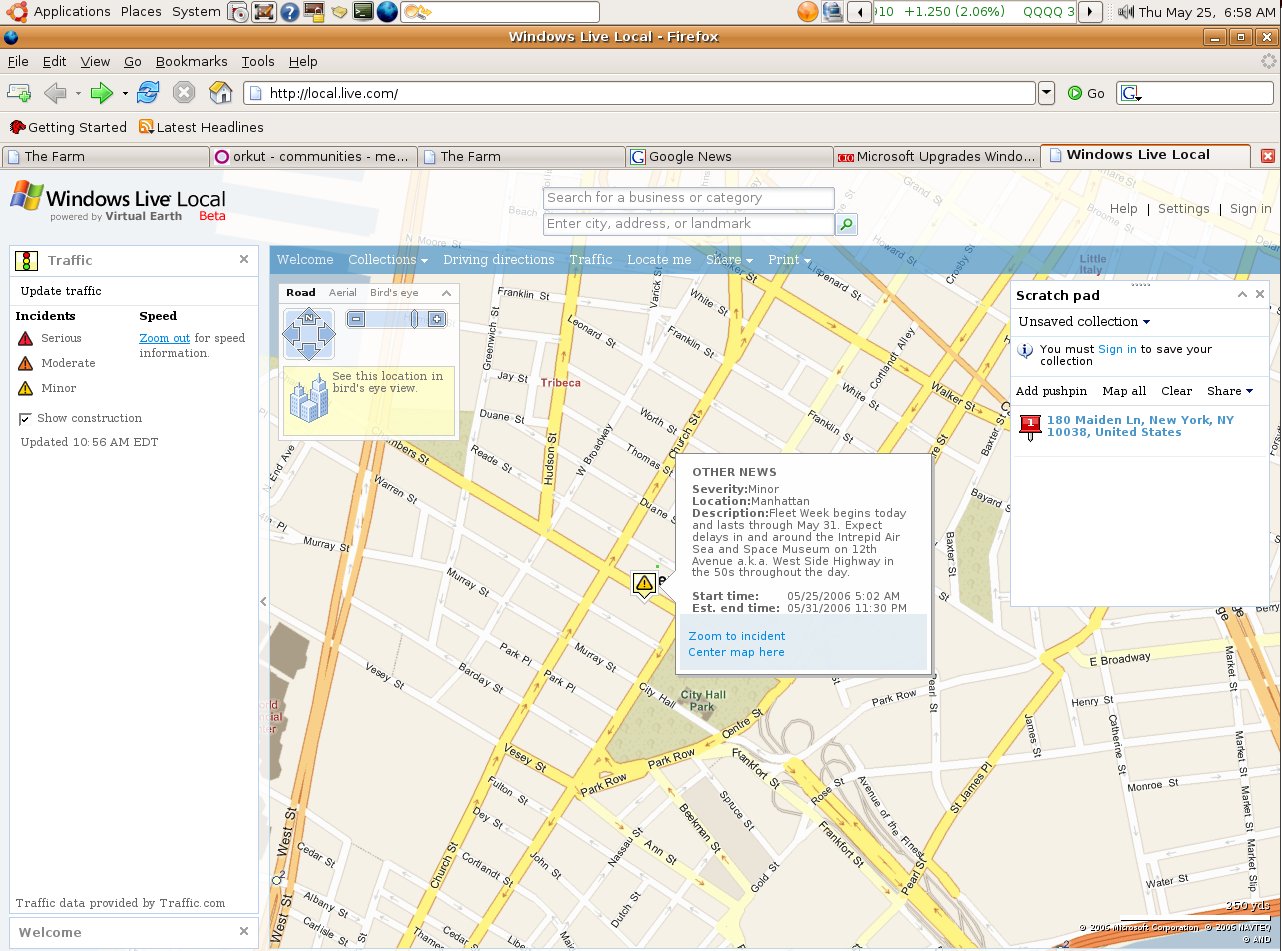 In the newest Windows Live Local release, users will be able to see how heavy or light traffic is along specific U.S. roads, find out if and where there are accidents, and how serious they are. For this new feature, Microsoft is partnering with Traffic.com.
Also new is a functionality Microsoft calls "collections," which lets users save their favorite places and locations to an online notebook, upload photos and add notes. Users will also be able to share with others these scratchpads’ content via e-mail or the MSN Spaces blogging service, creating a sort of social network based on Windows Live Local.
This new version also features integration with the Windows Live Messenger instant messaging service, so that users can initiate an instant-messaging session from within Windows Live Local while seeing and interacting with the same map.
In addition, Microsoft is releasing a new plug-in for Windows Live Local that extends the service’s mapping functions to the company’s Outlook e-mail, calendaring and contacts application. With the plug-in, Outlook XP and Outlook 2003 users will be able to find and print Windows Live Local maps from within Outlook. The plug-in will be available as a free download. Read the rest of the story here.
2006-05-22
Ubuntu Tips & Tricks
Just wanted to blog a very nice tips & tricks page for Ubuntu which is part of Ubuntu FAQ.
On a separate note, I installed Skype which is missing all the bells and whistles of the Windows version (like Video conferencing) but works fine. It start up very slowly though, I am not sure why...
On a separate note, I installed Skype which is missing all the bells and whistles of the Windows version (like Video conferencing) but works fine. It start up very slowly though, I am not sure why...
How does Yahoo, MSN stack up against Google?
According to the latest numbers compiled by Hitwise Blogger Bill Tancer, Google is the search-king (no surprises there) but Yahoo leaves Google in dust when it comes to e-mail, news, finance etc. Nice compariso tables over there, check it out!
Running DVDDecrypter on Ubuntu Linux via Wine
 I was not sure if it would work, but it did. I was able to relatively easily install DVD Decrypter 3.5.4 via wine & rip a DVD!
Most of the instructions mentioned in "Ubuntu Linux DVD Shrink, DVD Decrypter Guide" are OK. I had to do a few things differently:
- Verified via hdparm command that my DVD drive was already using DMA
- sudo apt-get update
- sudo apt-get install wine
winesetuptk
I prefer to use y: drive for dvd-reader and z: for dvd burner
cd ~/.wine/dosdevices
rm y:
ln -s /media/cdrom y:
gedit ~/.wine/config
[Version]
"Windows"="win98"
change to
"Windows"="nt40"
2006-05-21
device is busy...really?
Today, I was trying to figure out how I can run DVD Shrink on my Ubuntu. At some point, a DVD was stuck in my DVD-ROM drive and eject button would not work.
I tried to unmount the drive:
Apparently, the -l unlinks /media/cdrom0 from fstab, at which point any apps
with a lock on this directory cannot access it anymore and therefore it can be successfully unmounted.
I did not think of this at the time but next time it happens, I'll try using lsof to locate the process:
I tried to unmount the drive:
- umount /dev/hdd (or umount /media/cdrom0)
- umount -l /media/cdrom0
Apparently, the -l unlinks /media/cdrom0 from fstab, at which point any apps
with a lock on this directory cannot access it anymore and therefore it can be successfully unmounted.
I did not think of this at the time but next time it happens, I'll try using lsof to locate the process:
- lsof |grep /media/cdrom0
2006-05-19
BBC Senses Challange
I love BBC's tests and I mentioned some of them here. The latest one I discovered is about testing your senses: 8/20 (I think I was too tired to take this test so late at night).
Zero Day Exploit For MS Word
Ginwui.A Backdoor Trojan Horse is Distributed Inside MS Word Document
Description: Ginwui.A is a new backdoor Trojan Horse that exhibits rootkit functionality and that may arrive at a user's workstation inside an MS Word document. This vulnerability is claimed to be used as part of an attack that involves the exploitation of an unpatched vulnerability in the MS Word application. Fingerprint information is as follows:
File Information:
· [Windows Temp directory]\csrse.exe
· [Windows system directory]\winguis.dll
The shellcode contained in the MS Word document decrypts and drops the backdoor's file as csrse.exe in the Windows temporary folder. After execution, this file then drops a second file, winguis.dll to the Windows System folder. The dropper then deletes itself from a system. The .dll file acts as a main backdoor component. This file also exhibits rootkit functionality since it hides certain processes from the computer user.
Look for the Windows registry key(s) created by Ginwui.A.
Recovery: Remove all files and the Windows registry key modifications associated with this malicious code threat. Restore corrupted or damaged files with clean back-up copies. Restore script.ini and other files potentially overwritten by the Trojan. Validate the functionality of all anti-virus and security-related software.
More info:
Description: Ginwui.A is a new backdoor Trojan Horse that exhibits rootkit functionality and that may arrive at a user's workstation inside an MS Word document. This vulnerability is claimed to be used as part of an attack that involves the exploitation of an unpatched vulnerability in the MS Word application. Fingerprint information is as follows:
File Information:
· [Windows Temp directory]\csrse.exe
· [Windows system directory]\winguis.dll
The shellcode contained in the MS Word document decrypts and drops the backdoor's file as csrse.exe in the Windows temporary folder. After execution, this file then drops a second file, winguis.dll to the Windows System folder. The dropper then deletes itself from a system. The .dll file acts as a main backdoor component. This file also exhibits rootkit functionality since it hides certain processes from the computer user.
Look for the Windows registry key(s) created by Ginwui.A.
Recovery: Remove all files and the Windows registry key modifications associated with this malicious code threat. Restore corrupted or damaged files with clean back-up copies. Restore script.ini and other files potentially overwritten by the Trojan. Validate the functionality of all anti-virus and security-related software.
More info:
2006-05-18
Cutting Edge News
As I love to read technology news and would like to hear new things as soon as they become news, I will list some of the sites that I regularly visit (or syndicate via RSS) to get news:
- On top of my list is Technology Page of Google: news.google.com
- I also recently learnt and became addicted to digg.com
- ghacks.net is one of the first sites I love to read when I fire up my RSSOwl
- Yes, news on Google blog is much more exciting than news on Microsoft these days
- Interestingly, sometimes blogs on google are even more interesting: http://google.blognewschannel.com
- Bink.nu has been my primary source of information on Microsoft for years now...
- Who does not know about slashdot.org (Gee their interface is so outdated)
- I recently discovered a nice information source especially about *Betas* www.flexbeta.net
- And finally, Last year, I was sent to Tokyo for a business trip. Having lived in Japan for many years, my manager (then) called me into his office and made me a list of places to see. On top of the list was famous Akihabara, the electronics town! So, if you would like to know about newest, coolest gadgets, here is a site for you: www.akihabaranews.com.
2006-05-17
Windows Media Player 11 Beta
It's available in its beta form here http://www.microsoft.com/windows/windowsmedia/player/11/default.aspx but honestly I don't know what's the big fuss about. It's polished and surely looks better than previous versions but I have not really noticed a huge difference. Maybe I have not looked around too carefully?
2006-05-16
Accessing Favorites/Bookmarks From Anywhere
There used to be a lot of good & free websites, that offered favorites/bookmarks syncronization. My all-time favorite was SyncIt. Then, they started charging for the service and I dropped them! (Hmm, I just checked and it looks like they are free again).
Now that we have google, it's usually faster to find something by searching instead of trying to locate it among your bookmarks. Still, we can't stop bookmarking, can we?
So, in a catch-up game with Google, Microsoft started to offer some internet goodies, one of which is called "Windows Live Favorites". It's free in its beta form. You can easily upload all your bookmarks and access/edit them online anywhere.
There are also some other not-so-bad utilities on microsoft's ideas.live.com web site that you may want to check out.
Now that we have google, it's usually faster to find something by searching instead of trying to locate it among your bookmarks. Still, we can't stop bookmarking, can we?
So, in a catch-up game with Google, Microsoft started to offer some internet goodies, one of which is called "Windows Live Favorites". It's free in its beta form. You can easily upload all your bookmarks and access/edit them online anywhere.
There are also some other not-so-bad utilities on microsoft's ideas.live.com web site that you may want to check out.
2006-05-15
File/Folder Sharing with PowerFolder
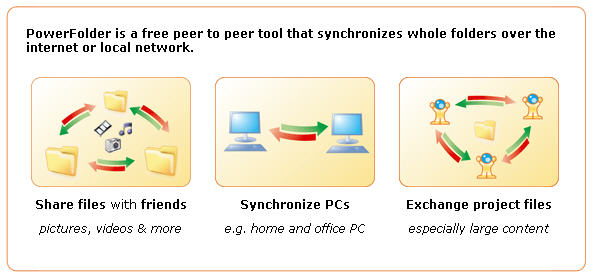
PowerFolder is a free peer to peer tool that synchronizes whole folders over the internet or local network.
In fact, It looks very promising as a back up solution. They just released PowerFolder 1.0 (for Windows & Linux). It's Java-based and installation will not finish if you do not have Java Runtime Environment 1.5 or above, so you may want to go to www.java.com and download it if you do not have it.
[Update - 05/17/2006]
I am really disappointed! Application has many features I love, GUI is beautiful, it is very easy to use and intuitive BUT it keeps on hanging :(
I installed it on my 3 PCs (2 XP and 1 Win2K3) and set up some folders for syncronization. These folders have about 150 folders & 15000 files. What I see is, it detects the differences and starts uploading/downloading but in a few minutes my systems start to hang. It seems to be very resource hungry and kicks my CPU usage to 100% (I have dual P4-2.8 GHz CPU).
Mathieu mentioned another application called iFolder. I also heard about some other file/folder syncronization software like SyncBack, Unison & BestSync...
I already tested Unison but did not really like it. I had to install GTK+, for which I needed to install Gaim for Windows. I could not specify a remote folder using \\ notation. It uses ssh, rsh or socket method to connect to a remote host. Too troublesome...
Free version of SyncBack (v.3.2) seems quite promising actually. I installed it on only one of my PCs and I was able to specify remote directories for sync'ing. Speed was OK. Setting up sync profiles were straight forward too. I am planning to install it on the other PCs and modify sync profiles accordingly. I checked their Support site and two methods to carry profiles were discussed here.
Taking notes via IM: Sabifoo
I was looking for a way to take notes and access them from anywhere and I came across this interesting tool called Sabifoo. You just add it to your IM. Then, whatever message you sent to it will be posted to a web site and you can retrieve it from there.

There is more to it that you can read at Sabifoo Help Page

|
There is more to it that you can read at Sabifoo Help Page
Skype: Free PC to landline calls
 Yippee! I love skype. Voice quality is very good compared to others. As explained in this FT article, now they are upping ther ante and making it free to call landlines from your PC (skypeOut) *FREE* until the end of the year! Competition is good!
[Update-1]
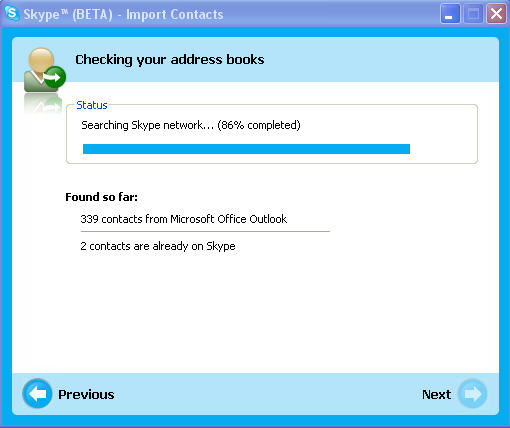
I've downloaded the latest Skype 2 and made calls to regular home and cell phones without any issues. I've also tried the Skype 2.5 beta (2.5.0.72), which has additional features that makes calling even easier. On the left, you can see the "import contacts from Outlook" screen. Instead of importing them, you can also just "view" them.
2006-05-13
Fallacies and how to recognize them
We all have our biases and argue with others. You sometimes see people arguing in a faul way. They use fallacies. Below is a description of fallacies from Nizkor Project Web Site. You can also find there how to recognize fallacies. A must-read!
Description of Fallacies
In order to understand what a fallacy is, one must understand what an argument is. Very briefly, an argument consists of one or more premises and one conclusion. A premise is a statement (a sentence that is either true or false) that is offered in support of the claim being made, which is the conclusion (which is also a sentence that is either true or false).
There are two main types of arguments: deductive and inductive. A deductive argument is an argument such that the premises provide (or appear to provide) complete support for the conclusion. An inductive argument is an argument such that the premises provide (or appear to provide) some degree of support (but less than complete support) for the conclusion. If the premises actually provide the required degree of support for the conclusion, then the argument is a good one. A good deductive argument is known as a valid argument and is such that if all its premises are true, then its conclusion must be true. If all the argument is valid and actually has all true premises, then it is known as a sound argument. If it is invalid or has one or more false premises, it will be unsound. A good inductive argument is known as a strong (or "cogent") inductive argument. It is such that if the premises are true, the conclusion is likely to be true.
A fallacy is, very generally, an error in reasoning. This differs from a factual error, which is simply being wrong about the facts. To be more specific, a fallacy is an "argument" in which the premises given for the conclusion do not provide the needed degree of support. A deductive fallacy is a deductive argument that is invalid (it is such that it could have all true premises and still have a false conclusion). An inductive fallacy is less formal than a deductive fallacy. They are simply "arguments" which appear to be inductive arguments, but the premises do not provided enough support for the conclusion. In such cases, even if the premises were true, the conclusion would not be more likely to be true.
Read more at Nizkor Project Web site. You may also want to visit Constructing a Logical ArgumentGoogle Trends

Google recently announced yet another nice search related feature called 'Google Trends'. Basically, it's a web site (http://google.com/trends) where you can type keywords and see how popular those keywords has been over the time and where they are most popular. It's fun to throw out some keywords into it and see the results.
Let me warn you though, if you put in more than one keyword, then results are displayed so that you will see the cities where the first keyword is most popular and popularity of the remaining keywords on these cities. So, I would suggest to use one keyword at a time.
See above a screenshot for "science". Yet another sign of upcoming India?
Subscribe to:
Posts (Atom)