The default desktop environment for Linux users, Gnome, is fast, organized and very easy to learn. But Gnome is also very powerful and highly customizable. Today's top 10 lists the various ways you can tweak Nautilus and the Gnome desktop to turn Linux into a productivity powerhouse.
read more | digg story

2007-08-22
Who owns what
 Above picture, which lists some of the companies bought a few Media conglamorate, was put together by Amy Webb and is getting circulated a lot these days. It gives an idea about how much of Internet these few companies own.
2007-08-13
Online Storage finally taking shape

Just want to note this article about Online Storage and what big 3 (Google, Microsoft, Apple) are doing about it. I think online storage makes perfect sense now that we have faster internet connection.
I only tried Microsoft's Windows Live SkyDrive and it looks pretty good but of course 500MB is 'nothing' if you seriously want to keep your files online. It maybe enough if you only want to keep 'some' files
2007-08-09
A (much needed) update for Vista
Today, when I saw MS KB938194 titled "An update is available that improves the compatibility and reliability of Windows Vista" and look at the issues it resolved, it reminded me of my experience with an ATI card when I moved to Vista:
A couple of months ago I bought a nice (=expensive) ATI all in wonder X800 video card and it worked perfectly fine under Windows XP when I was playing World of Warcraft (WoW). Then, I installed Vista. All seemed fine for a week or so and then hell broke loose...
At first, I would not be able to play more WoW than 5 minutes. It would freeze and I had to reboot. Then it got worse so that I could not even play 30 secs. I gave up and started to use my other PC to play the game.
It got even worse when Vista started to freeze even when I am not playing a game but just playing any video file. At some point, my pc was totally unusable as animations were too much to display.
One of these days, I saw a sign that CompUSA shop near my house was getting closing and there was a close-out sale. I bought ATI X1600 Pro & retired the problematic one but promised myself to test it out on my Windows XP box to see if the problem would present itself there too...
Read this article for more on Windows Vista issues and possible fixes coming out...
A couple of months ago I bought a nice (=expensive) ATI all in wonder X800 video card and it worked perfectly fine under Windows XP when I was playing World of Warcraft (WoW). Then, I installed Vista. All seemed fine for a week or so and then hell broke loose...
At first, I would not be able to play more WoW than 5 minutes. It would freeze and I had to reboot. Then it got worse so that I could not even play 30 secs. I gave up and started to use my other PC to play the game.
It got even worse when Vista started to freeze even when I am not playing a game but just playing any video file. At some point, my pc was totally unusable as animations were too much to display.
One of these days, I saw a sign that CompUSA shop near my house was getting closing and there was a close-out sale. I bought ATI X1600 Pro & retired the problematic one but promised myself to test it out on my Windows XP box to see if the problem would present itself there too...
Read this article for more on Windows Vista issues and possible fixes coming out...
2007-07-20
Vista UAC is just trouble
I am sorry to say this but Vista UAC is broken! I understand the concept, and I understand where Microsoft is coming from. In fact, I felt quite comfortable the way Ubuntu has implemented basically the same idea. But it is just painful in Vista.
I tried to work with it but got fed up soon. So, I disabled it using Local Group Policy. And then, my problems started. I did not realize it until today but UAC was the reason behind a couple of mysterious issues I was having. A few recent examples...
* NTFS permissions are all screwed up. Although my user account is in Administrators/backup operators groups, I sometimes can not access my personal folders. Then, I have actually blogged this here, so I wont go into details...
* My backup process got broken. I loved rsync in unix world and the closest thing I have in Vista is of course good old Robocopy. I already had some backup scripts that would take daily back ups between my various disks and PCs. Time to time, I would get mysterious errors like "ERROR 5 (0x00000005) Changing File Attributes"...
* Windows update would never install 'any' update. It kept on downloading the files and then reported errors but never offered any explanation why.
Finally, I suspected that UAC was not fully disabled. I saw a nicely written article and used msconfig method (Run msconfig > Tools > Disable UAC).
And guess what? Suddenly all looks good now :)
I tried to work with it but got fed up soon. So, I disabled it using Local Group Policy. And then, my problems started. I did not realize it until today but UAC was the reason behind a couple of mysterious issues I was having. A few recent examples...
* NTFS permissions are all screwed up. Although my user account is in Administrators/backup operators groups, I sometimes can not access my personal folders. Then, I have actually blogged this here, so I wont go into details...
* My backup process got broken. I loved rsync in unix world and the closest thing I have in Vista is of course good old Robocopy. I already had some backup scripts that would take daily back ups between my various disks and PCs. Time to time, I would get mysterious errors like "ERROR 5 (0x00000005) Changing File Attributes"...
* Windows update would never install 'any' update. It kept on downloading the files and then reported errors but never offered any explanation why.
Finally, I suspected that UAC was not fully disabled. I saw a nicely written article and used msconfig method (Run msconfig > Tools > Disable UAC).
And guess what? Suddenly all looks good now :)
Vista fails to boot

My vista ultimate crushed today for no apparent reason. As if that's not bad enough, Vista could not be loaded. Instead, I was stuck at the screen.
*******************************
WINDOWS BOOT MANAGER
Windows failed to start. A recent hardware or software change might be the cause. To Fix the problem:
1. Insert your Windows installation disc and restart your computer
2. Choose your language settings, and then click "Next"
3. Click "Repair your computer"
If you do not have this disc, contact your system administrator or computer manufacturer for assistance.
File: \Windows\system32\winload.exe
Status: 0x000000e
Info: The selected entry could not be loaded because the application is missing or corrupt
*******************************
Resolution: Simple, I simply unplugged the exterior Sony DVD burner. A funny fact was that simple reboot did not fix the issue but I shutdown the PC completely and then powered it on.
2007-07-17
NYC Subway Map

Just blogging this link of a site that has overlayed NYC subway and NJ Path information on Google maps.
A good feature is that, you can view all the trains passing thru a station when you move the mouse over the nodes.
Not a new idea, but good implementation.
2007-07-14
Outlook hangs due to Search Issue

I love to keep all my e-mails. So, I have huge outlook .pst files dedicated to some some active lists that I subscribed more than 10 years ago. Recently, I noticed that instant search in Outlook 2007 was not functioning properly. It would never find anything.
I checked the instant search index status (Tools > Instant Search > Indexing Status). It said something like
"Outlook is currently indexing your items." 1 item remaining in Inbox 150000 items remaining across all open mailboxes
It was clear that instant search was not working properly. So I checked "Windows Search" service by typing "Start > Run > services.msc"
Services was up and running...
Then I checked "Control Panel > Indexing Options". I decided to rebuild the index. So, I clicked "Indexing Options > Advanced > Rebuild" and changed Index location to a folder in a different drive that I usually use for backups.
Things went totally haywire after that :( Whenever I tried to check Indexing Options, it gave me messages like "Retrieving windows Search status" or "Windows search is performing maintenance". Restarting service did not help.
To add to my troubles, Outlook 2007 stopped working. I was able to start it in Safe Mode but it would not start in regular mode and just freeze during startup.
I started Outlook in safe mode and then ran Office diagnostics (Outlook > Help > Office Diagnostics), which found no issues. Google searches did not result in anything useful. Finally, I used Office 2007 CD to "repair" to no avail.
At this point I was not sure why Outlook was not working but because all this stuff did not happen the same day, at first I did not suspect them to be related. In fact, after an unexpected power outage, some Vista permissions were screwed up and I was thinking that issue could be related to .pst folder permissions.
Then it downed on me! I disabled/stopped Windows Search and then started Outlook. Puff! It launched without any issues. Basically, Outlook 2007 was detecting that Windows Search was not available,and disabling Instant Search.
I did a little bit more search on how to build index and found this MSDN thread:
"Set the registry value HKEY_LOCAL_MACHINE\SOFTWARE\Microsoft\Windows Search\SetupCompletedSuccessfully to 0 and try restarting the Windows Search service."
I did and it worked. Windows Search started indexing items properly and Outlook 2007 launched without a hitch. Problem solved.
For reference, below is what I saw in the Event viewer when index was corrupted and restarting service would not help:
Log Name: Application
Source: Microsoft-Windows-Search
Date: 7/14/2007 4:28:59 PM
Event ID: 3026
Task Category: Gatherer
Level: Error
Description:
Advise Status Change failed. The system is probably low on resources. Free up resources and restart the service.
Context: Windows Application, SystemIndex Catalog
Details:
The content index server cannot update or access information because of a database error. Stop and restart the search service. If the problem persists, reset and recrawl the content index. In some cases it may be necessary to delete and recreate the content index. (0x8004117f)
2007-07-12
Vista snipping tool error
I had an interesting issue with my Vista build today. Well, I have to disclose that this is basically a preview build that our engineering team is testing in the company. I was trying to launch Snipping Tool and received an error:
The Snipping Tool is not working on your computer right now. Restart your computer, and then try again. If the problem persists, contact your system administrator.
Sure enough, rebooting the machine did not help. I checked the event viewer and noticed that a warning gets logged everytime I try to start it:
Log Name: Application
Source: Microsoft-Windows-SoftwareRestrictionPolicies
Date: 7/12/2007 3:15:25 PM
Event ID: 866
Description:
Access to C:\Windows\SYSTEM32\WISPTIS.EXE has been restricted by your Administrator by location with policy rule {F8509577-AE57-4057-B256-2929FCC0931A} placed on path *WISPTIS.exe.
So, what's this Wisptis? "Windows Ink Services Platform Tablet Input Subsystem".
I ran rsop.msc to confirm that it was listed under
"Computer Configuration" > "Windows Settings" > "Security Settings" > "Software Restriction Policies" > "Additional Rules"
Why would snipping tool need Wisptis.exe is beyond me.
[Edit: 04/04/2008]
I've scraped the preview build long time ago and I use ultimate version for sometime. However, I get comment from people who still see the issue I mentioned above. I got two comments from people who confirmed that running "Office Diagnostics", however irrelevant it seems, fixed the issue for them.
It makes me very happy to see comments from people who reach this blog and either find or suggest solutions to problems. Thank you all!
The Snipping Tool is not working on your computer right now. Restart your computer, and then try again. If the problem persists, contact your system administrator.
Sure enough, rebooting the machine did not help. I checked the event viewer and noticed that a warning gets logged everytime I try to start it:
Log Name: Application
Source: Microsoft-Windows-SoftwareRestrictionPolicies
Date: 7/12/2007 3:15:25 PM
Event ID: 866
Description:
Access to C:\Windows\SYSTEM32\WISPTIS.EXE has been restricted by your Administrator by location with policy rule {F8509577-AE57-4057-B256-2929FCC0931A} placed on path *WISPTIS.exe.
So, what's this Wisptis? "Windows Ink Services Platform Tablet Input Subsystem".
I ran rsop.msc to confirm that it was listed under
"Computer Configuration" > "Windows Settings" > "Security Settings" > "Software Restriction Policies" > "Additional Rules"
Why would snipping tool need Wisptis.exe is beyond me.
[Edit: 04/04/2008]
I've scraped the preview build long time ago and I use ultimate version for sometime. However, I get comment from people who still see the issue I mentioned above. I got two comments from people who confirmed that running "Office Diagnostics", however irrelevant it seems, fixed the issue for them.
It makes me very happy to see comments from people who reach this blog and either find or suggest solutions to problems. Thank you all!
2007-06-19
Running PowerShell Scripts
When I read "Running windows PowerShell Scripts" on Microsoft technet, I wanted blog it. It's a long article. I am kinda disillusioned with PSH at this point :(
Some excerpts:
To summarize, here’s how you run from scripts from within Windows PowerShell:
• Make sure you’ve changed your execution policy. By default, PowerShell won’t run scripts at all, no matter how you specify the path.
• To run a script, specify the entire file path, or either: 1) use the .\ notation to run a script in the current directory or 2) put the folder where the script resides in your Windows path.
• If your file path includes blank spaces, enclose the path in double quote marks and preface the path with an ampersand.
And, yes, that all takes some getting used to. However, you will get used to it. (To make life easier for you, we recommend that you keep all your scripts in one folder, such as C:\Scripts, and add that folder to your Windows path.)
We realize that it’s been awhile, but way back at the start of this article we tried running a Windows PowerShell script by double-clicking a .PS1 file. That didn’t go quite the way we had hoped: instead of running the script all we managed to do was open the script file in Notepad. Interestingly enough, that’s the way it’s supposed to work: as a security measure you can’t start a PowerShell script by double-clicking a .PS1 file. So apparently that means that you do have to start PowerShell before you can run a PowerShell script.
In a somewhat roundabout way, that’s technically true. However, that doesn’t mean that you can’t start a PowerShell script from a shortcut or from the Run dialog box; likewise you can run a PowerShell script as a scheduled task.
The secret? Instead of calling the script you need to call the PowerShell executable file, and then pass the script path as an argument to PowerShell.exe. For example, in the Run dialog box you might type a command like powershell.exe –noexit c:\scripts\test.
Some excerpts:
To summarize, here’s how you run from scripts from within Windows PowerShell:
• Make sure you’ve changed your execution policy. By default, PowerShell won’t run scripts at all, no matter how you specify the path.
• To run a script, specify the entire file path, or either: 1) use the .\ notation to run a script in the current directory or 2) put the folder where the script resides in your Windows path.
• If your file path includes blank spaces, enclose the path in double quote marks and preface the path with an ampersand.
And, yes, that all takes some getting used to. However, you will get used to it. (To make life easier for you, we recommend that you keep all your scripts in one folder, such as C:\Scripts, and add that folder to your Windows path.)
We realize that it’s been awhile, but way back at the start of this article we tried running a Windows PowerShell script by double-clicking a .PS1 file. That didn’t go quite the way we had hoped: instead of running the script all we managed to do was open the script file in Notepad. Interestingly enough, that’s the way it’s supposed to work: as a security measure you can’t start a PowerShell script by double-clicking a .PS1 file. So apparently that means that you do have to start PowerShell before you can run a PowerShell script.
In a somewhat roundabout way, that’s technically true. However, that doesn’t mean that you can’t start a PowerShell script from a shortcut or from the Run dialog box; likewise you can run a PowerShell script as a scheduled task.
The secret? Instead of calling the script you need to call the PowerShell executable file, and then pass the script path as an argument to PowerShell.exe. For example, in the Run dialog box you might type a command like powershell.exe –noexit c:\scripts\test.
2007-06-15
Technet Webcast: Windows Hang and Crash Dump Analysis by Mark Russinovich
This is a great presentation from Mark Russinovich on BSODs.
Learn to analyze Microsoft Windows crash dumps, diagnose the cause, pinpoint a solution, and resolve the problem. Intended for system administrators, this webcast explains how system crashes occur and what happens when you reboot a crashed system. We lead you through the crash dump analysis process step by step, introducing the latest tools from Microsoft and handy tricks for isolating the cause of a crash.
Presenter: Mark Russinovich, Chief Software Architect and Cofounder, Winternals Software
Mark Russinovich is chief software architect and cofounder of Winternals Software, a company that specializes in advanced systems software for Microsoft Windows. He is coauthor of Windows Internals, 4th Edition (Microsoft Press, 2004), a Microsoft MVP, and he contributes to the Sysinternals tools at www.sysinternals.com, including Process Explorer, Filemon, and Regmon. Mark has a PhD in computer engineering from Carnegie Mellon University and is a senior contributing editor for Windows IT Pro Magazine.
To avoid possible problems, we suggest you temporarily disable pop-up blocker software before viewing the webcast.
Now that Tech-Ed is over, there are a lot of webcasts available. You can view Other sessions from Tech·Ed 2006 Webcasts: Power to the Pros.
View other sessions from Tech·Ed 2006 Webcasts: Power to the Pros.
Learn to analyze Microsoft Windows crash dumps, diagnose the cause, pinpoint a solution, and resolve the problem. Intended for system administrators, this webcast explains how system crashes occur and what happens when you reboot a crashed system. We lead you through the crash dump analysis process step by step, introducing the latest tools from Microsoft and handy tricks for isolating the cause of a crash.
Presenter: Mark Russinovich, Chief Software Architect and Cofounder, Winternals Software
Mark Russinovich is chief software architect and cofounder of Winternals Software, a company that specializes in advanced systems software for Microsoft Windows. He is coauthor of Windows Internals, 4th Edition (Microsoft Press, 2004), a Microsoft MVP, and he contributes to the Sysinternals tools at www.sysinternals.com, including Process Explorer, Filemon, and Regmon. Mark has a PhD in computer engineering from Carnegie Mellon University and is a senior contributing editor for Windows IT Pro Magazine.
To avoid possible problems, we suggest you temporarily disable pop-up blocker software before viewing the webcast.
Now that Tech-Ed is over, there are a lot of webcasts available. You can view Other sessions from Tech·Ed 2006 Webcasts: Power to the Pros.
View other sessions from Tech·Ed 2006 Webcasts: Power to the Pros.
2007-06-11
25 Most Popular Blogs June 2007 (Ranked By 5 Traffic Data Sources)
A complete list of the top 25 most popular blogs ranked by a combination of Inbound Links (Yahoo Site Explorer), RSS Subscribers (Feedburner), Alexa Rank and Compete and Quantcast traffic data. The data gives you a real insight into these blogs success which will allow you to judge the relative success of your own blog.
read more | digg story
read more | digg story
2007-06-09
Hack Your Router
Umm, well this is 'old news' that I only became aware of thanks to a colleague. There is a LifeHacker article about boosting router signal as well as adding tons of features to it for some make/model but especially Linksys WRT54GL Wireless router
Here is the link to the article.
Here is the link to the article.
2007-05-30
Microsoft Surface

The launch of Microsoft Surface marks the beginning of a new technology category and a user-interface revolution. Surface, Microsoft’s first surface computer, provides effortless interaction with digital content through natural hand gestures, touch and physical objects. Surface computing breaks down traditional barriers between people and technology.
read more digg story
read more digg story
Google Maps StreetView
Google Maps have a new feature and may be the best one I've seen: Street view. It's available in limited content now but you can click a street and look at a 360 degrees picture of the street! That's an awesome feature and can be extremely useful!
You can have an idea what the street looks like. You can use the arrows to go in all directions. I can't wait to see coverage getting wider. Check out the Demo.
You can have an idea what the street looks like. You can use the arrows to go in all directions. I can't wait to see coverage getting wider. Check out the Demo.
2007-05-18
The Ultimate Linux Reference Guide for Newbies
Very nice and complete linux commands reference: http://blog.lxpages.com/ultimate_linux.html
read more | digg story
read more | digg story
2007-05-17
Google 2.0 Unleashed Today: Universal Search, Invisible Tabs, and More
Google is undertaking the most radical change to its search results ever, introducing a "Universal Search" system that will blend listings from its news, video, images, local and book search engines among those it gathers from crawling web pages.
read more | digg story
read more | digg story
2007-05-11
Ubuntu Unleashed (Free eBook)
Incorporating an advanced approach to presenting information about Ubuntu, Ubuntu Unleashed aims to provide the best and latest information that intermediate to advanced Linux users need to know about installation, configuration, system administration, server operations, and security.
read more | digg story
read more | digg story
2007-04-19
Ubuntu 7.04 (Feisty Fawn) has officially been released!

The beta and the wait is over. Ubuntu 7.04 has been released and is available for immediate download.
2007-04-18
2007-04-11
Ubuntu feisty fawn (7.04) finally available on shipit for free
Canonical started to send free cd-s of ubuntu 7.04 feisty fawn. simply go to https://shipit.ubuntu.com/ and login with your Launchpad (http://launchpad.net) id to request the CDs
read more | digg story
read more | digg story
2007-02-06
IIS Permission Denied Error
I had some asp pages that worked fine on IIS5/w2K but gave me an error like below on IIS6/W2K3.
Microsoft VBScript runtime error '800a0046'
Permission denied
/SelfService/e360.asp, line 69
I searched thru MS site but could not come up with anything. I found my answer on ASP emporium site.
Line 69 has an OpenTextFile command with option 8 to modify and IUSR_ did not have rights to write into that file/folder. To fix it,
- Created a local user acc
- IIS Manager > Browse to Web sites > Default Web Site >> Properties > Directory Security > Edit > Set User name:MachineName\, Password: password
- Give Write Permission to on C:\Inetpub\wwwroot
Microsoft VBScript runtime error '800a0046'
Permission denied
/SelfService/e360.asp, line 69
I searched thru MS site but could not come up with anything. I found my answer on ASP emporium site.
Line 69 has an OpenTextFile command with option 8 to modify and IUSR_
- Created a local user acc
- IIS Manager > Browse to Web sites > Default Web Site >> Properties > Directory Security > Edit > Set User name:MachineName\
- Give Write Permission to
2007-02-05
Google Browser Sync for Firefox
Google Browser Sync for Firefox is an extension that continuously synchronizes your browser settings – including bookmarks, history, persistent cookies, and saved passwords – across your computers. It also allows you to restore open tabs and windows across different machines and browser sessions. For more info, please visit our FAQ.
It's pretty easy to set up.
It's pretty easy to set up.
2007-01-27
Vista Auto Logon
According to: http://forums.microsoft.com/MSDN/ShowPost.aspx?PostID=829701&SiteID=1 If you have a single user without password, then he gets logged on automatically after restart.
Not recommended! Of course, anyone with sufficient access to read your registry, can read your password in plain text if you set it up this way…
Here’s the procedure:
Open Regedit,
Not recommended! Of course, anyone with sufficient access to read your registry, can read your password in plain text if you set it up this way…
Here’s the procedure:
Open Regedit,
- Drill down to HKLM/Software/Microsoft/Windows NT/CurrentVersion/Winlogon,
- Find the “AutoAdminLogon” value, and change it to 1. Enter the following items as new string values: “DefaultUserName”, and “DefaultPassword”.
- Set the value of DefaultUserName to be the username that you want to autologin, and set the value of DefaultPassword to be that user’s password.
2007-01-08
Cool javascript trick
Go to any web site, preferably with lots of pics. copy/paste the following to the address bar and hit enter.
javascript:R=0; x1=.1; y1=.05; x2=.25; y2=.24; x3=1.6; y3=.24; x4=300; y4=200; x5=300; y5=200; DI=document.images; DIL=DI.length; function A(){for(i=0; i-DIL; i++){DIS=DI[ i ].style; DIS.position='absolute'; DIS.left=Math.sin(R*x1+i*x2+x3)*x4+x5; DIS.top=Math.cos(R*y1+i*y2+y3)*y4+y5}R++}setInterval('A()',5); void(0);
Here is the original Digg article.
javascript:R=0; x1=.1; y1=.05; x2=.25; y2=.24; x3=1.6; y3=.24; x4=300; y4=200; x5=300; y5=200; DI=document.images; DIL=DI.length; function A(){for(i=0; i-DIL; i++){DIS=DI[ i ].style; DIS.position='absolute'; DIS.left=Math.sin(R*x1+i*x2+x3)*x4+x5; DIS.top=Math.cos(R*y1+i*y2+y3)*y4+y5}R++}setInterval('A()',5); void(0);
Here is the original Digg article.
2006-12-13
Ms. Dewey: Search with a twist
Microsoft live search has been live for a while. Have you heard about the ad campaign for it. I mean the viral search campaign: No? Welcome to Ms. Dewey then :)
Utility: Process Tamer
Windows only: Freeware system tray app ProcessTamer is a lightweight CPU usage monitoring tool that watches your computer for CPU hogs and "tames" them before they freeze up your computer.
Read full article here.
Read full article here.
2006-12-11
Vista Documentation & Tools
Microsoft has a lot of good reading material for IT Professional on their site about Vista. They have also released a few useful tools:
SyncToy helps you copy, move, rename, and delete files between folders and computers quickly and easily.
This page provides the Group Policy Log view tool for Windows Vista
Windows User State Migration Tool (USMT) version 3.0
Microsoft® Windows® User State Migration Tool (USMT) version 3.0 migrates user files and settings during deployments of Microsoft Windows XP and Windows Vista™. USMT captures files and settings from the source computer and then migrates them to a new Windows installation.
Windows AIKThe Windows Automated Installation Kit (Windows AIK) helps you to install, customize, and deploy the Microsoft Windows Vista™ family of operating systems.
Remote Desktop Connection (Terminal Services Client 6.0) for Windows XP (KB925876)
Remote Desktop Connection (Terminal Services Client 6.0) provides a way to use any new Terminal Services features introduced in Microsoft Windows Vista and Microsoft Windows Server Code Name “Longhorn” from a computer running Microsoft Windows XP with Service Pack 2 or Microsoft Windows Server 2003 with Service Pack 1.
Consolas Font PackThe Microsoft Consolas Font Family is a set of highly legible fonts designed for ClearType. It is intended for use in programming environments and other circumstances where a monospaced
font is specified. This installation package will set the default font for Visual Studio to Consolas.
The Windows Vista Security Guide provides recommendations and tools to further harden Windows Vista. Use the GPOAccelerator tool in this Solution Accelerator to efficiently establish the Enterprise Client (EC) environment or the Specialized Security – Limited Functionality (SSLF) environment.
What about Users? Well, they can take a look at this:Windows Vista User Experience Guidelines
Download a preliminary draft of the Windows Vista™ User Experience Guidelines (UX Guide).
and Best Practices?Power Management for Windows Vista Best Practices
Use computer power plans to reduce consumption with Windows Vista.
Everyday Work with Windows Vista Best Practices
Work smarter with new features in Windows Vista.
Enjoy!
2006-12-03
PowerDVD Issue with Vista Aero

I use Cyberlink PowerDVD 7.0. Everytime I started it up, Vista would pop up an message saying that PowerDVD would not support Aero and therefore Aero features (transparency etc. ) would be DISABLED. I see screen flickering and then PowerDVD starts. As soon as I shutdown PowerDVD, I see screen flickering again and Aero is back!
Well, good news is that Cyberlink has an updated build (#2211) for PowerDVD that you can download for free & it resolves this issue.
2006-11-30
Vista Aero at last!
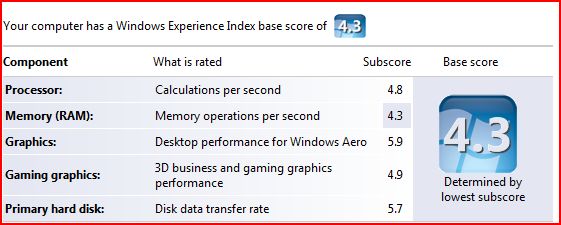
When I installed Vista, I was disappointed to see that my Windows Experience Index was 1.0 I was disappointed because I have a pretty decent machine:
- HP XW6000 Workstation
- 2 x 2.8 GHz P4 processor
- 1 GB DDR 266Mhz RAM
- 2 x 750GB SATA drives
- nVidia 980XGL video card with 128 MB ram & dual DVI output
It looks like I fell behind times in video cards department and I felt that this was a good time to catch up. So, I did some research. As always, Tom's Hardware Guide on graphic cards was pretty useful.
I ended up ordering an AGP 8x, ATI Radeon GDDR3 X800 XT with 256 MB ram from TigerDirect.com for $168 (I checked again now and they are not selling it anymore, maybe I got the last one :). It's all-in-one card, although I am not currently planning to use its TV capture capabilities.
I received in just two days. When I installed it though, my machine did not boot, all I was hearing was 2 long beeps. I put back the old card and got on internet to talk to HP. They simply told me that
- "ATI Radeon X800 XT card is not tested on xw6000 and is not supported".
In fact, HP guy told me that there was a problem between it and the motherboard but I kept on asking questions and he confessed that he was not sure of that and suggested I try the *newest* BIOS which was 2 years old and I was already running that.
I started tinkering with BIOS settings and one setting got my eye "AGP Aperture Size". It was set to 64MB. I did not know what it was for but when I saw someone mentioning it to fix a video card issue (not ATI), I realized that I had to change it to 256MB = what my new card had & voila!
To my surprise, Vista detected the card and installed the driver for it. Then, I checked my Windows Experience Index again: 4.3
This time, it was my 1Gig memory that was taking me down but hey, I have all the bells and whistles of Aero now :) I am quite disappointed with Doom 3 though, it looks better but not way better...
BTW, to see your Windows Experience index, do the followings:
Start > Run
control.exe system
Lastly, I wrote about BlackBerry on Vista yesterday. I checked the device in the morning and as expected it was fully charged.
2006-11-29
Blackberry & Vista
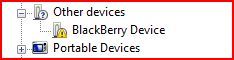 when I connected my Blackberry 8700 to Vista to charge it, it immediately popped up a message telling me that "a blackberry device was found". It did not however had the software for it
 I checked the device manager and sure enough BlackBerry was listed with a yellow icon on it meaning that it was missing the driver.
I went to RIM's homepage to see if they had any Vista drivers but could not locate one.
As my experience with Vista so far showed me that XP drivers usually worked fine, I wanted to give it a try by downloading and installing the latest BlackBerry Desktop Software (4.2 as of this moment).
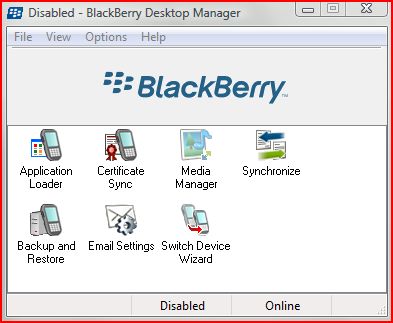 So I downloaded the software and installed it. Installation went just fine no issues. I have selected Enterprise features as mine is in fact belongs to my company.
As I only wanted to charge the battery and I selected not to launch the application at start up. I will probably not be able to use it anyway. Still, when I launched it, it came up just fine.
 Then, I went back to Device manager to see what happened and noticed that it was now showing under Universal Serial Bus Controller. Right now, it looks like it is charging. I will check back in the morning to see if it 'really' charged.
2006-11-27
Vista - Change Explorer Start up Directory
In Vista, Windows Explorer is located under All Programs > Accessories. It's actually a shortcut to%SystemRoot%\explorer.exe
When you open it, by default it will open your "Username"\"Documents" Folder:
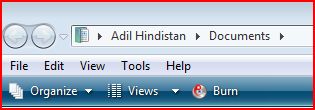 I do not want that! Instead, I want it to show me the root of my D: drive. Well, it's not difficult to change. Here is how:
[Update - 12/03/2006]
I made a mistake above. If you want do NOT want to see other drives when you start up and just D drive, then instructions stand. Otherwise, just modify target like this:
When you open it, by default it will open your "Username"\"Documents" Folder:
 I do not want that! Instead, I want it to show me the root of my D: drive. Well, it's not difficult to change. Here is how:
- Create a shortcut to Windows Explorer:
- Go to All programs > Accessories.
- Right click "Windows Explorer"
- From menu choose "Send to" > Desktop (Create Shortcut)
- Then right click on the new shortcut and from the menu choose properties
- Modify "target" by adding /root,D:
- It should now appear like this: %SystemRoot%\explorer.exe /root,D:
[Update - 12/03/2006]
I made a mistake above. If you want do NOT want to see other drives when you start up and just D drive, then instructions stand. Otherwise, just modify target like this:
- %SystemRoot%\explorer.exe D:
Vista: Corrupted Recycle Bin
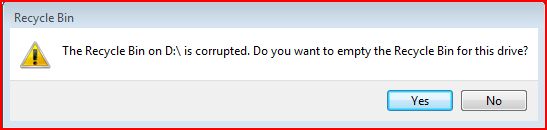 One of the issues I see everyday with Vista is about the recycle bin. It keeps on getting corrupted. I suspect that this is because of my dual-boot configuration with XP and may be permissions. It does not matter how many times I click "YES", it keeps on popping up. I am not sure how to fix it yet and the weird thing is that there is nothing in the eventlogs!
2006-11-26
Vista ReadyBoost & ReadyDrive
 Jim Allchin, has an informative article on a new feature in Vista: ReadyBoost. Below is an excerpt from this article.
... With Windows ReadyBoost, if you have a flash drive (like a USB thumb drive or an SD card) you can just use this to make your computer run better with Windows Vista. You simply plug in a flash drive and Windows Vista will use Windows ReadyBoost to utilize the flash memory to improve performance.
I should be clear that while flash drives do contain memory, Windows ReadyBoost isn’t really using that memory to increase the main system RAM in your computer. Instead, ReadyBoost uses the flash drive to store information that is being used by the memory manager. If you are running a lot of applications on a system that has limited memory, Windows ReadyBoost will use the flash drive to create a copy of virtual memory that is not quite as fast as RAM, but a whole lot faster than going to the hard disk. What is very cool here is that there is nothing stored on this flash disk that isn’t also on the hard disk, so if you remove the flash drive, the memory manager sees the change and automatically goes to the hard disk...
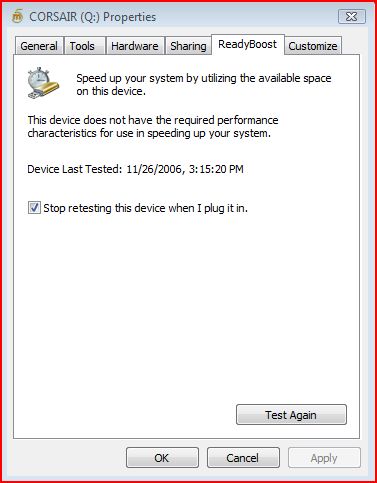
There are some articles on microsoft site that talk about ReadyBoost but they do not mention specifics.
As USB drives are very common these days, I think Microsoft had the right idea. Vista also supports Hybrid drives (HHD = regular HD + integrated NVRAM) via a technology called ReadyDrive.
These are welcome changes. What I understand from Allchin's message though is that Vista does not perform considerably better compared XP if you do not have a high-end system, which is a bit disappointing. Would not it be nice to see a lightning fast OS after so many years of development.
[Update - 12/05/2006]
On the comment section, somebody left me a message with a link to Tom Archer's blog. The link was not working but I was able to read the article when I hit the home page of the blog.
I am not sure what is the problem with my USB stick even after reading some of the requirements as it they did not mention a tool to measure the specs of usb stick but a few people suggested that they got their usb stick working when they formatted it with ntfs.
There was a link to another useful article at DvNation. Check it out.
2006-11-25
Lisp, Perl, Python
I learned programming in Perl 2 yrs ago when I started supporting an in-house-developed Java/Unix based application. I have seen Python gaining ground since then and got interested in it.
Today, I came across a bunch of very interesting and absorbing articles about several programming languages but mostly focused on lisp, perl and python.
It all started with Paul Graham's "Revenge of the Nerds" article. He is a Lisp expert and to be honest I did not know much about lisp until I read his article. It was a provocative one and he got a lot of responses which he responded with "Re: Revenge of the Nerds".
After you read these two, you would probably want to keep on reading how Python Lovers responded:
Paul Prescod has written a rebuttal to Revenge of the Nerds, On the Relationship between Python and Lisp. Peter Norvig (Google's Director of Research) has also written about this topic in Python for Lisp Programmers.
Today, I came across a bunch of very interesting and absorbing articles about several programming languages but mostly focused on lisp, perl and python.
It all started with Paul Graham's "Revenge of the Nerds" article. He is a Lisp expert and to be honest I did not know much about lisp until I read his article. It was a provocative one and he got a lot of responses which he responded with "Re: Revenge of the Nerds".
After you read these two, you would probably want to keep on reading how Python Lovers responded:
Paul Prescod has written a rebuttal to Revenge of the Nerds, On the Relationship between Python and Lisp. Peter Norvig (Google's Director of Research) has also written about this topic in Python for Lisp Programmers.
New blog
I am playing with a new blog http://AdilHindistan.blogspot.com. It's using Blogger Beta. If I like it, I may consider moving this blog over there...
2006-11-24
Vista permission inheritance issues
As I mentioned before, I have installed Vista next to XP and I am dual-booting. I had permission denied errors when I had tried to access files and folders that were created by XP.
Anyway, today I realized that permissions I set on the top level were not really inherited at all levels. I noticed it because I use Google Picasa to organize my pictures I realized that I was missing some pictures in Picasa database. What's more, when I browse to these folders via explorer, thumbnails were not showing up.
To make sure that all files and folders inherit permissions from the top level, on the root of the drive I issued the following command:
ICACLS name /reset /T /C /L /Q
Successfully processed 261133 files; Failed processing 0 files
This is supposed to reset the permissions so that they get inherited from the levels above. This worked and I noticed that Google Picasa was discovering new pictures it was not able to read before. Thumbnails were showing up properly too.
What I am worried is that if I go back to XP, they will get lost again. I will check and see...
Anyway, today I realized that permissions I set on the top level were not really inherited at all levels. I noticed it because I use Google Picasa to organize my pictures I realized that I was missing some pictures in Picasa database. What's more, when I browse to these folders via explorer, thumbnails were not showing up.
To make sure that all files and folders inherit permissions from the top level, on the root of the drive I issued the following command:
ICACLS name /reset /T /C /L /Q
Successfully processed 261133 files; Failed processing 0 files
This is supposed to reset the permissions so that they get inherited from the levels above. This worked and I noticed that Google Picasa was discovering new pictures it was not able to read before. Thumbnails were showing up properly too.
What I am worried is that if I go back to XP, they will get lost again. I will check and see...
Live PC & VMWare
Have you heard of Moka5.com or Live PCs. Well, it's a VMWare based technology and well-worth checking out. The only downside is, it does not yet work with Vista and requires XP SP2.
BTW, if you would like to download VMWare images and run them on your PC, you download free VMWare Player software from VMWare. VMWare Server is another free product you can download.
Below is description from their web site:
BTW, if you would like to download VMWare images and run them on your PC, you download free VMWare Player software from VMWare. VMWare Server is another free product you can download.
Below is description from their web site:
What are LivePCs?
LivePCs™ are virtual PCs that you can create and share just as you can share the rest of your digital life (photos, music, videos, etc..) A LivePC contains everything needed to run a virtual computer — an operating system and a bunch of applications. You can create and share your own LivePCs, or use the public LivePCs created by others in our BetaGarage™. You can use LivePCs on your desktop, or you can take them with you everywhere on a portable USB drive.
With LivePCs, a family can maintain separate computer personalities (work, home, kids) on a single PC. Software developers can make it easy for users to try out their latest suite of applications. Professionals can go on vacation and take their LivePCs with them on a USB stick to use "just in case".
2006-11-23
Dual Boot XP & Vista, Partition Magic Blues
I have a Fujitsu Lifebook that already has XP on it. I wanted to install Vista on it today. As the current XP installation was occupying the whole partition, I used Partition Magic 8 to resize the current partition, creating enough space for Vista.
It was not a trouble-free resizing though... I launched Partition Magic 8, selected the current drive and clicked resize and reduced current size of the partition from 60GB to 30GB. Change required a reboot.
I rebooted and partition magic kicked in but after a few seconds it gave me an error & quit:
Error 1530: Zero reference count
I looked it up on Symantec site which suggested that I use "chkdsk /f" on my drive and explained the error:
A file's record has a zero reference count, but the file appears in at least one directory.
Anyway, ran check disk and resized the partition again. After reboot, Partition Magic kicked in and looked like doing its job but after a while it gave me another error & quit.
Error 983: "Too many errors found, process halted"
Once again, Symantec documentation suggested I run "chkdsk /f". I did not run it again because once I logged into XP, I noticed that partition was already resized. Vista did not complain either and installed properly.
So, if you are going to use Partition Magic, save yourself sometime, check & repair your disks by running "chkdsk /f"...
It was not a trouble-free resizing though... I launched Partition Magic 8, selected the current drive and clicked resize and reduced current size of the partition from 60GB to 30GB. Change required a reboot.
I rebooted and partition magic kicked in but after a few seconds it gave me an error & quit:
Error 1530: Zero reference count
I looked it up on Symantec site which suggested that I use "chkdsk /f" on my drive and explained the error:
A file's record has a zero reference count, but the file appears in at least one directory.
Anyway, ran check disk and resized the partition again. After reboot, Partition Magic kicked in and looked like doing its job but after a while it gave me another error & quit.
Error 983: "Too many errors found, process halted"
Once again, Symantec documentation suggested I run "chkdsk /f". I did not run it again because once I logged into XP, I noticed that partition was already resized. Vista did not complain either and installed properly.
So, if you are going to use Partition Magic, save yourself sometime, check & repair your disks by running "chkdsk /f"...
2006-11-20
Vista: COM Surrogate keeps on crashing
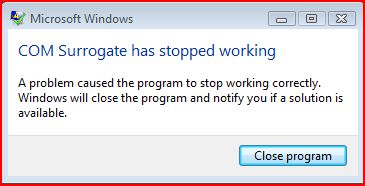 Time to time I keep on getting a message as shown in the screenshot. I did not see any harm when this happens and it usually happens when I open a folder which has a lot of files...
I am not sure what COM Surrogate is supposed to do but it is probably a bug in Vista. EventViewer logs an application error (Event ID 1000) which reads something like this:
Faulting application DllHost.exe, version 6.0.6000.16386, time stamp 0x4549b14e, faulting module unknown, version 0.0.0.0, time stamp 0x00000000, exception code 0xc0000005, fault offset 0x00bbb5ed, process id 0x594, application start time 0x01c70c6a663ae8c3.
So I guess, something is just taking more time than it is supposed to...
It actually created a report for it (probably to send back to Microsoft) under
C:\Users\Adil\AppData\Local\Microsoft\Windows\WER\ReportArchive\Report0f070a8c. I looked at it using notepad and below is what I see:
Version=1
EventType=APPCRASH
EventTime=128084765660881040
ReportType=2
Consent=1
UploadTime=128084765692168100
Response.BucketId=346129346
Response.BucketTable=1
Response.type=4
Sig[0].Name=Application Name
Sig[0].Value=DllHost.exe
Sig[1].Name=Application Version
Sig[1].Value=6.0.6000.16386
Sig[2].Name=Application Timestamp
Sig[2].Value=4549b14e
Sig[3].Name=Fault Module Name
Sig[3].Value=StackHash_1703
Sig[4].Name=Fault Module Version
Sig[4].Value=0.0.0.0
Sig[5].Name=Fault Module Timestamp
Sig[5].Value=00000000
Sig[6].Name=Exception Code
Sig[6].Value=c0000005
Sig[7].Name=Exception Offset
Sig[7].Value=00bbb5ed
DynamicSig[1].Name=OS Version
DynamicSig[1].Value=6.0.6000.2.0.0.256.4
DynamicSig[2].Name=Locale ID
DynamicSig[2].Value=1033
DynamicSig[22].Name=Additional Information 1
DynamicSig[22].Value=1703
DynamicSig[23].Name=Additional Information 2
DynamicSig[23].Value=2264db07e74365624c50317d7b856ae9
DynamicSig[24].Name=Additional Information 3
DynamicSig[24].Value=1344
DynamicSig[25].Name=Additional Information 4
DynamicSig[25].Value=875fa2ef9d2bdca96466e8af55d1ae6e
UI[2]=C:\Windows\system32\DllHost.exe
UI[3]=COM Surrogate has stopped working
UI[4]=Windows can check online for a solution to the problem.
UI[5]=Check online for a solution and close the program
UI[6]=Check online for a solution later and close the program
UI[7]=Close the program
State[0].Key=Transport.DoneStage1
State[0].Value=1
FriendlyEventName=Stopped working
ConsentKey=APPCRASH
AppName=COM Surrogate
AppPath=C:\Windows\system32\DllHost.exe
Well, not useful for me... I used EventViewe to report it back to Microsoft but although EventViewer recorded the event id as 1000, the web page that came up was talking about 1001:
There is no content available for Event 1001, for this version of the Windows operating system:
The following content is this event's explanations and user actions for earlier versions of the Windows operating system. Although this content is not specifically applicable to the version of the operating system that you are running on your computer, you might find the information of value.
Results for: Microsoft product: Windows Operating System; ID: 1001; Event Source: Windows Error Reporting;
No results were found for your query. Please see Search Help for suggestions.[2006-11-28]
Update
Well, today I found some more information on this. Apparently Nero is my problem ( I do not have DivX codec installed on Vista but I do have Nero Burner)! Following solutions were suggested:
You can use FFDShow instead of Divx and for Nero you can rename NeVideo.ax
in C:\Program Files\Common Files\Ahead\DSFilter\
Unfortunately, renaming did not fix the issue for me but at least I know what's going on!
Vista - First Impressions
 Finally! Vista is out and I have my hands all over it. I installed it on two machines and started testing it. Problems started during the installation, it failed to find any drives.
Problem: Both of these machines had promise IDE/SATA controller cards (Ultra 133 & TX2300) and Vista failed to recognize both.
Solution: Use Windows XP drivers! I am surprised but it worked. It's really cool that during the Vista set up, you can plug in a usb device and it will immediately recognize it and let you install drivers from there. So, I downloaded the XP drivers for both cards and Vista happily accepted them and showed me my hard disks.
Problem: After the installation, I had no internet access because it did recognize my Broadcom NetXtreme Gigabit network card but failed to find a suitable driver for it.
Solution: Yep, XP drivers work just fine. Once I had internet connectivity, I was able to download the beta drivers for my Creative Sound Blaster Live 24! I still seem to have a problem with the microphone but did not look deeper.
Problem: I installed Office 2007 and tried add my .pst files. I got access denied. When I checked, I realized that all the files in all the drives except the one I installed Vista were read-only. Even though permissions seemed OK as I was in the administrators group, and administrators group had Full access to all files and folders in all drives.
Solution: I created a new group and added my account and my wife's account in it. Then, I made this new group the owner of all files and folders by taking ownership. I then added this new group to the drive security on the top level and then replaced the permissions throughout my system. After logging off and logging back in, I was able to access all files and write to them. I went back to XP to see if anything was broken but other than "Recycle bin is corrupted, empty it?" message all was fine.
So far all the application I was running XP are working on Vista except McAfee Antivirus Plus Suite... It is not compatible with Vista and when I installed it anyway, it crashed explorer and everything else. I had an unusable system, so I had to reboot and log back in safe mode to uninstall it.
Windows Vista comes with a firewall like XP (but more advanced) yet because Enterprises would not let them, they would block all inbound traffic except allowed but no outgoing traffic, which is not acceptable to me as this means leakage! I am yet to find a firewall that would work seemlessly with Vista.
Vista Disable/Enable User Access Control
I was going thru System Configuration in Vista (Start>run, type "control.exe system") and noticed two options:
To disable User Access Control:
C:\Windows\System32\cmd.exe /k %windir%\System32\reg.exe ADD HKLM\SOFTWARE\Microsoft\Windows\CurrentVersion\Policies\System /v EnableLUA /t REG_DWORD /d 0 /f
To enable it:
C:\Windows\System32\cmd.exe /k %windir%\System32\reg.exe ADD HKLM\SOFTWARE\Microsoft\Windows\CurrentVersion\Policies\System /v EnableLUA /t REG_DWORD /d 1 /f
Both of these require a reboot. If you would like to disable Admin approval for the built-in administrator account to get rid of UAC, you can use Local Security Policy (LSA):
User Account Control is similar to Ubuntu's root access. In Ubuntu, you run everything as a normal user. When you need to be super user (root) you use sudo in the command line. In GUI, it asks you for your password. Vista can imitate the same behaviour. By default, instead of asking you for your password, it merely tells you that the action you are taking requires elevated privilage (administrator context) and asks you to confirm it.
The purpose is that if an application is trying to do something without you knowing it, it would be stopped. So, if you are changing these settings, you may not be doing yourself a favor.
To disable User Access Control:
C:\Windows\System32\cmd.exe /k %windir%\System32\reg.exe ADD HKLM\SOFTWARE\Microsoft\Windows\CurrentVersion\Policies\System /v EnableLUA /t REG_DWORD /d 0 /f
To enable it:
C:\Windows\System32\cmd.exe /k %windir%\System32\reg.exe ADD HKLM\SOFTWARE\Microsoft\Windows\CurrentVersion\Policies\System /v EnableLUA /t REG_DWORD /d 1 /f
Both of these require a reboot. If you would like to disable Admin approval for the built-in administrator account to get rid of UAC, you can use Local Security Policy (LSA):
- Start > Run, Type: secpol.msc
- Scroll down to Local Policies > Security Options
- Double click "User Account Control: Admins Approval Mode for the Built-in Administrator Account" and select "Disabled"
User Account Control is similar to Ubuntu's root access. In Ubuntu, you run everything as a normal user. When you need to be super user (root) you use sudo in the command line. In GUI, it asks you for your password. Vista can imitate the same behaviour. By default, instead of asking you for your password, it merely tells you that the action you are taking requires elevated privilage (administrator context) and asks you to confirm it.
The purpose is that if an application is trying to do something without you knowing it, it would be stopped. So, if you are changing these settings, you may not be doing yourself a favor.
2006-11-16
How To Crack A Combination Lock
A great way to figure out the combination to a lock that you had forgotten what it was. This is intended for information purposes only.
read more | digg story
read more | digg story
2006-11-15
Ilya Hevnikov’s Blog » Blog Archive » How To Triple Boot (XP, Vista, Ubuntu) With Single Boot Screen
Ilya Hevnikov's blog has a very nice guide to how to trible boot, Ubuntu, Windows XP and Windows Vista. As I use the first two and intend to install the third one as soon as it becomes available at MSDN Subscriber Downloads, I think this may prove to be useful (so blogging it).
The challange I have right now is to find Promise SATAII-TX4 controller drivers for Vista. Promise web site (www.promise.com) does not seem to offer the drivers. I sent them an e-mail asking for an ETA but who knows, maybe I can use one of these beta drivers that are available at Internet...
The challange I have right now is to find Promise SATAII-TX4 controller drivers for Vista. Promise web site (www.promise.com) does not seem to offer the drivers. I sent them an e-mail asking for an ETA but who knows, maybe I can use one of these beta drivers that are available at Internet...
2006-11-13
Office 2007 now available at MSDN
Office 2007 now available from MSDN Subscriber Downloads!
Office 2007 is now live and available to all MSDN Premium subscribers from MSDN Subscriber Downloads at http://msdn.microsoft.com/subscriptions. The following software editions and languages are now available:
- Office Professional 2007 (English, German, Japanese)
- Office Project Professional 2007 (English, Japanese)
- Office Visio Professional 2007 (English, Japanese)
- Office Groove 2007 (English, Japanese)
- Office InfoPath (English, Japanese)
- Office InterConnect 2007 (Japanese)
- Office OneNote 2007 (English, German, Japanese)
Additional products and language versions will be made available soon. In addition, we look forward to adding Windows Vista to our slate of offerings beginning November 17.
Get it First! from MSDN Subscriber Downloads.
Best regards,
Seth Adams
Program Manager, MSDN Subscriptions
Boot Windows XP from a USB flash drive
This article talks about installing a bootable copy of Windows XP onto a flash drive and then boot a PC off of the flash drive. Digg comments are pretty insteresting too. Somebody mentioned that you can write to the flash drives for a limited number (although a high one) and if you have an OS installed, paging, swapping can kill it pretty quickly...
read more | digg story
read more | digg story
2006-11-12
Sysinternals Utilities at their new home
"The Sysinternals web site was created in 1996 by Mark Russinovich and Bryce Cogswell to host their advanced system utilities and technical information and Microsoft acquired Sysinternals in July, 2006. Whether you’re an IT Pro or a developer, you’ll find Sysinternals utilities to help you manage, troubleshoot and diagnose your Windows systems and applications. If you have a question about a tool or how to use it, please visit the Sysinternals Forum for answers and help from other users and our moderators." goes the new home page of SysInternals under Microsoft Technet umbrella.
They also have a new blog. Check it out!
They also have a new blog. Check it out!
2006-11-11
Best Firefox Extensions and Customizing Tips
I had a post on "Less known Firefox Addons" sometime ago. Scott Finnie has a "live" document for "Best Firefox Extensions and Customizing Tips". It's a good document and I found the mentioned addons quite useful.
The one, I should mention is BugMeNot by Eric Hamiter. Once installed, you can right click on a login box, on several sites which requires you to log on before displaying the content (eg. The New York Times), and choose "Log me in with BugMeNot"! Go ahead & check out BugMeNot.com for this great service!
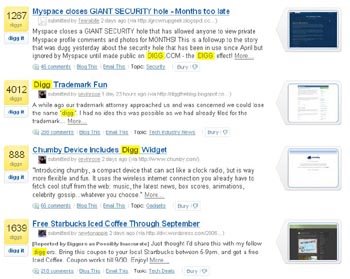
And I also love DiggThumbs, which will show the thumbnail images of the web site that hosts the digg story. You can see a screenshot at the right side...
[UPDATE - 11/18/2006]
I installed Windows Vista a few days ago and going thru installing all my apps. again. I'm writing down a few I felt I should install immediately to make FireFox 2.0 *usable* for me:
The one, I should mention is BugMeNot by Eric Hamiter. Once installed, you can right click on a
 login box, on several sites which requires you to log on before displaying the content (eg. The New York Times), and choose "Log me in with BugMeNot"! Go ahead & check out BugMeNot.com for this great service!
And I also love DiggThumbs, which will show the thumbnail images of the web site that hosts the digg story. You can see a screenshot at the right side...
[UPDATE - 11/18/2006]
I installed Windows Vista a few days ago and going thru installing all my apps. again. I'm writing down a few I felt I should install immediately to make FireFox 2.0 *usable* for me:
- Install Always Remember Password 0.6: Good for sites like Yahoo, hotmail, who offers "remember password" but does not actually remember it.
- Google Notebook: Indispensable as I take lots of note on the web
- Download Status Bar: A nice small status bar at the bottom for files being downloaded
- Greasemonkey: Holy grail of web customization
- Duplicate Tab: Right click on a tab and create a duplicate of it. I love it!
2006-11-02
Microsoft to support SuSe Linux
This is BIIIIIG News! Many CIOs were pushing MS to work with Linux. MS Office is the hands down killer app suite and running it on Linux is a win-win situation!
SAN FRANCISCO (MarketWatch) -- Microsoft Corp. and Novell Inc. are entering into a partnership that could help Novells Linux operating system, according to a media report Thursday. Under the agreement, which isnt final, Microsoft will offer sales support to Novells Suse Linux, the Wall Street Journal reported on its Web site.
For MS Announcement & Webcast:
http://www.microsoft.com/presspass/press/2006/nov06/11-02NewsConferenceMA.mspx
read more | digg story
SAN FRANCISCO (MarketWatch) -- Microsoft Corp. and Novell Inc. are entering into a partnership that could help Novells Linux operating system, according to a media report Thursday. Under the agreement, which isnt final, Microsoft will offer sales support to Novells Suse Linux, the Wall Street Journal reported on its Web site.
For MS Announcement & Webcast:
http://www.microsoft.com/presspass/press/2006/nov06/11-02NewsConferenceMA.mspx
read more | digg story
2006-10-31
Linux keyboard shortcuts you should know about
Summary of most useful keyboard shortcuts. Take a printout for handy quick reference.
read more | digg story
read more | digg story
HOWTO: Five steps to a more secure SSH
If you are running Linux, chances are you are running SSH. Here are five easy things you can do to lock down your server and make SSH more secure. Includes disabling root logins, using keys to login, automatically blocking hosts who are attempting dictionary attacks, and more.
read more | digg story
read more | digg story
Data visualization tools for Linux
Applications for graphical visualization of data on Linux
® are varied, from simple 2-D plots to 3-D surfaces, scientific graphics programming, and graphical simulation.There are many open source possibilities, including gnuplot, GNU Octave, Scilab, MayaVi, Maxima, and others.
read more | digg story
® are varied, from simple 2-D plots to 3-D surfaces, scientific graphics programming, and graphical simulation.There are many open source possibilities, including gnuplot, GNU Octave, Scilab, MayaVi, Maxima, and others.
read more | digg story
2006-10-26
Ubuntu Linux 6.10 - Edgy Eft Released
Ubuntu Linux 6.10 - Edgy Eft Released:
The desktop version introduces a host of new features, an improved interface and a wide variety of new applications and desktop tools making Ubuntu 6.10 flexible and user-friendly. Enhancements include:
Tomboy, an easy-to-use and efficient note-taking tool
F-Spot, a photo management tool that enables tagging, photo editing and automatic uploading to on-line web management sites such as Flickr
GNOME 2.16, which in addition to new features such as enhanced power management, makes the GNOME desktop more secure, faster and more stable
Upstart, a replacement start-up manager offering a cleaner design, eye-catching effects and a substantially faster boot time
The latest Firefox web browser, which offers inline spell check support in web forms, easy recovery of crashed sessions, built-in phishing detectors, enhanced search engine management with built in OpenSearch support, and better support for previewing and subscribing to web feeds
Proactive security features, preventing many common security vulnerabilities even before they are discovered
Evolution 2.8.0, which brings new features such as vertical message panes
2006-10-22
Throw away your TV
I recently came across this site called "Throw away your TV". It has tons of funny videos as well as educational ones.
One feature I liked was, when I am watching something, if I go to a different browser tab, it actually detects it and stops playing the video, only to continue after I go back to it.
One feature I liked was, when I am watching something, if I go to a different browser tab, it actually detects it and stops playing the video, only to continue after I go back to it.
2006-10-20
Have Your Lost USB Drive Ask For Help
It's like a digital luggage tag for your USB drive that pops up a message [via autorun] to notify the user that it's a lost drive.
read more | digg story
read more | digg story
AutoIt Automation Tool
 In the previous article about lost USB devices, author talks about AutoIt. I checked it out and it seems like a nice automation tool for Windows that can . There is also an informative Wikipedia article about it.
Below is from their home page:
AutoIt v3 is a freeware BASIC-like scripting language designed for automating the Windows GUI and general scripting. It uses a combination of simulated keystrokes, mouse movement and window/control manipulation in order to automate tasks in a way not possible or reliable with other languages (e.g. VBScript and SendKeys).
AutoIt is also very small, self-contained and will run on 95, 98, ME, NT4, 2000, XP, 2003 out of the box with no annoying "runtimes" required! You can even make compiled executable scripts that can run without AutoIt being installed!
2006-10-19
Imperial History of Middle East
Who has controlled the Middle East over the course of history? Pretty much everyone. Egyptians, Turks, Jews, Romans, Arabs, Greeks, Persians, Europeans...the list goes on. Who will control the Middle East today? That is a much bigger question.
See 5000 years of history in 90 seconds flash animation at http://www.mapsofwar.com/ind/imperial-history.html.
See 5000 years of history in 90 seconds flash animation at http://www.mapsofwar.com/ind/imperial-history.html.
2006-10-18
Microsoft releases Internet Explorer 7 Final
The official download on Microsoft's own page and not on some blogs or Yahoo. Some improvements over IE6 includes: New Interface, RSS Feeds, Phishing Filter, Protected Mode, Tabbed Browsing, and PNG support among many others.
Get IE7 here:
http://www.microsoft.com/windows/ie/downloads/default.mspx
read more | digg story
Get IE7 here:
http://www.microsoft.com/windows/ie/downloads/default.mspx
read more | digg story
2006-10-11
Colbert Roasts President Bush - 2006 White House Correspondents Dinner
| An excerpt from the annual White House Correspondents Association dinner. Comedian Stephen Colbert (one of my favorites) made humorous remarks about various current events and the relationship between the press and the White House. He also presented a video of a mock press conference which ended in a chase scene featuring long-time correspondent Helen Thomas. | |
2006-10-10
Top Five Wired Nations
IBM has a short list of countries hat are leaders in the wired revolution. The U.S. makes the list, barely.
read more | digg story
read more | digg story
2006-10-09
Its confirmed. Google buys youtube for $1.6 billion
Google Inc. said Monday it's buying No. 1 Internet video sharing Web site YouTube Inc. for $1.65 billion in stock. The deal is regarded as a largely defensive one that leapfrogs Google into a leading role in a burgeoning Internet marketplace
read more | digg story
read more | digg story
2006-10-07
Kick Ass Classical - Classical Music's Top 100 Greatest Hits
Kick Ass Classical - Classical Music's Top 100 Greatest Hits You can listen to them for a few seconds on the side. And believe me, a few secons is all you need to remember the tunes anyway
2006-10-02
Dive Into Python: Free eBook
Dive Into Python is a Python book for experienced programmers. You can buy a printed copy, read it online, or download it in a variety of formats. It is also available in multiple languages. Recommended eBook for anyone who wants to seriously learn Python. The main site also provides some good Python related websites.
From comments, there is a link to 17 Free Python Books:
http://freecomputerbooks.com/langPythonBooksIndex.html
Include this one (Dive Into Python)
read more | digg story
From comments, there is a link to 17 Free Python Books:
http://freecomputerbooks.com/langPythonBooksIndex.html
Include this one (Dive Into Python)
read more | digg story
Accessing Ubuntu from Windows with FreeNX
 [ORIGINAL POST - 06/02/2006]
My coworker, Andy Mei mentioned FreeNX to me. I checked out the Ubuntu Forums on FreeNX and FreeNX Wiki page. It's a two-part (client/server) software...
To install FreeNX on my ubuntu dapper,
First I added the following line to my /etc/apt/sources.list:
deb http://free.linux.hp.com/~brett/seveas/freenx dapper-seveas freenx
you can try other repositories.
If you do not want to get gpg errors, import them:
- sudo gpg --keyserver subkeys.pgp.net --recv-keys 1135D466
- sudo gpg --export --armor 1135D466 | sudo apt-key add -
- fired up Snaptic Package Manager,
- clicked reload to get updared package list from the newly added repository
- then searched for freenx
- marked it and clicked apply
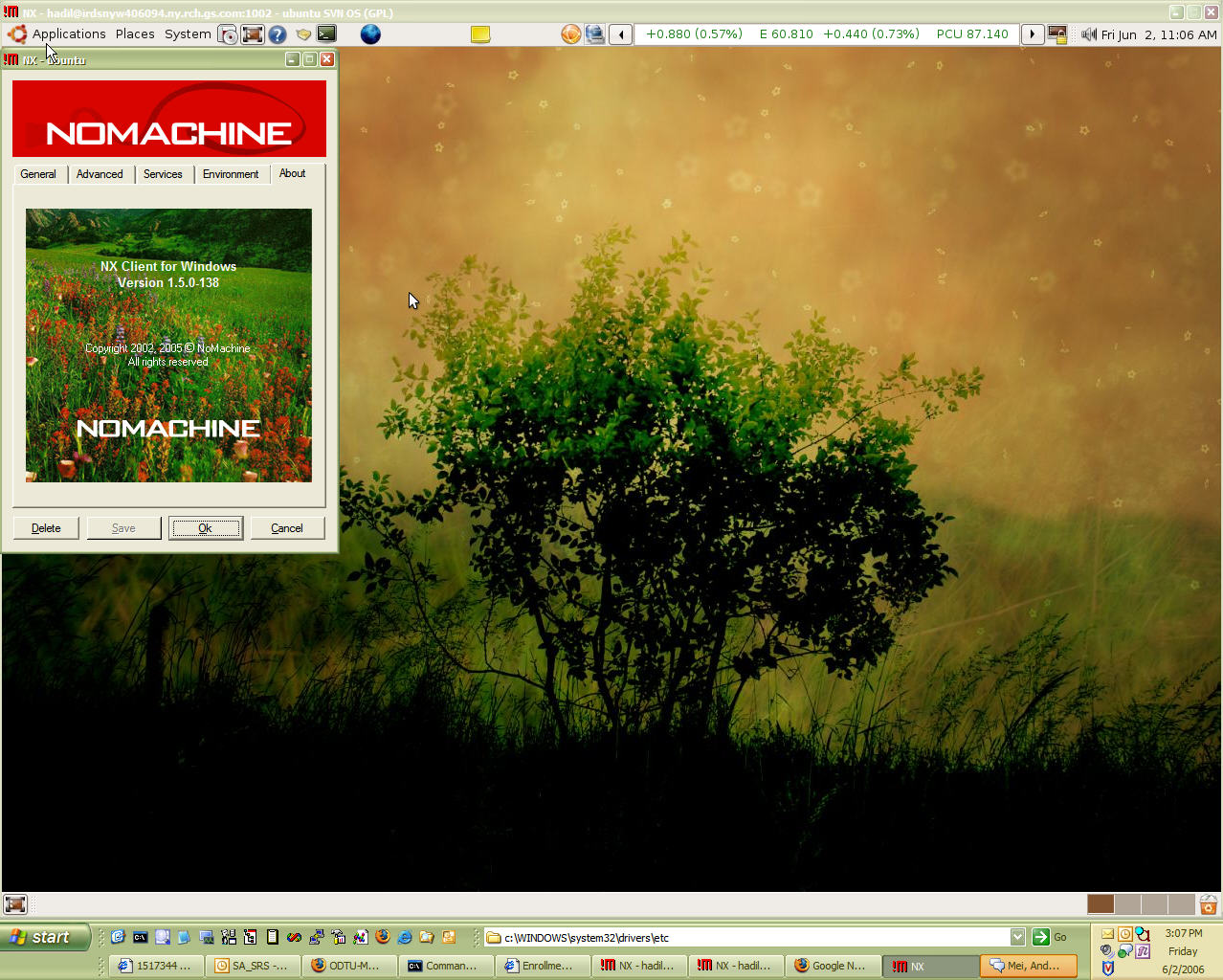
Result is a very fast & easy connection from Windows XP to Ubuntu Linux (see screenshot above).
Ahh, don't try to be smart and install it from cmd line `sudo apt-get install freenx`. I know people who did and suffered ;-)
[UPDATE - 09/29/2006]
OK, I take that back! I now have a beta version of Ubuntu Edgy Eft (Knot 3) running on my linux box and I installed it from command line:
sudo apt-get install freenxI chose No machine keys during the set up and it works just fine!
[UPDATE - 10/02/2006]
I downloaded the new NxClient (2.1.0-6) from NoMachine.com. It failed to connect to my Ubuntu
NX> 704 Session cache: unix-gnome
NX> 707 SSL tunneling: 0
/usr/lib/nx/nxserver: line 891: 27507 Terminated
( sleep $AGENT_STARTUP_TIMEOUT; exit 1 )
NX> 105 NX> 504 Session startup failed.
NX> 1004 Error: nxagent failed to start with: Unrecognized option: 1
NX> 1001 Bye.
Apparently, it needs a compatible client/server installation...
Useful Free Windows Programs Under 2MB
Over 20 free windows applications under 2mb, courteously of revision3 forum member, lordfoul. Definately a list to look into. Applications range from miscellaneous software, command utilities, system performance tools, and more.
I also liked the followings not yet in the list but mentioned in the comments:
- Taskbar Shuffle (left-click and drag the programs/buttons on your Windows taskbar to rearrange them)
- Power Menu (adds "Always On Top", "Minimize To Tray", "Priority" and "Transparency" sub menus to all top level system menus)
Also check out www.tinyapps.org!
read more | digg story
I also liked the followings not yet in the list but mentioned in the comments:

- Taskbar Shuffle (left-click and drag the programs/buttons on your Windows taskbar to rearrange them)
- Power Menu (adds "Always On Top", "Minimize To Tray", "Priority" and "Transparency" sub menus to all top level system menus)
Also check out www.tinyapps.org!
read more | digg story
2006-09-28
Saving Outlook E-mail Attachments To a Folder
I was looking for some code samples as I wanted to save e-mail attachments to a folder. Below is the code I got from OutlookCode.com. I modified it a bit as I did not want to touch the original e-mails...
In Outlook, hit Alt+F11, double click modules and paste it into module1
I have also seen a lot of useful code examples here
In Outlook, hit Alt+F11, double click modules and paste it into module1
Sub SaveSelectedAttachment()

  'Declaration
  Dim myItems, myItem, myAttachments, myAttachment As Object
  Dim myOrt As String
  Dim myOlApp As New Outlook.Application
  Dim myOlExp As Outlook.Explorer
  Dim myOlSel As Outlook.Selection

  'Ask for destination folder
  myOrt = InputBox("Destination", "Save Attachments", _
  "C:\Entertainment\Attachments\")

  On Error Resume Next

  'work on selected items
  Set myOlExp = myOlApp.ActiveExplorer
  Set myOlSel = myOlExp.Selection

  'for all items do...
  For Each myItem In myOlSel

      'point on attachments
      Set myAttachments = myItem.Attachments

      'if there are some...
      If myAttachments.Count > 0 Then

          'add remark to message text
'            myItem.Body = myItem.Body & vbCrLf & _
'            "Removed Attachments:" & vbCrLf

          'for all attachments do...
          For i = 1 To myAttachments.Count

              'save them to destination
              myAttachments(i).SaveAsFile myOrt & _
              myAttachments(i).DisplayName

              'add name and destination to message text
'                 myItem.Body = myItem.Body & "File: " & myOrt & _
'                 myAttachments(i).DisplayName & vbCrLf

          Next i

          'for all attachments do...
'            While myAttachments.Count > 0

              'remove it (use this method in Outlook XP)
              'myAttachments.Remove 1

              'remove it (use this method in Outlook 2000)
'                myAttachments(1).Delete

'            Wend

          'save item without attachments
'            myItem.Save
      End If

  Next

  'free variables
  Set myItems = Nothing
  Set myItem = Nothing
  Set myAttachments = Nothing
  Set myAttachment = Nothing
  Set myOlApp = Nothing
  Set myOlExp = Nothing
  Set myOlSel = Nothing

End Sub
I have also seen a lot of useful code examples here
Google Cheat Sheets
I came across this pretty useful site. All cheats can be downloaded as a pdf document... "This two page Google Cheat Sheet lists all Google services and tools as well as background information. The Cheat Sheet offers a great reference to grasp of basic to advance Google query building concepts and ideas."
2006-09-26
Bike Tour & World's Strongest Dad
I am going to join company bike team of "The 2006 MS Bike Tour" that will take place on October 15th in Manhattan.
One of the organizers has sent this motivational "no-dry eyes" story to our distribution list. It tells us about the unbelievable story of Dick & Rick Hoyt. This is a must-read!
One of the organizers has sent this motivational "no-dry eyes" story to our distribution list. It tells us about the unbelievable story of Dick & Rick Hoyt. This is a must-read!
2006-09-25
Tiny Linux gadget protects Windows XP laptops
An Israeli startup has announced a tiny, Linux-based remote access device that aims to protect Windows XP laptops. The credit card-sized device runs sophisticated firewall, VPN, and monitoring software on a hardened Linux kernel.
read more | digg story
read more | digg story
How XGL Works
Xgl, Xegl, Xglx, Aiglx... ever wondered what all this stuff does? Here's the definitive layman's guide to understanding how this stuff actually works. Scroll to the end for some illustrative diagrams.
read more | digg story
read more | digg story
Dapper Drake to Edgy Eft Upgrade
Being an impatient guy I am, I wanted to upgrade my Dapper Drake Linux boxes to the newest Edgy Eft, which is still in test phase and will be available next month.
I tried upgrades on two systems. Both got stuck. One complained about Firefox packages, other one supsys (this is related to printing system). After trying for hours to repair/uninstall/reinstall the packages, none were able to even boot properly. So, I gave up...
I decided to do a clean install by downloading the Edgy Eft Knot 3 CD. Installation went fine. There was 400Megs of upgrade afterwards. I am yet to screen resolution and test it...
[UPDATE - 09/27/2006]
As I mentioned above, the CD installation was fine on one of my PCs; however, it did not go so well for the other one. I wiped out the harddrive and tried to install Edgy Eft from scratch using the Knot 3 CD. It would just get stuck at some point no matter how many times I tried.
It seemed to finish installation once but then when I rebooted, I saw a *GRUB 18 error * which implies a bios issue... Anyway, I used Dapper Drake Live CD to install 6.06 and then on vanilla install just replaced all the "dapper" references in /etc/apt/sources.list to "edgy". In "vi" you can easily do this:
I tried upgrades on two systems. Both got stuck. One complained about Firefox packages, other one supsys (this is related to printing system). After trying for hours to repair/uninstall/reinstall the packages, none were able to even boot properly. So, I gave up...
I decided to do a clean install by downloading the Edgy Eft Knot 3 CD. Installation went fine. There was 400Megs of upgrade afterwards. I am yet to screen resolution and test it...
[UPDATE - 09/27/2006]
As I mentioned above, the CD installation was fine on one of my PCs; however, it did not go so well for the other one. I wiped out the harddrive and tried to install Edgy Eft from scratch using the Knot 3 CD. It would just get stuck at some point no matter how many times I tried.
It seemed to finish installation once but then when I rebooted, I saw a *GRUB 18 error * which implies a bios issue... Anyway, I used Dapper Drake Live CD to install 6.06 and then on vanilla install just replaced all the "dapper" references in /etc/apt/sources.list to "edgy". In "vi" you can easily do this:
:%s/dapper/edgy/gUpgrade still failed and it complained about Firefox... As suggested, I ran
sudo apt-get -f installto fix the issues. It worked (or so it seemed). Then I re-ran
sudo apt-get update && sudo apt-get dist-upgrade -yand installation finished. After reboot X-Server did not come up. Everything in /etc/X11/xorg.conf made sense to me. So, I tried running reconfiguration command
sudo dpkg-reconfigure -phigh xserver-xorgbut that would not work either as xserver-xorg was "broken". I, then, reinstalled xserver-xorg package:
sudo apt-get --reinstall install xserver-xorgThat seemed to do the trick as GUI came up when I ran
/etc/init.d/gdm restartThis is being a painful upgrade but hey I asked for it, did not I?
2006-09-15
112 Windows Run Commands
Wanted to Browse fast in windows. Remember these commands.
This will really save a lot of time of your. There are many
commands which you might have never seen or never knew.
There are certain properties of windows which you may hardly know
exist in windows. Here is a list of 112 run commands.
BTW, In case you did not know, you can quickly access Start > Run by using WindowsKey + R combination. (Windows Key is usually between Ctrl & Alt and has Windows Logo on it).
read more | digg story
This will really save a lot of time of your. There are many
commands which you might have never seen or never knew.
There are certain properties of windows which you may hardly know
exist in windows. Here is a list of 112 run commands.
BTW, In case you did not know, you can quickly access Start > Run by using WindowsKey + R combination. (Windows Key is usually between Ctrl & Alt and has Windows Logo on it).
read more | digg story
Worlds worst hacker (hacks 127.0.0.1)
This is a transcript of the worlds dummest hacker on an IRC channel. Prepare to roll on the floor :)
read more | digg story
read more | digg story
2006-09-13
2006-08-29
What are the top 100 Viewed Wikipedia Pages?
This tool shows the articles from the English Wikipedia that are viewed most. Some results may surprise you...
read more | digg story
read more | digg story
Microsoft PowerShell
As a Windows Administrator, I love FOR loops as they help me do the same thing for several servers. Then again, looking back scripting in DOS has always been rather painful. I admired powerful Unix shells and kept on wondering when will Microsoft recognize that and come up with a powerful shell.
Apparently, it's close! They have now released RC2 of their PowerShell (used to be known as Monad). I have not yet start reading the getting started guide but one I have high expectations. After all, Microsoft used to be a company that designed programming tools and languages :)
Hopefully we will get something better than vbscript. Check this out!
Apparently, it's close! They have now released RC2 of their PowerShell (used to be known as Monad). I have not yet start reading the getting started guide but one I have high expectations. After all, Microsoft used to be a company that designed programming tools and languages :)
Hopefully we will get something better than vbscript. Check this out!
101 ways to organize your life
Project Management (and life) Wisdom straight from a project managers... I like the article. I think it is a must-read!
read more | digg story
read more | digg story
2006-08-27
Neat ssh tricks
I saw a very concise article on ssh tricks here. I would highly suggest that you read the comments as they include a lot of stuff not covered in the original article or supplements it.
While you are at it, the same author has written a follow up to this article that explains how to bypass firewalls via tunneling.
Also want to mention a few tricks I learned today...
[X SESSION FORWARDING]
If you want to forward your X sessions from remote host to your local pc, use X
[KEEP SSH SESSION ALIVE]
If you find your ssh session timing out after 2 mins of inactivity (this is a security feature) and want to increase the time-out period, just add the following line into the /etc/ssh/sshd_config file on the target server:
Let's say you are on a firewalled host X. Assuming you can create a reverse tunnel (aka. Remote Port Forwarding or Incoming tunnel) to your target homeServerY using this:
[USING CORKSCREW]
Corkscrew is a simple tool to tunnel tcp connections via http proxy and is also very easy to configure. You just enter your http proxy like this into your .ssh/config file:
ssh -p 443 or scp -P 443 everytime, just place it into config file ~/.ssh/config so that your config file would look like:
-p is telling X how to connect to Y
-R and the port after it means use that port on the remote machine. Then, localhost:22 means forward anything that comes to 2222 to 22 on the local box, X. We chose a port >1024 as anything less would mean privileged port. ie. root access required.
Now, you can configure ~/.ssh/config file on Y
Remember, once you close the connection, reverse tunnel will disappear. If you do not want this, you can create a simple shell script:
In this scenario, let's assume that you have a home NAT where
your windows ip: 192.168.0.2
your linux ip: 192.168.0.3
your router's ip: 195.100.100.100
Let's also assume that your Router is forwarding port 22 traffic to your Linux box and you can access it from internet using ssh (you are on machine X).
If you want to rdesktop to your windows box from your linux box using rdesktop, you can first create a tunnel on machine X:
(add -p port# if you are not using standard SSH port of 22)
Then on X, simply run:
Of course it does not hurt if you add a few useful params to, for example, make it 1024x768 with 16 bit:
Then, we are essentially telling our linux box to forward all requests we sent to our local rdp port 3389 to the rdp port 3389 of windows box.
While you are at it, the same author has written a follow up to this article that explains how to bypass firewalls via tunneling.
Also want to mention a few tricks I learned today...
[X SESSION FORWARDING]
If you want to forward your X sessions from remote host to your local pc, use X
ssh -X username@server.address.com '/usr/bin/gaim'will run gaim on the target but will display it on your screen
[KEEP SSH SESSION ALIVE]
If you find your ssh session timing out after 2 mins of inactivity (this is a security feature) and want to increase the time-out period, just add the following line into the /etc/ssh/sshd_config file on the target server:
# Sets time out to 10 mins
ClientAliveInterval 600[REMOTE PORT FORWARDING]
Let's say you are on a firewalled host X. Assuming you can create a reverse tunnel (aka. Remote Port Forwarding or Incoming tunnel) to your target homeServerY using this:
ssh -N -R:2222:localhost:22 YYou can use that tunnel to access back to X from Y by typing the following on your homeServerY:
ssh -p 2222Read more below for further information...
[USING CORKSCREW]
Corkscrew is a simple tool to tunnel tcp connections via http proxy and is also very easy to configure. You just enter your http proxy like this into your .ssh/config file:
ProxyCommand corkscrew your.http.proxyserver 8080 %h %pLet's say SSH Daemon is running on port 443 on the target host. Instead of typing
ssh -p 443 or scp -P 443 everytime, just place it into config file ~/.ssh/config so that your config file would look like:
host targetServer
User username
Port 443
ProxyCommand corkscrew your.http.proxyserver 8080 %h %p
Now, assume a scenario where you have two servers, X, Y. X is able to ssh into Y using let's say port 443. However, X is behind a firewall and can not be accessed from outside. In this case, you may use ReverseTunneling,
ssh -N -p 443 -R:2222:localhost:22 Y-N means do not execute a command. Useful for port forwarding. Also checkout -n.
-p is telling X how to connect to Y
-R and the port after it means use that port on the remote machine. Then, localhost:22 means forward anything that comes to 2222 to 22 on the local box, X. We chose a port >1024 as anything less would mean privileged port. ie. root access required.
Now, you can configure ~/.ssh/config file on Y
host X
HostName localhost
User username
Port 2222
So now you can use ssh X, to connect to it from Y. Essentially, you are connecting to your Y's port 2222 which gets redirected to X's port 22
Remember, once you close the connection, reverse tunnel will disappear. If you do not want this, you can create a simple shell script:
#!/bin/bash
while [ true ];
do ssh -C -N -L 2222:localhost:22 Y
done[ACCESS WINDOWS USING RDESKTOP]
In this scenario, let's assume that you have a home NAT where
your windows ip: 192.168.0.2
your linux ip: 192.168.0.3
your router's ip: 195.100.100.100
Let's also assume that your Router is forwarding port 22 traffic to your Linux box and you can access it from internet using ssh (you are on machine X).
If you want to rdesktop to your windows box from your linux box using rdesktop, you can first create a tunnel on machine X:
ssh -N -L 3389:192.168.0.2:3389 195.100.100.100
(add -p port# if you are not using standard SSH port of 22)
Then on X, simply run:
rdesktop localhostYour windows box at 192.168.0.2 should answer with logon screen...
Of course it does not hurt if you add a few useful params to, for example, make it 1024x768 with 16 bit:
rdesktop -a 16 -g 1024x768 localhostSom what's happening here? Our target ip is 195.100.100.100 which, because of the port forwarding, will take us to our linux box (192.168.0.3) and establish an SSH session.
Then, we are essentially telling our linux box to forward all requests we sent to our local rdp port 3389 to the rdp port 3389 of windows box.
Upstart init.d replacement in Ubuntu Universe + Comparisons
I loved this article. As a matter of fact, it cleared a few things that kept me wondering about Mac's implementation. It's a must read. Also take a look at Ubuntu Wiki on upstart at https://wiki.ubuntu.com/ReplacementInit
Upstart, an init.d replacement, is now in the Ubuntu Universe. This article also details comparisons between other approaches and why Upstart is the best. "From the start of development of edgy+2, no new packages will be accepted unless they provide upstart jobs instead of init scripts and init scripts will be considered deprecated."
read more | digg story
Upstart, an init.d replacement, is now in the Ubuntu Universe. This article also details comparisons between other approaches and why Upstart is the best. "From the start of development of edgy+2, no new packages will be accepted unless they provide upstart jobs instead of init scripts and init scripts will be considered deprecated."
read more | digg story
2006-08-24
Stage6: High Quality Videos
DivX, the video company well known for its coding and compression technology, quietly launched a YouTube-style online video sharing community, Stage6, a few weeks ago. The quality of the videos are much better than what you will find at YouTube or Google Videos but site is slower. You have to install the DivX Web Player (a small download) too.
read more | digg story
read more | digg story
2006-08-22
Creating Firefox Search Shortcuts
 This is a neat trick, I've seen Rohit Pai using all the time... Purpose is to create a shortcut that will let you search for keywords (in our example "hindistan" "blog") using a search engine (in our example, google). Steps are simple:
- In Firefox, go to the web site that offers search
- Right click in the *search box*, where you would normally put your keywords
- Choose "Add a Keyword for this Search..."
- Give it any name
- Type the shortcut you would like to use (in our example g)
- Click OK.
2006-08-17
Seth Godin's list of 937 Web 2.0 sites, sorted by traffic rank
I am not surprised to see digg.com or some other web sites I frequently use raising in the ranking but there are a lot of services I never heard of. Worth taking a look... Adil
"Web 2.0" (for lack of a better term) has the 'net all atwitter. But of the websites included in the category, which of them have real traffic, and which don't? This list, put together by Seth Godin and Alexaholic, is the first of its kind to let you see at a glance the movers and shakers in Web 2.0-land.
read more | digg story
"Web 2.0" (for lack of a better term) has the 'net all atwitter. But of the websites included in the category, which of them have real traffic, and which don't? This list, put together by Seth Godin and Alexaholic, is the first of its kind to let you see at a glance the movers and shakers in Web 2.0-land.
read more | digg story
2006-08-15
5 Rarely Used HTML Elements
I saw this post on 5 rarely used HTML tags:
- "address""for address fields ",
- "q" for double or single quotation (does not seem to work with IE),
- "optiongroup" to group options,
- "acronym" or "abbr"for abbreviations and
- "optiongroup" & "legend" for grouping items inside a form.
2006-08-14
Automatix Bleeder & Compiz
Just wanted drop a note that you may also use automatixbleeder, to install XGL/Compiz. I actually tried it and it handles most of the work including installation & configuration of
XGL session menu
Compiz packages
nVidia drivers
...
I just talked to arnieboy, who is the original poster about Automatix Bleeder on irc #Automatix channel @Freenode, he told me that once Automatix Bleeder installation completes, it creates an instruction file on the desktop. He also corrected a few things like
- I should use cgwd instead of gnome-window-decorator
- I do not need to add deb http://xgl.compiz.info/ dabber main
- I do not need to add deb http://media.blukind.org/xgl/ dabber main
- gset-compiz is now obsolete as quinn does not maintain it anymore...
- bleeder does not overwrite my existing gnome session
I've updated the how-to with this info.
XGL session menu
Compiz packages
nVidia drivers
...
I just talked to arnieboy, who is the original poster about Automatix Bleeder on irc #Automatix channel @Freenode, he told me that once Automatix Bleeder installation completes, it creates an instruction file on the desktop. He also corrected a few things like
- I should use cgwd instead of gnome-window-decorator
- I do not need to add deb http://xgl.compiz.info/ dabber main
- I do not need to add deb http://media.blukind.org/xgl/ dabber main
- gset-compiz is now obsolete as quinn does not maintain it anymore...
- bleeder does not overwrite my existing gnome session
I've updated the how-to with this info.
Subscribe to:
Posts (Atom)