Google

2006-11-20

Vista: COM Surrogate keeps on crashing

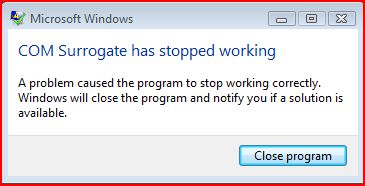
Time to time I keep on getting a message as shown in the screenshot. I did not see any harm when this happens and it usually happens when I open a folder which has a lot of files...

I am not sure what COM Surrogate is supposed to do but it is probably a bug in Vista. EventViewer logs an application error (Event ID 1000) which reads something like this:

Faulting application DllHost.exe, version 6.0.6000.16386, time stamp 0x4549b14e, faulting module unknown, version 0.0.0.0, time stamp 0x00000000, exception code 0xc0000005, fault offset 0x00bbb5ed, process id 0x594, application start time 0x01c70c6a663ae8c3.

So I guess, something is just taking more time than it is supposed to...

It actually created a report for it (probably to send back to Microsoft) under
C:\Users\Adil\AppData\Local\Microsoft\Windows\WER\ReportArchive\Report0f070a8c. I looked at it using notepad and below is what I see:

Version=1
EventType=APPCRASH
EventTime=128084765660881040
ReportType=2
Consent=1
UploadTime=128084765692168100
Response.BucketId=346129346
Response.BucketTable=1
Response.type=4
Sig[0].Name=Application Name
Sig[0].Value=DllHost.exe
Sig[1].Name=Application Version
Sig[1].Value=6.0.6000.16386
Sig[2].Name=Application Timestamp
Sig[2].Value=4549b14e
Sig[3].Name=Fault Module Name
Sig[3].Value=StackHash_1703
Sig[4].Name=Fault Module Version
Sig[4].Value=0.0.0.0
Sig[5].Name=Fault Module Timestamp
Sig[5].Value=00000000
Sig[6].Name=Exception Code
Sig[6].Value=c0000005
Sig[7].Name=Exception Offset
Sig[7].Value=00bbb5ed
DynamicSig[1].Name=OS Version
DynamicSig[1].Value=6.0.6000.2.0.0.256.4
DynamicSig[2].Name=Locale ID
DynamicSig[2].Value=1033
DynamicSig[22].Name=Additional Information 1
DynamicSig[22].Value=1703
DynamicSig[23].Name=Additional Information 2
DynamicSig[23].Value=2264db07e74365624c50317d7b856ae9
DynamicSig[24].Name=Additional Information 3
DynamicSig[24].Value=1344
DynamicSig[25].Name=Additional Information 4
DynamicSig[25].Value=875fa2ef9d2bdca96466e8af55d1ae6e
UI[2]=C:\Windows\system32\DllHost.exe
UI[3]=COM Surrogate has stopped working
UI[4]=Windows can check online for a solution to the problem.
UI[5]=Check online for a solution and close the program
UI[6]=Check online for a solution later and close the program
UI[7]=Close the program
State[0].Key=Transport.DoneStage1
State[0].Value=1
FriendlyEventName=Stopped working
ConsentKey=APPCRASH
AppName=COM Surrogate
AppPath=C:\Windows\system32\DllHost.exe


Well, not useful for me... I used EventViewe to report it back to Microsoft but although EventViewer recorded the event id as 1000, the web page that came up was talking about 1001:

There is no content available for Event 1001, for this version of the Windows operating system:

The following content is this event's explanations and user actions for earlier versions of the Windows operating system. Although this content is not specifically applicable to the version of the operating system that you are running on your computer, you might find the information of value.

Results for: Microsoft product: Windows Operating System; ID: 1001; Event Source: Windows Error Reporting;

No results were found for your query. Please see Search Help for suggestions.

[2006-11-28]
Update
Well, today I found some more information on this. Apparently Nero is my problem ( I do not have DivX codec installed on Vista but I do have Nero Burner)! Following solutions were suggested:

You can use FFDShow instead of Divx and for Nero you can rename NeVideo.ax
in C:\Program Files\Common Files\Ahead\DSFilter\

Unfortunately, renaming did not fix the issue for me but at least I know what's going on!

Vista - First Impressions

Finally! Vista is out and I have my hands all over it. I installed it on two machines and started testing it. Problems started during the installation, it failed to find any drives.

Problem: Both of these machines had promise IDE/SATA controller cards (Ultra 133 & TX2300) and Vista failed to recognize both.

Solution: Use Windows XP drivers! I am surprised but it worked. It's really cool that during the Vista set up, you can plug in a usb device and it will immediately recognize it and let you install drivers from there. So, I downloaded the XP drivers for both cards and Vista happily accepted them and showed me my hard disks.

Problem: After the installation, I had no internet access because it did recognize my Broadcom NetXtreme Gigabit network card but failed to find a suitable driver for it.

Solution: Yep, XP drivers work just fine. Once I had internet connectivity, I was able to download the beta drivers for my Creative Sound Blaster Live 24! I still seem to have a problem with the microphone but did not look deeper.

Problem: I installed Office 2007 and tried add my .pst files. I got access denied. When I checked, I realized that all the files in all the drives except the one I installed Vista were read-only. Even though permissions seemed OK as I was in the administrators group, and administrators group had Full access to all files and folders in all drives.

Solution: I created a new group and added my account and my wife's account in it. Then, I made this new group the owner of all files and folders by taking ownership. I then added this new group to the drive security on the top level and then replaced the permissions throughout my system. After logging off and logging back in, I was able to access all files and write to them. I went back to XP to see if anything was broken but other than "Recycle bin is corrupted, empty it?" message all was fine.

So far all the application I was running XP are working on Vista except McAfee Antivirus Plus Suite... It is not compatible with Vista and when I installed it anyway, it crashed explorer and everything else. I had an unusable system, so I had to reboot and log back in safe mode to uninstall it.

Windows Vista comes with a firewall like XP (but more advanced) yet because Enterprises would not let them, they would block all inbound traffic except allowed but no outgoing traffic, which is not acceptable to me as this means leakage! I am yet to find a firewall that would work seemlessly with Vista.

Vista Disable/Enable User Access Control

I was going thru System Configuration in Vista (Start>run, type "control.exe system") and noticed two options:

To disable User Access Control:
C:\Windows\System32\cmd.exe /k %windir%\System32\reg.exe ADD HKLM\SOFTWARE\Microsoft\Windows\CurrentVersion\Policies\System /v EnableLUA /t REG_DWORD /d 0 /f

To enable it:
C:\Windows\System32\cmd.exe /k %windir%\System32\reg.exe ADD HKLM\SOFTWARE\Microsoft\Windows\CurrentVersion\Policies\System /v EnableLUA /t REG_DWORD /d 1 /f

Both of these require a reboot. If you would like to disable Admin approval for the built-in administrator account to get rid of UAC, you can use Local Security Policy (LSA):

  • Start > Run, Type: secpol.msc
  • Scroll down to Local Policies > Security Options
  • Double click "User Account Control: Admins Approval Mode for the Built-in Administrator Account" and select "Disabled"

User Account Control is similar to Ubuntu's root access. In Ubuntu, you run everything as a normal user. When you need to be super user (root) you use sudo in the command line. In GUI, it asks you for your password. Vista can imitate the same behaviour. By default, instead of asking you for your password, it merely tells you that the action you are taking requires elevated privilage (administrator context) and asks you to confirm it.

The purpose is that if an application is trying to do something without you knowing it, it would be stopped. So, if you are changing these settings, you may not be doing yourself a favor.

2006-11-16

How To Crack A Combination Lock

A great way to figure out the combination to a lock that you had forgotten what it was. This is intended for information purposes only.

read more | digg story

2006-11-15

Ilya Hevnikov’s Blog » Blog Archive » How To Triple Boot (XP, Vista, Ubuntu) With Single Boot Screen

Ilya Hevnikov's blog has a very nice guide to how to trible boot, Ubuntu, Windows XP and Windows Vista. As I use the first two and intend to install the third one as soon as it becomes available at MSDN Subscriber Downloads, I think this may prove to be useful (so blogging it).

The challange I have right now is to find Promise SATAII-TX4 controller drivers for Vista. Promise web site (www.promise.com) does not seem to offer the drivers. I sent them an e-mail asking for an ETA but who knows, maybe I can use one of these beta drivers that are available at Internet...

2006-11-13

Office 2007 now available at MSDN

Office 2007 now available from MSDN Subscriber Downloads!

Office 2007 is now live and available to all MSDN Premium subscribers from MSDN Subscriber Downloads at http://msdn.microsoft.com/subscriptions. The following software editions and languages are now available:

  • Office Professional 2007 (English, German, Japanese)
  • Office Project Professional 2007 (English, Japanese)
  • Office Visio Professional 2007 (English, Japanese)
  • Office Groove 2007 (English, Japanese)
  • Office InfoPath (English, Japanese)
  • Office InterConnect 2007 (Japanese)
  • Office OneNote 2007 (English, German, Japanese)

Additional products and language versions will be made available soon. In addition, we look forward to adding Windows Vista to our slate of offerings beginning November 17.

Get it First! from MSDN Subscriber Downloads.

Best regards,

Seth Adams

Program Manager, MSDN Subscriptions

Boot Windows XP from a USB flash drive

This article talks about installing a bootable copy of Windows XP onto a flash drive and then boot a PC off of the flash drive. Digg comments are pretty insteresting too. Somebody mentioned that you can write to the flash drives for a limited number (although a high one) and if you have an OS installed, paging, swapping can kill it pretty quickly...

read more | digg story

2006-11-12

Sysinternals Utilities at their new home

"The Sysinternals web site was created in 1996 by Mark Russinovich and Bryce Cogswell to host their advanced system utilities and technical information and Microsoft acquired Sysinternals in July, 2006. Whether you’re an IT Pro or a developer, you’ll find Sysinternals utilities to help you manage, troubleshoot and diagnose your Windows systems and applications. If you have a question about a tool or how to use it, please visit the Sysinternals Forum for answers and help from other users and our moderators." goes the new home page of SysInternals under Microsoft Technet umbrella.

They also have a new blog. Check it out!

2006-11-11

Best Firefox Extensions and Customizing Tips

I had a post on "Less known Firefox Addons" sometime ago. Scott Finnie has a "live" document for "Best Firefox Extensions and Customizing Tips". It's a good document and I found the mentioned addons quite useful.

The one, I should mention is BugMeNot by Eric Hamiter. Once installed, you can right click on a login box, on several sites which requires you to log on before displaying the content (eg. The New York Times), and choose "Log me in with BugMeNot"! Go ahead & check out BugMeNot.com for this great service!

And I also love DiggThumbs, which will show the thumbnail images of the web site that hosts the digg story. You can see a screenshot at the right side...

[UPDATE - 11/18/2006]
I installed Windows Vista a few days ago and going thru installing all my apps. again. I'm writing down a few I felt I should install immediately to make FireFox 2.0 *usable* for me:

2006-11-02

Microsoft to support SuSe Linux

This is BIIIIIG News! Many CIOs were pushing MS to work with Linux. MS Office is the hands down killer app suite and running it on Linux is a win-win situation!

SAN FRANCISCO (MarketWatch) -- Microsoft Corp. and Novell Inc. are entering into a partnership that could help Novells Linux operating system, according to a media report Thursday. Under the agreement, which isnt final, Microsoft will offer sales support to Novells Suse Linux, the Wall Street Journal reported on its Web site.

For MS Announcement & Webcast:
http://www.microsoft.com/presspass/press/2006/nov06/11-02NewsConferenceMA.mspx

read more | digg story

2006-10-31

Linux keyboard shortcuts you should know about

Summary of most useful keyboard shortcuts. Take a printout for handy quick reference.

read more | digg story

HOWTO: Five steps to a more secure SSH

If you are running Linux, chances are you are running SSH. Here are five easy things you can do to lock down your server and make SSH more secure. Includes disabling root logins, using keys to login, automatically blocking hosts who are attempting dictionary attacks, and more.

read more | digg story

Data visualization tools for Linux

Applications for graphical visualization of data on Linux
® are varied, from simple 2-D plots to 3-D surfaces, scientific graphics programming, and graphical simulation.There are many open source possibilities, including gnuplot, GNU Octave, Scilab, MayaVi, Maxima, and others.

read more | digg story

2006-10-26

Ubuntu Linux 6.10 - Edgy Eft Released

Ubuntu Linux 6.10 - Edgy Eft Released:

The desktop version introduces a host of new features, an improved interface and a wide variety of new applications and desktop tools making Ubuntu 6.10 flexible and user-friendly. Enhancements include:

  • Tomboy, an easy-to-use and efficient note-taking tool

  • F-Spot, a photo management tool that enables tagging, photo editing and automatic uploading to on-line web management sites such as Flickr

  • GNOME 2.16, which in addition to new features such as enhanced power management, makes the GNOME desktop more secure, faster and more stable

  • Upstart, a replacement start-up manager offering a cleaner design, eye-catching effects and a substantially faster boot time

  • The latest Firefox web browser, which offers inline spell check support in web forms, easy recovery of crashed sessions, built-in phishing detectors, enhanced search engine management with built in OpenSearch support, and better support for previewing and subscribing to web feeds

  • Proactive security features, preventing many common security vulnerabilities even before they are discovered

  • Evolution 2.8.0, which brings new features such as vertical message panes

Download here...

2006-10-22

Throw away your TV

I recently came across this site called "Throw away your TV". It has tons of funny videos as well as educational ones.

One feature I liked was, when I am watching something, if I go to a different browser tab, it actually detects it and stops playing the video, only to continue after I go back to it.

2006-10-20

Have Your Lost USB Drive Ask For Help

It's like a digital luggage tag for your USB drive that pops up a message [via autorun] to notify the user that it's a lost drive.

read more | digg story

AutoIt Automation Tool

In the previous article about lost USB devices, author talks about AutoIt. I checked it out and it seems like a nice automation tool for Windows that can . There is also an informative Wikipedia article about it.

Below is from their home page:

AutoIt v3 is a freeware BASIC-like scripting language designed for automating the Windows GUI and general scripting. It uses a combination of simulated keystrokes, mouse movement and window/control manipulation in order to automate tasks in a way not possible or reliable with other languages (e.g. VBScript and SendKeys).

AutoIt is also very small, self-contained and will run on 95, 98, ME, NT4, 2000, XP, 2003 out of the box with no annoying "runtimes" required! You can even make compiled executable scripts that can run without AutoIt being installed!

2006-10-19

Imperial History of Middle East

Who has controlled the Middle East over the course of history? Pretty much everyone. Egyptians, Turks, Jews, Romans, Arabs, Greeks, Persians, Europeans...the list goes on. Who will control the Middle East today? That is a much bigger question.

See 5000 years of history in 90 seconds flash animation at http://www.mapsofwar.com/ind/imperial-history.html.

2006-10-18

Microsoft releases Internet Explorer 7 Final

The official download on Microsoft's own page and not on some blogs or Yahoo. Some improvements over IE6 includes: New Interface, RSS Feeds, Phishing Filter, Protected Mode, Tabbed Browsing, and PNG support among many others.
Get IE7 here:
http://www.microsoft.com/windows/ie/downloads/default.mspx

read more | digg story

2006-10-11

Colbert Roasts President Bush - 2006 White House Correspondents Dinner

An excerpt from the annual White House Correspondents Association dinner. Comedian Stephen Colbert (one of my favorites) made humorous remarks about various current events and the relationship between the press and the White House. He also presented a video of a mock press conference which ended in a chase scene featuring long-time correspondent Helen Thomas.

2006-10-10

Top Five Wired Nations

IBM has a short list of countries hat are leaders in the wired revolution. The U.S. makes the list, barely.

read more | digg story

2006-10-09

Its confirmed. Google buys youtube for $1.6 billion

Google Inc. said Monday it's buying No. 1 Internet video sharing Web site YouTube Inc. for $1.65 billion in stock. The deal is regarded as a largely defensive one that leapfrogs Google into a leading role in a burgeoning Internet marketplace

read more | digg story

2006-10-07

Kick Ass Classical - Classical Music's Top 100 Greatest Hits

Kick Ass Classical - Classical Music's Top 100 Greatest Hits You can listen to them for a few seconds on the side. And believe me, a few secons is all you need to remember the tunes anyway

Windows Vista RC2 available

Microsoft Windows Vista RC2 is now available for download

2006-10-02

Dive Into Python: Free eBook

Dive Into Python is a Python book for experienced programmers. You can buy a printed copy, read it online, or download it in a variety of formats. It is also available in multiple languages. Recommended eBook for anyone who wants to seriously learn Python. The main site also provides some good Python related websites.

From comments, there is a link to 17 Free Python Books:
http://freecomputerbooks.com/langPythonBooksIndex.html
Include this one (Dive Into Python)

read more | digg story

Accessing Ubuntu from Windows with FreeNX

[ORIGINAL POST - 06/02/2006]
My coworker, Andy Mei mentioned FreeNX to me. I checked out the Ubuntu Forums on FreeNX and FreeNX Wiki page. It's a two-part (client/server) software...

To install FreeNX on my ubuntu dapper,

First I added the following line to my /etc/apt/sources.list:
deb http://free.linux.hp.com/~brett/seveas/freenx dapper-seveas freenx
you can try other repositories.

If you do not want to get gpg errors, import them:
  • sudo gpg --keyserver subkeys.pgp.net --recv-keys 1135D466
  • sudo gpg --export --armor 1135D466 | sudo apt-key add -
Then I,
  • fired up Snaptic Package Manager,
  • clicked reload to get updared package list from the newly added repository
  • then searched for freenx
  • marked it and clicked apply
To make installation simple, I did not enable ssh. Then, I went to NoMachine's website & downloaded NX Windows Client.

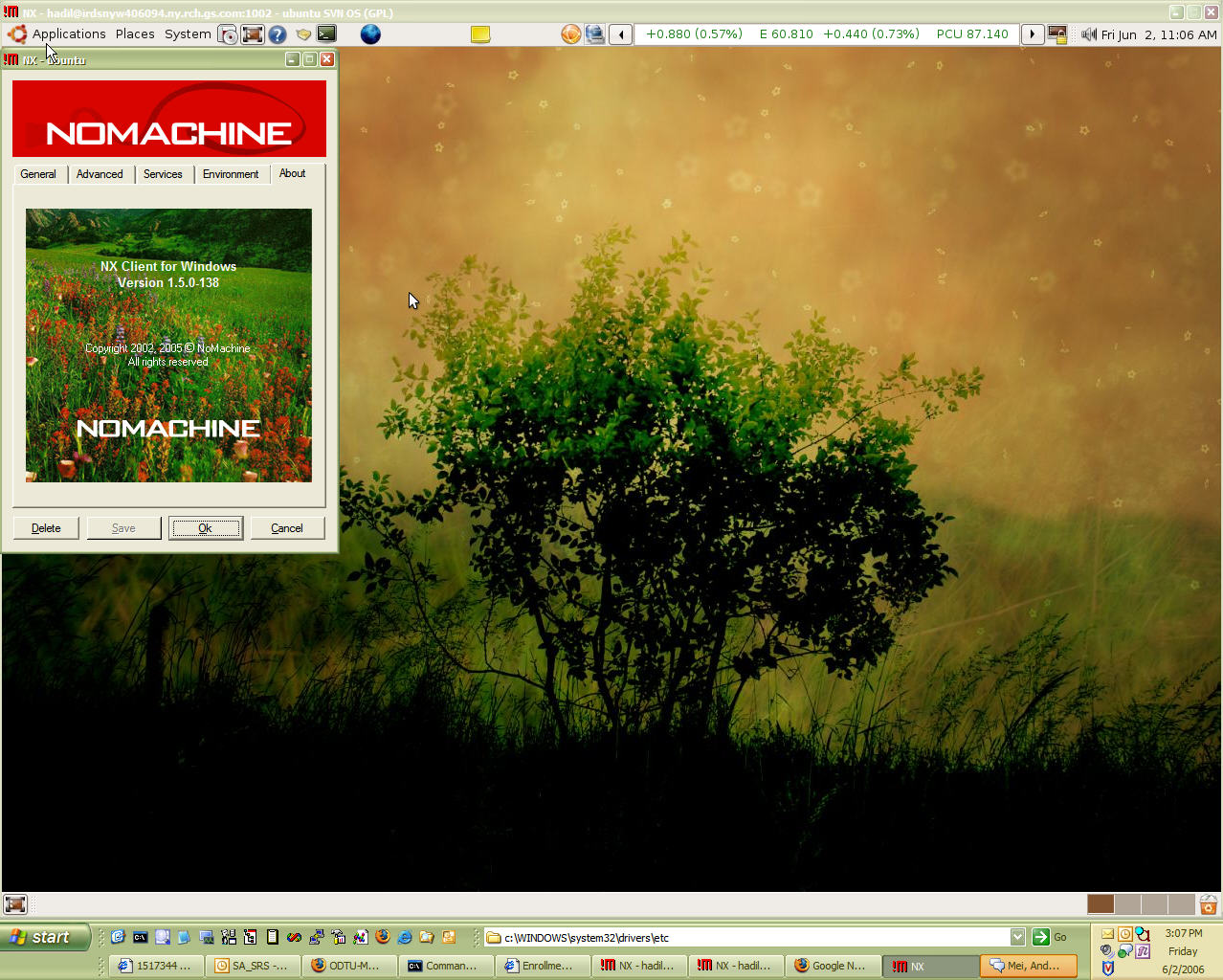
Result is a very fast & easy connection from Windows XP to Ubuntu Linux (see screenshot above).

Ahh, don't try to be smart and install it from cmd line `sudo apt-get install freenx`. I know people who did and suffered ;-)

[UPDATE - 09/29/2006]
OK, I take that back! I now have a beta version of Ubuntu Edgy Eft (Knot 3) running on my linux box and I installed it from command line:
sudo apt-get install freenx
I chose No machine keys during the set up and it works just fine!

[UPDATE - 10/02/2006]
I downloaded the new NxClient (2.1.0-6) from NoMachine.com. It failed to connect to my Ubuntu
NX> 704 Session cache: unix-gnome
NX> 707 SSL tunneling: 0
/usr/lib/nx/nxserver: line 891: 27507 Terminated              
( sleep $AGENT_STARTUP_TIMEOUT; exit 1 )
NX> 105 NX> 504 Session startup failed.
NX> 1004 Error: nxagent failed to start with: Unrecognized option: 1
NX> 1001 Bye.
Apparently, it needs a compatible client/server installation...

Useful Free Windows Programs Under 2MB

Over 20 free windows applications under 2mb, courteously of revision3 forum member, lordfoul. Definately a list to look into. Applications range from miscellaneous software, command utilities, system performance tools, and more.

I also liked the followings not yet in the list but mentioned in the comments:
- Taskbar Shuffle (left-click and drag the programs/buttons on your Windows taskbar to rearrange them)

- Power Menu (adds "Always On Top", "Minimize To Tray", "Priority" and "Transparency" sub menus to all top level system menus)

Also check out www.tinyapps.org!

read more | digg story

2006-09-28

Saving Outlook E-mail Attachments To a Folder

I was looking for some code samples as I wanted to save e-mail attachments to a folder. Below is the code I got from OutlookCode.com. I modified it a bit as I did not want to touch the original e-mails...

In Outlook, hit Alt+F11, double click modules and paste it into module1
Sub SaveSelectedAttachment()

'Declaration
Dim myItems, myItem, myAttachments, myAttachment As Object
Dim myOrt As String
Dim myOlApp As New Outlook.Application
Dim myOlExp As Outlook.Explorer
Dim myOlSel As Outlook.Selection

'Ask for destination folder
myOrt = InputBox("Destination", "Save Attachments", _
"C:\Entertainment\Attachments\")

On Error Resume Next

'work on selected items
Set myOlExp = myOlApp.ActiveExplorer
Set myOlSel = myOlExp.Selection

'for all items do...
For Each myItem In myOlSel

'point on attachments
Set myAttachments = myItem.Attachments

'if there are some...
If myAttachments.Count > 0 Then

'add remark to message text
' myItem.Body = myItem.Body & vbCrLf & _
' "Removed Attachments:" & vbCrLf

'for all attachments do...
For i = 1 To myAttachments.Count

'save them to destination
myAttachments(i).SaveAsFile myOrt & _
myAttachments(i).DisplayName

'add name and destination to message text
' myItem.Body = myItem.Body & "File: " & myOrt & _
' myAttachments(i).DisplayName & vbCrLf

Next i

'for all attachments do...
' While myAttachments.Count > 0

'remove it (use this method in Outlook XP)
'myAttachments.Remove 1

'remove it (use this method in Outlook 2000)
' myAttachments(1).Delete

' Wend

'save item without attachments
' myItem.Save
End If

Next

'free variables
Set myItems = Nothing
Set myItem = Nothing
Set myAttachments = Nothing
Set myAttachment = Nothing
Set myOlApp = Nothing
Set myOlExp = Nothing
Set myOlSel = Nothing

End Sub

I have also seen a lot of useful code examples here

Google Cheat Sheets

I came across this pretty useful site. All cheats can be downloaded as a pdf document... "This two page Google Cheat Sheet lists all Google services and tools as well as background information. The Cheat Sheet offers a great reference to grasp of basic to advance Google query building concepts and ideas."

2006-09-26

Bike Tour & World's Strongest Dad

I am going to join company bike team of "The 2006 MS Bike Tour" that will take place on October 15th in Manhattan.

One of the organizers has sent this motivational "no-dry eyes" story to our distribution list. It tells us about the unbelievable story of Dick & Rick Hoyt. This is a must-read!

2006-09-25

Tiny Linux gadget protects Windows XP laptops

An Israeli startup has announced a tiny, Linux-based remote access device that aims to protect Windows XP laptops. The credit card-sized device runs sophisticated firewall, VPN, and monitoring software on a hardened Linux kernel.

read more | digg story

How XGL Works

Xgl, Xegl, Xglx, Aiglx... ever wondered what all this stuff does? Here's the definitive layman's guide to understanding how this stuff actually works. Scroll to the end for some illustrative diagrams.

read more | digg story

Dapper Drake to Edgy Eft Upgrade

Being an impatient guy I am, I wanted to upgrade my Dapper Drake Linux boxes to the newest Edgy Eft, which is still in test phase and will be available next month.

I tried upgrades on two systems. Both got stuck. One complained about Firefox packages, other one supsys (this is related to printing system). After trying for hours to repair/uninstall/reinstall the packages, none were able to even boot properly. So, I gave up...

I decided to do a clean install by downloading the Edgy Eft Knot 3 CD. Installation went fine. There was 400Megs of upgrade afterwards. I am yet to screen resolution and test it...

[UPDATE - 09/27/2006]
As I mentioned above, the CD installation was fine on one of my PCs; however, it did not go so well for the other one. I wiped out the harddrive and tried to install Edgy Eft from scratch using the Knot 3 CD. It would just get stuck at some point no matter how many times I tried.

It seemed to finish installation once but then when I rebooted, I saw a *GRUB 18 error * which implies a bios issue... Anyway, I used Dapper Drake Live CD to install 6.06 and then on vanilla install just replaced all the "dapper" references in /etc/apt/sources.list to "edgy". In "vi" you can easily do this:
:%s/dapper/edgy/g
Upgrade still failed and it complained about Firefox... As suggested, I ran
sudo apt-get -f install
to fix the issues. It worked (or so it seemed). Then I re-ran
sudo apt-get update && sudo apt-get dist-upgrade -y
and installation finished. After reboot X-Server did not come up. Everything in /etc/X11/xorg.conf made sense to me. So, I tried running reconfiguration command
sudo dpkg-reconfigure -phigh xserver-xorg
but that would not work either as xserver-xorg was "broken". I, then, reinstalled xserver-xorg package:
sudo apt-get --reinstall install xserver-xorg
That seemed to do the trick as GUI came up when I ran
/etc/init.d/gdm restart
This is being a painful upgrade but hey I asked for it, did not I?

2006-09-15

112 Windows Run Commands

Wanted to Browse fast in windows. Remember these commands.
This will really save a lot of time of your. There are many
commands which you might have never seen or never knew.
There are certain properties of windows which you may hardly know
exist in windows. Here is a list of 112 run commands.

BTW, In case you did not know, you can quickly access Start > Run by using WindowsKey + R combination. (Windows Key is usually between Ctrl & Alt and has Windows Logo on it).

read more | digg story

Worlds worst hacker (hacks 127.0.0.1)

This is a transcript of the worlds dummest hacker on an IRC channel. Prepare to roll on the floor :)

read more | digg story

2006-09-13

Hello

I too joined to scorion.net! :)

2006-08-29

What are the top 100 Viewed Wikipedia Pages?

This tool shows the articles from the English Wikipedia that are viewed most. Some results may surprise you...

read more | digg story

Microsoft PowerShell

As a Windows Administrator, I love FOR loops as they help me do the same thing for several servers. Then again, looking back scripting in DOS has always been rather painful. I admired powerful Unix shells and kept on wondering when will Microsoft recognize that and come up with a powerful shell.

Apparently, it's close! They have now released RC2 of their PowerShell (used to be known as Monad). I have not yet start reading the getting started guide but one I have high expectations. After all, Microsoft used to be a company that designed programming tools and languages :)

Hopefully we will get something better than vbscript. Check this out!

101 ways to organize your life

Project Management (and life) Wisdom straight from a project managers... I like the article. I think it is a must-read!

read more | digg story

2006-08-27

Neat ssh tricks

I saw a very concise article on ssh tricks here. I would highly suggest that you read the comments as they include a lot of stuff not covered in the original article or supplements it.

While you are at it, the same author has written a follow up to this article that explains how to bypass firewalls via tunneling.

Also want to mention a few tricks I learned today...

[X SESSION FORWARDING]
If you want to forward your X sessions from remote host to your local pc, use X
ssh -X username@server.address.com '/usr/bin/gaim'
will run gaim on the target but will display it on your screen

[KEEP SSH SESSION ALIVE]
If you find your ssh session timing out after 2 mins of inactivity (this is a security feature) and want to increase the time-out period, just add the following line into the /etc/ssh/sshd_config file on the target server:
# Sets time out to 10 mins
ClientAliveInterval 600
[REMOTE PORT FORWARDING]
Let's say you are on a firewalled host X. Assuming you can create a reverse tunnel (aka. Remote Port Forwarding or Incoming tunnel) to your target homeServerY using this:
ssh -N -R:2222:localhost:22 Y
You can use that tunnel to access back to X from Y by typing the following on your homeServerY:
ssh -p 2222
Read more below for further information...

[USING CORKSCREW]
Corkscrew is a simple tool to tunnel tcp connections via http proxy and is also very easy to configure. You just enter your http proxy like this into your .ssh/config file:
ProxyCommand corkscrew your.http.proxyserver 8080 %h %p
Let's say SSH Daemon is running on port 443 on the target host. Instead of typing
ssh -p 443 or scp -P 443 everytime, just place it into config file ~/.ssh/config so that your config file would look like:
host targetServer
User username
Port 443
ProxyCommand corkscrew your.http.proxyserver 8080 %h %p
Now, assume a scenario where you have two servers, X, Y. X is able to ssh into Y using let's say port 443. However, X is behind a firewall and can not be accessed from outside. In this case, you may use ReverseTunneling,
ssh -N -p 443 -R:2222:localhost:22 Y
-N means do not execute a command. Useful for port forwarding. Also checkout -n.
-p is telling X how to connect to Y
-R and the port after it means use that port on the remote machine. Then, localhost:22 means forward anything that comes to 2222 to 22 on the local box, X. We chose a port >1024 as anything less would mean privileged port. ie. root access required.

Now, you can configure ~/.ssh/config file on Y
host X
HostName localhost
User username
Port 2222
So now you can use ssh X, to connect to it from Y. Essentially, you are connecting to your Y's port 2222 which gets redirected to X's port 22

Remember, once you close the connection, reverse tunnel will disappear. If you do not want this, you can create a simple shell script:
#!/bin/bash
while [ true ];
do ssh -C -N -L 2222:localhost:22 Y
done
[ACCESS WINDOWS USING RDESKTOP]
In this scenario, let's assume that you have a home NAT where
your windows ip: 192.168.0.2
your linux ip: 192.168.0.3
your router's ip: 195.100.100.100

Let's also assume that your Router is forwarding port 22 traffic to your Linux box and you can access it from internet using ssh (you are on machine X).

If you want to rdesktop to your windows box from your linux box using rdesktop, you can first create a tunnel on machine X:
ssh -N -L 3389:192.168.0.2:3389 195.100.100.100

(add -p port# if you are not using standard SSH port of 22)
Then on X, simply run:
rdesktop localhost
Your windows box at 192.168.0.2 should answer with logon screen...
Of course it does not hurt if you add a few useful params to, for example, make it 1024x768 with 16 bit:
rdesktop -a 16 -g 1024x768 localhost
Som what's happening here? Our target ip is 195.100.100.100 which, because of the port forwarding, will take us to our linux box (192.168.0.3) and establish an SSH session.
Then, we are essentially telling our linux box to forward all requests we sent to our local rdp port 3389 to the rdp port 3389 of windows box.

Upstart init.d replacement in Ubuntu Universe + Comparisons

I loved this article. As a matter of fact, it cleared a few things that kept me wondering about Mac's implementation. It's a must read. Also take a look at Ubuntu Wiki on upstart at https://wiki.ubuntu.com/ReplacementInit

Upstart, an init.d replacement, is now in the Ubuntu Universe. This article also details comparisons between other approaches and why Upstart is the best. "From the start of development of edgy+2, no new packages will be accepted unless they provide upstart jobs instead of init scripts and init scripts will be considered deprecated."

read more | digg story

2006-08-24

Stage6: High Quality Videos

DivX, the video company well known for its coding and compression technology, quietly launched a YouTube-style online video sharing community, Stage6, a few weeks ago. The quality of the videos are much better than what you will find at YouTube or Google Videos but site is slower. You have to install the DivX Web Player (a small download) too.

read more | digg story

2006-08-22

Creating Firefox Search Shortcuts

This is a neat trick, I've seen Rohit Pai using all the time... Purpose is to create a shortcut that will let you search for keywords (in our example "hindistan" "blog") using a search engine (in our example, google). Steps are simple:

  • In Firefox, go to the web site that offers search
  • Right click in the *search box*, where you would normally put your keywords
  • Choose "Add a Keyword for this Search..."
  • Give it any name
  • Type the shortcut you would like to use (in our example g)
  • Click OK.
Now in the address bar you can use type your new shortcut and the keywords as shown above...

2006-08-17

Seth Godin's list of 937 Web 2.0 sites, sorted by traffic rank

I am not surprised to see digg.com or some other web sites I frequently use raising in the ranking but there are a lot of services I never heard of. Worth taking a look... Adil
"Web 2.0" (for lack of a better term) has the 'net all atwitter. But of the websites included in the category, which of them have real traffic, and which don't? This list, put together by Seth Godin and Alexaholic, is the first of its kind to let you see at a glance the movers and shakers in Web 2.0-land.

read more | digg story

2006-08-15

5 Rarely Used HTML Elements

I saw this post on 5 rarely used HTML tags:
  • "address""for address fields ",
  • "q" for double or single quotation (does not seem to work with IE),
  • "optiongroup" to group options,
  • "acronym" or "abbr"for abbreviations and
  • "optiongroup" & "legend" for grouping items inside a form.
Seemed pretty useful to me.

2006-08-14

Automatix Bleeder & Compiz

Just wanted drop a note that you may also use automatixbleeder, to install XGL/Compiz. I actually tried it and it handles most of the work including installation & configuration of
XGL session menu
Compiz packages
nVidia drivers
...

I just talked to arnieboy, who is the original poster about Automatix Bleeder on irc #Automatix channel @Freenode, he told me that once Automatix Bleeder installation completes, it creates an instruction file on the desktop. He also corrected a few things like
- I should use cgwd instead of gnome-window-decorator
- I do not need to add deb http://xgl.compiz.info/ dabber main
- I do not need to add deb http://media.blukind.org/xgl/ dabber main
- gset-compiz is now obsolete as quinn does not maintain it anymore...
- bleeder does not overwrite my existing gnome session

I've updated the how-to with this info.

2006-08-12

compiz on Ubuntu Dapper

[LAST UPDATED ON 2006-08-16]

After seeing compiz videos at eHomeUpgrade, I could hardly wait to try it on my Ubuntu. I have an HP X6000 Workstation with nVidia 980 XGL card which is not of course that great to show all the great effects compiz offers. Plus I was disheartened at some blog entry because I did not have direct rendering enabled on my card :
adil@ahlnx:/etc/apt$ glxinfo  grep rendering
direct rendering: No
but none of them proved to be a show stopper! I had to try a few things to get this working so bear with me...

First thing first, I backed up my /etc/X11/xorg.conf and /etx/apt/sources.list
Then edited /etc/X11/xorg.conf as described here.

It was time to add additional repositories so that I could download and install compiz and dependent packages again as described in the link above. I added the followings into /etc/apt/sources.list
deb http://www.beerorkid.com/compiz/ dapper main
deb http://xgl.compiz.info/ dapper main
deb http://media.blutkind.org/xgl/ dapper main

Then installed the GPG key:
wget http://www.beerorkid.com/compiz/quinn.key.asc -O - sudo apt-key add -
Updated the available package list:
sudo apt-get update
and finally installed the packages:
sudo apt-get install xserver-xgl compiz-gnome gset-compiz
Edited the /etc/gdm/gdm.conf-custom and added the followings
---------------------------------
[servers]
0=Xgl

[server-Xgl]
name=Xgl server
command=/usr/bin/Xgl :0 -fullscreen -ac -accel glx:pbuffer -accel xv:pbuffer
flexible=true
Updated (Automatix Bleeder) script

=================================
adil@ahlnx:~$ more /usr/bin/toggle-compiz-nvidia
#!/bin/bash
if ps -A grep -e "compiz.real$" > /dev/null; then
killall cgwd
metacity --replace &
else
cgwd &
compiz --replace gconf &
fi

=================================

If you do not use Automatix Bleeder, make sure you can execute it
sudo chmod 755 /usr/bin/toggle-compix-nvidia

I actually use a different name:
sudo mv /usr/bin/toggle-compix-nvidia /usr/local/bin/startcompiz


Effects are mind blowing. To have an idea what my desktop is like now, watch this YouTube video or see the below post

=-=-=-=-=-=-=-=-=-=-=-=-=-=-=-=-=-=-=-=-=-=-=-=-=-=

TIPS & TRICKS
As I keep on reading and learning more and more on compiz,
I decided to add some more tips...

1) When ubuntu Logon Screen shows up I have an option for XGL
Here is the content of my xsessions
sudo gedit /usr/share/xsessions/xgl.desktop
---------------------------------
[Desktop Entry]
Encoding=UTF-8
Name=Xgl
Comment=Start an Xgl Session
Exec=/usr/bin/startxgl.sh
Icon=
Type=Application
---------------------------------
If you have do not see any effects, try to start compiz-start script we created
above. To see session start up errors, take a look at your xsession-errors file
gedit ~/.xsession-errors
2) Remember, you can find tons of info on compiz forums

3) Obviously, ATI configuration is different than nVidia. For example,

in /etc/gdm/gdm.conf-custom>

[servers]
# Override display 1 to use Xgl (DISPLAY 1 IMPORTANT FOR ATI FGLRX).
1=Xgl

For nVidia screen is always 0 not 1!

4) When checking forumg, if you need to find out whether you have a
package already installed try:

dpkg -s  grep -i status
eg.
adil@ahlnx:/usr/local/bin$ dpkg -s compiz grep -i status
Status: install ok installed
5) Use `xvinfo` to confirm that your
color depth is set to 24 bit

6) To check what plugins you have, run gconf-edit & browse to
"apps/compiz/general/allscreens/options"
double click active_plugins, you should see things like
gconf decoration reflection blur wobble fade minimize cube rotate zoom
scale move resize dbus switcher water trailfocus state showdesktop neg bs
If you do not try adding them in that order as there are dependencies
(one per line)

7) Sometimes you see an application is missing a window decorator,
eg. my firefox was missing it, use ALT + Mouse to move that window ;)

8) There are some really nice themes for compiz , heres how to install them:
You will need the following packages:
gcompizthemer
cgwd
After you have installed the packages , edit /usr/local/bin/startcompiz
And change it like this:
---------------------------------
#!/bin/sh
killall gnome-window-decorator
wait

cgwd &
compiz --replace gconf &
---------------------------------
Restart compiz / reboot.
Go to System , preferences and you will find Compiz Themer there.

Apparently there used to be a gcompizthemer-themes package, which is now
part of cgwd package, which will appear in
System > Preferences > CGWD Themes menu

9) If you do not want the XGL session restart when you press shift+backspace, add this to your start up script: (toggle-compiz-nvidia or startcompiz)
xmodmap -e "keycode 22 = BackSpace BackSpace Terminate_Server"

=-=-=-=-=-=-=-=-=-=-=-=-=-=-=-=-=-=-=-=-=-=-=-=-=-=-=-=-=
So, what's not working?
Well, after reboot, if I choose XGL session, it does not start.
I see some errors in the ~/.session-errors log...

The workaround?
Well, I asked in Automatix Bleeder forum and arnieboy suggested this:
"revert your gdm-custom.conf to its original shape and try again. you told me in #Automatix yesterday that you already have gdm set up to start xgl. you need to change that to NOT let gdm start up xgl by default (in other words, revert it back to the default) and try loggin in to the xgl session from gdm (after restarting)."
That did the trick. No more issues logging into XGL session.

Linux XGL/Compiz Graphics to Apple Aqua & Vista Aero: EAT ME!

WOW! Oh boy, is this really possible? Guys at worked showed me the videos of Compiz together with Apple's new Leopard and of course Microsoft's Aero. There is no comparison really. Compiz is the clear winner. You really have to see these videos.

By Alexander Grundner - "I couldn't help being a little over the top on this one. Just watch the attached videos. And if you want to see XGL/Compiz running on dual screens, click here. Do me a favor, though. After watching all three videos, tell me which desktop graphics environment looks more advanced."

read more digg story

2006-08-09

Installing mailx on Ubuntu Dapper

At work, I frequently use mailx on Solaris and I thought I could make use of it on my linux box too. I did not know how to install it but guessed right:
sudo apt-get install mailx
During the installation, it asked some questions which I did not know how to answer and just chose the defaults. Then I tried something like
ls -l |mailx myemail@address.com
which indeed did not work. Then I started reading and realized that I should have probably used "Satellite" mode during installation....

Removing it should be easy, right? Well, sure, if you know what you are doing! I did not :)
sudo apt-get remove mailx
said it removed the package but when I reinstalled it, it did not really ask me any questions which meant that I had not removed it completely. Reading some more on APT documentation, I learnt a few useful commands like
sudo apt-get --purge remove mailx
(would remove mailx together with "configuration files")
Nope! Then I cleaned the cache:
sudo apt-cache autoclean
(supposed to remove unupgradable packages from /var/cache/apt/archives)
and
sudo apt-cache clean
(Removes everything except locks from apt-cache archives)
Still, I was missing something. The command I was looking for was something like
rpm -qp 
or
rpm -qlp 
that would tell me more about package and its file.

I found something similar:
sudo apt-get depends mailx
mailx
Depends: libc6
Depends: liblockfile1
|Depends: postfix
Depends: <mail-transport-agent>
...
Depends: base-files
Conflicts: <suidmanager>
Aha, I needed to remove postfix too. As expected, after that I was able to get the install menu. I chose satellite and specified smtp.comcast.net as my relay host. I got an error when I tried the above mailx command though:
postdrop: warning: unable to look up public/pickup: No such file or directory

I did not find much info on the error but somebody was talking about authentication... Then, I remembered that comcast needs authentication and did some more google search and found a nice article.

I did everything mentioned but still the same issue. It looks like I am missing SASL now but readme is losing me...

[UPDATE - Aug.17 -2006]
Looking at the /var/log/mail.err files, I found out that it was complaining about a file missing
/etc/postfix/sasl_passwd.db
Then, I remembered that I had entered this line:
smtp_sasl_password_maps = hash:/etc/postfix/sasl_passwd
into /etc/postfix/main.cf
sasl_passwd file included something like this:
smtp.comcast.net myuserid:mypwd
but I had fat fingers and actually named the file not sasl_passwd but sasl_password and the accompanying .db file was named sasl_password.db. The thing is, running
sudo postmap sasl_passwd
gave me an update error. So I left it as is.

So I corrected both and now when I tail /var/log/mail.info, while I run something like
ls -l|mails myemail@address.com
I don't see errors:
Aug 17 00:13:20 ahlnx postfix/pickup[17245]: 6823B64707: uid=1000from=Aug 17 00:13:20 ahlnx postfix/cleanup[17973]: 6823B64707: message-id=<20060817041320.6823b64707@ahlnx>Aug 17 00:13:20 ahlnx postfix/qmgr[11714]: 6823B64707: from=, size=788, nrcpt=1 (queue active)

Bad news is, mail still does not arrive and I see this warning:
Aug 17 00:29:45 ahlnx postfix/master[4870]: warning: /usr/lib/postfix/smtp: bad command startup -- throttling

I still had a hunch that there not being able to update that .db file was not good. Even stopping postfix was not enough:
sudo /etc/init.d/postfix stop
So, I removed it. Then changed the permissions on /etc/postfix
sudo chmod 777 /etc/postfix
and ran the command again while I was in /etc/postfix directory :
sudo postmap sasl_passwd
I got relatively better results:
Aug 17 00:39:22 ahlnx postfix/pickup[18775]: CC18F63A35: uid=1000 from=
Aug 17 00:39:22 ahlnx postfix/cleanup[18784]: CC18F63A35:
message-id=<20060817043922.cc18f63a35@ahlnx>
Aug 17 00:39:22 ahlnx postfix/qmgr[18776]: CC18F63A35: from=,
size=788, nrcpt=1 (queue active)
Aug 17 00:39:23 ahlnx postfix/smtp[18781]: CC18F63A35: to=,
relay=smtp.comcast.net[63.240.77.77], delay=1, status=bounced (host 
smtp.comcast.net[63.240.77.77] said: 550 [PERMFAIL]
comcast.net requires valid sender
domain (in reply to RCPT TO command))
So, I needed to enter a valid address somewhere. Examining /etc/postfix/main.cf, I guessed that I had to activate this line:
myorigin=/etc/mailname
and created the file /etc/mailname, which included a single line like
comcast.net

That did the trick, and after reloading postfix
sudo /etc/init.d/postfix reload
I was able to send e-mails:
Aug 17 00:45:22 ahlnx postfix/master[18772]: reload configuration /etc/postfix

Aug 17 00:46:08 ahlnx postfix/pickup[19101]: 87A5163A35: uid=1000 from=

Aug 17 00:46:08 ahlnx postfix/cleanup[19148]: 87A5163A35:
message-id=<20060817044608.87a5163a35@ahlnx>

Aug 17 00:46:08 ahlnx postfix/qmgr[19102]: 87A5163A35: from=, size=2033, nrcpt=1 (queue active)Aug 17 00:46:09 ahlnx postfix/smtp[19150]: 87A5163A35: to=<destination@comcast.net>, relay=smtp.comcast.net[216.148.227.147], delay=1, status=sent (250 ok ; id=20060817044626m12001a30fe)
Aug 17 00:46:09 ahlnx postfix/qmgr[19102]: 87A5163A35: removed


That was some experience! But as always, it feels good to make something finally work :)

SSH, SCP, SFTP From Windows

I have just finished configuring my ssh daemon on my ubuntu box where I changed port number to 443 in /etc/ssh/sshd.config file

Then I tried to use Putty to connect to it from windows, it worked like a charm. However, I found another very useful tool that can do scp, sftp as well: It's called WinSCP. It's very easy to configure and in not time I was able to login to my Ubuntu and copy files from there to my windows box using scp/sftp.

The problem is I have NAT enabled. I also have a Vonage box in front of my router. I created an account on www.dyndns.org and entered relevant info on my router configuration. However, because it is also behind NAT, it can not properly update its IP and there is no configuration option on the Vonage Motorola box.

The only thing I could do was to tell Vonage Motorola box to forward all 443 port requests to my router and then enabled Port forwarding in my router so that it would forward all 443 requests to my Ubuntu box.

I have restarted ssh daemon by running
/etc/init.d/ssh restart
and now it's listening on 443. This is working fine as long as I connect to it directly at 443 but port forwarding does not seem to be working properly. I guess I have to wait for Mathieu to come back from France to show me a few tricks to do this...

2006-08-08

Creating A New Partition in Ubuntu Dapper


When I was installing my Ubuntu Dapper, I had not really used up all the space. In fact, I had left about 250GB free space. Today I wanted to use up that space...

First, I checked my partitions
adil@ahlnx:/etc$ sudo fdisk -l Disk /dev/hde: 300.0 GB, 300090728448 bytes 255 heads, 63 sectors/track, 36483 cylinders Units = cylinders of 16065 * 512 = 8225280 bytes Device Boot Start End Blocks Id System /dev/hde1 * 1 3187 25599546 7 HPFS/NTFS /dev/hde2 3188 36483 267450120 7 HPFS/NTFS Disk /dev/hdf: 300.0 GB, 300090728448 bytes 255 heads, 63 sectors/track, 36483 cylinders Units = cylinders of 16065 * 512 = 8225280 bytes Device Boot Start End Blocks Id System /dev/hdf1 1 4613 37053891 83 Linux /dev/hdf2 4614 4740 1020127+ 82 Linux swap / Solaris /dev/hdf3 4741 5633 7173022+ 83 Linux
So, I could have simply run
  • sudo mkfs.ext3 /dev/hdf4
but I wanted to use Gnome Partition Tool. So,
  • sudo apt-get install gparted
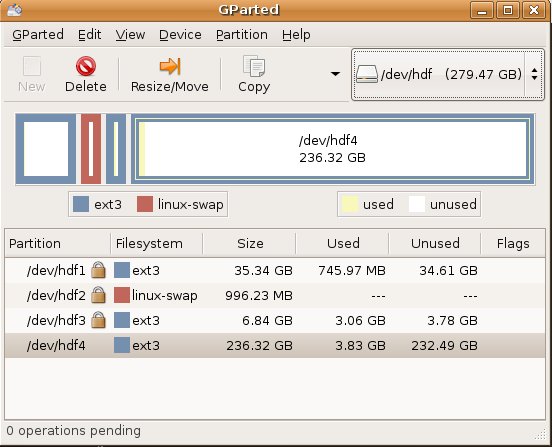
After the installation, I ran it (also available System > Administeration > Gnome Partition Editor)
  • gksudo gparted
Tool is very intuitive! Simply select the /dev/hdf from up on right side on the toolbar and then click the empty space, click "New" & choose the size. Then "Apply".

After partitioning done, it advised that I reboot the server...

2006-08-04

Configuring IP Address in Ubuntu

As most people, I have a small home-network. My ubuntu was getting the IP address from the router dynamically. I decided to use static addresses instead of DHCP. The procedure is a bit different then Red Hat Linux.

I first connected to my router and changed the DHCP range so that I would have plenty of static addresses. Then I backed up my /etc/network/interfaces file which had an entry like this:

iface eth0 inet dhcp

As I did not know how to edit this file, I ran the network-admin script:
/etc/network-admin, (you can also do this from GUI: System > Administration > Networking)
Clicked Deactivate Ethernet Connection
Clicked Properties & Changed the IP/NetMask/Gateway after choosing static
Clicked Activate Ethernet Connection
and examined the difference in /etc/network/interfaces file:

OLD <> iface eth0 inet static
NEW > address 192.168.1.3
NEW > netmask 255.255.255.0
NEW > gateway 192.168.1.1

Then, to be able to access my windows box, I added the following entry into /etc/hosts
192.168.1.2 windows

In Red Hat Enterprise, there are to bring up/down eth0, you would run
/etc/sysconfig/network-scripts/if-up eth0
/etc/sysconfig/network-scripts/if-down eth0

In Ubuntu, it's a little different
sudo /etc/ifup eth0
sudo /etc/ifdown eth0

[UPDATE - 08/09/2006]
I noticed a weird issue with the Gnome Network Applet icon on the top right corner. It has a little red exclamation mark and when hovered reads "No network connection" although my network connection is just fine...

2006-08-03

Red Hat Enterprise Training

I was at Red Hat Training this week. I took RH133 Red Hat Linux System Administration course at Global Knowledge which located in down-town Manhattan at 90 Broad street.

It was one of the best training courses I ever attended. Instructor Rob Locke was great! Unfortunately, I am not going to take the exam to become a Red Hat Certifief Technician but today they gave us a taste of what the exam will be like. I loved it.

They made us install a troubleshooting package and then go to init 3. Then, we started to the tests. They were divided into 3 categories. Basically, they break something in your system and make you repair it. They do not care how you fix it as long as it is fixed.

They had 4 so called 'local' problems, 2 network and 3 boot problems. The last boot problem was the hardest to find but my scripting skills helped me realize that they broke bash and that's why the system was not booting up.

I was one of the few who fixed all the issues and I was proud of myself when I completed them. I came home and tested myself via their course pre-assessment tasks. Normally, you should take RH033 , Red Hat Linux Essentials but I had skipped that as it would be difficult for me to get both that one and system administration.

Interestingly, when I tested myself using Red Hat Linux System Administration Pre-assessment Questionnaire, I scored 34/48 but scored 37/48 on Red Hat Linux System Administration Pre-assessment Questionnaire .

Below are my results... The thing is, I use Ubuntu as my desktop :)

Red Hat Linux Essentials Pre-assessment Questionnaire

Topic Evaluation Score
Basic Filesystem and File Commands Deep Understanding 4
The Linux Filesystem Layout Substantial Knowledge 3
Permissions and Attributes Substantial Knowledge 3
Manipulating Floppy Disks Familiarity 1
The vi and vim Editors Substantial Knowledge 3
Regular Expressions Substantial Knowledge 3
Standard Input and Output System Substantial Knowledge 3
Process Control Substantial Knowledge 3
Client-side Encrypted Communications Familiarity 1
bash Command Line Shortcuts Substantial Knowledge 3
Shell Scripting Substantial Knowledge 3
Task Automation Deep Understanding 4

Total Score: 34


Red Hat Linux System Administration Pre-assessment Questionnaire

Topic Evaluation Score
Supported Hardware Substantial Knowledge 3
Installation Deep Understanding 4
Creating and maintaining filesystems Deep Understanding 4
X Window System Administration Familiarity 1
System initialization Substantial Knowledge 3
User and group administration Substantial Knowledge 3
Client-side network authentication Substantial Knowledge 3
Network setup and troubleshooting Deep Understanding 4
Printing Substantial Knowledge 3
System Logging and Monitoring Familiarity 1
System-wide task automation Deep Understanding 4
RPM Deep Understanding 4

Total Score: 37

Conclusion: You have sufficient knowledge of the topics at this skill level.


How Pre-assessment Questionnaires are Scored

Questionnaire takers answer questions on twelve topics related to a particular subject matter.

Each topic is scored separately, more points for more difficult questions. Question type and scoring is as follows:

Question 1:

  • Easy
  • Correct = +1 point

Question 2:

  • Moderately difficult
  • Correct = +2 points

Question 3:

  • Extremely difficult
  • Correct = +4 points

For any one topic, the range of possible points is 0 to 7. Questionnaire takers are evaluated per topic as follows:

Deep Understanding


6 or 7

Substantial Knowledge


3, 4, or 5

Familiarity


1 or 2

Unfamiliar


0

The overall score for the class will be based on the number of topics falling into each category, as follows:

# of topics with this score


Multiplied by

Deep Understanding


4

Substantial Knowledge


3

Familiar


1

Unfamiliar


0

This final score will range from 0 to 48. Based on this score, we come to one of the following conclusions:


42 - 48

You have mastered the topics at this skill level.


Red Hat Linux Essentials (RH033)


Consider taking a System Administration or Network and Security class. Take the Red Hat Linux System Administration Pre-assessment Questionnaire to determine your best placement.


Red Hat Linux System Administration (RH133)


Consider taking a Network and Security class or the RHCE Rapid Track course. Take the Red Hat Linux Network and Security Pre-assessment Questionnaire to determine your best placement.


Red Hat Linux Network and Security (RH253)


Most likely, you are prepared for the RHCE exam. Either:

  1. Take RH302, the RHCE exam, or:
  2. Take RH300, the RHCE Rapid Track course, if you would like a review of the material before taking the exam, although this is probably not necessary.

36 - 41

You have sufficient knowledge of the topics at this skill level.


Red Hat Linux Essentials (RH033)


Consider taking a System Administration class. Take the Red Hat Linux System Administration Pre-assessment Questionnaire to determine your best placement.


Red Hat Linux System Administration (RH133)


Consider taking a Network and Security class. Take the Red Hat Linux Network and Security Pre-assessment Questionnaire to determine your best placement.


Red Hat Linux Network and Security (RH253)


You are probably prepared for the RHCE exam. However, you should consider taking RH300, the RHCE Rapid Track course, if you would like some review before taking the exam.

32 - 35

You have substantial knowledge of the topics at this skill level, but you may benefit from further study.


Red Hat Linux Essentials (RH033)


Either:

  1. Take the RH033 class, or:
  2. Take classes from the Red Hat Linux Essentials eLearning curriculum, or:
  3. Take classes from the Red Hat Academy Essentials curriculum, or:
  4. Study the material in this curriculum on your own before taking a system administration class.


Red Hat Linux System Administration (RH133)


Either:

  1. Take the RH133 class, or:
  2. Take classes from the Red Hat Linux System Administration eLearning curriculum, or:
  3. Take classes from the Red Hat Academy System Administration curriculum, or:
  4. Take the pre-assessment questionnaire for RH253. If you score decently (24+ points) on that quiz, you may consider taking RH300, the RHCE Rapid Track class, or:
  5. Study the material in this curriculum on your own before attempting a Networking and Security class.


Red Hat Linux Network and Security (RH253)


Either:

  1. Take the RH253 class, or:
  2. Take RH300 if you prefer a rapid track class and would like to review the system administration material, or:
  3. Study the material in this curriculum on your own before attempting RH302, the RHCE exam.

24 - 31

Your knowledge of the materials at this skill level is spotty.


Red Hat Linux Essentials (RH033)


Either:

  1. Take the RH033 class, or:
  2. Take classes from the Red Hat Linux Essentials eLearning curriculum, or:
  3. Take classes from the Red Hat Academy Essentials curriculum, or:
  4. Plan on studying extensively to become completely comfortable with this material before taking a system administration class.


Red Hat Linux System Administration (RH133)


Either:

  1. Take the RH133 class, or:
  2. Take classes from the Red Hat Linux System Administration eLearning curriculum, or:
  3. Take classes from the Red Hat Academy System Administration curriculum, or:
  4. Take the Red Hat Network and Security Pre-assessment Questionnaire. If you score decently (24+ points) on that quiz, you may consider taking RH300, the RHCE Rapid Track class.


Red Hat Linux Network and Security (RH253)


Take the Red Hat Linux System Administration Pre-assessment Questionnaire. If your score for that questionnaire is:

  1. Below 24: consider taking RH133, the System Administration class, or taking classes from the Red Hat Linux System Administration eLearning series, or similar classes from the Red Hat Academy before taking a Networking and Security class.
  2. 24 through 35: consider taking RH300 to learn/review the system administration materials as well as learning the Networking and Security materials in a rapid track class.
  3. Above 35: take a Networking and Security class:

0 - 23

You will need to undertake substantial studying to acquire skills at this level.


Red Hat Linux Essentials (RH033)


You must take a Red Hat Essentials class before engaging in the study of System Administration. Either:

  1. Take the RH033 class, or:
  2. Take classes from the Red Hat Linux Essentials eLearning curriculum, or:
  3. Take classes from the Red Hat Linux Essentials curriculum from the Red Hat Academy.


Red Hat Linux System Administration (RH133)


Either:

  1. Take the RH133 class, or:
  2. Take classes from the Red Hat Linux System Administration eLearning curriculum, or:
  3. Take classes from the Red Hat Linux System Administration curriculum from the Red Hat Academy.

Also, take the Red Hat Linux Essentials Pre-assessment Questionnaire, if you have not already done so, to consider if classes in that sequence are a better placement.


Red Hat Linux Network and Security (RH253)


Either:

  1. Take the RH253 class, or:
  2. Take classes from the Red Hat Linux Networking and Security eLearning curriculum, or:
  3. Take classes from the Red Hat Linux Networking and Security curriculum from the Red Hat Academy.

Also, take the Red Hat Linux System Administration Pre-assessment Questionnaire, if you have not already done so, to consider if classes in that sequence are a better placement.

2006-08-02

The 100 Top Brands 2006

Just wanted to blog this: Top 100 Brands of 2006. The two company I worked for are on the list as #36 & #37

2006-07-22

Podcast & AudioShell

When I was shopping for an mp3 player, I preferred Cowon iAudio X5L over iPods as it had much longer battery life and radio. Since then, podcasts became very popular and iTunes is one of the best out there. Of course, it only works with iPods :(

So today I started to look for non-iPod podcast software. That's when I saw AudioShell, which is

"a freeware MS Windows Explorer shell extension plugin which allows you to view and edit music file tags directly in Windows Explorer. AudioShell support all files and tags standards supported by Tag&Rename. AudioShell adds tag editor and viewer tabs to the music files properties menu (you can edit tags file by file or by groups), detailed music files hints with tag and file information, and additional columns in the Explorer files list. Full Unicode support. Great tool for mp3 players owners! You can fast and easy fix files tags in Explorer before uploading its to your iPod/Creative or any other mp3 player."


I am a big fan of Tag&Rename but this little utility seems to do a good job too.

My quest for ideal podcast application is still going on. I have tried a few apps like Juice (aka iPodder) and MyPodder from Podcast Ready but had issues with both. Still searching...

2006-07-19

NTFS with read/write support using ntfs-3g

One of the things I wanted to do but never got to is to be able to write to NTFS partitions from my Ubuntu Dapper. I came across a nice how-to doc here

I will post results once I try it out...
[UPDATE - 07/22/2006]
I tried the instructions today. It did not work for me but that was because I had a typo: I typed en-us instead of en_US which resulted in an error like "Couldn't set locale to en_us.utf8 thus you may not see properly or at all some files". Correcting the error in the /etc/fstab resolved the issue and now I can write to NTFS without any issues :)

2006-07-12

Marcus Ranum on hard disk encryption "This stuff is really easy!"

I barely tested TrueCrypt just before my hard drives crashed one after another 2 months ago. I was planning to reinstall it but could not just get to it. After reading Marcus Ranum's article, I guess I have more confidence in this software: http://www.truecrypt.org/

read more | digg story

2006-07-07

31 browser hacks in 31 days

Browser Fun blog has promised to disclose 31 browser hacks/vulnerabilities during the month of July 2006, one for each day. Apparently, there is a story behind all this :)