I have just finished configuring my ssh daemon on my ubuntu box where I changed port number to 443 in /etc/ssh/sshd.config file
Then I tried to use Putty to connect to it from windows, it worked like a charm. However, I found another very useful tool that can do scp, sftp as well: It's called WinSCP. It's very easy to configure and in not time I was able to login to my Ubuntu and copy files from there to my windows box using scp/sftp.
The problem is I have NAT enabled. I also have a Vonage box in front of my router. I created an account on www.dyndns.org and entered relevant info on my router configuration. However, because it is also behind NAT, it can not properly update its IP and there is no configuration option on the Vonage Motorola box.
The only thing I could do was to tell Vonage Motorola box to forward all 443 port requests to my router and then enabled Port forwarding in my router so that it would forward all 443 requests to my Ubuntu box.
I have restarted ssh daemon by running
/etc/init.d/ssh restart
and now it's listening on 443. This is working fine as long as I connect to it directly at 443 but port forwarding does not seem to be working properly. I guess I have to wait for Mathieu to come back from France to show me a few tricks to do this...
2006-08-09

2006-08-08
Creating A New Partition in Ubuntu Dapper
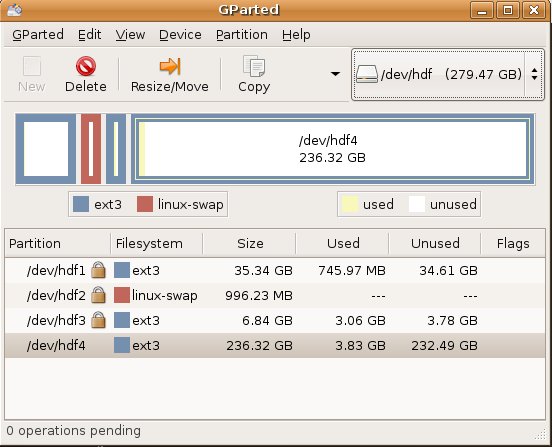
When I was installing my Ubuntu Dapper, I had not really used up all the space. In fact, I had left about 250GB free space. Today I wanted to use up that space...
First, I checked my partitions
adil@ahlnx:/etc$ sudo fdisk -l Disk /dev/hde: 300.0 GB, 300090728448 bytes 255 heads, 63 sectors/track, 36483 cylinders Units = cylinders of 16065 * 512 = 8225280 bytes Device Boot Start End Blocks Id System /dev/hde1 * 1 3187 25599546 7 HPFS/NTFS /dev/hde2 3188 36483 267450120 7 HPFS/NTFS Disk /dev/hdf: 300.0 GB, 300090728448 bytes 255 heads, 63 sectors/track, 36483 cylinders Units = cylinders of 16065 * 512 = 8225280 bytes Device Boot Start End Blocks Id System /dev/hdf1 1 4613 37053891 83 Linux /dev/hdf2 4614 4740 1020127+ 82 Linux swap / Solaris /dev/hdf3 4741 5633 7173022+ 83 Linux
So, I could have simply run
- sudo mkfs.ext3 /dev/hdf4
- sudo apt-get install gparted
- gksudo gparted
After partitioning done, it advised that I reboot the server...
2006-08-04
Configuring IP Address in Ubuntu
As most people, I have a small home-network. My ubuntu was getting the IP address from the router dynamically. I decided to use static addresses instead of DHCP. The procedure is a bit different then Red Hat Linux.
I first connected to my router and changed the DHCP range so that I would have plenty of static addresses. Then I backed up my /etc/network/interfaces file which had an entry like this:
iface eth0 inet dhcp
As I did not know how to edit this file, I ran the network-admin script:
/etc/network-admin, (you can also do this from GUI: System > Administration > Networking)
Clicked Deactivate Ethernet Connection
Clicked Properties & Changed the IP/NetMask/Gateway after choosing static
Clicked Activate Ethernet Connection
and examined the difference in /etc/network/interfaces file:
OLD <> iface eth0 inet static
NEW > address 192.168.1.3
NEW > netmask 255.255.255.0
NEW > gateway 192.168.1.1
Then, to be able to access my windows box, I added the following entry into /etc/hosts
192.168.1.2 windows
In Red Hat Enterprise, there are to bring up/down eth0, you would run
/etc/sysconfig/network-scripts/if-up eth0
/etc/sysconfig/network-scripts/if-down eth0
In Ubuntu, it's a little different
sudo /etc/ifup eth0
sudo /etc/ifdown eth0
[UPDATE - 08/09/2006]
I noticed a weird issue with the Gnome Network Applet icon on the top right corner. It has a little red exclamation mark and when hovered reads "No network connection" although my network connection is just fine...
I first connected to my router and changed the DHCP range so that I would have plenty of static addresses. Then I backed up my /etc/network/interfaces file which had an entry like this:
iface eth0 inet dhcp
As I did not know how to edit this file, I ran the network-admin script:
/etc/network-admin, (you can also do this from GUI: System > Administration > Networking)
Clicked Deactivate Ethernet Connection
Clicked Properties & Changed the IP/NetMask/Gateway after choosing static
Clicked Activate Ethernet Connection
and examined the difference in /etc/network/interfaces file:
OLD <> iface eth0 inet static
NEW > address 192.168.1.3
NEW > netmask 255.255.255.0
NEW > gateway 192.168.1.1
Then, to be able to access my windows box, I added the following entry into /etc/hosts
192.168.1.2 windows
In Red Hat Enterprise, there are to bring up/down eth0, you would run
/etc/sysconfig/network-scripts/if-up eth0
/etc/sysconfig/network-scripts/if-down eth0
In Ubuntu, it's a little different
sudo /etc/ifup eth0
sudo /etc/ifdown eth0
[UPDATE - 08/09/2006]
I noticed a weird issue with the Gnome Network Applet icon on the top right corner. It has a little red exclamation mark and when hovered reads "No network connection" although my network connection is just fine...
2006-08-03
Red Hat Enterprise Training
I was at Red Hat Training this week. I took RH133 Red Hat Linux System Administration course at Global Knowledge which located in down-town Manhattan at 90 Broad street.
It was one of the best training courses I ever attended. Instructor Rob Locke was great! Unfortunately, I am not going to take the exam to become a Red Hat Certifief Technician but today they gave us a taste of what the exam will be like. I loved it.
They made us install a troubleshooting package and then go to init 3. Then, we started to the tests. They were divided into 3 categories. Basically, they break something in your system and make you repair it. They do not care how you fix it as long as it is fixed.
They had 4 so called 'local' problems, 2 network and 3 boot problems. The last boot problem was the hardest to find but my scripting skills helped me realize that they broke bash and that's why the system was not booting up.
I was one of the few who fixed all the issues and I was proud of myself when I completed them. I came home and tested myself via their course pre-assessment tasks. Normally, you should take RH033 , Red Hat Linux Essentials but I had skipped that as it would be difficult for me to get both that one and system administration.
Interestingly, when I tested myself using Red Hat Linux System Administration Pre-assessment Questionnaire, I scored 34/48 but scored 37/48 on Red Hat Linux System Administration Pre-assessment Questionnaire .
Below are my results... The thing is, I use Ubuntu as my desktop :)
How Pre-assessment Questionnaires are Scored
Question 1:
Question 2:
Question 3:
It was one of the best training courses I ever attended. Instructor Rob Locke was great! Unfortunately, I am not going to take the exam to become a Red Hat Certifief Technician but today they gave us a taste of what the exam will be like. I loved it.
They made us install a troubleshooting package and then go to init 3. Then, we started to the tests. They were divided into 3 categories. Basically, they break something in your system and make you repair it. They do not care how you fix it as long as it is fixed.
They had 4 so called 'local' problems, 2 network and 3 boot problems. The last boot problem was the hardest to find but my scripting skills helped me realize that they broke bash and that's why the system was not booting up.
I was one of the few who fixed all the issues and I was proud of myself when I completed them. I came home and tested myself via their course pre-assessment tasks. Normally, you should take RH033 , Red Hat Linux Essentials but I had skipped that as it would be difficult for me to get both that one and system administration.
Interestingly, when I tested myself using Red Hat Linux System Administration Pre-assessment Questionnaire, I scored 34/48 but scored 37/48 on Red Hat Linux System Administration Pre-assessment Questionnaire .
Below are my results... The thing is, I use Ubuntu as my desktop :)
Red Hat Linux Essentials Pre-assessment Questionnaire
Topic Evaluation Score Basic Filesystem and File Commands Deep Understanding 4 The Linux Filesystem Layout Substantial Knowledge 3 Permissions and Attributes Substantial Knowledge 3 Manipulating Floppy Disks Familiarity 1 The viandvimEditorsSubstantial Knowledge 3 Regular Expressions Substantial Knowledge 3 Standard Input and Output System Substantial Knowledge 3 Process Control Substantial Knowledge 3 Client-side Encrypted Communications Familiarity 1 bashCommand Line ShortcutsSubstantial Knowledge 3 Shell Scripting Substantial Knowledge 3 Task Automation Deep Understanding 4 Total Score: 34
Red Hat Linux System Administration Pre-assessment Questionnaire
| Topic | Evaluation | Score |
|---|---|---|
| Supported Hardware | Substantial Knowledge | 3 |
| Installation | Deep Understanding | 4 |
| Creating and maintaining filesystems | Deep Understanding | 4 |
| X Window System Administration | Familiarity | 1 |
| System initialization | Substantial Knowledge | 3 |
| User and group administration | Substantial Knowledge | 3 |
| Client-side network authentication | Substantial Knowledge | 3 |
| Network setup and troubleshooting | Deep Understanding | 4 |
| Printing | Substantial Knowledge | 3 |
| System Logging and Monitoring | Familiarity | 1 |
| System-wide task automation | Deep Understanding | 4 |
| RPM | Deep Understanding | 4 |
Total Score: 37
Conclusion: You have sufficient knowledge of the topics at this skill level.
How Pre-assessment Questionnaires are Scored
Questionnaire takers answer questions on twelve topics related to a particular subject matter.
Each topic is scored separately, more points for more difficult questions. Question type and scoring is as follows:
Question 1:
- Easy
- Correct = +1 point
Question 2:
- Moderately difficult
- Correct = +2 points
Question 3:
- Extremely difficult
- Correct = +4 points
For any one topic, the range of possible points is 0 to 7. Questionnaire takers are evaluated per topic as follows:
| Deep Understanding | | 6 or 7 |
| Substantial Knowledge | | 3, 4, or 5 |
| Familiarity | | 1 or 2 |
| Unfamiliar | | 0 |
The overall score for the class will be based on the number of topics falling into each category, as follows:
| # of topics with this score | | Multiplied by |
| Deep Understanding | | 4 |
| Substantial Knowledge | | 3 |
| Familiar | | 1 |
| Unfamiliar | | 0 |
This final score will range from 0 to 48. Based on this score, we come to one of the following conclusions:
| | |
| 42 - 48 | You have mastered the topics at this skill level. |
| | Red Hat Linux Essentials (RH033) |
| | Consider taking a System Administration or Network and Security class. Take the Red Hat Linux System Administration Pre-assessment Questionnaire to determine your best placement. |
| | Red Hat Linux System Administration (RH133) |
| | Consider taking a Network and Security class or the RHCE Rapid Track course. Take the Red Hat Linux Network and Security Pre-assessment Questionnaire to determine your best placement. |
| | Red Hat Linux Network and Security (RH253) |
| | Most likely, you are prepared for the RHCE exam. Either:
|
| 36 - 41 | You have sufficient knowledge of the topics at this skill level. |
| | Red Hat Linux Essentials (RH033) |
| | Consider taking a System Administration class. Take the Red Hat Linux System Administration Pre-assessment Questionnaire to determine your best placement. |
| | Red Hat Linux System Administration (RH133) |
| | Consider taking a Network and Security class. Take the Red Hat Linux Network and Security Pre-assessment Questionnaire to determine your best placement. |
| | Red Hat Linux Network and Security (RH253) |
| | You are probably prepared for the RHCE exam. However, you should consider taking RH300, the RHCE Rapid Track course, if you would like some review before taking the exam. |
| 32 - 35 | You have substantial knowledge of the topics at this skill level, but you may benefit from further study. |
| | Red Hat Linux Essentials (RH033) |
| | Either:
|
| | Red Hat Linux System Administration (RH133) |
| | Either:
|
| | Red Hat Linux Network and Security (RH253) |
| | Either: |
| 24 - 31 | Your knowledge of the materials at this skill level is spotty. |
| | Red Hat Linux Essentials (RH033) |
| | Either:
|
| | Red Hat Linux System Administration (RH133) |
| | Either:
|
| | Red Hat Linux Network and Security (RH253) |
| | Take the Red Hat Linux System Administration Pre-assessment Questionnaire. If your score for that questionnaire is:
|
| 0 - 23 | You will need to undertake substantial studying to acquire skills at this level. |
| | Red Hat Linux Essentials (RH033) |
| | You must take a Red Hat Essentials class before engaging in the study of System Administration. Either:
|
| | Red Hat Linux System Administration (RH133) |
| | Either:
Also, take the Red Hat Linux Essentials Pre-assessment Questionnaire, if you have not already done so, to consider if classes in that sequence are a better placement. |
| | Red Hat Linux Network and Security (RH253) |
| | Either:
Also, take the Red Hat Linux System Administration Pre-assessment Questionnaire, if you have not already done so, to consider if classes in that sequence are a better placement. |
2006-08-02
The 100 Top Brands 2006
Just wanted to blog this: Top 100 Brands of 2006. The two company I worked for are on the list as #36 & #37
2006-07-22
Podcast & AudioShell
When I was shopping for an mp3 player, I preferred Cowon iAudio X5L over iPods as it had much longer battery life and radio. Since then, podcasts became very popular and iTunes is one of the best out there. Of course, it only works with iPods :(
So today I started to look for non-iPod podcast software. That's when I saw AudioShell, which is
"a freeware MS Windows Explorer shell extension plugin which allows you to view and edit music file tags directly in Windows Explorer. AudioShell support all files and tags standards supported by Tag&Rename. AudioShell adds tag editor and viewer tabs to the music files properties menu (you can edit tags file by file or by groups), detailed music files hints with tag and file information, and additional columns in the Explorer files list. Full Unicode support. Great tool for mp3 players owners! You can fast and easy fix files tags in Explorer before uploading its to your iPod/Creative or any other mp3 player."
I am a big fan of Tag&Rename but this little utility seems to do a good job too.
My quest for ideal podcast application is still going on. I have tried a few apps like Juice (aka iPodder) and MyPodder from Podcast Ready but had issues with both. Still searching...
So today I started to look for non-iPod podcast software. That's when I saw AudioShell, which is
"a freeware MS Windows Explorer shell extension plugin which allows you to view and edit music file tags directly in Windows Explorer. AudioShell support all files and tags standards supported by Tag&Rename. AudioShell adds tag editor and viewer tabs to the music files properties menu (you can edit tags file by file or by groups), detailed music files hints with tag and file information, and additional columns in the Explorer files list. Full Unicode support. Great tool for mp3 players owners! You can fast and easy fix files tags in Explorer before uploading its to your iPod/Creative or any other mp3 player."
I am a big fan of Tag&Rename but this little utility seems to do a good job too.
My quest for ideal podcast application is still going on. I have tried a few apps like Juice (aka iPodder) and MyPodder from Podcast Ready but had issues with both. Still searching...
2006-07-19
NTFS with read/write support using ntfs-3g
One of the things I wanted to do but never got to is to be able to write to NTFS partitions from my Ubuntu Dapper. I came across a nice how-to doc here
I will post results once I try it out...
[UPDATE - 07/22/2006]
I tried the instructions today. It did not work for me but that was because I had a typo: I typed en-us instead of en_US which resulted in an error like "Couldn't set locale to en_us.utf8 thus you may not see properly or at all some files". Correcting the error in the /etc/fstab resolved the issue and now I can write to NTFS without any issues :)
I will post results once I try it out...
[UPDATE - 07/22/2006]
I tried the instructions today. It did not work for me but that was because I had a typo: I typed en-us instead of en_US which resulted in an error like "Couldn't set locale to en_us.utf8 thus you may not see properly or at all some files". Correcting the error in the /etc/fstab resolved the issue and now I can write to NTFS without any issues :)
2006-07-12
Marcus Ranum on hard disk encryption "This stuff is really easy!"
I barely tested TrueCrypt just before my hard drives crashed one after another 2 months ago. I was planning to reinstall it but could not just get to it. After reading Marcus Ranum's article, I guess I have more confidence in this software: http://www.truecrypt.org/
read more | digg story
read more | digg story
2006-07-07
31 browser hacks in 31 days
Browser Fun blog has promised to disclose 31 browser hacks/vulnerabilities during the month of July 2006, one for each day. Apparently, there is a story behind all this :)
2006-06-22
Welcome Rohit!
On April 27th, one of my co-workers, Mathieu Wache accepted my invitation to be a contributed to this technology blog. I had expressed my wish to have more contribution from other techies that share my passion for technology.
Andy Mei is on a business trip to Japan but will soon join us. And today, Rohit Pai became a contributor for scorion.net. Rohit proved us that he can cook! :) I added Rohit's blog to the links on the right side where he is sharing his recipes.
Andy Mei is on a business trip to Japan but will soon join us. And today, Rohit Pai became a contributor for scorion.net. Rohit proved us that he can cook! :) I added Rohit's blog to the links on the right side where he is sharing his recipes.
Gregorian Calendar
In my alumni e-mail list, somebody questioned the origins of Gregorian Calender... An informative link was given that explained a lot of things I did not know about the subject. check it out, you may find it interesting too.
2006-06-19
Analytical Puzzles
Just noticed this on popular del.icio.us pages. On the site, there are logic problems in varying difficulty levels. Be careful though, you may get addicted to them :)
Google Notebook Review
 The more I use Google Notebook, the more I like it! When looking for information on web, I usually find myself taking notes using MS OneNote, Outlook > Notes or plain notepad. As my blackberry is sync'ed with Outlook Notes, I tend to remind myself to put notes in there but it has a lot of limitations.
What Google Notebook gives me is the ability to select some part of a web page & simply make it a note that's available to me wherever I can access internet.
I downloaded & the plugin for IE and Firefox on all my computers. Both plugins work equally well. I created a number of notebooks as seen on the screenshot. If I want to move a note from one notebook to another, I can simply drag and drop it over.
I can edit the note anytime and really like the fact that it captures the original URL, I created the note from. So, if I have to go back to the original document, there is a reference to it.
By default, only "you" can see your notes. they are private. However, if you want to make them public, you can choose to do so. And of course, google's fabulous search engine lets you search your own, or public notes effectively.
What can be improved? Well, this is pretty good for taking notes from web sites. One step further would be to highlight any part of any document and upload it as a note! Now, I think that would be a killer-app!
2006-06-17
Hi-Res Panoramic Images of Paris
Mathieu should have posted this but I saw it before him :) Here is a link to high resolution panoramic pictures of beautiful Paris.
Did you know that France was the most visited country in the World in 2004?
2. Spain
3. US
...
12. Turkey
(Source: http://www.world-tourism.org/facts/menu.html)
Site is a bit slow but I saw some mirrors in digg. I don't know for how long they will stay:
http://www.gourp.com/paris-360-110.jpg
http://195.62.29.95/paris-360-110.jpg
15,000 px X 520 px (1.8 mb)
http://duggmirror.com/design/Hi-Res_Panoramic_Image_of_Paris/fc08a2cad710de1774c7d1d76eb11fce_paris-360-110.jpg
Direct Links to two other images on same website:
4200 px X 520 px (500 kb)
http://www.arnaudfrichphoto.com/Images/paris-neige-panorama.jpg
15,000 px X 520 px (1.9 mb)
http://www.arnaudfrichphoto.com/Images/paris-360-110-texte.jpg
Did you know that France was the most visited country in the World in 2004?
2. Spain
3. US
...
12. Turkey
(Source: http://www.world-tourism.org/facts/menu.html)
Site is a bit slow but I saw some mirrors in digg. I don't know for how long they will stay:
http://www.gourp.com/paris-360-110.jpg

http://195.62.29.95/paris-360-110.jpg
15,000 px X 520 px (1.8 mb)
http://duggmirror.com/design/Hi-Res_Panoramic_Image_of_Paris/fc08a2cad710de1774c7d1d76eb11fce_paris-360-110.jpg

Direct Links to two other images on same website:
4200 px X 520 px (500 kb)
http://www.arnaudfrichphoto.com/Images/paris-neige-panorama.jpg

15,000 px X 520 px (1.9 mb)
http://www.arnaudfrichphoto.com/Images/paris-360-110-texte.jpg

2006-06-16
On Bill Gates...
 When I read today that Bill Gates is stepping down from day to day managerial works of Microsoft, I felt happy for him. Unlike many other rich people of the world all throughout the history, he did not become slave of his own wealth and managed to put it into good work. So I always admired him!
"With great wealth comes great responsibility. Many years ago I made it clear that almost all my wealth would be returned to society," Gates said in an afternoon press conference in Redmond, Wash.
I think it could not be put better. He has created a giant industry and became the richest man on earth all in a very short time. He is a one of a kind, a great man that I think, most of us in the IT world owe him a big "thank you"!
He is setting a huge example that I hope other rich people will follow! Thank you, Bill!
2006-06-13
2006-06-12
Opt-Out of Credit Card Offers
Are not you sick & tired of receving credit card offers everyday? Don't you want the junk mail STOP? Who does not? :)
Well, you may not be able to stop getting all junk mail but to remove (or add???) your name from firm offers based on your credit information, it's possible to call Consumer Credit Reporting Industry Opt-in, Opt-Out Number: 1-888-567-8688
or write to:
Equifax Options, P.O. Box 740123, Atlanta, GA 30374-01123
Experian Target Marketing, P.O. Box 919, Allen, TX 75013
TransUnion Opt Out Request, P.O. Box 505, Woodlyn, PA 19094-0505
You can either choose to opt-out for 5 years or permenantly and you can add your name back any time you want.
To give you and idea, it took me about 5mins to remove both my name and my wife's name for 5 years. Of course, because they already fed many businesses with your information offers may keep on coming for quite sometime. and if you want your name to be removed permenantly, then they will send you a form that you need to fill in and send back to them and you will be removed from the lists of 4 Credit Reporting Agencies.
Well, you may not be able to stop getting all junk mail but to remove (or add???) your name from firm offers based on your credit information, it's possible to call Consumer Credit Reporting Industry Opt-in, Opt-Out Number: 1-888-567-8688
or write to:
Equifax Options, P.O. Box 740123, Atlanta, GA 30374-01123
Experian Target Marketing, P.O. Box 919, Allen, TX 75013
TransUnion Opt Out Request, P.O. Box 505, Woodlyn, PA 19094-0505
You can either choose to opt-out for 5 years or permenantly and you can add your name back any time you want.
To give you and idea, it took me about 5mins to remove both my name and my wife's name for 5 years. Of course, because they already fed many businesses with your information offers may keep on coming for quite sometime. and if you want your name to be removed permenantly, then they will send you a form that you need to fill in and send back to them and you will be removed from the lists of 4 Credit Reporting Agencies.
2006-06-10
Ubuntu Dapper Install Issues
Today, I downloaded Ubuntu Dapper 6.06 LTS Desktop CD to install it on a new hard drive. I ran into some issues but luckily I was able to fix them. I will write them down here just in case someone out there runs into a similar issue and may benefit from the solution
1) Ubuntu CD would not boot
I knew that CD was good because it was booting fine on a different PC. On the other hand, if I inserted an XP or Vista set-up CD, they would be detected fine but not the ubuntu CD.
I suspected that CD was not detected because of the Promise UltraATA133 TX2 card I was using with my "large" drives. The motherboard of my HP XW6000 pc did have ATA100 but not ATA133.
Anyway, to solve the problem, I disconnected my DVD drive from Promise Controller and connected it directly to the motherboard's Primary ATA. Then, Ubuntu CD happily booted.
2) "Out of range" error while Ubuntu was booting
So, to install Ubuntu Dapper 6.06, I chose "Live CD & Install" option from the boot menu. However, at some point Ubuntu would disappear and I would just see an "Out of Range" error on the screen.
Fixing this was pretty easy actually. I hit Ctrl+Alt+F1 to go to prompt and then edited the display config
sudo vi /etc/X11/xorg.conf
I removed all entries before"1280x1024" for my nVidia card so that my card would not try to load a resolution that it can not support and saved the file.
Then, I hit "Ctrl+Alt+F7" to go back to the screen where I was seeing "out of range" and hit "Ctrl+Alt+Backspace" to restart Gnome Display Manager (gdm) and voila!
Then, ubuntu user logged in and there was a "Install" icon on the desktop. Using GPart, I first created three partitions on the free space:
1 GB for swap
7 GB for / (formatted with ext3 file system)
25 GB /home (formatted with ext3 file system)
Installation did not took long and in about 20mins, my ubuntu dapper was up and running :)
1) Ubuntu CD would not boot
I knew that CD was good because it was booting fine on a different PC. On the other hand, if I inserted an XP or Vista set-up CD, they would be detected fine but not the ubuntu CD.
I suspected that CD was not detected because of the Promise UltraATA133 TX2 card I was using with my "large" drives. The motherboard of my HP XW6000 pc did have ATA100 but not ATA133.
Anyway, to solve the problem, I disconnected my DVD drive from Promise Controller and connected it directly to the motherboard's Primary ATA. Then, Ubuntu CD happily booted.
2) "Out of range" error while Ubuntu was booting
So, to install Ubuntu Dapper 6.06, I chose "Live CD & Install" option from the boot menu. However, at some point Ubuntu would disappear and I would just see an "Out of Range" error on the screen.
Fixing this was pretty easy actually. I hit Ctrl+Alt+F1 to go to prompt and then edited the display config
sudo vi /etc/X11/xorg.conf
I removed all entries before"1280x1024" for my nVidia card so that my card would not try to load a resolution that it can not support and saved the file.
Then, I hit "Ctrl+Alt+F7" to go back to the screen where I was seeing "out of range" and hit "Ctrl+Alt+Backspace" to restart Gnome Display Manager (gdm) and voila!
Then, ubuntu user logged in and there was a "Install" icon on the desktop. Using GPart, I first created three partitions on the free space:
1 GB for swap
7 GB for / (formatted with ext3 file system)
25 GB /home (formatted with ext3 file system)
Installation did not took long and in about 20mins, my ubuntu dapper was up and running :)
2006-06-02
sudo issues
While testing linux to linux nxclient with my coworker andy Mei, a rogue line was accidentally pasted to /etc/hosts just before we saved & exit.
It was something like this
192.168.1.1 myubuntu.scorion.net192.168.1.1 myubuntu.scorion.net192.168.1.1 myubuntu.scorion.net192.168.1.1 myubuntu.scorion.net192.168.1.1 myubuntu.scorion.net192.168.1.1 myubuntu.scorion.net192.168.1.1 myubuntu.scorion.net192.168.1.1 myubuntu.scorion.net192.168.1.1 myubuntu.scorion.net192.168.1.1 myubuntu.scorion.net192.168.1.1 myubuntu.scorion.net192.168.1.1 myubuntu.scorion.net192.168.1.1 myubuntu.scorion.net192.168.1.1 myubuntu.scorion.net...
That caused some grief! It broke sudo. So everytime I typed `sudo ...` I would get an error:
sudo: unable to lookup via gethostbyname()
I was not able to sudo and therefore I was not able to correct /etc/hosts. So, I rebooted (I could not `sudo reboot` but I could reboot from GUI) to login in Recovery Mode.
As luck would have it, I ran into another issue. I was always getting "keyboard error" while system was booting up but it would be fine after GUI came up. So, I never paid attention to it.
To fix the issue, I connected my keyboard to a different usb port (but this time at the back of my dell pc) and then I was able to login in Recovery Mode as root. Once the offending entry was deleted, everything was back to normal.
It was something like this
192.168.1.1 myubuntu.scorion.net192.168.1.1 myubuntu.scorion.net192.168.1.1 myubuntu.scorion.net192.168.1.1 myubuntu.scorion.net192.168.1.1 myubuntu.scorion.net192.168.1.1 myubuntu.scorion.net192.168.1.1 myubuntu.scorion.net192.168.1.1 myubuntu.scorion.net192.168.1.1 myubuntu.scorion.net192.168.1.1 myubuntu.scorion.net192.168.1.1 myubuntu.scorion.net192.168.1.1 myubuntu.scorion.net192.168.1.1 myubuntu.scorion.net192.168.1.1 myubuntu.scorion.net...
That caused some grief! It broke sudo. So everytime I typed `sudo ...` I would get an error:
sudo: unable to lookup via gethostbyname()
I was not able to sudo and therefore I was not able to correct /etc/hosts. So, I rebooted (I could not `sudo reboot` but I could reboot from GUI) to login in Recovery Mode.
As luck would have it, I ran into another issue. I was always getting "keyboard error" while system was booting up but it would be fine after GUI came up. So, I never paid attention to it.
To fix the issue, I connected my keyboard to a different usb port (but this time at the back of my dell pc) and then I was able to login in Recovery Mode as root. Once the offending entry was deleted, everything was back to normal.
2006-06-01
Ubuntu 6.06 LTS released
New Ubuntu Release Available for Desktops and Servers, with Long Term, Global Support
Ubuntu, which has become one of the world's most popular Linux distributions in recent years, launched its latest version on June 1 following months of intense testing. The new release is titled Ubuntu 6.06 LTS (Long Term Support), and has a specific emphasis on the needs of large organisations with both desktop and server versions... Read the rest of their announcement.
BTW, check this nice blog entry called "25 tips to make Ubuntu 6.06 LTS perfect
by Keir Thomas"
Subscribe to:
Posts (Atom)