Google

2009-05-03

Vista Post-SP2 Black Screen. Is Vista slower?

There are tons of XP vs. Vista posts on web. To be honest, I have a pretty fast PC and never I could care less if Vista is a couple of seconds slower than XP; it's still fast. This post is not looking to make a comparison but it is more about a couple of useful things I discovered when I was looking around post-sp2 upgrade. Here is what happened...

Post-SP2 Black Screen
I've downloaded and installed Vista SP2 on one of my laptops and noticed that there was an extended period of "black" screen during boot time. I did not pay much attention to it but today I noticed the same thing on my desktop post SP2.

Vista Logs
It tickled my curiosity and I started looking around. Soon, I found out that Vista Logs are incredibly detailed and there is abundant information to diagnose such stuff. That is great news because I always hated XP's inability to tell me what was causing slowness during boot. I would sit there and watch for 4-5 mins painfully while my laptop crawls to a start. Of course I tried invaluable Sysinternal tools like Procmon to watch boot process and try to sift thru hundreds of thousands of records which was mostly useless...

So, first I headed to Control Panel to see what was Vista reporting recently:

Control Panel > Performance Information and Tools > Advanced Tools


I have not seen anything in the recent "Performance Issues" section that suggested that I was seeing a degradation of system boot but interestingly enough there was some clue to another issue I was seeing on my Pc recently; it just would not go to Sleep mode...

You will notice that at the bottom of the dialog box; there is a link to the Event Viewer; and that's the beauty of Vista. This basically means that Vista is in fact going thru performance logs and giving you a summary of recent events...

Diagnostics-Performance
To get to Diagnostics-Performance logs, you can click the link above or open up Event Viewer
Start > run > eventvwr.msc then browse to
Applications and Services Logs > Microsoft > Windows > Diagnostics-Performance > Operational

Under the Operational, you will see tons of events logged. There a couple of Task Categories.
  • Click on "Task Category" and
  • Select "Group Events by This Category"


From category names, it's clear that "Boot Performance Monitoring" is the one that should give us the information we are looking for.

In the screenshot above you will notice that; Vista is in fact telling us about the time it took to boot. There is more, if you click the details tab, there is actually a breakdown of boot time! I think this is a very neat feature b/c I still remember how painful it was for me to use a stopwatch to record each phase of XP boot visually and then try to match them to whatever was recorded by extended Group Policy logs and Event Logs... It's all there; in the event logs now.

When I looked at break-down of boot times, it was not easy to tell what some of them were; so I googled and in fact found an article titled "Microsoft's hidden diagnostic tool unlocks Vista startup secrets". Well, there is not much there other than what I had already found out but it mentioned two parts of boot time:

MainPathBootTime measures the time it takes for the system to load all drivers and services that are critical to user interaction and get to the Windows desktop where the user can begin doing things.

BootPostBootTime includes all the other drivers and processes that aren’t critical to user interaction and can be loaded with low-priority I/O that always gives preference to user-initiated actions that execute using Normal I/O priority.

I tried to find the follow up writing on ZD net but after spending 20mins to no avail; I gave up.
I filtered by Event ID 100-190:
  • On the left pane, right click on "Operational"
  • Click "Filter Current Log"
  • Replace "" with 100-190
And started to look at boot times. Apparently my boot up time was around 80000milliseconds (ie. 80 seconds) but the latest boot time was a whopping 262sec (4.3mins). Unfortunately, there was no smoking gun; and Windows did not report anything unusual in this case.

This may be OK though; because I remembered that I had also installed Office 2007 SP2 and had not rebooted yet; so this might have been the cause of delay. To be sure, I will need to reboot a couple of times and measure them to see if I was still getting 80secs.

During the investigation, I noticed that at times, some apps (McAfee Antivirus, Rawr etc) were causing delays and Windows were reporting such events. By the way, the same log is also used to determine what is blocking a machine from sleeping or causing delays during shutdown.


Conclusion
So, is Vista slower than XP? Maybe but I don't care. With XP, I could never tell what was causing slowness. Now, at least I have better visibility. Overall, I like Vista more.


2009-01-14

Google Chrome Standalone Installer

Google Chrome Standalone (aka offline) installer is available in a openly hidden :) link here:

This version is probably more suitable for Enterprise environment as it does not attempt to auto-update itself. Auto-Updating / Home-Dialing software is usually a no-no as Enterprise IT would want to control the deployments and phase them in.


2008-11-01

Amazing Wallpapers


I just wanted to drop two wallpaper links here that I enjoyed browsing:

2008-09-04

New URL for my tech blog

Hi,

I stopped updating this blog sometime ago however I kept on blogging on the new address http://AdilHindistan.blogspot.com. I was hoping that Google will come up a with a tool to move the content from one blog to another but as of today I am not aware of any. I would like to do it once such a tool becomes available. In the meantime, I want to make it clear that this blog will continue to exist as a way to access older content but new content will be posted on http://AdilHindistan.blogspot.com.

Thanks,
Adil

2008-09-02

RIP: My Falcon Fragbox 2


I bought a Fragbox 2 gaming computer from Falcon Northwest last month. The first time I ran World of Warcraft on it, it felt awesome. Everything was incredibly smooth; I had all the settings in the game maxed up but I was never getting less than 60fps. I thought it was worth the ~$2000 and 2 weeks wait time!

Some specs:
MB: Asus P5E-VM Micro ATX Q35 Motherboard (AS-P5E-VM )
CPU: Intel Core 2 Duo E8500 - 3.16 GHz 1333 FSB ( INTC2E8500 )
RAM: Crucial 4GB (2x2GB) DDR2 PC2-6400 800MHz ( CR-4GBK2-6400 )
Video: NVidia 8800 GTS 512MB PCIE (NV8800GTS512 )
Storage: Seagate Sata 750GB HD 7200 RPM
ST50EFCS 500 watt power supply ( SS-ST50EFCS )


Two days ago, I was getting ready for Karazhan raid and suddenly my fragbox started to stutter. Everything became slow and at some point it became unresponsive, I was not able to restart it. So, I hard booted it by pressing the power button and all hell broke lose!

Windows failed to start. A recent hardware or software change might be the cause. To fix the problem:
1.Insert your installation disc and restart your computer
2. Choose your language settings, and then click "next"
3. Click "Repair your computer"
If you do not have this disc, contact your system administrator or computer manufacturer for assistance.
File:\Windows\System32\config\system
Status: 0xc00000e9
Info: Windows failed to load because the system registry file is missing, or corrupt.

I tried to reboot a couple of times hoping it would clear but it did not seem like the kind. So, after trying safe mode and every other option without moving an inch closer to booting into Windows, I gave up and attempted to reload Windows Vista...

Install seemed to go smoothly but after the reboot; same error showed up. As a last resort, I used the Recovery Disc that came with the Fragbox 2 package. Recovery stalled at 30% and I was prompted to either ignore the errors or abort recovery. I chose to ignore the errors but recovery did not go thru.

I attempted recovery again and to my surprise, it completed this time but no joy after reboot:

Windows has encountered a problem communicating with a device connected to your computer.
This error can be caused by unplugging a removable storage device such as an external usb drive while the drive is in use, or by faulty hardware such as a hard drive or CD-rom drive that is failing. Make sure any removable storage is properly connected and then restart your computer.
If you continue to receive this error message, contact the hardware manufacturer.
File: \Windows\System32\Winload.exe
Status: 0xc00000e9
Info: An unexpected I/O error has occured

At this point, I looked at the warranty document and was happy to see that this:

Falcon Overnight Service
Your Falcon Overnight Service Policy: How It Works
Summary: If your Falcon system should develop a serious hardware problem that we can't solve via telephone technical support, we will pick it up via overnight courier, correct any problem, and overnight it back to you, The Falcon Overnight Service covers any applicable instance within one year of the date of purchase.

So, I sent an e-mail to support@falcon-nw.com with all the details of the issue and steps I have taken and asked them to call me back...

That brings us to today. I called them to follow up and talked to a technician who suggested that I should open up the box and re-seat cables... OK, unscrewing a couple of screws and opening up a box is no big deal but I am sure many people may feel uneasy about doing this. They do not need to know how to do this...

Anyway, I went ahead and re-seat the cables which seemed firmly in place anyway and of course nothing is fixed. Falcon support also told me that I should run some hard drive diagnostics. So, I asked where I would get the diagnostic application and he said he will send me instructions.

It's been a couple of hours since the conversation but they have not yet replied to my e-mail with instructions. I called them up a couple of times already but keep on getting Voice mail. So, I left VMs...and waiting.... Arrrgh!

[ Update - 09/04/2008]
Apparently, Falcon Support team was calling me back...but they were not calling my work number instead of the number I left with them. Anyway, person I talked to was a soft spoken, very kind person. After sorting out the miscommunication, I agreed to follow the instructions to download a Seagate tool and use it to test the drive.

I reseated the cables on the motherboard side and re-ran recovery disc as they suggested; which resulted in the same error. Then I downloaded the Seagate Diagnostic tool from http://www.seagate.com/support/seatools/SeaToolsDOS207EURO.iso . 20mins after starting the diagnostic in "Long Test" mode, it stopped at 17% done. Waited for another hour but it was clearly not moving. So, I aborted the process and checked the logs which did not have anything useful about test.

I sent another e-mail to support detailing what I have done and the results. They called me back and and I said "I think at this point, I'd better ship it to you guys'. The sense I get from talking to these guys is that they sure would like to avoid shipping it if possible and work with you to fix it if you are willing to work with them, but they are not 'forcing' you to do that.

I was willing to work with them but I don't think anyone reading this should be worried if they are planning to buy a Fragbox from Falcon and would not be willing to do troubleshooting in case they hit a similar issue.

On the plus side, when I was purchasing the system, they refused to add a second hard drive as the configuration was fixed and they were not willing to modify it. Now that I encountered this issue, I asked the support person if it would be possible to buy a second 750GB Seagate drive from them and would they install it for me. He said yes and told me they could even install a drive that I would ship them if I had any extra. I am waiting for them to confirm the price. I hope it is not too much above market price.
[Update - 09/24/2008]
So, it took Falcon a week to fix issue(s) on my Fragbox 2...
  • First they replaced the Seagate 750gig hard drive and added the second 750gig I bought from them.... During testing, they found out that issue did not disappear.
  • Then, they replaced motherboard. During test, they realized that one of the RAM chips were defective although it had passed RAM test.
  • After replacing RAM, all went well and they installed Windows, updates drivers etc. Falcon creates a Recovery disk. So, that disc did not get created successfully at first but second attempt was successful. Oh, they also print a funny custom DVD cover with my name on it :)

They kept me informed via e-mail updates all along and I told them that although I could not wait to get back on my Fragbox, I would rather a bit and have it tested thoroughly, which they do and at the end they send a list of all checks they performed.

Of course, it sucks that my Fragbox had all these issues only after 2 months but it's clear that they are using the best parts and testing it; so cannot blame them for that. Now that I have a second drive on it, I will be able to use it not just as a gaming (ie. World of Warcraft) computer but as my main workstation at home replacing HP workstation xw6000.

2008-06-18

Vista Tweaks

I just encountered a forum entry that talks about tweaking Vista and has an extensive list. Some of them really useless crap in my opinion but there are lots of interesting and useful tweaks also... Eg. Activate hidden admin account by typing
net user administrator activate:yes
or
net user administrator "your pwd" activate:yes
Take a look!

2008-05-05

Search Commands from Microsoft Office

Woot! I never liked the ribbons as it made it more difficult for me to find out when I was looking for a command. I found myself going to help and searching many times.

Well, help is here. Microsoft seems to listen! In their www.OfficeLabs.com site, they released a new toy called Search Commands, which makes finding command in office very convenient. Try it out, if you are one of those users annoyed by ribbons.

2008-04-04

Best Programming Language To Learn

I think it was 1988 when I learned my first programming language: Basic. I will never forget the first day when teacher wrote I = I +1 on the screen, and for a second it made no 'matheatical' sense at all :) I liked Basic!

Anyway, most Engineering applications were written in some variation of Fortran then, so that's what I learned in college. I never really liked Fortran. At the time, Computer Science students were learning Pascal, Turbo Pascal was very popular. One of the students who was very good at it gave a couple of us free lessons and that's how I learned it...

Then, when I started to work at 1993, I realized that 'Excel' (version 4, then) was 'the' application that was used for everything around me. Accounting was using it as well as Engineering teams. So, I learned about Macros and later VBA, which made life so much easier! At some point, I jumped from VBA to VisualBasic.

When 'Web Master' became a cool term, I learned about html and ASP. That was a nice combo and helped me do a lot of cool stuff around year 2000.

Later on, when I started to dig into Unix/Linux world, it became clear that Perl would help and together with shell scripting; it did in a big way when automatic tasks in Unix! Although I became proficient with VBScript/WMI scripting, ActivePerl is still my preferred choice in Windows b/c of it's spectacular power with regular expressions (Well VBScript became better with regular expressions and introduced "Dictionaries" (Hashes) yet I don't think it matches Perl).

So, I was thinking what to do next? Java has been out there for quite a while. I was interested in PowerShell but became disillusioned with version 1. AutoIt3 seems interesting but not super easy or intuitive. I keep on hearing about Python (check out this link for some resources) but I am not sure if it adds much on top of Perl...

That's why, I was quite interested when I saw the subject on LifeHacker. There is a lengthy discussion about it. Take a look if you are interested...

2008-03-29

While waiting for GDrive

Still waiting for highly speculated Google GDrive to become available... In the meantime, http://www.getdropbox.com/ seems like a nice try...

2008-03-05

Have Phun!

I just saw a cool science tool named Phun. Here is what it is 'about':

Phun is a Master of Science Theises by Computing Science student Emil Ernerfeldt for supervisor Kenneth Bodin at VRLab, Umeå University. The solver is based on work by Claude Lacoursière
Phun is meant to be a playground where people can be creative. It can also be used as an educational tool to learn about physics concepts such as restitution and friction.

Watch out this pretty cool video and you will love it too...

2008-02-17

Vista - Cannot Open Control Panel (Fixed)

World of Warcraft was giving me headache yesterday. FPS near Ogri'la was only 4fps, although lag was not too bad (~150-200ms). So I decided to disable addons, defrag HD blah blah. I was also using procmon from sysinternals to see if there was anything hogging Vista...

I noticed SearchIndexer was a bit troublesome and stopped the service. While there, I went thru the list and disabled a couple of other that did not seem useful/applicable. One of them was "Software Licensing".

Software Licensing Service Description:
Enables the download, installation and enforcement of digital licenses for Windows and Windows applications. If the service is disabled, the operating system and licensed applications may run in a reduced function mode.

Apparently, if you disable this service you cannot open Control Panel. It looks like it's coming up but then disappears immediately. Enabling/starting service fixes the issue...

2008-02-09

Vista - Still Bluescreens

After installing Vista SP1 RC1 and moving Page file to a different hard drive, I was finally not able to get rid of BSODs when computer was idle...

After a coupel of weeks, unfortunately freezes and BSODs came back. The last one I had said something like:

Win32k.sys

Page_Fault_In_Nonpaged_Area
STOP 0x00000050 (0xFFC000000,all zeros,0x964E0FB3, All Zeros)...

Apparently, Microsoft has a hotfix for this. There is an article titled "Error message when you start a Windows Vista-based computer: "STOP: 0x00000050 PAGE_FAULT_IN_NONPAGED_AREA" ( http://support.microsoft.com/kb/939720 )

However, this article mentioned issues during startup, which was not really my case. I kept on looking and found another KB article: http://support.microsoft.com/kb/939720 about STOP: 0x00000050.

From http://support.microsoft.com/kb/244617 I get the feeling that one of the drivers is not playing well with vista. I ran c:\windows\system32\verifier.exe to see if it will be able to help me pinpoint the issue.

2008-01-30

SysPro Policy Reporter

A colleague showed me this cool free tool called "Policy Reporter".

Policy Reporter makes it much easier to understand how Microsoft implements Policy Processing, which is not really transparent...

It reformats the log provided in %systemRoot%\Debug\UserMode to give a more meaningful display.

It provides a Tree structure on the left which shows major events reported in the Log. Selecting an entry in the tree structure displays that section of the log in the view window.

It also has a "Performance History" tab that loads Group Policy Performance information from the registry, including the time taken to apply the policies and what policies were applied.

It also has some other nice features such as 'Search' and 'Export to Excel'.

Note: You must activate Verbose logging to get detailed information. Policy Reporter assists in doing this.

2008-01-19

Windows Vista SP1 RC1 Issues


One of my computer is locking up almost every day. I leave it alone at night, when I come back in the morning I see it BlueScreened. I googled "Stop 0x00000077" or "KERNEL_STACK_INPAGE_ERROR" and tried to find something that would explain my BSOD with Vista to no avail... and decided to try Vista SP1 RC1.

I downloaded the stand-alone version and tried to install it. It bluescreened half way there after half an hour or so (well, it said SP1 update can take hours in the screen so half an hour is great).

I tried on my other Vista machine and it even did not get that far. Then, Microsoft refreshed RC1 and I decided to try it again as my Vista keeps on locking up.

So, I browsed to Windows Vista Service Pack 1 page, and downloaded Windows Vista SP1 RC Refresh (Build 17128) – released 01/11/08. When unpacked it has 3 files in it. I ran the cmd, which entered a registry key that enabled me to see an Update for Vista SP1 Control Panel > Windows Update > "Check for Updates".

Update actually installed 3 files, rebooted. Then I went back to Windows Update and clicked "Check for Updates" but it did not find anything. I waited and tried a couple of mins later. This time it finally found SP1 RC1. I clicked install and it froze on me after a few mins.

I tried a couple more times suspecting that whatever issue was causing my lock-up , it was preventing update from finishing. And Windows Update was able to finish the download but it failed to install it. Error code: 80070005. Unfortunately Vista help did not list this error code.

After some search, I realized that many other has seen the same issue and the only solution I saw was Aaron Stebner's blog entry. Apparently, MS messed up permissioning and Windows Update does not have enough permissions to write some reg keys/files.

I followed the instructions mentioned. I do not know if this will work for me yet. I will post a follow up later.

[Update - 01/21/2008]
I ran the script from Aaron's page. It did a lot of things but failed to reset permissions on 7 keys. I rebooted and tried again, it kept on failing. I also tried running SP1 update but it too failed...

I looked into the error Kernel_Data_InPage_Error, I was getting. I had the following error codes: 0000007A (0xC020BF84, 0xC00009C, 02a266860, 0x82FE130D)
ntfs.sys - Address 82FE130D base at 82EF8000 Datestamp 47214597

So, there are 4 block of error codes:
1st set is about Lock Type (0xC020BF84)
2nd set is the I/O status (0xC00009C)
3rd set tells us about Current Process when BSOD occured(02a266860)
and 4th set mentions the memory code where error occured.

As per this article at MSDN, my issue was 0xC000009C, or STATUS_DEVICE_DATA_ERROR, is typically due to bad blocks (sectors) on the hard disk.

As my Page File was in C drive, probably there was some bad blocks in the C drive. Unfortunately, chkdisk did not help. So, I moved the page file to my other drive.

No lockups since then. And to my surprise, Vista SP1 RC1 installed successfully today!

2008-01-07

Bill Gates last day at Microsoft from CES 2008

Earlier this evening Bill Gates gave his final Microsoft keynote at the 2008 CES show in Las Vegas. Throughout the keynote he made many references to what he will do with his free time once he retires from day to day operations at Microsoft. It turns out, Bill has big plans in addition to his foundation after all.

read more | digg story

2008-01-02

Disposable Web Accounts

So, we are in 2008 now. After taking the final two weeks of 2007 off, I am back to work and catching up with e-mails & diggs. As I was looking at the most popular technology content in the last month, I noticed the subject above.

5 “DISPOSABLE” Web Accounts to Keep Your Identity Safe is the actual title of a wonderful post from makeuseof.com.

BugMeNot was already one of my favorite firefox addons. I especially liked "file.io" service...

2007-10-26

Path Maximum Transmission Unit (PMTU) Black Hole Routers

Windows XP SP3 promises detection of Black Hole Routers, which is supposed to improve over all networking experience especially for laptops. While investigating the subject, I came across a good, comprehensive article about PMTU (Path Maximum Transmission Unit) at Microsoft site.

By default PMTU Black Hole Discovery for TCP/IP is disabled on Windows XP machines. It can be enabled though:

Setting: EnablePMTUBHDetect
Key: HKEY_LOCAL_MACHINE\SYSTEM\CurrentControlSet\Services\Tcpip\Parameters
Value Type: REG_DWORD Value: 1

"Changes in PMTU black hole router detection in Windows Server 2003 and in Windows Vista" is a good follow up article.

Enabling of PMTU Black Hole detection and changes are all result of Microsoft's "Next Generation TCP/IP Stack".

The Cable Guy from Microsoft has an article on enhancements that "Next Generation TCP/IP Stack" (terrible name IMHO) offers.

2007-10-22

Vista BSOD

My vista install started to crash when there is a lot of disk activity. It would crash every other day at first. Then, at some point it started to go down shortly after I initiate PowerUsenet downloads.

I looked at MS documentation for 0x0000007B and concluded that it had something to do with Sata controller. Article suggested to replace cables as it could be caused by a faulty cable but doing so did not help.

Then, I bought a HighPoint Tech TocketRaid 1742 PCI card. Documentation suggested to simply install the card and point to the driver location once Vista detected it. Unfortunately, Vista kept on blue screening once card was installed and I could not reach the logon page.

I installed the card on an empty PCI slot and connected back my Promise SATA controller. After the Vista came up I installed drivers, shutdown pc and removed the promise controller. Then, I reconnected my SATA HDs to the new controller and succesfully booted.

I hope this will end my BSOD issues....Time will show.

2007-10-19

Ubuntu 7.10 (Gutsy Gibbon) Test Drive

Ubuntu 7.10 was released yesterday. Below is my first hand impression of new release. The Good, The Bad & The Ugly, if you will...

Getting the image:
I tried all North America mirrors to find a fast image download site but I guess because of first day rush, all were slow, download speeds around 50 KB/s. After a couple of hours, I was able to access Georgia Tech mirror which let me download at speeds of 2MB/s, so I got the image in a matter of mins.

I usually use Lauchpad.net to order my free copies of Ubuntu, which is an awesome feature of Ubuntu Distro.

Because of firewall rules, I could not use torrents in my environment. Not sure how that would change my experience.

One thing I noticed was that Europe/Asia had a lot more mirrors and when I tried them I got almost the same download speeds: ~50KB/s. I hope more 'fast' mirrors are added for North America soon.

Installation:
Ubuntu installs were always good but not without hickups... When I was reading reviews, I had read something like 'Installation was even easier than Vista'. I attest to that now.

I decided to wipe out earlier version and install it on my IBM T40. I popped in the CD, live-cd install completed in a few mins. Then I clicked install shortcut on the desktop and installation started.

In all installs up to this version, time would always be incorrect, this worked fine. Install time was short and I had to click 'next' a couple of times to confirm keyboard, regions etc and enter username/pwd.

Devices:
When I say devices, I should confess that I don't really have a lot of devices to check the functionality. What has always been painful for me was Wireless Access. I have a netgear wireless card, which was automatically recognized, drivers were installed and was ready for me to use after reboot.

The only thing I noticed was, it was not available during install and at some point Ubuntu install warned me that I did not have internet connectivity, so Security Repositories/Updates would not be available at the time. No biggie.

Post-Install:
One of the exciting things I saw in 10 rocking features in 10 days series of articles was about Tight integration of Firefox with Ubuntu. So when I browsed to blogger site, firefox popped up a message for "missing plugin".

Unfortunately, things did not work as advertised after that. Flash Plugin was supposed to be installed seemlessly. Instead I got an error when I tried to install it.

In fact, once I clicked "close", it told me that plugin was installed and I needed to restart firefox. Of course, that was not true...

I also tried Firefox > Tool > Addons to install some plugins like GreaseMonkey but no luck there either. It kept on complaining about source not being available. If you look carefully, you will notice a type in "available".

I know some may think I am just being picky now, but I hate to see such typos as it gives you the impression of sloppiness. Ubuntu is a 'high-quality' distro, such small stuff does therefore matter (at least to me).

I am not sure if this is a bug or if there is some back-end issues here though. Because I also got a "Service Outage" page when I was trying to get some more explanation on what's going on.

Anyway, I am sure I can still download and install these stuff manually as I used to.

Screen Resolution: It always bothered me with Ubuntu/linux installs not to be able to easily increase screen resolution from current setting. Ok, "easily" is a relative term. Because normally, you would edit /etc/X11/xorg.conf and then logout / log back in to see changes. That's a "no no".

In fact, in Ubuntu preview, Lifehacker touched upon this point: "It might not seem like a revolutionary feature, but users can now change their screen resolutions and refresh rates without having to log out or hack around in terminal."

I think it should be like in Windows, where all resolutions are listed and when users chooses one, it's tested and user is asked to confirm if it was OK. This is still missing from "easy-to-use" Ubuntu and require a bit more tech skills.

OK, I guess I will post more when I have more time in my hands to play with it. This is it for the time being. Oh, before I forget, I loved the fact that Compiz is the default window manager in Ubuntu now:)

Edit 10/22/2007: I am having an issue with Ubuntu start up. It does not start properly and a black screen is displayed. I play with the mouse and touch a few keys, I see HD activity in the meantime and after a minute or so logon screen shows up. I have an ATI card on this IBM T40 laptop, not sure what exactly is causing this but no update has resolved the issue yet.

2007-10-04

Enable / Disable Outlook 2007 Rules


As a Blackberry user, one of my pain-points is with the pst files. Here is how it goes. Let's say Outlook is open and I get an e-mail, my rules process it and move it to one of the pst folders. Problem is that I don't get it in my BlackBerry.

Of course, if outlook was closed, or if the rules were not processed, that message would end up in my BlackBerry. As I want to keep outlook open, I have to disable the rules. There is no manual way of quickly doing this. If you look at Outlook Rules > Run Rules, you can not, for example, select all with Ctrl+a. You have to click and select each one of them. Painful!

So, I decided to create a macro, that would automatically disable the rules, or enable & run them. Idea is that in the morning, I will keep the rules disabled so that I will get them in my BB, and time to time I will run enable script to move them to psts.

Below is the code. In Outlook, you can
* press Alt+F11
* Expand Project1 (VbaProject.OTM)
* Expand Microsoft Office Outlook Objects
* double click ThisOutlookSession
and paste the code in there.

Then you can simply Press Alt+F8 and chose the action...


Sub DisableAllRules()
Dim colRules As Outlook.Rules
Dim oRule As Outlook.Rule
Dim count As Integer
Dim ruleList As String
'On Error Resume Next

'Get Rules from Session.DefaultStore object
Set colRules = Application.Session.DefaultStore.GetRules

' iterate all the rules
For Each oRule In colRules
oRule.Enabled = False
count = count + 1
ruleList = ruleList & vbCrLf & count & ". " & oRule.Name
Next

colRules.Save

' tell the user what you did
ruleList = "These rules were enabled: " & vbCrLf & ruleList
MsgBox ruleList, vbInformation, "Macro: DisableAllRules"

Set colRules = Nothing
Set oRule = Nothing
End Sub

Sub Enable_Run_AllRules()
Dim colRules As Outlook.Rules
Dim oRule As Outlook.Rule
Dim count As Integer
Dim ruleList As String
'On Error Resume Next

'Get Rules from Session.DefaultStore object
Set colRules = Application.Session.DefaultStore.GetRules

' iterate all the rules
For Each oRule In colRules
oRule.Enabled = True
oRule.Execute ShowProgress:=True
count = count + 1
ruleList = ruleList & vbCrLf & count & ". " & oRule.Name
Next

colRules.Save

' tell the user what you did
ruleList = "These rules were enabled: " & vbCrLf & ruleList
MsgBox ruleList, vbInformation, "Macro: EnableAllRules"

Set colRules = Nothing
Set oRule = Nothing
End Sub

2007-10-03

Rounded Corners with CSS

I was looking for a way to create rounded corners without using images. I came across "Nifty Corners Cube" which does exactly that and more.

2007-09-03

Digg - The Pictures Section!

I check Technology Section of Digg.com at least a couple of times daily. I am not sure exactly what purpose the new picture site will serve but it's another way of 'sharing', which is a good thing.

[UPDATE]
Heh, this site turned out to be a 'rogue' one :) Still... I like the idea.

read more | digg story

2007-08-28

Install Ubuntu On Windows - WUBI


I saw an article about installing Ubuntu on Windows at Ubuntu-Unleashed Blog. It talks about an open source project called "WUBI".


Premise is very simple: You install an application called Wubi on Windows XP/Vista which uses an "alternate" (text based) Ubuntu ISO file to install Ubuntu in the windows partition in a 'single file' and give you an option to boot into it.


What does that mean? You do not need to have separate partitions to install linux/windows. It installs necessary drivers to access NTFS share, and does pretty cool stuff like importing your favorites/booksmarks.

When I was testing the application, which you can download via this link, it could not connect to a download site for ubuntu alternate image. So, I checked c:\wubi\install\ubuntu-7.04-alternate-i386.iso.metalink and used one of the US sites to download it.

I copied both the alternate image and wubi executable to the same directory and then ran the executable. GUI part is quick, actual installation takes sometime. It's advised to defrag your machine prior to installing it.

This is a cool idea and I hope it gets official acceptance from Ubuntu! Check out Wubi Forums if you are interested.

2007-08-23

Lifehacker's Top 10 Gnome Desktop Tweaks

The default desktop environment for Linux users, Gnome, is fast, organized and very easy to learn. But Gnome is also very powerful and highly customizable. Today's top 10 lists the various ways you can tweak Nautilus and the Gnome desktop to turn Linux into a productivity powerhouse.

read more | digg story

2007-08-22

Who owns what

Above picture, which lists some of the companies bought a few Media conglamorate, was put together by Amy Webb and is getting circulated a lot these days. It gives an idea about how much of Internet these few companies own.

2007-08-13

Online Storage finally taking shape


Just want to note this article about Online Storage and what big 3 (Google, Microsoft, Apple) are doing about it. I think online storage makes perfect sense now that we have faster internet connection.


I only tried Microsoft's Windows Live SkyDrive and it looks pretty good but of course 500MB is 'nothing' if you seriously want to keep your files online. It maybe enough if you only want to keep 'some' files

2007-08-09

A (much needed) update for Vista

Today, when I saw MS KB938194 titled "An update is available that improves the compatibility and reliability of Windows Vista" and look at the issues it resolved, it reminded me of my experience with an ATI card when I moved to Vista:

A couple of months ago I bought a nice (=expensive) ATI all in wonder X800 video card and it worked perfectly fine under Windows XP when I was playing World of Warcraft (WoW). Then, I installed Vista. All seemed fine for a week or so and then hell broke loose...

At first, I would not be able to play more WoW than 5 minutes. It would freeze and I had to reboot. Then it got worse so that I could not even play 30 secs. I gave up and started to use my other PC to play the game.

It got even worse when Vista started to freeze even when I am not playing a game but just playing any video file. At some point, my pc was totally unusable as animations were too much to display.

One of these days, I saw a sign that CompUSA shop near my house was getting closing and there was a close-out sale. I bought ATI X1600 Pro & retired the problematic one but promised myself to test it out on my Windows XP box to see if the problem would present itself there too...

Read this article for more on Windows Vista issues and possible fixes coming out...

2007-07-20

Vista UAC is just trouble

I am sorry to say this but Vista UAC is broken! I understand the concept, and I understand where Microsoft is coming from. In fact, I felt quite comfortable the way Ubuntu has implemented basically the same idea. But it is just painful in Vista.

I tried to work with it but got fed up soon. So, I disabled it using Local Group Policy. And then, my problems started. I did not realize it until today but UAC was the reason behind a couple of mysterious issues I was having. A few recent examples...

* NTFS permissions are all screwed up. Although my user account is in Administrators/backup operators groups, I sometimes can not access my personal folders. Then, I have actually blogged this here, so I wont go into details...

* My backup process got broken. I loved rsync in unix world and the closest thing I have in Vista is of course good old Robocopy. I already had some backup scripts that would take daily back ups between my various disks and PCs. Time to time, I would get mysterious errors like "ERROR 5 (0x00000005) Changing File Attributes"...

* Windows update would never install 'any' update. It kept on downloading the files and then reported errors but never offered any explanation why.

Finally, I suspected that UAC was not fully disabled. I saw a nicely written article and used msconfig method (Run msconfig > Tools > Disable UAC).

And guess what? Suddenly all looks good now :)

Vista fails to boot


My vista ultimate crushed today for no apparent reason. As if that's not bad enough, Vista could not be loaded. Instead, I was stuck at the screen.

*******************************
WINDOWS BOOT MANAGER
Windows failed to start. A recent hardware or software change might be the cause. To Fix the problem:

1. Insert your Windows installation disc and restart your computer
2. Choose your language settings, and then click "Next"
3. Click "Repair your computer"

If you do not have this disc, contact your system administrator or computer manufacturer for assistance.

File: \Windows\system32\winload.exe

Status: 0x000000e

Info: The selected entry could not be loaded because the application is missing or corrupt
*******************************

Resolution: Simple, I simply unplugged the exterior Sony DVD burner. A funny fact was that simple reboot did not fix the issue but I shutdown the PC completely and then powered it on.

2007-07-17

NYC Subway Map


Just blogging this link of a site that has overlayed NYC subway and NJ Path information on Google maps.

A good feature is that, you can view all the trains passing thru a station when you move the mouse over the nodes.

Not a new idea, but good implementation.

2007-07-14

Outlook hangs due to Search Issue


I love to keep all my e-mails. So, I have huge outlook .pst files dedicated to some some active lists that I subscribed more than 10 years ago. Recently, I noticed that instant search in Outlook 2007 was not functioning properly. It would never find anything.

I checked the instant search index status (Tools > Instant Search > Indexing Status). It said something like
"Outlook is currently indexing your items." 1 item remaining in Inbox 150000 items remaining across all open mailboxes

It was clear that instant search was not working properly. So I checked "Windows Search" service by typing "Start > Run > services.msc"
Services was up and running...

Then I checked "Control Panel > Indexing Options". I decided to rebuild the index. So, I clicked "Indexing Options > Advanced > Rebuild" and changed Index location to a folder in a different drive that I usually use for backups.

Things went totally haywire after that :( Whenever I tried to check Indexing Options, it gave me messages like "Retrieving windows Search status" or "Windows search is performing maintenance". Restarting service did not help.

To add to my troubles, Outlook 2007 stopped working. I was able to start it in Safe Mode but it would not start in regular mode and just freeze during startup.

I started Outlook in safe mode and then ran Office diagnostics (Outlook > Help > Office Diagnostics), which found no issues. Google searches did not result in anything useful. Finally, I used Office 2007 CD to "repair" to no avail.

At this point I was not sure why Outlook was not working but because all this stuff did not happen the same day, at first I did not suspect them to be related. In fact, after an unexpected power outage, some Vista permissions were screwed up and I was thinking that issue could be related to .pst folder permissions.

Then it downed on me! I disabled/stopped Windows Search and then started Outlook. Puff! It launched without any issues. Basically, Outlook 2007 was detecting that Windows Search was not available,and disabling Instant Search.

I did a little bit more search on how to build index and found this MSDN thread:

"Set the registry value HKEY_LOCAL_MACHINE\SOFTWARE\Microsoft\Windows Search\SetupCompletedSuccessfully to 0 and try restarting the Windows Search service."

I did and it worked. Windows Search started indexing items properly and Outlook 2007 launched without a hitch. Problem solved.

For reference, below is what I saw in the Event viewer when index was corrupted and restarting service would not help:

Log Name: Application
Source: Microsoft-Windows-Search
Date: 7/14/2007 4:28:59 PM
Event ID: 3026
Task Category: Gatherer
Level: Error
Description:
Advise Status Change failed. The system is probably low on resources. Free up resources and restart the service.

Context: Windows Application, SystemIndex Catalog

Details:
The content index server cannot update or access information because of a database error. Stop and restart the search service. If the problem persists, reset and recrawl the content index. In some cases it may be necessary to delete and recreate the content index. (0x8004117f)

2007-07-12

Vista snipping tool error

I had an interesting issue with my Vista build today. Well, I have to disclose that this is basically a preview build that our engineering team is testing in the company. I was trying to launch Snipping Tool and received an error:

The Snipping Tool is not working on your computer right now. Restart your computer, and then try again. If the problem persists, contact your system administrator.

Sure enough, rebooting the machine did not help. I checked the event viewer and noticed that a warning gets logged everytime I try to start it:

Log Name: Application
Source: Microsoft-Windows-SoftwareRestrictionPolicies
Date: 7/12/2007 3:15:25 PM
Event ID: 866
Description:
Access to C:\Windows\SYSTEM32\WISPTIS.EXE has been restricted by your Administrator by location with policy rule {F8509577-AE57-4057-B256-2929FCC0931A} placed on path *WISPTIS.exe.


So, what's this Wisptis? "Windows Ink Services Platform Tablet Input Subsystem".
I ran rsop.msc to confirm that it was listed under

"Computer Configuration" > "Windows Settings" > "Security Settings" > "Software Restriction Policies" > "Additional Rules"

Why would snipping tool need Wisptis.exe is beyond me.

[Edit: 04/04/2008]
I've scraped the preview build long time ago and I use ultimate version for sometime. However, I get comment from people who still see the issue I mentioned above. I got two comments from people who confirmed that running "Office Diagnostics", however irrelevant it seems, fixed the issue for them.

It makes me very happy to see comments from people who reach this blog and either find or suggest solutions to problems. Thank you all!

2007-06-19

Running PowerShell Scripts

When I read "Running windows PowerShell Scripts" on Microsoft technet, I wanted blog it. It's a long article. I am kinda disillusioned with PSH at this point :(

Some excerpts:

To summarize, here’s how you run from scripts from within Windows PowerShell:
• Make sure you’ve changed your execution policy. By default, PowerShell won’t run scripts at all, no matter how you specify the path.
• To run a script, specify the entire file path, or either: 1) use the .\ notation to run a script in the current directory or 2) put the folder where the script resides in your Windows path.
• If your file path includes blank spaces, enclose the path in double quote marks and preface the path with an ampersand.
And, yes, that all takes some getting used to. However, you will get used to it. (To make life easier for you, we recommend that you keep all your scripts in one folder, such as C:\Scripts, and add that folder to your Windows path.)

We realize that it’s been awhile, but way back at the start of this article we tried running a Windows PowerShell script by double-clicking a .PS1 file. That didn’t go quite the way we had hoped: instead of running the script all we managed to do was open the script file in Notepad. Interestingly enough, that’s the way it’s supposed to work: as a security measure you can’t start a PowerShell script by double-clicking a .PS1 file. So apparently that means that you do have to start PowerShell before you can run a PowerShell script.

In a somewhat roundabout way, that’s technically true. However, that doesn’t mean that you can’t start a PowerShell script from a shortcut or from the Run dialog box; likewise you can run a PowerShell script as a scheduled task.

The secret? Instead of calling the script you need to call the PowerShell executable file, and then pass the script path as an argument to PowerShell.exe. For example, in the Run dialog box you might type a command like powershell.exe –noexit c:\scripts\test.

2007-06-15

Technet Webcast: Windows Hang and Crash Dump Analysis by Mark Russinovich

This is a great presentation from Mark Russinovich on BSODs.

Learn to analyze Microsoft Windows crash dumps, diagnose the cause, pinpoint a solution, and resolve the problem. Intended for system administrators, this webcast explains how system crashes occur and what happens when you reboot a crashed system. We lead you through the crash dump analysis process step by step, introducing the latest tools from Microsoft and handy tricks for isolating the cause of a crash.

Presenter: Mark Russinovich, Chief Software Architect and Cofounder, Winternals Software

Mark Russinovich is chief software architect and cofounder of Winternals Software, a company that specializes in advanced systems software for Microsoft Windows. He is coauthor of Windows Internals, 4th Edition (Microsoft Press, 2004), a Microsoft MVP, and he contributes to the Sysinternals tools at www.sysinternals.com, including Process Explorer, Filemon, and Regmon. Mark has a PhD in computer engineering from Carnegie Mellon University and is a senior contributing editor for Windows IT Pro Magazine.

To avoid possible problems, we suggest you temporarily disable pop-up blocker software before viewing the webcast.

Now that Tech-Ed is over, there are a lot of webcasts available. You can view Other sessions from Tech·Ed 2006 Webcasts: Power to the Pros.


View other sessions from Tech·Ed 2006 Webcasts: Power to the Pros.

2007-06-11

25 Most Popular Blogs June 2007 (Ranked By 5 Traffic Data Sources)

A complete list of the top 25 most popular blogs ranked by a combination of Inbound Links (Yahoo Site Explorer), RSS Subscribers (Feedburner), Alexa Rank and Compete and Quantcast traffic data. The data gives you a real insight into these blogs success which will allow you to judge the relative success of your own blog.


read more | digg story

2007-06-09

Hack Your Router

Umm, well this is 'old news' that I only became aware of thanks to a colleague. There is a LifeHacker article about boosting router signal as well as adding tons of features to it for some make/model but especially Linksys WRT54GL Wireless router

Here is the link to the article.

2007-05-30

Microsoft Surface


The launch of Microsoft Surface marks the beginning of a new technology category and a user-interface revolution. Surface, Microsoft’s first surface computer, provides effortless interaction with digital content through natural hand gestures, touch and physical objects. Surface computing breaks down traditional barriers between people and technology.

read more digg story

Google Maps StreetView

Google Maps have a new feature and may be the best one I've seen: Street view. It's available in limited content now but you can click a street and look at a 360 degrees picture of the street! That's an awesome feature and can be extremely useful!

You can have an idea what the street looks like. You can use the arrows to go in all directions. I can't wait to see coverage getting wider. Check out the Demo.

2007-05-18

The Ultimate Linux Reference Guide for Newbies

Very nice and complete linux commands reference: http://blog.lxpages.com/ultimate_linux.html


read more | digg story

2007-05-17

Google 2.0 Unleashed Today: Universal Search, Invisible Tabs, and More

Google is undertaking the most radical change to its search results ever, introducing a "Universal Search" system that will blend listings from its news, video, images, local and book search engines among those it gathers from crawling web pages.


read more | digg story

2007-05-11

Ubuntu Unleashed (Free eBook)

Incorporating an advanced approach to presenting information about Ubuntu, Ubuntu Unleashed aims to provide the best and latest information that intermediate to advanced Linux users need to know about installation, configuration, system administration, server operations, and security.


read more | digg story

2007-04-19

Ubuntu 7.04 (Feisty Fawn) has officially been released!


The beta and the wait is over. Ubuntu 7.04 has been released and is available for immediate download.

2007-04-11

Ubuntu feisty fawn (7.04) finally available on shipit for free

Canonical started to send free cd-s of ubuntu 7.04 feisty fawn. simply go to https://shipit.ubuntu.com/ and login with your Launchpad (http://launchpad.net) id to request the CDs


read more | digg story

2007-02-06

IIS Permission Denied Error

I had some asp pages that worked fine on IIS5/w2K but gave me an error like below on IIS6/W2K3.

Microsoft VBScript runtime error '800a0046'
Permission denied
/SelfService/e360.asp, line 69

I searched thru MS site but could not come up with anything. I found my answer on ASP emporium site.

Line 69 has an OpenTextFile command with option 8 to modify and IUSR_ did not have rights to write into that file/folder. To fix it,

- Created a local user acc
- IIS Manager > Browse to Web sites > Default Web Site >> Properties > Directory Security > Edit > Set User name:MachineName\, Password: password
- Give Write Permission to on C:\Inetpub\wwwroot

2007-02-05

Google Browser Sync for Firefox

Google Browser Sync for Firefox is an extension that continuously synchronizes your browser settings – including bookmarks, history, persistent cookies, and saved passwords – across your computers. It also allows you to restore open tabs and windows across different machines and browser sessions. For more info, please visit our FAQ.

It's pretty easy to set up.

2007-01-27

Vista Auto Logon

According to: http://forums.microsoft.com/MSDN/ShowPost.aspx?PostID=829701&SiteID=1 If you have a single user without password, then he gets logged on automatically after restart.
Not recommended! Of course, anyone with sufficient access to read your registry, can read your password in plain text if you set it up this way…

Here’s the procedure:
Open Regedit,
  • Drill down to HKLM/Software/Microsoft/Windows NT/CurrentVersion/Winlogon,
  • Find the “AutoAdminLogon” value, and change it to 1. Enter the following items as new string values: “DefaultUserName”, and “DefaultPassword”.
  • Set the value of DefaultUserName to be the username that you want to autologin, and set the value of DefaultPassword to be that user’s password.

2007-01-08

Cool javascript trick

Go to any web site, preferably with lots of pics. copy/paste the following to the address bar and hit enter.

javascript:R=0; x1=.1; y1=.05; x2=.25; y2=.24; x3=1.6; y3=.24; x4=300; y4=200; x5=300; y5=200; DI=document.images; DIL=DI.length; function A(){for(i=0; i-DIL; i++){DIS=DI[ i ].style; DIS.position='absolute'; DIS.left=Math.sin(R*x1+i*x2+x3)*x4+x5; DIS.top=Math.cos(R*y1+i*y2+y3)*y4+y5}R++}setInterval('A()',5); void(0);

Here is the original Digg article.

2006-12-13

Ms. Dewey: Search with a twist

Microsoft live search has been live for a while. Have you heard about the ad campaign for it. I mean the viral search campaign: No? Welcome to Ms. Dewey then :)

Utility: Process Tamer

Windows only: Freeware system tray app ProcessTamer is a lightweight CPU usage monitoring tool that watches your computer for CPU hogs and "tames" them before they freeze up your computer.

Read full article here.

2006-12-11

Vista Documentation & Tools

Microsoft has a lot of good reading material for IT Professional on their site about Vista. They have also released a few useful tools:

SyncToy v1.4

SyncToy helps you copy, move, rename, and delete files between folders and computers quickly and easily.

Group Policy Log View

This page provides the Group Policy Log view tool for Windows Vista

Windows User State Migration Tool (USMT) version 3.0

Microsoft® Windows® User State Migration Tool (USMT) version 3.0 migrates user files and settings during deployments of Microsoft Windows XP and Windows Vista™. USMT captures files and settings from the source computer and then migrates them to a new Windows installation.

Windows AIK

The Windows Automated Installation Kit (Windows AIK) helps you to install, customize, and deploy the Microsoft Windows Vista™ family of operating systems.

Remote Desktop Connection (Terminal Services Client 6.0) for Windows XP (KB925876)

Remote Desktop Connection (Terminal Services Client 6.0) provides a way to use any new Terminal Services features introduced in Microsoft Windows Vista and Microsoft Windows Server Code Name “Longhorn” from a computer running Microsoft Windows XP with Service Pack 2 or Microsoft Windows Server 2003 with Service Pack 1.

Consolas Font Pack

The Microsoft Consolas Font Family is a set of highly legible fonts designed for ClearType. It is intended for use in programming environments and other circumstances where a monospaced
font is specified. This installation package will set the default font for Visual Studio to Consolas.

and even more documentation on Security:

Windows Vista Security Guide

The Windows Vista Security Guide provides recommendations and tools to further harden Windows Vista. Use the GPOAccelerator tool in this Solution Accelerator to efficiently establish the Enterprise Client (EC) environment or the Specialized Security – Limited Functionality (SSLF) environment.

What about Users? Well, they can take a look at this:

Windows Vista User Experience Guidelines

Download a preliminary draft of the Windows Vista™ User Experience Guidelines (UX Guide).

and Best Practices?

Power Management for Windows Vista Best Practices

Use computer power plans to reduce consumption with Windows Vista.

Everyday Work with Windows Vista Best Practices

Work smarter with new features in Windows Vista.

Enjoy!

2006-12-03

PowerDVD Issue with Vista Aero


I use Cyberlink PowerDVD 7.0. Everytime I started it up, Vista would pop up an message saying that PowerDVD would not support Aero and therefore Aero features (transparency etc. ) would be DISABLED. I see screen flickering and then PowerDVD starts. As soon as I shutdown PowerDVD, I see screen flickering again and Aero is back!


Well, good news is that Cyberlink has an updated build (#2211) for PowerDVD that you can download for free & it resolves this issue.

2006-11-30

Vista Aero at last!


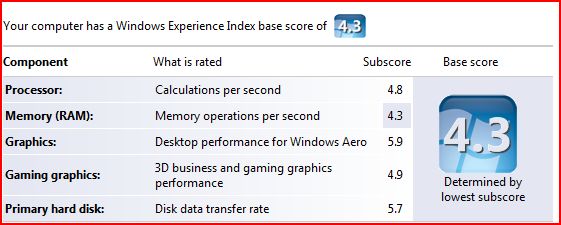
When I installed Vista, I was disappointed to see that my Windows Experience Index was 1.0 I was disappointed because I have a pretty decent machine:
  • HP XW6000 Workstation
  • 2 x 2.8 GHz P4 processor
  • 1 GB DDR 266Mhz RAM
  • 2 x 750GB SATA drives
  • nVidia 980XGL video card with 128 MB ram & dual DVI output
So, what was wrong in this picture? Why was I getting such a bad score? Well, apparently, Windows Experience Index base score is determined by the lowest number. And what was that? Yep, you probably guesses it right. It was my video card.

It looks like I fell behind times in video cards department and I felt that this was a good time to catch up. So, I did some research. As always, Tom's Hardware Guide on graphic cards was pretty useful.

I ended up ordering an AGP 8x, ATI Radeon GDDR3 X800 XT with 256 MB ram from TigerDirect.com for $168 (I checked again now and they are not selling it anymore, maybe I got the last one :). It's all-in-one card, although I am not currently planning to use its TV capture capabilities.

I received in just two days. When I installed it though, my machine did not boot, all I was hearing was 2 long beeps. I put back the old card and got on internet to talk to HP. They simply told me that
- "ATI Radeon X800 XT card is not tested on xw6000 and is not supported".

In fact, HP guy told me that there was a problem between it and the motherboard but I kept on asking questions and he confessed that he was not sure of that and suggested I try the *newest* BIOS which was 2 years old and I was already running that.

I started tinkering with BIOS settings and one setting got my eye "AGP Aperture Size". It was set to 64MB. I did not know what it was for but when I saw someone mentioning it to fix a video card issue (not ATI), I realized that I had to change it to 256MB = what my new card had & voila!

To my surprise, Vista detected the card and installed the driver for it. Then, I checked my Windows Experience Index again: 4.3

This time, it was my 1Gig memory that was taking me down but hey, I have all the bells and whistles of Aero now :) I am quite disappointed with Doom 3 though, it looks better but not way better...

BTW, to see your Windows Experience index, do the followings:
Start > Run
control.exe system

Lastly, I wrote about BlackBerry on Vista yesterday. I checked the device in the morning and as expected it was fully charged.

2006-11-29

Blackberry & Vista

when I connected my Blackberry 8700 to Vista to charge it, it immediately popped up a message telling me that "a blackberry device was found". It did not however had the software for it

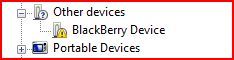
I checked the device manager and sure enough BlackBerry was listed with a yellow icon on it meaning that it was missing the driver.

I went to RIM's homepage to see if they had any Vista drivers but could not locate one.

As my experience with Vista so far showed me that XP drivers usually worked fine, I wanted to give it a try by downloading and installing the latest BlackBerry Desktop Software (4.2 as of this moment).

So I downloaded the software and installed it. Installation went just fine no issues. I have selected Enterprise features as mine is in fact belongs to my company.

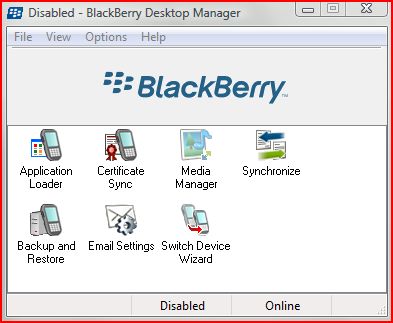
As I only wanted to charge the battery and I selected not to launch the application at start up. I will probably not be able to use it anyway. Still, when I launched it, it came up just fine.


Then, I went back to Device manager to see what happened and noticed that it was now showing under Universal Serial Bus Controller. Right now, it looks like it is charging. I will check back in the morning to see if it 'really' charged.


2006-11-27

Vista - Change Explorer Start up Directory

In Vista, Windows Explorer is located under All Programs > Accessories. It's actually a shortcut to%SystemRoot%\explorer.exe

When you open it, by default it will open your "Username"\"Documents" Folder:

I do not want that! Instead, I want it to show me the root of my D: drive. Well, it's not difficult to change. Here is how:
  • Create a shortcut to Windows Explorer:
  1. Go to All programs > Accessories.
  2. Right click "Windows Explorer"
  3. From menu choose "Send to" > Desktop (Create Shortcut)
  • Then right click on the new shortcut and from the menu choose properties
  • Modify "target" by adding /root,D:
  • It should now appear like this: %SystemRoot%\explorer.exe /root,D:
That's it. From now on, when you open Windows Explorer using that shortcut, it will go to the root of D: drive. This is actually and old trick and works well with Windows XP too.

[Update - 12/03/2006]

I made a mistake above. If you want do NOT want to see other drives when you start up and just D drive, then instructions stand. Otherwise, just modify target like this:
  • %SystemRoot%\explorer.exe D:

Vista: Corrupted Recycle Bin

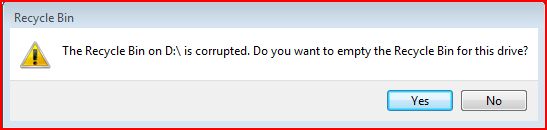
One of the issues I see everyday with Vista is about the recycle bin. It keeps on getting corrupted. I suspect that this is because of my dual-boot configuration with XP and may be permissions. It does not matter how many times I click "YES", it keeps on popping up. I am not sure how to fix it yet and the weird thing is that there is nothing in the eventlogs!

2006-11-26

Vista ReadyBoost & ReadyDrive

Jim Allchin, has an informative article on a new feature in Vista: ReadyBoost. Below is an excerpt from this article.

... With Windows ReadyBoost, if you have a flash drive (like a USB thumb drive or an SD card) you can just use this to make your computer run better with Windows Vista. You simply plug in a flash drive and Windows Vista will use Windows ReadyBoost to utilize the flash memory to improve performance.

I should be clear that while flash drives do contain memory, Windows ReadyBoost isn’t really using that memory to increase the main system RAM in your computer. Instead, ReadyBoost uses the flash drive to store information that is being used by the memory manager. If you are running a lot of applications on a system that has limited memory, Windows ReadyBoost will use the flash drive to create a copy of virtual memory that is not quite as fast as RAM, but a whole lot faster than going to the hard disk. What is very cool here is that there is nothing stored on this flash disk that isn’t also on the hard disk, so if you remove the flash drive, the memory manager sees the change and automatically goes to the hard disk...

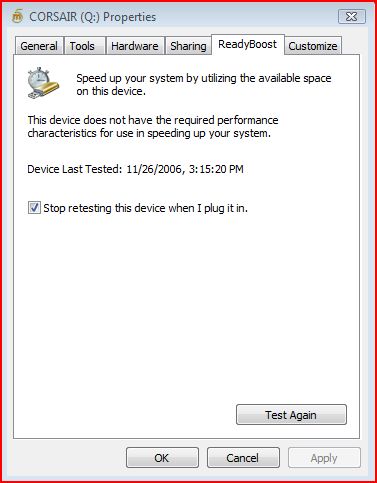
Unfortunately for me, my Corsair USB 2 drive did not qualify :( This is a bit surprising. I am not sure what qualification is considered adequate by Vista...


There are some articles on microsoft site that talk about ReadyBoost but they do not mention specifics.

As USB drives are very common these days, I think Microsoft had the right idea. Vista also supports Hybrid drives (HHD = regular HD + integrated NVRAM) via a technology called ReadyDrive.

These are welcome changes. What I understand from Allchin's message though is that Vista does not perform considerably better compared XP if you do not have a high-end system, which is a bit disappointing. Would not it be nice to see a lightning fast OS after so many years of development.

[Update - 12/05/2006]
On the comment section, somebody left me a message with a link to Tom Archer's blog. The link was not working but I was able to read the article when I hit the home page of the blog.

I am not sure what is the problem with my USB stick even after reading some of the requirements as it they did not mention a tool to measure the specs of usb stick but a few people suggested that they got their usb stick working when they formatted it with ntfs.

There was a link to another useful article at DvNation. Check it out.

2006-11-25

Lisp, Perl, Python

I learned programming in Perl 2 yrs ago when I started supporting an in-house-developed Java/Unix based application. I have seen Python gaining ground since then and got interested in it.

Today, I came across a bunch of very interesting and absorbing articles about several programming languages but mostly focused on lisp, perl and python.

It all started with Paul Graham's "Revenge of the Nerds" article. He is a Lisp expert and to be honest I did not know much about lisp until I read his article. It was a provocative one and he got a lot of responses which he responded with "Re: Revenge of the Nerds".

After you read these two, you would probably want to keep on reading how Python Lovers responded:
Paul Prescod has written a rebuttal to Revenge of the Nerds, On the Relationship between Python and Lisp. Peter Norvig (Google's Director of Research) has also written about this topic in Python for Lisp Programmers.

New blog

I am playing with a new blog http://AdilHindistan.blogspot.com. It's using Blogger Beta. If I like it, I may consider moving this blog over there...

2006-11-24

Vista permission inheritance issues

As I mentioned before, I have installed Vista next to XP and I am dual-booting. I had permission denied errors when I had tried to access files and folders that were created by XP.

Anyway, today I realized that permissions I set on the top level were not really inherited at all levels. I noticed it because I use Google Picasa to organize my pictures I realized that I was missing some pictures in Picasa database. What's more, when I browse to these folders via explorer, thumbnails were not showing up.

To make sure that all files and folders inherit permissions from the top level, on the root of the drive I issued the following command:

ICACLS name /reset /T /C /L /Q
Successfully processed 261133 files; Failed processing 0 files

This is supposed to reset the permissions so that they get inherited from the levels above. This worked and I noticed that Google Picasa was discovering new pictures it was not able to read before. Thumbnails were showing up properly too.

What I am worried is that if I go back to XP, they will get lost again. I will check and see...

Live PC & VMWare

Have you heard of Moka5.com or Live PCs. Well, it's a VMWare based technology and well-worth checking out. The only downside is, it does not yet work with Vista and requires XP SP2.

BTW, if you would like to download VMWare images and run them on your PC, you download free VMWare Player software from VMWare. VMWare Server is another free product you can download.

Below is description from their web site:

What are LivePCs?

LivePCs™ are virtual PCs that you can create and share just as you can share the rest of your digital life (photos, music, videos, etc..) A LivePC contains everything needed to run a virtual computer — an operating system and a bunch of applications. You can create and share your own LivePCs, or use the public LivePCs created by others in our BetaGarage™. You can use LivePCs on your desktop, or you can take them with you everywhere on a portable USB drive.

With LivePCs, a family can maintain separate computer personalities (work, home, kids) on a single PC. Software developers can make it easy for users to try out their latest suite of applications. Professionals can go on vacation and take their LivePCs with them on a USB stick to use "just in case".

2006-11-23

Dual Boot XP & Vista, Partition Magic Blues

I have a Fujitsu Lifebook that already has XP on it. I wanted to install Vista on it today. As the current XP installation was occupying the whole partition, I used Partition Magic 8 to resize the current partition, creating enough space for Vista.

It was not a trouble-free resizing though... I launched Partition Magic 8, selected the current drive and clicked resize and reduced current size of the partition from 60GB to 30GB. Change required a reboot.

I rebooted and partition magic kicked in but after a few seconds it gave me an error & quit:

Error 1530: Zero reference count

I looked it up on Symantec site which suggested that I use "chkdsk /f" on my drive and explained the error:

A file's record has a zero reference count, but the file appears in at least one directory.

Anyway, ran check disk and resized the partition again. After reboot, Partition Magic kicked in and looked like doing its job but after a while it gave me another error & quit.

Error 983: "Too many errors found, process halted"

Once again, Symantec documentation suggested I run "chkdsk /f". I did not run it again because once I logged into XP, I noticed that partition was already resized. Vista did not complain either and installed properly.

So, if you are going to use Partition Magic, save yourself sometime, check & repair your disks by running "chkdsk /f"...