Google

2007-04-19

Ubuntu 7.04 (Feisty Fawn) has officially been released!


The beta and the wait is over. Ubuntu 7.04 has been released and is available for immediate download.

2007-04-11

Ubuntu feisty fawn (7.04) finally available on shipit for free

Canonical started to send free cd-s of ubuntu 7.04 feisty fawn. simply go to https://shipit.ubuntu.com/ and login with your Launchpad (http://launchpad.net) id to request the CDs


read more | digg story

2007-02-06

IIS Permission Denied Error

I had some asp pages that worked fine on IIS5/w2K but gave me an error like below on IIS6/W2K3.

Microsoft VBScript runtime error '800a0046'
Permission denied
/SelfService/e360.asp, line 69

I searched thru MS site but could not come up with anything. I found my answer on ASP emporium site.

Line 69 has an OpenTextFile command with option 8 to modify and IUSR_ did not have rights to write into that file/folder. To fix it,

- Created a local user acc
- IIS Manager > Browse to Web sites > Default Web Site >> Properties > Directory Security > Edit > Set User name:MachineName\, Password: password
- Give Write Permission to on C:\Inetpub\wwwroot

2007-02-05

Google Browser Sync for Firefox

Google Browser Sync for Firefox is an extension that continuously synchronizes your browser settings – including bookmarks, history, persistent cookies, and saved passwords – across your computers. It also allows you to restore open tabs and windows across different machines and browser sessions. For more info, please visit our FAQ.

It's pretty easy to set up.

2007-01-27

Vista Auto Logon

According to: http://forums.microsoft.com/MSDN/ShowPost.aspx?PostID=829701&SiteID=1 If you have a single user without password, then he gets logged on automatically after restart.
Not recommended! Of course, anyone with sufficient access to read your registry, can read your password in plain text if you set it up this way…

Here’s the procedure:
Open Regedit,
  • Drill down to HKLM/Software/Microsoft/Windows NT/CurrentVersion/Winlogon,
  • Find the “AutoAdminLogon” value, and change it to 1. Enter the following items as new string values: “DefaultUserName”, and “DefaultPassword”.
  • Set the value of DefaultUserName to be the username that you want to autologin, and set the value of DefaultPassword to be that user’s password.

2007-01-08

Cool javascript trick

Go to any web site, preferably with lots of pics. copy/paste the following to the address bar and hit enter.

javascript:R=0; x1=.1; y1=.05; x2=.25; y2=.24; x3=1.6; y3=.24; x4=300; y4=200; x5=300; y5=200; DI=document.images; DIL=DI.length; function A(){for(i=0; i-DIL; i++){DIS=DI[ i ].style; DIS.position='absolute'; DIS.left=Math.sin(R*x1+i*x2+x3)*x4+x5; DIS.top=Math.cos(R*y1+i*y2+y3)*y4+y5}R++}setInterval('A()',5); void(0);

Here is the original Digg article.

2006-12-13

Ms. Dewey: Search with a twist

Microsoft live search has been live for a while. Have you heard about the ad campaign for it. I mean the viral search campaign: No? Welcome to Ms. Dewey then :)

Utility: Process Tamer

Windows only: Freeware system tray app ProcessTamer is a lightweight CPU usage monitoring tool that watches your computer for CPU hogs and "tames" them before they freeze up your computer.

Read full article here.

2006-12-11

Vista Documentation & Tools

Microsoft has a lot of good reading material for IT Professional on their site about Vista. They have also released a few useful tools:

SyncToy v1.4

SyncToy helps you copy, move, rename, and delete files between folders and computers quickly and easily.

Group Policy Log View

This page provides the Group Policy Log view tool for Windows Vista

Windows User State Migration Tool (USMT) version 3.0

Microsoft® Windows® User State Migration Tool (USMT) version 3.0 migrates user files and settings during deployments of Microsoft Windows XP and Windows Vista™. USMT captures files and settings from the source computer and then migrates them to a new Windows installation.

Windows AIK

The Windows Automated Installation Kit (Windows AIK) helps you to install, customize, and deploy the Microsoft Windows Vista™ family of operating systems.

Remote Desktop Connection (Terminal Services Client 6.0) for Windows XP (KB925876)

Remote Desktop Connection (Terminal Services Client 6.0) provides a way to use any new Terminal Services features introduced in Microsoft Windows Vista and Microsoft Windows Server Code Name “Longhorn” from a computer running Microsoft Windows XP with Service Pack 2 or Microsoft Windows Server 2003 with Service Pack 1.

Consolas Font Pack

The Microsoft Consolas Font Family is a set of highly legible fonts designed for ClearType. It is intended for use in programming environments and other circumstances where a monospaced
font is specified. This installation package will set the default font for Visual Studio to Consolas.

and even more documentation on Security:

Windows Vista Security Guide

The Windows Vista Security Guide provides recommendations and tools to further harden Windows Vista. Use the GPOAccelerator tool in this Solution Accelerator to efficiently establish the Enterprise Client (EC) environment or the Specialized Security – Limited Functionality (SSLF) environment.

What about Users? Well, they can take a look at this:

Windows Vista User Experience Guidelines

Download a preliminary draft of the Windows Vista™ User Experience Guidelines (UX Guide).

and Best Practices?

Power Management for Windows Vista Best Practices

Use computer power plans to reduce consumption with Windows Vista.

Everyday Work with Windows Vista Best Practices

Work smarter with new features in Windows Vista.

Enjoy!

2006-12-03

PowerDVD Issue with Vista Aero


I use Cyberlink PowerDVD 7.0. Everytime I started it up, Vista would pop up an message saying that PowerDVD would not support Aero and therefore Aero features (transparency etc. ) would be DISABLED. I see screen flickering and then PowerDVD starts. As soon as I shutdown PowerDVD, I see screen flickering again and Aero is back!


Well, good news is that Cyberlink has an updated build (#2211) for PowerDVD that you can download for free & it resolves this issue.

2006-11-30

Vista Aero at last!


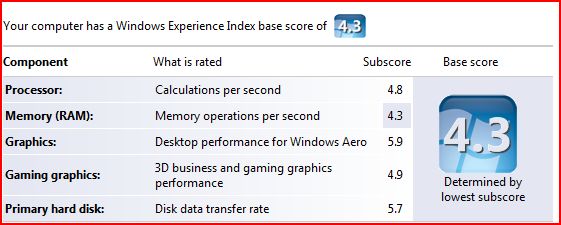
When I installed Vista, I was disappointed to see that my Windows Experience Index was 1.0 I was disappointed because I have a pretty decent machine:
  • HP XW6000 Workstation
  • 2 x 2.8 GHz P4 processor
  • 1 GB DDR 266Mhz RAM
  • 2 x 750GB SATA drives
  • nVidia 980XGL video card with 128 MB ram & dual DVI output
So, what was wrong in this picture? Why was I getting such a bad score? Well, apparently, Windows Experience Index base score is determined by the lowest number. And what was that? Yep, you probably guesses it right. It was my video card.

It looks like I fell behind times in video cards department and I felt that this was a good time to catch up. So, I did some research. As always, Tom's Hardware Guide on graphic cards was pretty useful.

I ended up ordering an AGP 8x, ATI Radeon GDDR3 X800 XT with 256 MB ram from TigerDirect.com for $168 (I checked again now and they are not selling it anymore, maybe I got the last one :). It's all-in-one card, although I am not currently planning to use its TV capture capabilities.

I received in just two days. When I installed it though, my machine did not boot, all I was hearing was 2 long beeps. I put back the old card and got on internet to talk to HP. They simply told me that
- "ATI Radeon X800 XT card is not tested on xw6000 and is not supported".

In fact, HP guy told me that there was a problem between it and the motherboard but I kept on asking questions and he confessed that he was not sure of that and suggested I try the *newest* BIOS which was 2 years old and I was already running that.

I started tinkering with BIOS settings and one setting got my eye "AGP Aperture Size". It was set to 64MB. I did not know what it was for but when I saw someone mentioning it to fix a video card issue (not ATI), I realized that I had to change it to 256MB = what my new card had & voila!

To my surprise, Vista detected the card and installed the driver for it. Then, I checked my Windows Experience Index again: 4.3

This time, it was my 1Gig memory that was taking me down but hey, I have all the bells and whistles of Aero now :) I am quite disappointed with Doom 3 though, it looks better but not way better...

BTW, to see your Windows Experience index, do the followings:
Start > Run
control.exe system

Lastly, I wrote about BlackBerry on Vista yesterday. I checked the device in the morning and as expected it was fully charged.

2006-11-29

Blackberry & Vista

when I connected my Blackberry 8700 to Vista to charge it, it immediately popped up a message telling me that "a blackberry device was found". It did not however had the software for it

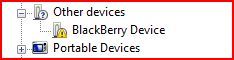
I checked the device manager and sure enough BlackBerry was listed with a yellow icon on it meaning that it was missing the driver.
I went to RIM's homepage to see if they had any Vista drivers but could not locate one.

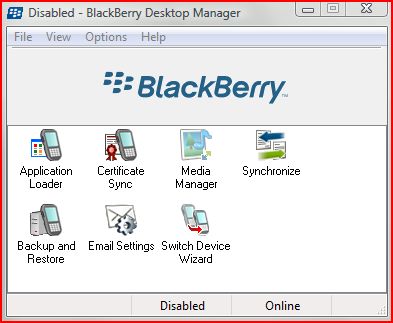
As my experience with Vista so far showed me that XP drivers usually worked fine, I wanted to give it a try by downloading and installing the latest BlackBerry Desktop Software (4.2 as of this moment).

So I downloaded the software and installed it. Installation went just fine no issues. I have selected Enterprise features as mine is in fact belongs to my company.

As I only wanted to charge the battery and I selected not to launch the application at start up. I will probably not be able to use it anyway. Still, when I launched it, it came up just fine.


Then, I went back to Device manager to see what happened and noticed that it was now showing under Universal Serial Bus Controller. Right now, it looks like it is charging. I will check back in the morning to see if it 'really' charged.


2006-11-27

Vista - Change Explorer Start up Directory

In Vista, Windows Explorer is located under All Programs > Accessories. It's actually a shortcut to%SystemRoot%\explorer.exe

When you open it, by default it will open your "Username"\"Documents" Folder:

I do not want that! Instead, I want it to show me the root of my D: drive. Well, it's not difficult to change. Here is how:
  • Create a shortcut to Windows Explorer:
  1. Go to All programs > Accessories.
  2. Right click "Windows Explorer"
  3. From menu choose "Send to" > Desktop (Create Shortcut)
  • Then right click on the new shortcut and from the menu choose properties
  • Modify "target" by adding /root,D:
  • It should now appear like this: %SystemRoot%\explorer.exe /root,D:
That's it. From now on, when you open Windows Explorer using that shortcut, it will go to the root of D: drive. This is actually and old trick and works well with Windows XP too.

[Update - 12/03/2006]

I made a mistake above. If you want do NOT want to see other drives when you start up and just D drive, then instructions stand. Otherwise, just modify target like this:
  • %SystemRoot%\explorer.exe D:

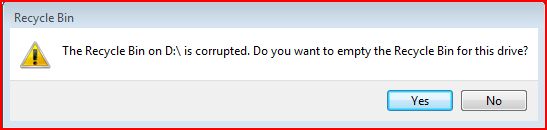
Vista: Corrupted Recycle Bin

One of the issues I see everyday with Vista is about the recycle bin. It keeps on getting corrupted. I suspect that this is because of my dual-boot configuration with XP and may be permissions. It does not matter how many times I click "YES", it keeps on popping up. I am not sure how to fix it yet and the weird thing is that there is nothing in the eventlogs!

2006-11-26

Vista ReadyBoost & ReadyDrive

Jim Allchin, has an informative article on a new feature in Vista: ReadyBoost. Below is an excerpt from this article.

... With Windows ReadyBoost, if you have a flash drive (like a USB thumb drive or an SD card) you can just use this to make your computer run better with Windows Vista. You simply plug in a flash drive and Windows Vista will use Windows ReadyBoost to utilize the flash memory to improve performance.

I should be clear that while flash drives do contain memory, Windows ReadyBoost isn’t really using that memory to increase the main system RAM in your computer. Instead, ReadyBoost uses the flash drive to store information that is being used by the memory manager. If you are running a lot of applications on a system that has limited memory, Windows ReadyBoost will use the flash drive to create a copy of virtual memory that is not quite as fast as RAM, but a whole lot faster than going to the hard disk. What is very cool here is that there is nothing stored on this flash disk that isn’t also on the hard disk, so if you remove the flash drive, the memory manager sees the change and automatically goes to the hard disk...
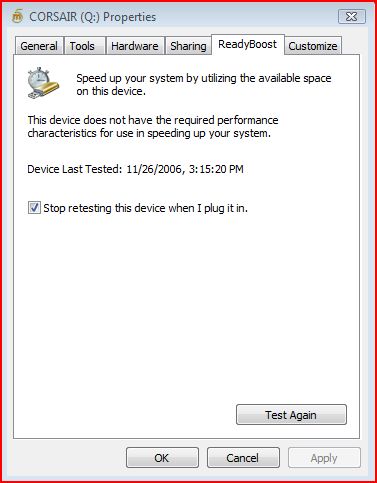
Unfortunately for me, my Corsair USB 2 drive did not qualify :( This is a bit surprising. I am not sure what qualification is considered adequate by Vista...


There are some articles on microsoft site that talk about ReadyBoost but they do not mention specifics.

As USB drives are very common these days, I think Microsoft had the right idea. Vista also supports Hybrid drives (HHD = regular HD + integrated NVRAM) via a technology called ReadyDrive.

These are welcome changes. What I understand from Allchin's message though is that Vista does not perform considerably better compared XP if you do not have a high-end system, which is a bit disappointing. Would not it be nice to see a lightning fast OS after so many years of development.

[Update - 12/05/2006]
On the comment section, somebody left me a message with a link to Tom Archer's blog. The link was not working but I was able to read the article when I hit the home page of the blog.

I am not sure what is the problem with my USB stick even after reading some of the requirements as it they did not mention a tool to measure the specs of usb stick but a few people suggested that they got their usb stick working when they formatted it with ntfs.

There was a link to another useful article at DvNation. Check it out.

2006-11-25

Lisp, Perl, Python

I learned programming in Perl 2 yrs ago when I started supporting an in-house-developed Java/Unix based application. I have seen Python gaining ground since then and got interested in it.

Today, I came across a bunch of very interesting and absorbing articles about several programming languages but mostly focused on lisp, perl and python.

It all started with Paul Graham's "Revenge of the Nerds" article. He is a Lisp expert and to be honest I did not know much about lisp until I read his article. It was a provocative one and he got a lot of responses which he responded with "Re: Revenge of the Nerds".

After you read these two, you would probably want to keep on reading how Python Lovers responded:
Paul Prescod has written a rebuttal to Revenge of the Nerds, On the Relationship between Python and Lisp. Peter Norvig (Google's Director of Research) has also written about this topic in Python for Lisp Programmers.

New blog

I am playing with a new blog http://AdilHindistan.blogspot.com. It's using Blogger Beta. If I like it, I may consider moving this blog over there...

2006-11-24

Vista permission inheritance issues

As I mentioned before, I have installed Vista next to XP and I am dual-booting. I had permission denied errors when I had tried to access files and folders that were created by XP.

Anyway, today I realized that permissions I set on the top level were not really inherited at all levels. I noticed it because I use Google Picasa to organize my pictures I realized that I was missing some pictures in Picasa database. What's more, when I browse to these folders via explorer, thumbnails were not showing up.

To make sure that all files and folders inherit permissions from the top level, on the root of the drive I issued the following command:

ICACLS name /reset /T /C /L /Q
Successfully processed 261133 files; Failed processing 0 files

This is supposed to reset the permissions so that they get inherited from the levels above. This worked and I noticed that Google Picasa was discovering new pictures it was not able to read before. Thumbnails were showing up properly too.

What I am worried is that if I go back to XP, they will get lost again. I will check and see...

Live PC & VMWare

Have you heard of Moka5.com or Live PCs. Well, it's a VMWare based technology and well-worth checking out. The only downside is, it does not yet work with Vista and requires XP SP2.

BTW, if you would like to download VMWare images and run them on your PC, you download free VMWare Player software from VMWare. VMWare Server is another free product you can download.

Below is description from their web site:

What are LivePCs?

LivePCs™ are virtual PCs that you can create and share just as you can share the rest of your digital life (photos, music, videos, etc..) A LivePC contains everything needed to run a virtual computer — an operating system and a bunch of applications. You can create and share your own LivePCs, or use the public LivePCs created by others in our BetaGarage™. You can use LivePCs on your desktop, or you can take them with you everywhere on a portable USB drive.

With LivePCs, a family can maintain separate computer personalities (work, home, kids) on a single PC. Software developers can make it easy for users to try out their latest suite of applications. Professionals can go on vacation and take their LivePCs with them on a USB stick to use "just in case".